






  1. Home
  2. Shop
  3. Inventory Scripts

4 product images available.

Inventory Scripts
Compatibility:
ESX

Cyber Inventory Pro

Review process
$29.99

Secure Checkout

Cards, Apple Pay, Google Pay, iDEAL/Wero, Bancontact, EPS, Przelewy24, and optional Crypto where available via Stripe.

Instant file access after paymentSupport and refund policy shown before checkout
Ask support before buyingRead refund policy
Instant Access
SSL Encrypted
Cards, wallets, bank redirects
Frameworksesx
Setup

Requires a FiveM server, ESX or QBCore, access to server resources, and permission to restart the resource after configuration.

RequirementsPublished on this page
PreviewAvailable

Description

Cyber Inventory Pro - Complete ESX Inventory System in Pure Lua

Revolutionize your FiveM server's item management with Cyber Inventory Pro, a comprehensive inventory system built entirely in Lua without JavaScript dependencies. Inspired by QBCore's polished interface but designed specifically for ESX servers, this system brings advanced features like weapon attachments, item durability, weight management, and trunk storage to your ESX-based server with exceptional performance and reliability.

What's Included

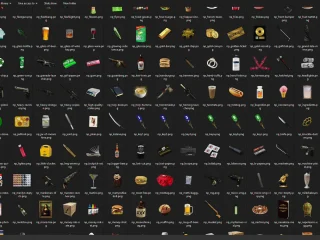
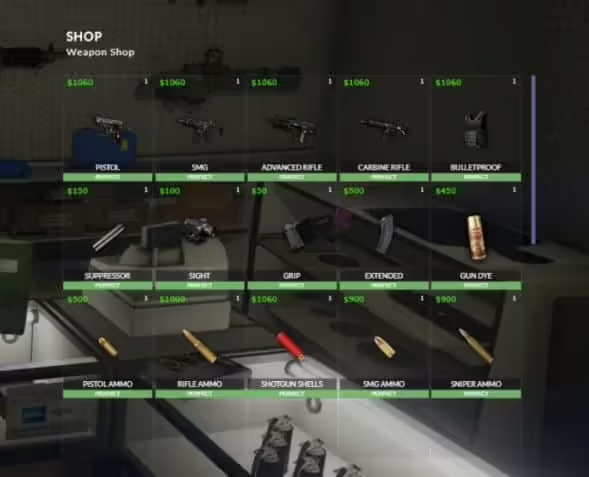
This complete package includes a fully functional inventory system with modified es_extended or extendedmode frameworks optimized for inventory compatibility, pre-configured SQL database structures with all necessary tables and objects, comprehensive weapon attachment and accessory systems, vehicle trunk and glove compartment storage, and detailed configuration files for shops, durability settings, and weight management. You'll receive everything needed to replace your basic ESX inventory with this professional-grade alternative.

The package also includes item description management through cyber_itemdata SQL table, stash system integration for properties and businesses, weapon dye customization with multiple color options, and a complete tutorial file explaining every configuration option. All components work together seamlessly to create a cohesive inventory experience that feels native to ESX while providing features typically only found in more modern frameworks.

Key Features

  • Pure Lua Implementation - No JavaScript dependencies or complex frameworks, just clean Lua code that's easy to understand and modify
  • QBCore-Inspired Design - Beautiful, modern UI based on QBCore's aesthetic but fully adapted for ESX functionality
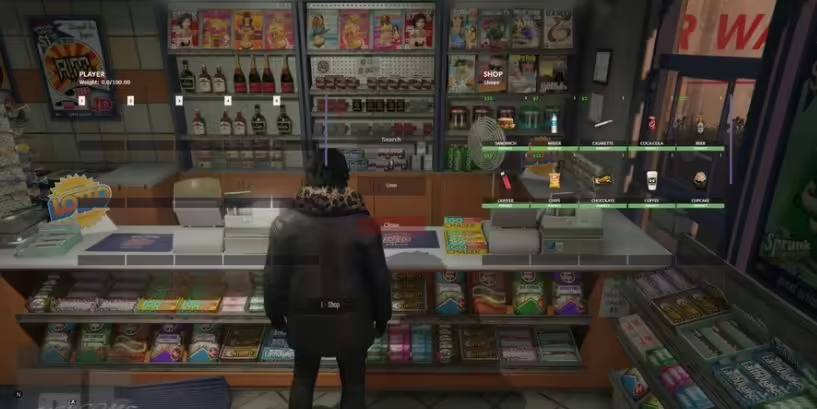
  • Complete Weight System - Configurable item weights with visual indicators preventing over-encumbrance and balancing gameplay
  • Durability Mechanics - Items degrade with use, creating realistic economy dynamics and repair gameplay opportunities
  • Vehicle Storage - Fully functional trunk and glove compartment systems with weight limits and persistent storage
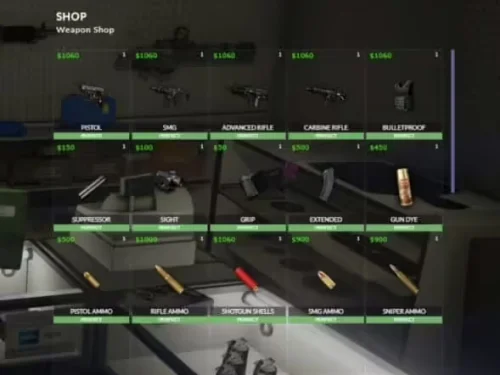
  • Weapon Attachments - Comprehensive attachment system for scopes, grips, magazines, and suppressors with compatibility checks
  • Weapon Dye System - Multiple color options for weapon customization allowing personalization and player expression
  • Money as Inventory Item - Cash displays in inventory as physical object, enabling robbery mechanics and realistic transactions
  • Stash System Integration - Easy-to-implement stashes for properties, gang hideouts, businesses, and more
  • Shop Configuration - Fully customizable shop inventories with different items and prices per location
  • Ultra-Fast Clicks - Optimized item movement and interaction code for responsive, lag-free inventory management
  • Multi-Version ESX Support - Works with ESX 1.9.x legacy versions and ESX Legacy 1.10.x+ with minimal modifications

Perfect For

  • ESX servers wanting modern inventory features without switching to QBCore or other frameworks
  • Roleplay servers emphasizing realistic item management and economy systems
  • Servers with custom weapon systems needing attachment and customization support
  • Economy-focused servers benefiting from durability mechanics and repair gameplay loops
  • Developers seeking easily modifiable Lua-based inventory code for custom features

Technical Details

  • Framework: ESX 1.9.x (final) and ESX Legacy 1.10.x+ with included modified es_extended
  • Programming Language: 100% Lua (no JavaScript or NUI dependencies)
  • Database: MySQL with included SQL files for all tables and default items
  • Performance: Optimized for minimal resource usage with efficient item caching
  • Compatibility: Works with most ESX-compatible item scripts and frameworks
  • Dependencies: mysql-async or oxmysql for database operations

Installation

  1. Backup your current ESX - Create complete backup of es_extended and your database before proceeding
  2. Replace es_extended - Use the included modified es_extended or extendedmode framework from the package
  3. Install SQL files - Import all SQL files in correct order, ensuring the 'cash' object has weight 0.00
  4. Configure shops and items - Edit Config.lua to set up shop locations, item weights, and durability settings
  5. Add item descriptions - Populate cyber_itemdata SQL table with descriptions for your items
  6. Test stash implementation - Use provided TriggerEvent examples to add stashes to properties and businesses
  7. Adjust for ESX v1final - If using ESX 1.9.x final, apply the small modifications detailed in tutorial file

Stash System Implementation

The stash system is incredibly flexible and easy to implement anywhere in your server. Simply trigger the inventory opening event with appropriate parameters to create persistent storage for apartments, gang hideouts, businesses, or any other location. Each stash can have custom weight limits and item restrictions, and all inventory data is stored in the database for persistence across server restarts.

Example implementation for apartment storage:

TriggerEvent(cyber-inventory:openInventory, {
[type] = stash,
[owner] = CurrentApartment
})

Configuration and Customization

The Config.lua file provides extensive customization options without requiring code modifications. You can adjust weight limits for different container types, configure item durability rates, set up shop inventories with specific items and prices, enable or disable various features, and translate all UI text to your preferred language. The tutorial file included in the package walks through every configuration option with examples and explanations.

What Makes It Stand Out

While many inventory systems rely on heavy JavaScript frameworks or require complete server rebuilds to implement, Cyber Inventory Pro delivers advanced functionality through clean, efficient Lua code that integrates seamlessly with existing ESX servers. The decision to build this entirely in Lua means better performance, easier troubleshooting, and simpler modifications for server developers. You get the polished user experience of modern frameworks without abandoning your ESX investment or learning completely new systems.

The comprehensive feature set rivals or exceeds inventory systems found in other frameworks, bringing weapon attachments, durability mechanics, vehicle storage, and visual polish to ESX servers. Extensive bug fixes and optimization work ensure reliability that basic ESX inventories can't match, making this a true upgrade rather than just a cosmetic change.

Related Products You Might Like

  • Premium Inventory Script - Advanced inventory trusted by 225+ servers
  • Premium Vehicle HUD - Professional speedometer with 429+ sales
  • Super ESX Server - Complete ESX server package with 306+ sales
  • Vehicle Control UI - Advanced vehicle controls used by 227+ servers

Installation notes

Requires a FiveM server, ESX or QBCore, access to server resources, and permission to restart the resource after configuration.
Installation notes
Requires a FiveM server, ESX or QBCore, access to server resources, and permission to restart the resource after configuration.

Buy this when it saves setup time

Use this checklist to decide quickly whether the resource fits your current server build, framework, and support expectations.

Server-owner payoff

Cyber Inventory Pro is positioned to reduce Inventory Scripts instead of making you rebuild the same system from scratch.

Compatibility

Works with esx. Check the requirements block before adding it to a live stack.

Purchase confidence

Instant download, Stripe checkout, support access, and refund policy context are shown before payment.

Decision assets

Requirements, Preview video, Product Q&A

Product fit, setup, and proof at a glance

Use the published facts on this page to confirm whether Cyber Inventory Pro matches your server before checkout.

Compatibility

Frameworks
ESX
Category
Inventory Scripts

Setup & requirements

Install flow
Download → resources folder → ensure in server.cfg
Requirements
Published on this page
File size
21.75 MB

Proof & buyer questions

Reviews
No reviews yet
Answered Q&A
Ask before buying

Only the facts published on this page should be treated as confirmed. If you need more detail, review the description, requirements, changelog, reviews, and product Q&A before checkout.

DescriptionRequirementsPreview video

Key Features

  • Pure Lua Implementation

    Built entirely in Lua without JavaScript dependencies or complex frameworks, providing clean code that is easy to understand and modify.

  • QBCore-Inspired Design with ESX Compatibility

    Features a beautiful, modern UI based on QBCore's aesthetic but fully adapted for ESX functionality, distinguishing it from other ESX inventory scripts by offering a polished interface native to the framework.

  • Complete Weight System

    Includes configurable item weights with visual indicators that prevent over-encumbrance and balance gameplay through weight management.

  • Durability Mechanics

    Items degrade with use, creating realistic economy dynamics and enabling repair gameplay opportunities for servers.

  • Vehicle Storage System

    Provides fully functional trunk and glove compartment systems with weight limits and persistent storage across server restarts.

Frequently Asked Questions

Inventory Scripts
Compatibility:
ESX

Cyber Inventory Pro

Review process
$29.99

Secure Checkout

Cards, Apple Pay, Google Pay, iDEAL/Wero, Bancontact, EPS, Przelewy24, and optional Crypto where available via Stripe.

Instant file access after paymentSupport and refund policy shown before checkout
Ask support before buyingRead refund policy
Instant Access
SSL Encrypted
Cards, wallets, bank redirects
Frameworksesx
Setup

Requires a FiveM server, ESX or QBCore, access to server resources, and permission to restart the resource after configuration.

RequirementsPublished on this page
PreviewAvailable
FiveMX

Start building your server today.

Curated FiveM resources, instant delivery, free starter mods, and practical guides in one calm marketplace.

Browse the shopsupport@fivemx.com

Shop

  • Shop
  • FiveM Mods
  • All Products
  • Free Mods
  • Best Scripts & Mods
  • FiveM Scripts

Frameworks

  • QBCore Scripts
  • ESX Scripts
  • QBox
  • Standalone

Community

  • Blog
  • Support
  • Creators
  • Affiliate

Legal

  • Privacy Policy
  • Terms of Service
  • Refund Policy
  • Digital Delivery
  • Cookie Policy
  • GDPR Compliance
  • DMCA
  • Imprint
  • Editorial Policy

Server Templates

  • QBCore Server Template
  • ESX Server Template
  • NoPixel Server Template
  • Server Packs
  • Free Server Templates
  • Tebex Alternative
© 2026 FiveMX. All rights reserved.·FiveMX is not affiliated with Rockstar Games, Take-Two Interactive, or CFX.re. All trademarks are property of their respective owners.
DiscordDocs
  • Instant digital delivery
  • Lifetime updates on selected products
  • Trusted by server owners
FiveMX
Shop
Full ServersBundlesNew releases

Related Products

$18.99
$4.49
$8.49
$8.49

Related Tutorials & Guides

Learn more about setting up, configuring, and using this type of resource.

Best FiveM Inventory Scripts 2026: Complete Comparison Guide

Best FiveM Inventory Scripts 2026: Complete Comparison Guide

The best FiveM inventory scripts in 2026 are ox_inventory as the free open-source default, qs-inventory as the polished premium alternative around 35 to 50 USD, qb-inventory as…

ESX Admin Commands List: /setjob, /car, /dv, /setgroup & More

ESX Admin Commands List: /setjob, /car, /dv, /setgroup & More

A practical ESX admin commands list for FiveM: user commands, admin commands, aliases, arguments, examples, and permission notes for es_extended.

ESX vs QBCore vs QBOX: Technical Framework Comparison 2026

ESX vs QBCore vs QBOX: Technical Framework Comparison 2026

Choosing a framework is the single most consequential decision when building a FiveM server. It determines which scripts you can use, how your developers write code, the…

Continue Building Your FiveM Server

Use this product as part of a larger setup. Explore related categories, alternative frameworks, premium bundles, and free companion downloads.

Explore Economy & BankingExplore Drug ScriptsBrowse all scriptsInventory Scripts scriptsesx scriptsTry QBCore insteadTry QBox insteadFree FiveM modsCompare bundles
Premium Inventory Script

Premium Inventory Script

Cooking Script

Cooking Script

ESX Inventory HUD V16

ESX Inventory HUD V16

Chezza Inventory

Chezza Inventory