Économisez 20% dès aujourd'hui Utilisez le code BIENVENUE lors du paiement. ACCUEILLIR
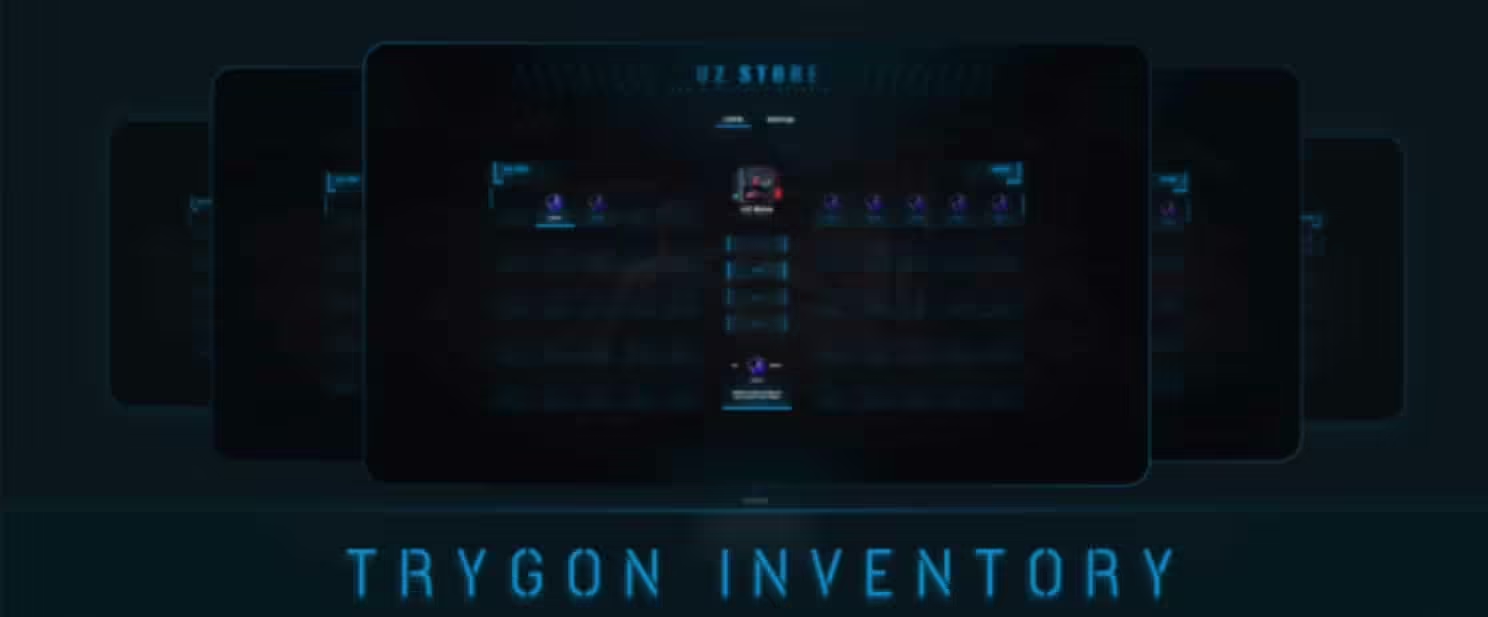
Inventaire du mod Trygon pour FiveM
Inventaire de Trygon

Le prix initial était : $50.00.Le prix actuel est : $23.00.

Ajouter au panier
Économisez 20% dès aujourd'hui : Utilisez le code BIENVENUE lors du paiement. ACCUEILLIR
Valable une seule fois par client sur les commandes passées à partir du $10.

Inventaire de Trygon

Le prix initial était : $50.00.Le prix actuel est : $23.00.

Économisez 20% pendant une durée limitée.
Commande sécurisée garantie
  • Qualité supérieure
  • Entièrement Open Source
  • Paiements sécurisés
  • Garantie de satisfaction
  • Garantie de remboursement de 30 jours

Trygon Inventory – Modern Drag-and-Drop Inventory System

Transform your server’s inventory experience with Trygon Inventory, a fully open-source, modern inventory system that brings intuitive drag-and-drop mechanics and stunning visual design to ESX et QBCore frameworks. Unlike outdated inventory systems that feel clunky and dated, Trygon Inventory provides the smooth, responsive interface that today’s players expect – comparable to AAA games rather than cobbled-together FiveM scripts. Whether you’re launching a new server or upgrading from a basic inventory system, Trygon delivers professional-grade item management that enhances every aspect of your economy and gameplay.

Built with performance and customization at its core, Trygon Inventory supports advanced features that most inventory scripts charge premium prices for – and it’s completely open source with no code escrow. You get full access to 2,400+ lines of optimized Lua code and 2,500+ lines of clean JavaScript, allowing complete customization to match your server’s unique needs. The system handles everything from basic item storage to complex crafting, item giving with custom animations, RGB color customization for personalized inventory aesthetics, and intelligent weight/slot management that prevents exploits while maintaining smooth gameplay.

Ce qui est inclus

Trygon Inventory arrives as a complete replacement for your current inventory system, with everything needed for immediate deployment. The package includes the core inventory script with drag-and-drop functionality, a modern UI built with responsive design principles, comprehensive item configuration files with dozens of pre-configured items, and integration modules for both ESX and QBCore frameworks. The system supports unlimited item types with configurable properties – stackable items, weapons with attachments, consumables with effects, crafting materials, and unique items with custom metadata.

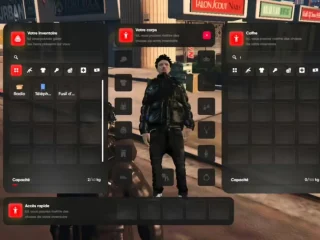
The UI design features smooth animations, intelligent sorting options, quick-use hotkeys, and visual feedback for every action. Players can drag items between inventory slots, drop items on the ground for others to pick up, give items directly to nearby players with animated handoff sequences, and split item stacks with an intuitive interface. The color customization system allows players to personalize their inventory background using RGB sliders, creating unique visual styles that match their character’s personality or gang colors.

Administrative tools are built directly into the system, allowing server staff to spawn items, check player inventories remotely, remove problematic items, and monitor inventory transactions for economy balance. The script logs all significant inventory actions – item spawns, trades, drops, and deletions – providing audit trails that help identify duplication bugs or cheating attempts. Weight and slot limits are enforced server-side, preventing client-side manipulation while providing clear feedback when players exceed capacity.

Caractéristiques principales

  • Interface glisser-déposer – Intuitive item movement by dragging between slots, dropping on ground, or giving to nearby players
  • RGB Color Customization – Players personalize inventory background colors using RGB sliders for unique visual styles
  • Code source ouvert – Full code access with 2,400+ lines Lua and 2,500+ lines JavaScript, no escrow restrictions
  • Support du double cadre – Works seamlessly with both ESX and QBCore servers with framework-specific optimizations
  • Item Style Selection – Configure items with custom visuals, icons, and display properties for unique presentation
  • Give Item Animations – Animated sequences when players hand items to each other create immersive interactions
  • Weight & Slot Management – Intelligent capacity system with real-time feedback and server-side validation
  • Max Slot Notifications – Clear alerts when inventory is full, preventing confusion about why items can’t be picked up
  • Item Splitting – Divide stackable items between slots or players with simple right-click menu
  • Quick Use Hotkeys – Assign frequently used items to hotbar slots for instant access during gameplay
  • Ground Item System – Drop items in the world for others to find or retrieve, with customizable despawn timers
  • Nearby Player Detection – Shows players within range for item giving and trading interactions
  • Item Metadata Support – Attach custom data to items (durability, quality, serial numbers, owner names)
  • Intégration de l'artisanat – Built-in hooks for crafting systems to check ingredients and add crafted items
  • Shop System Compatible – Works with popular shop scripts for buying/selling inventory items
  • Système de fixation d'armes – Store weapon mods and attachments as item metadata for realistic gun customization
  • Prise en charge des conteneurs – Configure special items as containers (backpacks, bags) that expand inventory capacity
  • Fonctionnalité de recherche – Filter inventory by item name for quick location in large inventories
  • Performances optimisées – 0.00ms idle, minimal UI rendering impact, efficient database queries

Parfait pour

  • New servers wanting a modern, professional inventory system from day one
  • Existing servers upgrading from outdated or limited inventory scripts
  • Developers who need full code access for custom integrations and modifications
  • Economy-focused servers requiring detailed item tracking and trade monitoring
  • Roleplay communities wanting immersive item interactions with animations
  • Servers with complex crafting systems needing flexible item metadata
  • Communities that value player customization options like RGB color selection

Détails techniques

  • Compatibilité du framework : ESX (all versions) and QBCore (all versions)
  • Accès au code : Fully open source – no escrow, complete customization freedom
  • Lines of Code: ~2,400 lines Lua (server/client logic), ~2,500 lines JavaScript (UI)
  • Performance: 0.00ms idle, ~0.01-0.02ms when inventory UI is open
  • Base de données: Integrates with framework’s existing item storage tables
  • Dépendances: ESX or QBCore framework, no additional required resources
  • Optional Integrations: Works with ox_lib, qb-target, crafting scripts, shop systems

Installation

  1. Backup your current inventory system and database (important for rollback if needed)
  2. Extract trygon_inventory to your resources folder
  3. Configure config.lua to match your framework (ESX or QBCore)
  4. Set up item definitions in items.lua with weights, labels, and properties
  5. Configure weight/slot limits per player or based on items (backpacks, etc.)
  6. Add ‘ensure trygon_inventory’ to server.cfg
  7. Restart server and test inventory functionality with a few players
  8. Customize RGB color options and item styles to match your server aesthetic

Drag-and-Drop Mechanics

The core of Trygon Inventory is its smooth, intuitive drag-and-drop system that works exactly as players expect from modern games. Click and hold any inventory item, then drag it to a new slot to reorganize your inventory. Drag an item outside your inventory window to drop it on the ground, creating a world object that others can interact with. Drag an item onto another player’s name in the nearby players list to initiate a give item animation and transfer the item directly to their inventory.

The system provides instant visual feedback during dragging – the item being moved follows your cursor with a semi-transparent preview, valid drop zones highlight in green, invalid zones show in red, and a tooltip displays item details during the drag operation. If you try to drop an item in an invalid location (like trying to place a weapon in a food-only slot on servers with categorized inventories), the item snaps back to its original position with a subtle animation and error sound.

Stacking mechanics are handled intelligently. Drag a stackable item (like food, ammo, or materials) onto another stack of the same type, and the system automatically combines them up to the maximum stack size. If the target stack is already at maximum, the items swap positions instead. Right-clicking a stack brings up a quantity selector, allowing you to split the stack into specific amounts – perfect for selling exact quantities to shops or giving precise amounts to other players.

RGB Color Customization

Trygon Inventory includes a unique RGB color picker that lets players personalize their inventory interface. Access the color customization menu through the inventory settings icon, then use smooth sliders to adjust red, green, and blue values from 0-255. The inventory background updates in real-time as you adjust sliders, showing exactly how your choices will look. Players can create subtle dark themes, vibrant gang colors, or any color combination they prefer.

Server owners can configure whether color customization is available to all players, restricted to VIP/donator ranks, or disabled entirely if you want to maintain consistent UI branding. The chosen colors are saved per-player in the database, persisting across sessions and server restarts. Some servers use inventory colors as gang identification – Bloods run red backgrounds, Crips use blue, and neutral players keep default colors. The flexibility allows both personal expression and functional server mechanics.

Item Giving and Trading

When players give items to others using Trygon Inventory, the system creates immersive animated sequences rather than instant teleportation. Both players perform a hand-off animation where the giver extends the item and the receiver accepts it. This animation prevents drive-by item transfers during active situations and creates visible, roleplay-friendly item exchanges. Police officers can observe item handoffs, making drug deals and illegal item transfers visible to law enforcement.

The nearby players list shows all players within configurable range (default 3-5 meters), with distance indicators and player names. This range requirement prevents cross-map item transfers and ensures trades happen face-to-face. The system validates that both players have sufficient inventory space before completing transfers, preventing exploits where items could be lost if the receiver’s inventory is full. If a transfer fails (receiver logged out, moved out of range, inventory full), the item returns to the giver with a notification explaining why.

What Makes Trygon Inventory Stand Out

The FiveM marketplace is flooded with inventory scripts, but Trygon stands apart through its combination of modern design, open-source accessibility, and performance optimization. Many premium inventories hide mediocre code behind escrow protection, preventing server owners from fixing bugs or adding features. Trygon gives you complete code access, allowing custom integrations, bug fixes, and feature additions without waiting for the original developer. The community has created dozens of add-ons and extensions that work seamlessly with Trygon’s architecture.

Performance is exceptional for an inventory system with this many features. The developers optimized database queries to minimize server impact, implemented efficient caching to reduce repeated lookups, and designed the UI rendering to maintain 60+ FPS even with hundreds of items. Server owners report that Trygon uses less resources than simpler inventory scripts while providing far more functionality. The open source nature means the community can contribute optimizations and improvements, creating a continuously evolving codebase that gets better over time.

The active development community surrounding Trygon ensures long-term viability. When framework updates break compatibility, community developers quickly patch and update the script. When players request features, experienced coders contribute implementations that everyone benefits from. This collaborative ecosystem means Trygon isn’t dependent on a single developer – it’s maintained by dozens of contributors who have vested interests in keeping it working perfectly.

Options de configuration avancées

Server owners can configure nearly every aspect of inventory behavior through the comprehensive config file. Set global weight limits that apply to all players, or implement dynamic limits based on player level, VIP status, or equipped items like backpacks. Configure slot counts per inventory type – main inventory, vehicle trunks, property storage, gang stashes – with different limits for different storage types. Some servers run 50-slot main inventories for casual gameplay, while hardcore survival servers use 20 slots to create inventory management challenges.

Item definitions support extensive customization. Set individual item weights, stack sizes, and whether items can be dropped, given, or sold. Assign custom metadata fields that track item condition, ownership history, or unique identifiers for rare items. Configure item categories (weapons, food, materials, tools) with different display properties, sort orders, and restrictions. The flexibility allows you to create unique item ecosystems where server mechanics are enforced through inventory rules.

Visual customization extends beyond RGB colors. Configure item icon styles – some servers use realistic photo icons, others prefer illustrated game-style icons, while minimal servers use simple silhouettes. Adjust inventory grid layouts from compact 10×5 grids to spacious 5×10 vertical layouts. Customize UI animations, transition speeds, and sound effects to match your server’s overall design language. Every visual element can be tweaked through CSS and configuration files without touching the core code.

Intégration avec d'autres scripts

Trygon Inventory integrates seamlessly with most popular FiveM scripts through standard framework item hooks. Crafting scripts can query inventory contents to check for required materials, then add crafted items through standard item-add functions. Shop systems read available items and their metadata for purchase/sale transactions. Emploi scripts can check for required items (licenses, tools, ingredients) before allowing job actions. The open source code makes custom integrations straightforward for developers.

The script includes built-in support for weapon attachment systems. When players modify weapons at gun stores or mechanic shops, attachment data saves to the weapon’s metadata. When the weapon is equipped, those attachments apply automatically. Drop or trade the weapon, and the attachments transfer with it – creating a realistic weapon customization economy where modified guns have higher value than stock firearms.

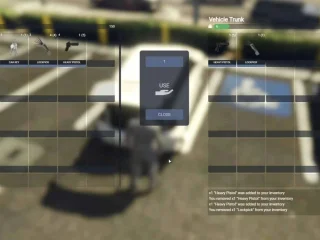
Vehicle trunk storage works through Trygon’s container system. Each vehicle has an inventory separate from the player’s personal inventory, with capacity based on vehicle type. Motorcycles get small trunks (30-50kg), sedans get medium trunks (100-150kg), vans and trucks get large trunks (200-300kg). Players can drag items from personal inventory to vehicle trunk and vice versa, with the same smooth drag-and-drop interface. Some servers implement locked trunks that require car keys, creating realistic vehicle storage mechanics.

Aperçu vidéo

Community Support and Resources

The Trygon development team maintains active presence in FiveM communities, providing support through Discord channels and forums. Detailed documentation covers installation, configuration, common integrations, and troubleshooting for typical issues. Video tutorials walk through setup processes, demonstrate advanced features, and showcase customization possibilities. The open source nature means community members frequently answer questions and share configuration examples from their own servers.

GitHub repositories contain the latest code, issue trackers for bug reports, and pull request systems where contributors submit improvements. This transparent development process ensures bugs get fixed quickly, requested features are publicly tracked, and the script’s evolution is visible to all users. Server owners can follow development, contribute code if they’re able, or simply benefit from the community’s collective improvements.

Scripts ESX associés

Avis

Il n’y a pas encore d’avis.

Soyez le premier à laisser votre avis sur “Trygon Inventory”