Économisez 20% dès aujourd'hui : Utilisez le code BIENVENUE lors du paiement. ACCUEILLIR Valable une seule fois par client sur les commandes passées à partir du $10.
AC-NOTEBOOK | NoPixel 4.0 Inspired Notebook Script – Digital Note-Taking System
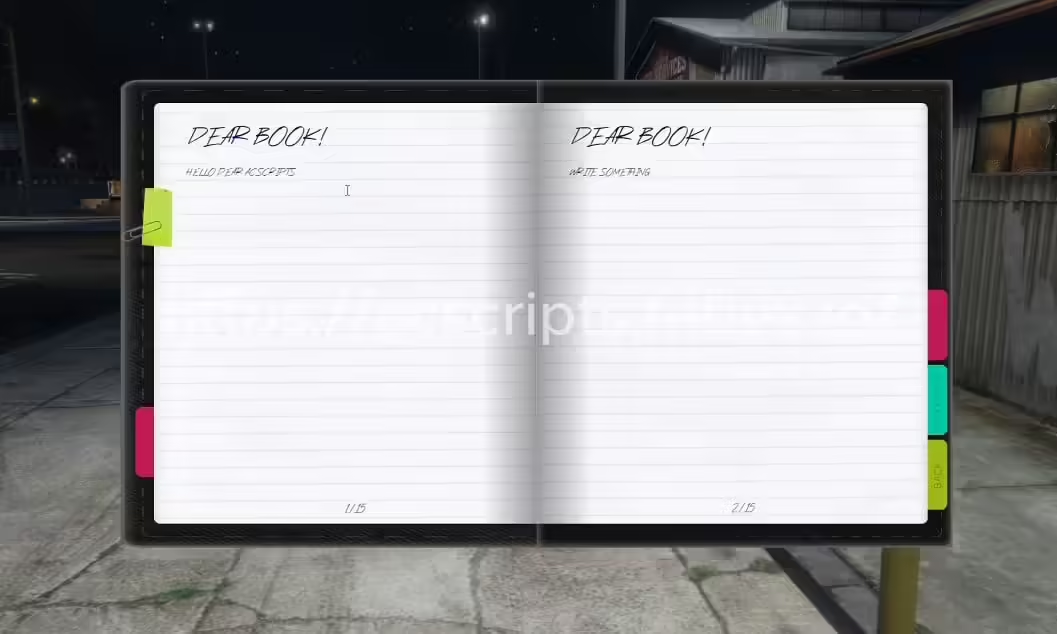
The AC-NOTEBOOK brings NoPixel 4.0’s iconic digital notebook system to your FiveM server, giving players a sleek in-game note-taking tool for documenting investigations, tracking leads, managing to-do lists, and organizing information. This immersive notebook interface lets players create, edit, and organize notes without breaking roleplay immersion. Perfect for detective work, criminal organization planning, business management, or any scenario where players need to document information during their roleplay sessions.
Ce qui est inclus
This notebook system provides a fully functional digital note-taking interface accessible through an in-game item or keybind. Players can create unlimited notes with titles, body text, and timestamps. The system supports note categorization with custom tags and folders, making it easy to organize information across different cases, projects, or activities. Notes persist across sessions and are stored per character, ensuring privacy and data security. The interface is inspired by NoPixel 4.0’s clean, modern design with smooth animations and intuitive navigation.
Caractéristiques principales
NoPixel 4.0 Design – Authentic interface matching the popular server’s aesthetic
Unlimited Notes – Create as many notes as needed without restrictions
Note Organization – Categorize with folders, tags, and search functionality
Rich Text Support – Format notes with different text styles and sizes
Timestamp Tracking – Automatic creation and modification timestamps
Character-Specific – Each character has their own private notebook
Quick Access – Configurable keybind or usable item to open notebook
Search Function – Find notes quickly by keyword or tag
Note Sharing – Option to share notes with other players (optional)
Auto-Save – Notes save automatically to prevent data loss
Parfait pour
Detective and investigation roleplay scenarios
Criminal organizations tracking operations and contacts
Business owners managing tasks and client information
Gang members documenting territory and rivalries
Medical professionals tracking patient notes
Lawyers documenting case details and evidence
Any roleplay requiring information documentation
Exemples de cas d'utilisation
Police Detectives – Document witness statements, case leads, and evidence
Gestion d'entreprise – Keep client lists, order details, and task reminders
Medical Records – Document patient conditions and treatment plans (unofficial notes)
Personal Journal – Character diary entries and personal reflections
Gang Intelligence – Track rival gang members, territories, and alliances
Guide d'installation
Extrayez la ressource dans le dossier des ressources de votre serveur.
Configurer l'intégration du framework (ESX/QBCore) in the config file
Set up the notebook item in your framework’s items database (if using item-based activation)
Configure keybind settings or item usage triggers
Customize UI colors and branding to match your server theme
Ajoutez la ressource au fichier server.cfg et redémarrez.
Test note creation, editing, and organization features
Integration Setup
If you’re using this notebook with the Frkn Spawn Selector mentioned in the help section, ensure proper event triggering in your multicharacter system. Add the trigger event after character selection to ensure the notebook data loads correctly for each character. The notebook automatically syncs with your framework’s character identification system to maintain proper data separation.
Compatibilité du framework
✅ ESX – Full ESX integration with character identifier system
✅ QBCore – Compatible with QB character and inventory systems
✅ QBOX – Works with QBOX character management
✅ Autonome – Can be adapted for any framework with character IDs
Ce qui le distingue
This notebook script captures the polish and functionality of NoPixel 4.0’s beloved note system while remaining accessible to all server owners. The interface is intuitive enough that players can use it effectively without tutorials, yet powerful enough to handle complex organization needs. Unlike basic note scripts that just store text, this system includes proper search, categorization, and management tools that make it genuinely useful for long-term gameplay. The auto-save feature prevents frustration from lost notes, while character-specific storage ensures privacy and immersion.
Options de personnalisation
Configure notebook access method (item, keybind, or both)
Set maximum note character limits if desired
Customize UI colors, fonts, and styling
Enable/disable note sharing features
Configure folder and tag options
Set up permission-based access for admin oversight
Spécifications techniques
Performance: Lightweight UI with minimal resource usage (~0.00ms idle)
Base de données: Stores notes in dedicated database table per character
Cadre d'interface utilisateur : Modern HTML/CSS/JS with smooth animations
Data Security: Server-side validation and character-locked storage
Compatibilité: Works alongside other phone/tablet scripts
Note Management Features
Create notes with custom titles and unlimited body text
Edit existing notes with full text editing capabilities
Delete notes with confirmation prompts
Organize notes into folders for different topics
Add tags for easy filtering and searching
Sort notes by creation date, modification date, or alphabetically
Search all notes by keyword or tag instantly
Privacy & Security
Each character’s notes are completely private by default
Server admins can view notes for moderation if configured
Optional note sharing requires both players to be online
Notes persist permanently unless manually deleted
No cross-character data leakage
Aide
Add TriggerEvent(‘frkn-spawnselector:menuopen’) in your multicharacter spawn line.
Assurez-vous que l'événement est déclenché après avoir sélectionné votre personnage.
Scripts ESX associés
[ESX] Emploi de jardinier avancé
Affichage tête haute du BP
Système immobilier ESX (500 appartements)
Expédition de CD
Cadre
ESX, QBCore, QBOX, Autonome
Avis
Il n’y a pas encore d’avis.
Soyez le premier à laisser votre avis sur “AC-NOTEBOOK | NoPixel 4.0 Inspired Notebook Script”Annuler la réponse







Avis
Il n’y a pas encore d’avis.