
Source status: the legacy listing names a Speedometer HUD and describes an ESX-oriented build workflow, but FiveMX could not locate a matching creator-owned source, licence, checksum, or public manifest for the Linkvertise archive. The features below are test targets, not verified package claims.
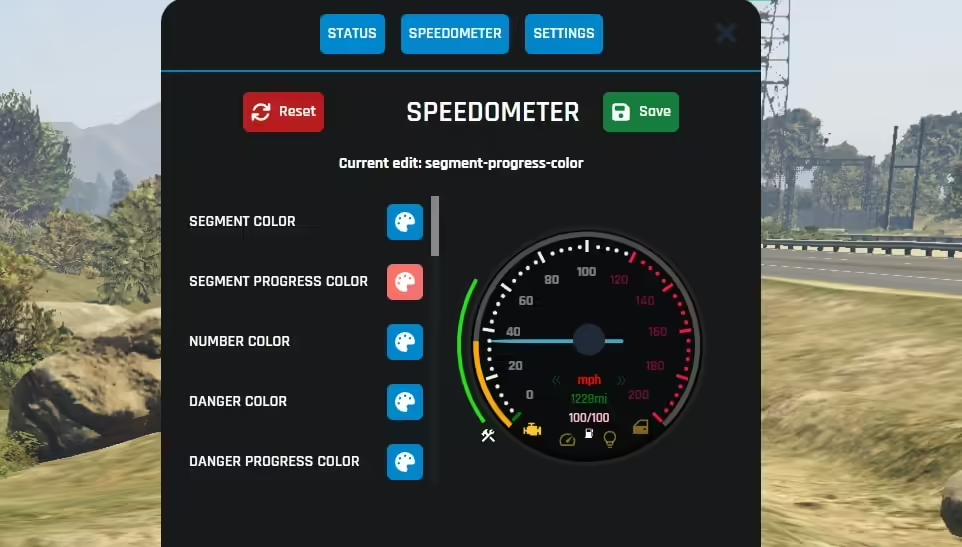
What the public source check established
On 22 July 2026, the monetized landing page returned HTTP 200 but did not reveal a public filename, archive size, SHA-256, repository, licence, dependency list, or fxmanifest.lua. FiveMX could not verify whether the archive is source code, a prebuilt NUI, or the specific HUD shown above. The old instruction to run npm install and npm run build is therefore not repeated as a universal requirement.
Installing npm packages runs code from a dependency tree and may invoke lifecycle scripts. Only run a build after reading the package manifest, using the repository’s matching lockfile and package manager, and confirming that the resource actually requires a local build. A release archive may already include production assets.
Inspect the HUD archive
- Record the filename, byte size, and SHA-256; scan the archive before extraction.
- Open
fxmanifest.lua. Record the resource name, client/server scripts,ui_page, files, dependencies, and framework references. - Inspect
package.jsonand the lockfile without installing. Review scripts, registries, dependencies, and expected Node version. - Search Lua and JavaScript for server events, callbacks, remote URLs, player-count logic, job data, mileage persistence, and unrestricted configuration commands.
- Check whether
esx_cruisecontrol, a fuel system, voice resource, framework, database table, or item definition is actually required.
NUI packaging checks
Cfx.re documents fullscreen NUI through a manifest ui_page and an explicit list of packaged web files. Confirm every referenced HTML, CSS, font, image, and JavaScript file exists with the same case. Check that the UI uses the secure https://cfx-nui- resource scope rather than obsolete paths. Use nui_devTools on staging to capture console errors and failed requests.
Three-role and three-resolution test
| Dimension | Cases | Failure to catch |
|---|---|---|
| Role | civilian, configured job, administrator | Leaked job data or unauthorized settings |
| Resolution | 1920×1080, 2560×1440, 3440×1440 | Overlap, clipping, or misplaced minimap |
| Vehicle | car, motorcycle, aircraft | Wrong layout, unit, or hidden state |
| Lifecycle | join, respawn, vehicle enter/exit, reconnect | Stale HUD or duplicate UI |
Use two clients so the online-player counter can be compared with the actual connected count. Change jobs through the normal framework workflow and verify the label refreshes without a reconnect. Empty the weapon, reload, switch weapons, and die once to test the ammo display. These steps validate behavior rather than trusting the feature list.
Speed, mileage, and seatbelt checks
- Compare stationary, low-speed, and motorway values with the same vehicle. Switch between km/h and mph and confirm the conversion is plausible and consistent.
- Drive a fixed route, record the starting and ending mileage, reconnect, and repeat. Identify whether mileage is per vehicle, per character, or only client-local.
- Use indicators while stationary and moving. Confirm sounds stop, do not stack, and are audible only to the intended player.
- Test seatbelt state on enter, exit, ejection conditions, death, and resource restart. If a dependency is missing, the HUD should fail clearly rather than spam errors.
- Confirm the aircraft layout hides road-only controls and does not break when switching vehicle classes.
Performance measurement
Capture client resource time while on foot, driving, with the settings panel open, and after repeated vehicle transitions. Record NUI console errors and compare frame pacing at the same location. A HUD updates frequently, so inefficient polling or oversized UI work may remain invisible in a static screenshot.
Test with the production minimap, status HUD, inventory, notifications, and vehicle scripts enabled. Two individually functional NUI resources can still overlap, compete for focus, or duplicate speed, fuel, seatbelt, and job information.
Accessibility and player-control review
Check whether players can scale, move, recolor, or hide the HUD without editing source files. Test readable contrast against bright daylight, night roads, snow or rain, and the map. Confirm that color is not the only indicator for seatbelt, engine, or warning state and that sounds can be reduced when they are not gameplay-critical.
Save settings, reconnect, switch characters, and clear only the resource’s client storage to understand where preferences live. Document the reset command or file before launch so support staff can recover an off-screen or unreadable HUD without deleting a player’s entire FiveM cache.
Deployment and rollback
If the reviewed archive passes, install it under its exact manifest-backed folder name and use ensure for that name. Back up the prior HUD, framework configuration, database changes, and server.cfg. To roll back, stop the new resource, restore the old start order and data, clear only the relevant test cache, and repeat join, vehicle, job, and respawn checks.
Legacy monetized mirror
Open the preserved Speedometer HUD Linkvertise page. FiveMX has not verified the archive or its licence. Do not run its npm scripts or server code until the exact files pass the checks above.
Support evidence to publish internally
Give support staff the tested archive hash, exact resource name, framework and dependency versions, build command if one was actually required, settings-reset method, and screenshots from each resolution. Add the expected role, vehicle, speed-unit, and persistence results. This turns “the HUD is broken” into a reproducible case and helps distinguish a package defect from a conflict with another minimap, status, fuel, or vehicle resource.