Come Risolvere gli Avvisi di Thread Hitch del Server
Avviso di intoppo del filo FiveM: come risolverlo
Che cos'è un avviso di intoppo filettato FiveM?
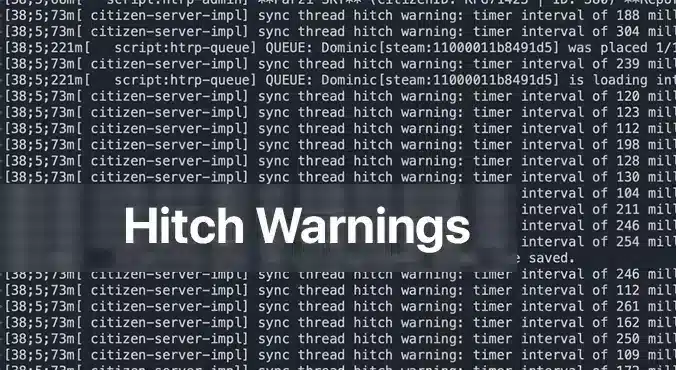
UN Avvertenza di attacco del filo FiveM appare come un messaggio permanente nella console del server, avvertendoti che uno o più script stanno utilizzando troppo tempo di elaborazione. È il modo in cui il server ti dice: "Ehi, qualcosa sta impiegando più tempo del dovuto e i tuoi giocatori percepiranno un picco di lag". Per chiunque gestisca un server FiveM, questi avvisi sono un segnale immediato che l'esperienza potrebbe risentirne. Comprendere la causa e risolverla non solo renderà il gameplay più fluido, ma renderà anche felice la tua community.
Perché vengono visualizzati gli avvisi di inceppamento del filo?
Il colpevole più comune è un script non ottimizzatoIn FiveM, gli script vengono eseguiti sulla CPU del server per gestire ogni aspetto, dal comportamento degli NPC alla logica personalizzata dei veicoli. Quando uno script contiene loop inefficienti, chiamate al database pesanti o verifica ripetutamente condizioni che non cambiano mai, può bloccare il thread del server. La coda del server si blocca, causando il temuto avviso di intoppo. Un'altra causa, meno comune, è l'hardware inadeguato: una CPU di fascia bassa o una RAM insufficiente non riescono a tenere il passo con un server occupato, costringendo ogni script a competere per risorse limitate.
Soluzioni passo passo per gli avvisi di intoppi del thread
1. Verifica l'hardware del tuo server
Even the best‑optimized script can choke if your hardware is underpowered. Below is a quick hardware checklist rated by player count.
| Player Count | CPU | RAM | Storage | Bandwidth | OS |
|————–|—–|—–|——–|———–|—-|
| 64 | 8‑Core 4.0 GHz | 32 GB DDR4 | 1 TB NVMe | 100 Mbps+ | Ubuntu 22.04 |
– processore: FiveM is CPU‑bound; higher clock speeds improve single‑thread performance, which is more critical than extra cores.
– RAM: More memory means the server can cache more assets and handle more connections without swapping to disk.
– Magazzinaggio: SSD or NVMe drives cut loading times dramatically; HDDs become a bottleneck.
– Larghezza di banda: Higher upload speeds ensure packets reach the server fast, especially with larger player counts.
– Sistema operativo: Linux distributions offer lower overhead and better stability for game servers.
If you’re running on a shared host or a virtual private server, confirm these specs with your provider. Upgrade when you hit consistent hitch warnings and notice performance lag.
2. Identificare gli script difettosi con la profilazione del server
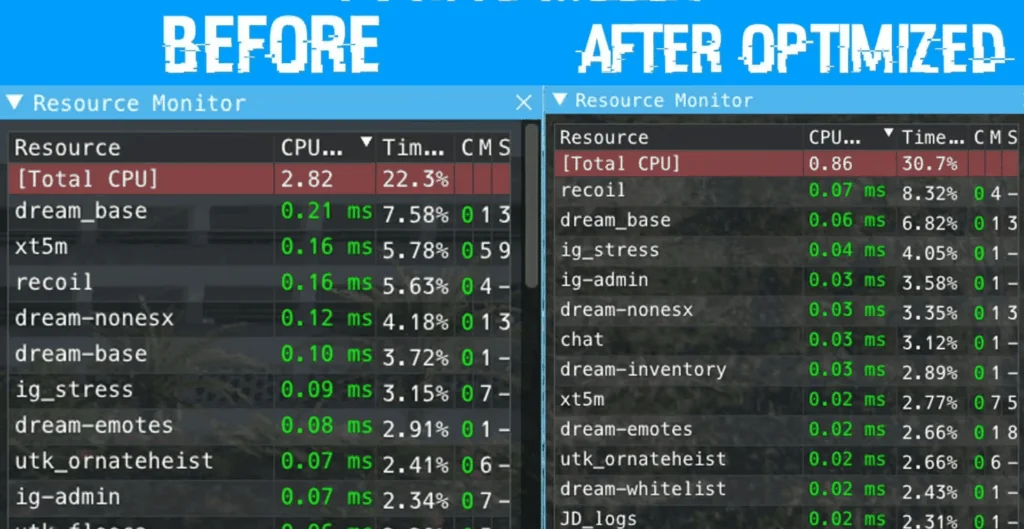
Compare the same resources before and after optimization.
The built‑in profiling tools in txAdmin or the FiveM server console let you pinpoint which script is causing the hitch.
1. Open a console or txAdmin in Amministratore mode.
2. Type: `profiler record 500`
(This records 500 milliseconds of execution data.)
3. Wait for the recording to finish, then run: `profiler save myprofile`.
A file will be generated.
4. Finally, `profiler view myprofile` will open a link in your browser.
If you’re not on the same machine, you may need to use `export profilers` to send the file elsewhere.
In the profiler report, look for functions or scripts that consistently consume a large portion of the measured time. Pay attention to:
– Long loops that run every tick
– Database queries or file reads that
– External API calls or network requests that block the thread
Once you’ve located the problematic parts, you have two options: optimize or remove.
3. Ottimizzare o disabilitare gli script problematici
Ottimizzare
If the script is essential to your server’s unique gameplay, try the following:
– Cicli di refactoring: Replace `for {}` loops that run per tick with event‑driven logic or reduce the frequency.
– Risultati della cache: Store expensive calculations or database results in memory, updating only when necessary.
– Utilizzare funzioni native: Where possible, replace custom code with FiveM’s built‑in natives, which are usually more efficient.
– Chiamate asincrone: Switch blocking operations to asynchronous patterns if the API supports them.
After modifications, run the profiler again to verify the improvement.
Disabilitare
If optimization isn’t feasible or the script is cosmetic, disable it safely:
1. Edit `server.cfg`.
2. Comment out or delete any lines that load the script, e.g. `ensure faulty_script`.
3. Restart the server to confirm the hitch warning disappears.
You can always re‑enable it later if you find a workaround or external optimization support.
4. Mantenere il server aggiornato
Versioni precedenti di FiveM o le sue dipendenze potrebbero contenere prestazioni regressions. Ensure you’re running the latest stable server files:
“`
cd /root/fivem
git pull
sh ctl restart
“`
Also keep the operating system updated with the latest patches; this can prevent unknown bottlenecks.
Quando i ritardi persistono dopo aver corretto gli avvisi
If a hitch warning has been addressed but lag continues, consider:
– Aumento del tasso di tick: Lowering TPS (ticks per second) reduces CPU demand but can feel less responsive. Balance it by only adjusting if other solutions fail.
– Disabilitazione delle risorse non necessarie: Many servers enable mods that provide little value but consume resources. Remove or replace them.
– Monitoraggio delle metriche del sistema: Use tools like `htop`, `nvme-cli`, or `iftop` to watch CPU, RAM, disk, and network usage in real time.
A persistent lag can also stem from network issues outside the server’s control. Ask your players to test latency with `ping` or `traceroute` and confirm they’re in the same region as your server.
Considerazioni finali
UN FiveM avviso di intoppo del filo è un chiaro segnale che qualcosa nel tuo ambiente server, che si tratti di uno script non autorizzato o di hardware insufficiente, necessita di attenzione. Controllando sistematicamente l'hardware, profilando gli script e ottimizzando o disabilitando il codice problematico, puoi eliminare questi avvisi e offrire un'esperienza più fluida e piacevole alla tua community. Ricorda, la chiave per un server FiveM stabile è il monitoraggio proattivo e gli aggiornamenti regolari. Se riscontri ancora problemi, i forum FiveM, Discord e le risorse di txAdmin sono ottimi posti per ottenere consigli personalizzati. Buon hosting!
ho bisogno di aiuto con questo problema di sincronizzazione del thread, tutti i miei script sembrano essere ottimizzati e continuo a ricevere questo avviso anche su una nuova installazione di qb-core che causa la desincronizzazione dei giocatori








ho bisogno di aiuto con questo problema di sincronizzazione del thread, tutti i miei script sembrano essere ottimizzati e continuo a ricevere questo avviso anche su una nuova installazione di qb-core che causa la desincronizzazione dei giocatori