







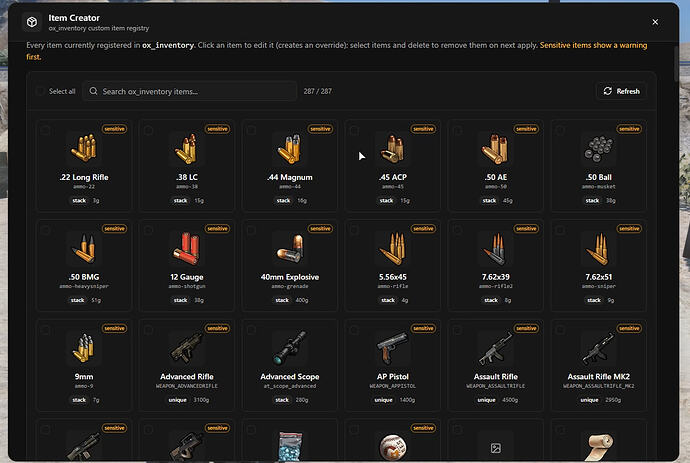
Crea e gestisci oggetti personalizzati di ox_inventory direttamente in gioco senza modificare file o riavviare il server.
Anteprima
Panoramica
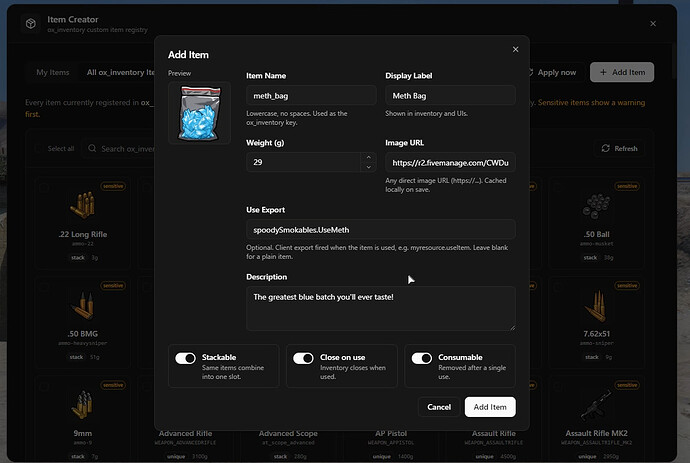
Questo strumento ti permette di aggiungere, modificare ed eliminare elementi di ox_inventory dall'interno di FiveM. Usa \/itemcreator (solo admin) per aprire un pannello pulito invece di modificare items.lua manualmente.
Le modifiche vengono sincronizzate con tutti i giocatori istantaneamente, senza bisogno di riavviare il server o di fare il relog. Puoi sfogliare tutti gli elementi registrati, modificare i valori, incollare URL di immagini per il download automatico e definire azioni degli elementi tramite esportazioni client.
Caratteristiche principali
- Aggiungi, modifica ed elimina elementi da un pannello invece che da un editor di testo
- Sfoglia tutti gli elementi di ox_inventory — i tuoi, di magazzino e di altre risorse
- Incolla un URL diretto di un'immagine e questa verrà scaricata in ox_inventory\/web\/images
- Elementi scritti come voci native [‘nome’] = { ... }, corrispondenti alle modifiche manuali
- Punta un elemento a un'esportazione client per definirne l'azione d'uso
- Gli elementi nuovi e modificati appaiono immediatamente per i giocatori connessi
- Si pulisce da solo: eliminare un elemento lo rimuove da items.lua e solo la sua immagine scaricata
Scaricamento
Flusso di lavoro admin e controlli di sicurezza
Un creatore di elementi in-game è utile quando lo staff aggiunge frequentemente cibo, strumenti, oggetti prove, parti per crafting o ricompense per eventi. Il vantaggio principale è la velocità: gli admin possono creare o modificare elementi di ox_inventory senza modificare items.lua a mano e riavviare il server.
Il rischio è la stessa velocità. Limita l'accesso agli admin di fiducia, mantieni un backup delle definizioni degli elementi e testa le esportazioni degli elementi prima di dare accesso ai giocatori. Un nome di elemento errato, un URL immagine rotto o un'esportazione client non sicura possono creare un comportamento confuso dell'inventario.
Riferimento ufficiale:
Percorsi correlati FiveMX: