







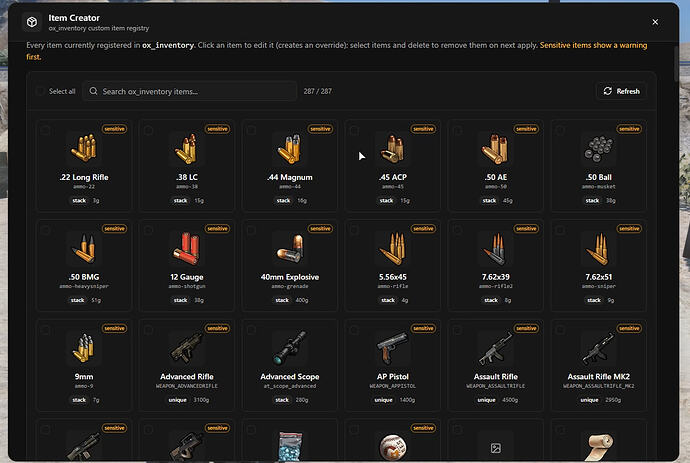
Twórz i zarządzaj niestandardowymi przedmiotami ox_inventory bezpośrednio w grze, bez edytowania plików lub restartowania serwera.
Podgląd
Przegląd
To narzędzie pozwala dodawać, edytować i usuwać przedmioty ox_inventory z wnętrza FiveM. Użyj /itemcreator (tylko admin) aby otworzyć czysty panel zamiast ręcznej edycji pliku items.lua.
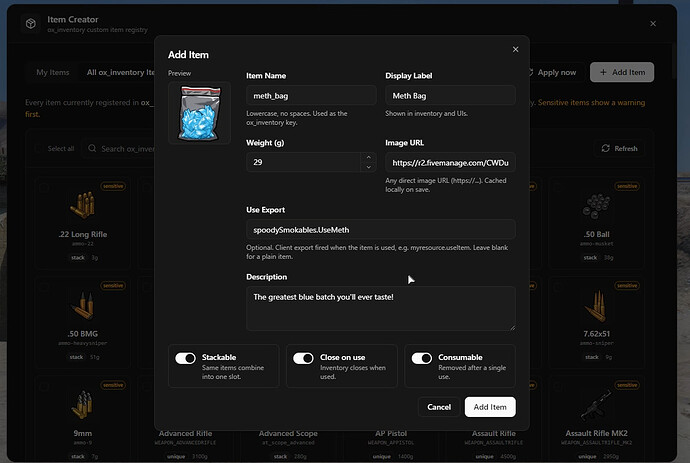
Zmiany synchronizują się natychmiastowo dla wszystkich graczy — nie wymaga restartu serwera ani ponownego logowania. Możesz przeglądać wszystkie zarejestrowane przedmioty, dostosowywać wartości, wklejać URL-e obrazów do automatycznego pobierania oraz definiować akcje przedmiotów poprzez eksporty klienta.
Kluczowe Funkcje
- Dodawaj, edytuj i usuwaj przedmioty z panelu zamiast z edytora tekstu
- Przeglądaj wszystkie przedmioty ox_inventory — twoje, standardowe oraz z innych zasobów
- Wklej bezpośredni URL obrazu, a zostanie pobrany do ox_inventory/web/images
- Przedmioty zapisywane jako natywne wpisy [‘name’] = { … }, zgodne z ręcznymi edycjami
- Przypisz przedmiot do eksportu klienta, aby zdefiniować jego akcję użycia
- Nowe i edytowane przedmioty pojawiają się natychmiastowo dla podłączonych graczy
- Czyści po sobie: usunięcie przedmiotu usuwa go z items.lua oraz tylko jego pobrany obraz
Pobierz
Przepływ pracy administratora i kontrole bezpieczeństwa
Kreator przedmiotów w grze jest przydatny, gdy personel często dodaje jedzenie, narzędzia, przedmioty dowodowe, części do craftingu lub nagrody za wydarzenia. Główną zaletą jest szybkość: administratorzy mogą tworzyć lub dostosowywać przedmioty ox_inventory bez ręcznej edycji pliku items.lua i restartowania serwera.
Ryzykiem jest ta sama szybkość. Ogranicz dostęp do zaufanych administratorów, zachowaj kopię zapasową definicji przedmiotów i przetestuj eksporty przedmiotów przed udostępnieniem graczom. Zła nazwa przedmiotu, uszkodzony URL obrazu lub niebezpieczny eksport klienta mogą powodować dezorientujące zachowanie ekwipunku.
Oficjalne odniesienie:
Powiązane ścieżki FiveMX: