Le MLO gratuite sono utili per i prototipi. Per un server RP live, confronta gli interni premium e i pacchetti server prima del lancio.
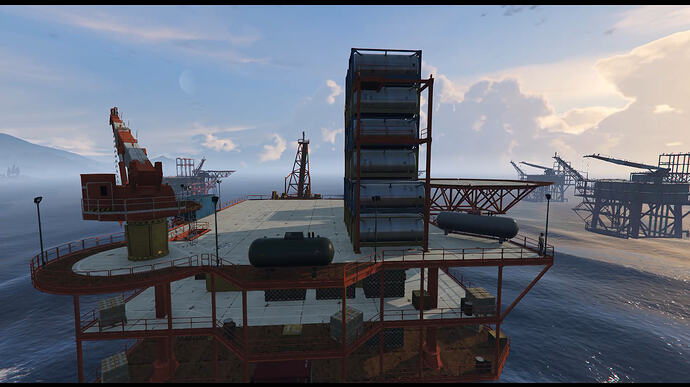
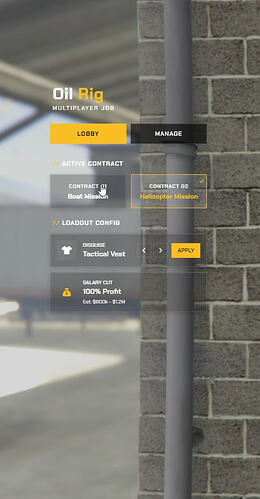
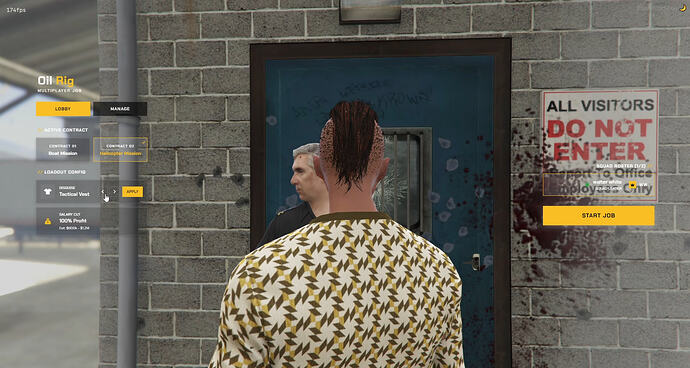
A free, detailed Custom Oil Rig MLO and script for FiveM, featuring dynamic boat and helicopter missions with a modern UI.
Anteprima
Panoramica
This free resource includes a massive, highly detailed Custom Oil Rig map built specifically for the accompanying script. It offers dynamic mission options: a boat mission where you pilot a tugboat from port to the platform to transport containers, and a he…
The resource features a clean, modern interface and is designed for plug-and-play compatibility with popular frameworks. Performance is optimized with lightweight coding, showing 0.00ms idle, and over 450 lines of configurable settings.
Caratteristiche principali
- Custom Oil Rig MLO with massive, highly detailed map
- Dynamic boat mission: tugboat from port to platform for container transport
- Dynamic helicopter mission: Skylift airlift containers from platform
- Clean, visually appealing modern user interface
- Plug-and-play compatibility with QBCore, QBOX, and ESX frameworks
- Lightweight coding with 0.00ms idle performance optimization
- Over 450 lines of detailed configuration options
Requisiti e compatibilità
- Compatible with QBCore framework
- Compatible with QBOX framework
- Compatible with ESX framework
Fonte
Pagina fonte verificata: https://forum.cfx.re/t/free-multiplayer-oil-job-custom-map-qbcore-qbox-esx/5410064
Installazione
- Scarica la risorsa tramite il pulsante di download recensito.
- Leggi le note del creatore sulla pagina della fonte verificata.
- Estrai la risorsa e posizionala nella cartella corretta delle risorse del server FiveM.
- Aggiungi la risorsa a server.cfg quando la release include una cartella resource.
- Riavvia e testa su un server di staging prima di utilizzarlo in produzione.