Ücretsiz MLOs'ler prototipler için kullanışlıdır. Canlı bir RP sunucusu için, lansmandan önce premium iç mekanları ve sunucu paketlerini karşılaştırın.
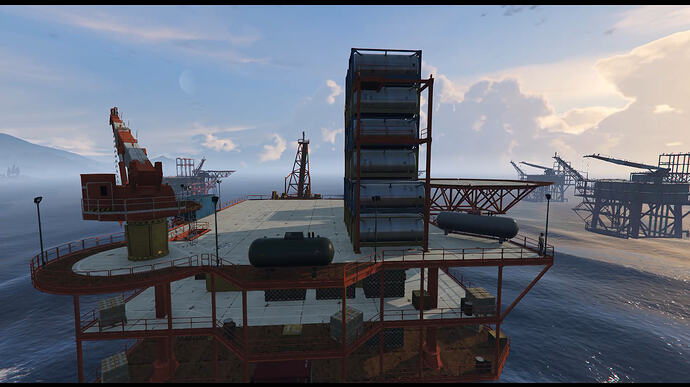
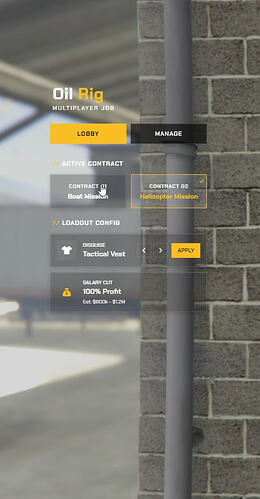
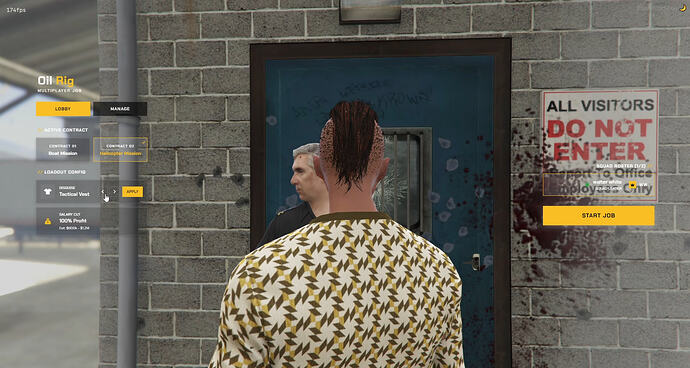
A free, detailed Custom Oil Rig MLO and script for FiveM, featuring dynamic boat and helicopter missions with a modern UI.
Önizleme
Genel bakış
This free resource includes a massive, highly detailed Custom Oil Rig map built specifically for the accompanying script. It offers dynamic mission options: a boat mission where you pilot a tugboat from port to the platform to transport containers, and a he…
The resource features a clean, modern interface and is designed for plug-and-play compatibility with popular frameworks. Performance is optimized with lightweight coding, showing 0.00ms idle, and over 450 lines of configurable settings.
Temel Özellikler
- Custom Oil Rig MLO with massive, highly detailed map
- Dynamic boat mission: tugboat from port to platform for container transport
- Dynamic helicopter mission: Skylift airlift containers from platform
- Clean, visually appealing modern user interface
- Plug-and-play compatibility with QBCore, QBOX, and ESX frameworks
- Lightweight coding with 0.00ms idle performance optimization
- Over 450 lines of detailed configuration options
Gereksinimler ve Uyumluluk
- Compatible with QBCore framework
- Compatible with QBOX framework
- Compatible with ESX framework
Kaynak
Doğrulanmış kaynak sayfası: https://forum.cfx.re/t/free-multiplayer-oil-job-custom-map-qbcore-qbox-esx/5410064
Kurulum
- Kaynağı, incelenen indirme düğmesi aracılığıyla indirin.
- Doğrulanmış kaynak sayfasındaki yaratıcı notlarını okuyun.
- Kaynağı çıkarın ve doğru FiveM sunucu kaynakları klasörüne yerleştirin.
- Yayınlanan sürümde kaynak klasörü bulunuyorsa, kaynağı server.cfg dosyasına ekleyin.
- Canlı kullanmadan önce bir hazırlık sunucusunda yeniden başlatın ve test edin.