









![[ESX] Anteprima risorsa FiveM del lavoro avanzato di ambulanza](https://cdn.fivemx.com/wp-content/uploads/2023/10/chrome_r89t4g1UUb-jpg-500x375.avif)
VIP+ Radio V2 (Ultimate Edition) – Advanced Communication System
Transform emergency service communication on your FiveM server with VIP+ Radio V2 Ultimate Edition, the most feature-rich radio system available. This ultimate version includes customizable color themes (14 options), real-time player lists showing who’s on your channel, custom channel naming, mic click sounds, radio animations, and comprehensive framework integration. Perfect for law enforcement, EMS, fire departments, and any organized groups requiring professional communication. The system supports whitelisted channels with job-based access control, making it ideal for emergency services with classified radio frequencies.
Cosa è Incluso
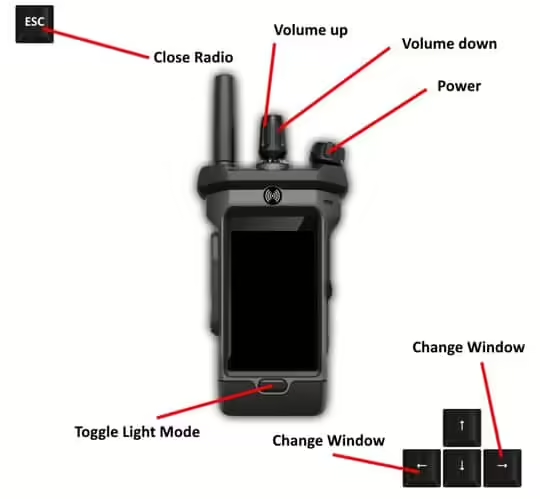
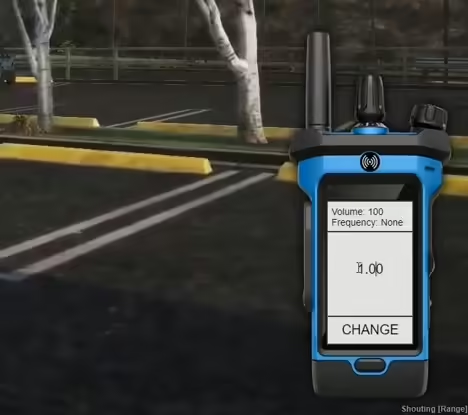
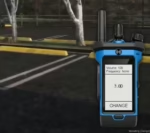
VIP+ Radio V2 delivers complete communication functionality with visual and audio enhancements. The radio UI offers 14 color themes from default to custom colors like blue, cherry, cyan, mint, and more. Real-time player lists show everyone on your current channel, with optional display of your own name. Mic click sounds provide audio feedback when transmitting. Radio animations show characters holding radios while talking. Custom channel names let you label frequencies (LEO RTO, EMT RTO, etc). The system integrates with ESX, QBCore, or runs standalone, with optional item-based activation requiring a radio item in inventory.
Caratteristiche principali
- 14 Color Themes – Customize radio appearance to match your preference
- Real-Time Player Lists – See who’s on your channel
- Custom Channel Names – Label frequencies with department names
- Mic Click Sounds – Authentic audio feedback when transmitting
- Radio Animations – Characters hold radios while talking
- Whitelisted Channels – Job-based access control for secure frequencies
- Item-Based Activation – Require radio item in inventory (optional)
- Supporto multi-framework – ESX, QBCore, or Standalone
Opzioni di personalizzazione
The extensive config file controls every aspect of the radio system. Choose your default color theme or let players change colors in-game using the /rcolour command. Enable or disable the player list, or let users toggle it with /rlist. Allow players to edit their display names and callsigns for professional identification. Set up whitelisted channels with job-specific access – for example, channel 1 for police/EMS only, channel 2 for fire/rescue. The item system works with both ESX and QBCore inventories, or disable it for command-based activation.
Whitelisted Channel System
Secure your emergency frequencies with job-based channel whitelisting. Configure which jobs can access specific channels – restrict channel 1 to police only, channel 2 to EMS, or combine jobs for joint operations. Players without proper job access get blocked from joining secured channels, preventing civilians from monitoring law enforcement communications. This creates realistic operational security for sensitive radio traffic. The system supports unlimited channel configurations with granular job permissions.
Dettagli Integrazione Framework
Integrazione ESX: Full support for ESX jobs and inventory. Use radio as an item players must own, with optional color-based items (radio_blue, radio_red, etc). Job checking integrates with es_extended for channel whitelisting.
Integrazione QBCore: Compatible with QB-Core jobs and inventory system. Item-based radios work with QB inventory, job permissions sync with qb-core framework.
Modalità Standalone: Works without any framework using ACE permissions for channel access control. Perfect for servers not running ESX or QBCore.
Specifiche tecniche
- Prestazione: 0.01-0.02 ms idle, 0.03 ms transmitting
- Audio: High-quality mic click sound effects
- Animazioni: Smooth radio holding animations
- Compatibilità: Works with all voice systems
File di configurazione:
Scully = {
Framework = 'none', -- Server Core = scully_core, ESX = es_extended, QBCore = qb-core, Standalone = none
RadioColour = 'default', -- Options are default, blue, brown, cherry, coral, cyan, green, mint, orange, pink, purple, red, white and yellow
AllowColours = true, -- Disable if you don't want people to be able to change their radio colour in-game
ColourCommand = 'rcolour', -- Set to '' if you don't want to allow changing with a command, command is /rcolour 1-11
EnableList = true, -- Set to false to disable the player list
HideListCommand = 'rlist', -- Set to '' if you don't want to allow hiding the list with a command, command is /rlist
ShowSelf = true, -- Enable if you want your own name to be shown on the radio list
EnableEditing = true, -- Disable if you don't want to allow players to change their names and callsigns on the radio
MicClicks = true, -- Disable if you don't want mic clicks
RadioAnims = true, -- Disable if you don't want to use radio animations for holding the radio
UseItem = false, -- Enable if you want to use the radio as an item, will only work for QBCore and ESX
UseItemColours = false, -- Enable if you want to use different items for each colour, this will disable the command also
UseKeybind = 'u', -- Set to '' if you don't want to use the radio as a keybind, can be changed here for first use only or in your fivem keybind settings
UseCustomChannelNames = true, -- Enable if you want custom channel names to be displayed on the radio
ChannelNames = { -- Channel names have a limit of 7 characters or they won't display
[6.25] = 'LEO RTO',
[6.30] = 'EMT RTO'
},
WhitelistedAccess = { -- What channels should be whitelisted and what jobs should have access to them?
[1] = {
['police'] = true,
['ems'] = true
},
[2] = {
['police'] = true,
['ems'] = true
}
},
AcePerms = { -- Not needed unless Framework is set to 'none'
'police',
'ems'
}
}
Compatibilità del framework
- ESX – Full integration with jobs and inventory
- QBCore – Compatible with QB jobs and items
- Standalone – ACE permissions for access control
Cosa lo fa risaltare
VIP+ Radio V2 Ultimate Edition goes beyond basic radio scripts with its comprehensive feature set. The 14 color themes let departments customize radios to their branding – blue for police, red for fire, green for EMS. Real-time player lists create situational awareness of who’s monitoring each channel. Custom channel naming makes frequencies instantly recognizable (TAC 1, Dispatch, Air Support). The whitelisting system provides genuine operational security rather than honor-system channel assignments. Item-based activation adds inventory realism where players must equip radios. The Ultimate Edition combines professional features with extensive customization for servers demanding the best communication tools.
File di configurazione:
Scully = {
Framework = 'none', -- Server Core = scully_core, ESX = es_extended, QBCore = qb-core, Standalone = none
RadioColour = 'default', -- Options are default, blue, brown, cherry, coral, cyan, green, mint, orange, pink, purple, red, white and yellow
AllowColours = true, -- Disable if you don't want people to be able to change their radio colour in-game
ColourCommand = 'rcolour', -- Set to '' if you don't want to allow changing with a command, command is /rcolour 1-11
EnableList = true, -- Set to false to disable the player list
HideListCommand = 'rlist', -- Set to '' if you don't want to allow hiding the list with a command, command is /rlist
ShowSelf = true, -- Enable if you want your own name to be shown on the radio list
EnableEditing = true, -- Disable if you don't want to allow players to change their names and callsigns on the radio
MicClicks = true, -- Disable if you don't want mic clicks
RadioAnims = true, -- Disable if you don't want to use radio animations for holding the radio
UseItem = false, -- Enable if you want to use the radio as an item, will only work for QBCore and ESX
UseItemColours = false, -- Enable if you want to use different items for each colour, this will disable the command also
UseKeybind = 'u', -- Set to '' if you don't want to use the radio as a keybind, can be changed here for first use only or in your fivem keybind settings
UseCustomChannelNames = true, -- Enable if you want custom channel names to be displayed on the radio
ChannelNames = { -- Channel names have a limit of 7 characters or they won't display
[6.25] = 'LEO RTO',
[6.30] = 'EMT RTO'
},
WhitelistedAccess = { -- What channels should be whitelisted and what jobs should have access to them?
[1] = {
['police'] = true,
['ems'] = true
},
[2] = {
['police'] = true,
['ems'] = true
}
},
AcePerms = { -- Not needed unless Framework is set to 'none'
'police',
'ems'
}
}
Marcellus (proprietario verificato) –
The item and the design are very cool. Also the support is amazing, they always help you with any detail that you have.
Jarod (proprietario verificato) –
Ottima risorsa per server GTA RP.
Aaliyah (proprietario verificato) –
I got excellent support for this item. They were patient with me, and helped me solve my issue. I recommend this company 100%
Nestor (proprietario verificato) –
This is the best support for a product I had so far, they reply quickly and solve themselves the problems most of the time. Kudos guyz
Jane (proprietario verificato) –
The first time I got the urges to leave a comment, but this is simply a top-notch thing you can find.
Hilbert (proprietario verificato) –
No complicated installation process and no hidden dependencies. Everything was clearly explained.
GreenCobra (proprietario verificato) –
One of the best scripts I have used.
Juanita (proprietario verificato) –
Think this could be a potential item in the future
Odessa (proprietario verificato) –
Clean and optimized script. It works smoothly even with many players online.