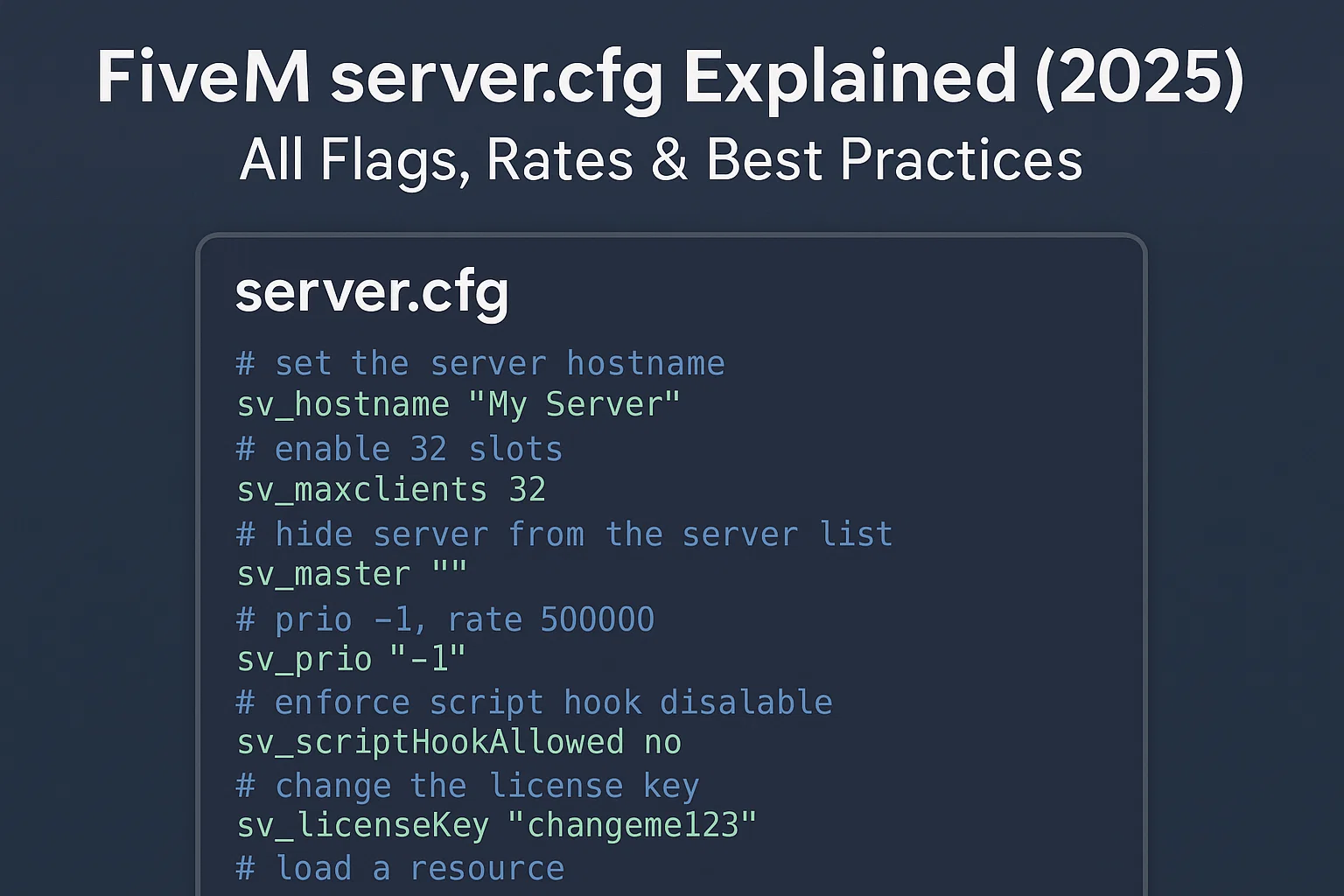
Quick answer: start with the official Cfx.re example, change only the endpoint, project fields, slot limit, server registration key, and explicit resource list, then validate in txAdmin and test a direct connection. Keep a known-good copy before every edit.
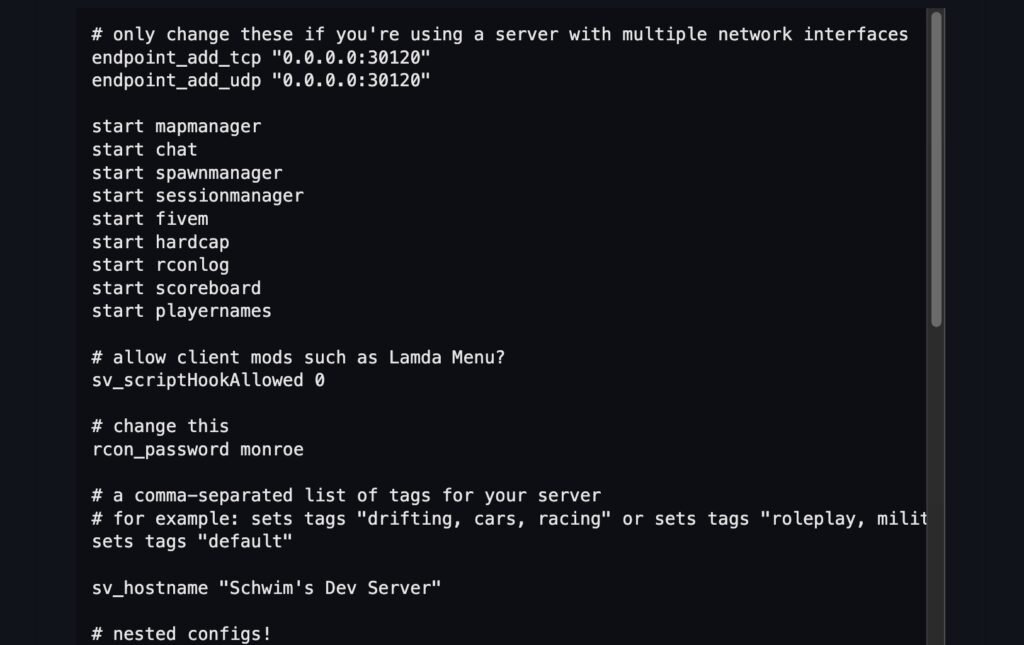
endpoint_add_tcp "0.0.0.0:30120"
endpoint_add_udp "0.0.0.0:30120"
sets sv_projectName "My Server"
sets sv_projectDesc "A clear one-sentence description"
sv_hostname "My Server"
set onesync on
sv_maxclients 48
sv_licenseKey "replace_with_portal_key"
ensure mapmanager
ensure chat
ensure spawnmanager
ensure sessionmanager
ensure hardcap
Security boundary: sv_endpointPrivacy hides player IPs from public reports; it does not provide DDoS mitigation or conceal the server origin. Leave RCon disabled unless it is explicitly required, and never publish real license, database, Steam, Tebex, or webhook secrets.
De server.cfg bestand is het hart van elke FiveM-server. Het bepaalt hoe uw server draait: slots, netwerk, game build, OneSync, logging en zichtbaarheid in de serverlijst. Deze gids is voor server eigenaren en ontwikkelaars die veilige standaardinstellingen, productieverharding en prestatiebest practices willen. Houd altijd back-ups bij en gebruik versiebeheer. Als u nieuw bent, begin dan met onze Hoe maak je een FiveM-server. Voor diepere optimalisaties, zie onze Prestatiehub.
TL;DR: Productieklare basislijn (geannoteerd)
Een schone server.cfg is de basis van stabiliteit. Hieronder staan twee voorbeelden: een minimale dev config en een verharde productie configuratie.
Minimale dev configuratie
# server.cfg (development)
# Basic config for local testing

# Network
endpoint_add_tcp "0.0.0.0:30120" # TCP port binding
endpoint_add_udp "0.0.0.0:30120" # UDP port binding

# Server info
sv_hostname "My Dev Server"
sv_maxclients 8

# OneSync
set onesync on

# Resources (basic example)
ensure mapmanager
ensure chat
ensure spawnmanager
ensure sessionmanager
ensure hardcap
ensure baseevents

# Permissions (default ACL)
exec permissions.cfg
Geharde productieconfiguratie
# server.cfg (production)

# Network
endpoint_add_tcp "0.0.0.0:30120"
endpoint_add_udp "0.0.0.0:30120"

# Security
sv_endpointPrivacy true # Hides player IP addresses from public server reports; it does not hide the server origin
sv_scriptHook 0 # Disable client mods
# Leave rcon_password unset unless legacy RCon is explicitly required

# Slots
sv_maxclients 64 # Adjust to host capacity

# Game build (use latest recommended)
# Optional: pin a documented game build only when your resources require it

# Project info
sv_hostname "FIVEMX Roleplay | Serious RP"
sets sv_projectName "FIVEMX RP Server"
sets sv_projectDesc "Realistic RP with QBCore & custom scripts"
sets tags "roleplay, seriousrp, qbcore"
sets locale "en-US"
load_server_icon mylogo.png
sets banner_detail "https://cdn.example.com/banner.png"
sets banner_connecting "https://cdn.example.com/loading.png"

# OneSync
set onesync on

# Resources (use resource list)
exec resources.cfg

# Logging & ACL
set sv_logLevel 2
exec permissions.cfg

# txAdmin integration
# Load framework/database configuration from a separately permissioned config; do not publish real credentials
Tip: Valideer altijd uw configuratie na bewerkingen met txAdmin health checks en consolelogs. Zie txAdmin logs.
Serverinformatie & vermelding
De volgende convars bepalen hoe uw server verschijnt in de serverbrowser en API:
| Convar | Doel | Voorbeeld | Wanneer te wijzigen | Kanttekeningen |
|---|---|---|---|---|
sv_hostname | Openbare naam in de serverlijst | sv_hostname "My RP Server [EN]" | Altijd instellen | Vermijd speciale tekens, houd duidelijk |
sets sv_projectName | Interne projectweergavenaam | sets sv_projectName "MyCommunityRP" | Branding, multi-server opstellingen | Alleen zichtbaar in lijst UI |
sets sv_projectDesc | Beschrijving weergegeven in lijst | sets sv_projectDesc "QBCore RP Server" | Voeg regels, taal, functies toe | Houd < 100 tekens |
sets tags | Serverlijst tags | sets tags "roleplay, cars, qbcore" | Verbeter vindbaarheid | Gebruik alleen officiële tags |
sets locale | Standaardtaal | sets locale "en-US" | Komt overeen met servertaal | Verkeerde locale kan server verbergen |
sv_endpointPrivacy | Verberg openbaar IP in browser | sv_endpointPrivacy true | Aanbevolen voor productie | Spelers maken verbinding via Cfx relay |
load_server_icon | 96×96 PNG pictogram | load_server_icon mylogo.png | Voor branding | Moet vierkant zijn, <96×96 pixels |
sets banner_detail | Grote banner in serverlijst | sets banner_detail "url" | Optioneel maar aanbevolen | Moet een HTTPS-URL zijn |
sets banner_connecting | Banner weergegeven tijdens verbinden | sets banner_connecting "url" | Goed voor branding/laden | Gebruik CDN om vertraging te voorkomen |
Zie de official Cfx.re server command and convar reference for current syntax and behavior.
Netwerk & slots
FiveM-servers gebruiken TCP/UDP-eindpunten. Standaard wordt poort 30120 gebruikt.
endpoint_add_tcp "0.0.0.0:30120"
endpoint_add_udp "0.0.0.0:30120"
sv_maxclients 64
- Voer meerdere servers uit op één machine met poortverschuivingen: bijv.
30121,30122. - Pas firewallregels aan om TCP/UDP-poorten te openen.
sv_maxclientsheeft direct invloed op CPU- en RAM-gebruik — stel niet hoger in dan je hardware aankan. Zie serverhostingproviders
Waarschuwing: Stel MySQL- of RCON-poorten niet bloot aan het internet.
Gamebuild & artefacten
An FXServer artifact version and a GTA V game build are separate choices. Update artifacts through Cfx.re’s recommended build path; set sv_enforceGameBuild only when the server’s resources require a documented GTA content build, and verify the value against the current Cfx.re command reference.
# Optional startup-only setting; choose a value from the current Cfx.re reference
# sv_enforceGameBuild
- [Officiële convars-documentatie][1] bevat geldige buildnummers.
- Stel build in
server.cfgof in txAdmin → Instellingen → FXServer → Extra argumenten:
+set sv_enforceGameBuild 2944
- Download de nieuwste artefacten van [runtime.fivem.net][4] (Windows) of de Linux-buildpagina.
- Meng nooit client- en serverbuilds.
OneSync-configuratie
OneSync schakelt server-side entiteitssynchronisatiein: meer spelers, nauwkeurige statussen, betere streaming. Gebruik altijd OneSync aan voor moderne frameworks (QBCore, ESX).
| Instelling | Effect | Typische waarde | Impact op CPU/geheugen | Documentatie |
onesync | Schakelt OneSync in | on | Hoger CPU-gebruik | [OneSync docs][3] |
onesync_population | Bestuurt lokale NPCs/verkeer | on (optioneel) | Voegt CPU-belasting toe | [OneSync docs][3] |
onesync_distanceCullVehicles | Stream voertuigen efficiënt | true | Betere prestaties, bespaart bandbreedte | [OneSync docs][3] |
Tip: Schaal
sv_maxclientsmet hardware. Gebruik Resmon-gids om de impact van bronnen te meten.
Resource startvolgorde & afhankelijkheden
Resources worden geladen in de volgorde zoals gedefinieerd door ensure. Afhankelijkheden altijd eerst starten.
# resources.cfg (split file)
ensure oxmysql
ensure qb-core
ensure qb-adminmenu
ensure qb-inventory
ensure qb-policejob
ensure my-custom-scripts
In server.cfg:
exec resources.cfg
- Houd frameworks en DB-connectoren eerst.
- Groepeer gerelateerde bronnen.
- Vermijd
ensure *in productie; het veroorzaakt een niet-deterministische volgorde.
Beveiliging & misbruikverharding
Een veilige server.cfg voorkomt lekken en misbruik.
Checklist:
sv_endpointPrivacy truesv_scriptHook 0(blokkeer client mods)- Sterk of uitgeschakeld
rcon_password - Gebruik
add_principalEnadd_acevoor ACL's - Keep secrets out of public repositories and client/shared resource files; restrict access to the server-only configuration that contains them
- Update artifacts regelmatig
- Monitor txAdmin logs
- Gebruik Resmon-gids om zware scripts te vangen
ACL voorbeeld:
add_ace group.admin command allow
add_principal identifier.steam:110000112345678 group.admin
CDN & asset streaming (wanneer te gebruiken)
Voor grote MLOs, aangepaste auto's en texturen, gebruik een CDN om te verminderen vervoegingstijden.
- Host bestanden op een CDN zoals Cloudflare R2 (stel [CORS headers][6] in).
- Voor hoge prestaties ondersteunt BunnyCDN [range requests][7] (nodig voor
.rpfstreaming). - Voeg versie-URL's toe om cacheconflicten te voorkomen.
Zie onze Optimaliseer laadtijden handleiding.
Mythes & verouderde vlaggen
Veel configs online tonen nog steeds Source Engine cvars zoals:
sv_maxrate 0
sv_minrate 30000
sv_maxupdaterate 60
Niet gebruiken. Deze worden niet ondersteund in FiveM en hebben geen effect. Zie [officiële convars][1].
Verouderde/legacy convars:
sv_master1→ niet langer nodig.sv_useDirectListing→ vervangen doorsv_endpointPrivacy.
Validatie & probleemoplossing
Sleutelcontroles na het bewerken server.cfg:
| Symptoom | Waarschijnlijke oorzaak | Oplossing | Tijd |
| Server start niet | Syntaxisfout in configuratie | Controleer console, verwijder ongeldige regels | 5m |
| Niet in serverlijst | Ontbreekt sv_hostname/tags | Voeg hostname/tags toe, controleer firewall, sv_master1 | 10m |
| Spelers kunnen geen verbinding maken | Poorten gesloten / verkeerd IP | Open 30120 TCP+UDP, controleer endpoint_add_* | 15m |
| Hoge CPU-gebruik | Te veel slots / slechte scripts | Lager sv_maxclients, gebruik Prestatie-afstemming | 20m |
| Lange laadtijden | Grote assets niet geoptimaliseerd | Gebruik Optimaliseer laadtijden + CDN | 20m |
| Crasht na update | Build mismatch | Pin sv_enforceGameBuild, update [artifacts][4] | 15m |
Ontdek complete serverproducten voor lanceringen en herbouw.

Interne bronnen & volgende stappen
FAQ
1. Wat is server.cfg in FiveM?
Dit is het hoofdconfiguratiebestand dat de servernaam, slots, bronnen, netwerken, beveiliging en zichtbaarheid definieert.
2. Waar moet ik plaatsen server.cfg?
In de rootmap van je server (naast server.exe of FXServer entrypoint). txAdmin laadt het automatisch.
3. Wat is het verschil tussen set, sets, en setr?
set: server-only variabele.sets: verschijnt in de serverlijst (openbare informatie).setr: gesynchroniseerd met clients.
4. Mijn server wordt niet weergegeven in de lijst. Waarom?
Controleren sv_hostname, sets tags, sets locale, en sv_endpointPrivacy. Zorg er ook voor dat je poorten openstaan.
5. Hoe verhoog ik het aantal spelerslots?
Wijzigen sv_maxclients. Schaal geleidelijk en monitor met Resmon-gids. Zorg ervoor dat uw hardware en netwerk dit aankunnen.
6. Wat is sv_enforceGameBuild?
Een convar die clients dwingt om een specifieke GTA V game build te gebruiken. Voorkomt crashes door incompatibele versies. Zie [Convars documentatie][1].
7. Moet ik buildnummers of aliassen gebruiken?
Beide werkt. Numeriek (2944) is expliciet; alias (mp2024_02) is gemakkelijker te volgen. Beide worden ondersteund.
8. Waar stel ik in sv_enforceGameBuild in txAdmin?
In txAdmin → Instellingen → FXServer → Extra argumenten. Voorbeeld: +set sv_enforceGameBuild 2944.
9. Wat is OneSync?
Een systeem dat meer spelers, nauwkeurige entity streaming en serverautoriteit toestaat. Vereist voor moderne frameworks. Zie [OneSync documentatie][3].
10. Infinity vs Legacy OneSync?
Legacy = tot 64 slots. Infinity = ondersteunt 128+, geavanceerde entity sync. Gebruik altijd onesync on (standaard oneindig).
11. Hoe organiseer ik bronnen?
Gebruik exec resources.cfg. Start eerst DB-connectoren, dan frameworks, dan banen/scripts. Vermijd ensure *.
12. Mijn banners worden niet weergegeven in de serverlijst.
Zorg ervoor dat URL's HTTPS zijn, openbaar en verwijzen naar de juiste afbeeldingsgroottes. Gebruik een CDN voor betrouwbaarheid.
13. Waarvoor dienen txAdmin logs?
Ze tonen fouten, crashes, resourceproblemen. Zie txAdmin logs.
14. Hoe controleer ik prestatieproblemen?
Gebruik resmon 1 in de console. Zie onze Resmon-gids voor details.
15. Zijn Source engine rate flags nodig?
Nee. sv_maxrate, sv_minrate, sv_maxupdaterate doe niets in FiveM. Gebruik in plaats daarvan [Convars doc][1].
Credits:
- [Convars – Cfx.re Docs][1]
- [Server Commando's – Cfx.re Docs][2]
- [OneSync – Cfx.re Documentatie][3]
- [Artifacts (Windows builds) – runtime.fivem.net
Gerelateerde FiveMX-bronnen
Configuratiecontroles voordat bronnen worden toegevoegd
Wanneer nieuwe resources banen, EMS workflows of server opstartvolgorde wijzigen, beoordeel FiveM Jobs Creator installatie notities, vergelijk medische scripts, en behoud de fout bij het opblazen fix beschikbaar voor problemen met het laden van bronnen.
For the listing-specific fields and current sv_master1 behavior, continue with the FiveM server list configuration guide.
![NP geïnspireerde ATM overval [BIJGEWERKT] FiveM resource preview](https://cdn.fivemx.com/wp-content/uploads/2022/11/chrome_3pdqQBiGII-jpg-500x375.avif)