







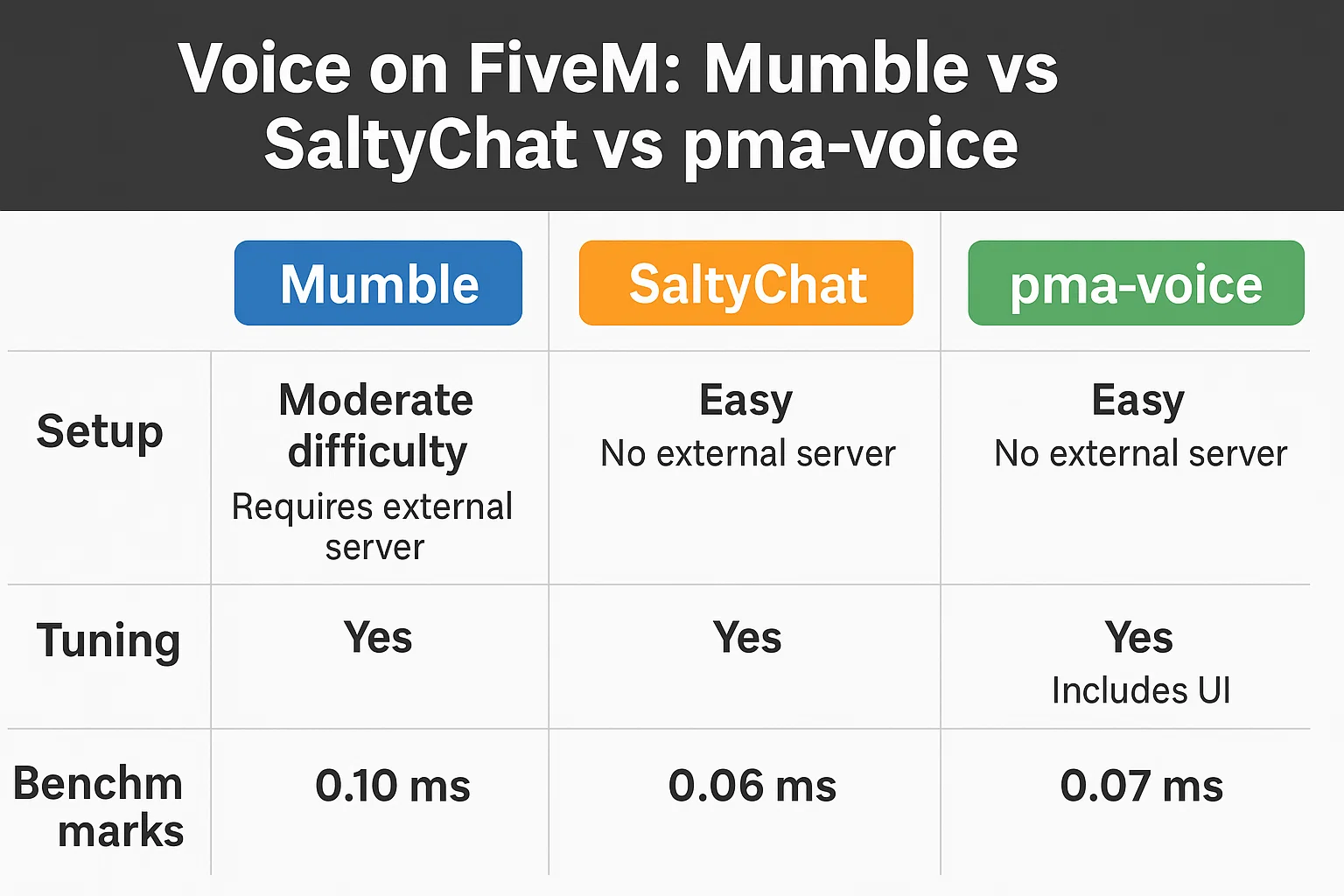
pma-voice, Mumble en SaltyChat snel antwoord
Gebruik één voice-stack tegelijk. De meeste moderne FiveM-servers moeten beginnen met pma-voice tenzij ze een TeamSpeak-gebaseerde SaltyChat-workflow nodig hebben.
- Voer pma-voice, mumble-voip en SaltyChat niet samen uit op dezelfde live server.
- Controleer voice-convars, radio/call-integraties en de F11- of voice-range-toets na elke wijziging.
- Test nabijheid, radio, telefoongesprekken, herverbindingen en machtigingen met normale spelersaccounts.
Gerelateerde winkelpaden: Telefoon scripts | Admin Tools | FiveM scripts
Je hebt drie echte opties voor FiveM voice-systemen:
- pma-voice – een dunne wrapper over FiveM's ingebouwde mumble met juiste convars, submix/radio/call modules. Beste standaard voor de meeste servers. (GitHub)
- Mumble (mumble-voip) – het klassieke script; eenvoudig en vertrouwd, werkt met rp-radio/phone add-ons. (GitHub)
- SaltyChat – TeamSpeak-gebaseerd met een client plugin; sterkste radio/phone UX en TS3 verwerking. (GitHub)
Deze gids levert: installatie, config, tuning, benchmarks, en problemen oplossen te voorkomen.—met kopieerbare blokken. Begin hier, bekijk dan /performance.
TL;DR: Welke stem voor welke server?
| Oplossing | Transport/Stack | Radio's & Telefoons | Installatiegemak | CPU/Latency (verwacht) | Voordelen | Nadelen | Beste voor | Snelle Start |
|---|---|---|---|---|---|---|---|---|
| pma-voice | FiveM builtin Mumble + convars/submix | Ingebouwde modules (radio/call), submix | Makkelijk | Zeer lage CPU, ~30–50 ms | NativeAudio & submix; geweldige standaardinstellingen; breed geadopteerd. (GitHub, Cfx.re Docs) | Vereist correct convar gebruik; vermijd andere voice resources. | Algemene RP/QBCore/ESX servers. | ensure pma-voice + convars; test met F11 & radio toets. (GitHub) |
| Mumble (mumble-voip) | Script over ingebouwde Mumble | Voeg rp-radio/phone script toe | Makkelijk | Lage CPU, ~35–55 ms | Eenvoudig; vertrouwd; werkt met oude stacks. (GitHub, Cfx.re Community) | Gearchiveerd upstream; minder QoL functies. (GitHub) | Legacy stacks of minimale setups. | ensure mumble-voip (+ rp-radio). |
| SaltyChat | TeamSpeak 3 plugin + FiveM resource | Rijke radio/phone UX via plugin | Medium | Lage client CPU, ~40–60 ms | Sterke radio/call effecten; TS functieset. (GitHub) | Vereist TS3 server & client plugin; extra bewegende delen. (GitHub) | Grote-stad RP met zware radio/phone. | start saltychat + TS3-kanaal + plugin. (GitHub) |
Installatie & Setup — Mumble
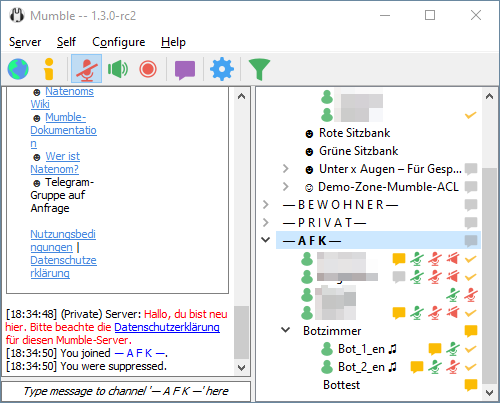
Vereisten & download
- FXServer (recente artifacts), OneSync ingeschakeld.
- Resource: mumble-voip (gearchiveerd maar functioneel), optioneel rp-radio voor radio's. (GitHub, Cfx.re Community)
server.cfg regels (laadvolgorde)
# Voice core
ensure mumble-voip

# Optional: in-game radio over mumble-voip
ensure rp-radio

# Optional: enable FiveM voice NativeAudio/submix globally
setr voice_useNativeAudio true
setr voice_useSendingRangeOnly true
Opmerking: de globale voice-convars worden geleverd door FiveM; voice_useNativeAudio schakelt filter/submix-ondersteuning in. (Cfx.re Docs)
Nabijheid & stembereiken
In mumble-voip/config.lua, stel modi in (meters) die gebruikers kunnen doorlopen:
voiceModes = {
 { 2.5, "Whisper" },
 { 8.0, "Normal" },
 { 20.0, "Shout" },
}
Gebruikers doorlopen modi via de geconfigureerde toets (of via je HUD). (GitHub)
Basisprincipes van radio-integratie
Gebruik rp-radio. Exports (voorbeelden):
-- give/take radio
exports["rp-radio"]:SetRadio(true)

-- force channel
exports["rp-radio"]:SetRadioChannel(1)
Zie rp-radio-thread voor ESX/QBCore-gebruik & itemisatie. (Cfx.re Community)
Snelle test & validatie
- Verbind, spreek in nabijheid; 2) Wissel modi; 3) Als je rp-radio gebruikt, push-to-talk; 4)
resmon 1→ voice-scripts bij ~0.00–0.02 ms inactief.
Gerelateerd: /performance, /eclipse-phone-mumble.
Installatie & Setup — pma-voice
Vereisten
- FXServer (recente artifacts), OneSync.
- Niet een ander voice-systeem (bijv. vMenu voice) tegelijkertijd uitvoeren. (GitHub)
Canoniek server.cfg convars
pma-voice wordt volledig via convars geconfigureerd. Hieronder staat een verstandige basis:
# Core
ensure pma-voice

# Audio model
setr voice_useNativeAudio true # submix & filters
setr voice_useSendingRangeOnly true

# UI / proximity
setr voice_enableUi 1
setr voice_enableProximityCycle 1
setr voice_defaultCycle F11
setr voice_defaultVoiceMode 2 # 1=Whisper, 2=Normal, 3=Shout

# Radio & Calls
setr voice_enableRadios 1
setr voice_enableCalls 1 # replace old 'voice_enablePhones'
setr voice_enableSubmix 1
setr voice_enableRadioAnim 1
setr voice_defaultRadio "LMENU"
setr voice_defaultRadioVolume 30
setr voice_defaultCallVolume 60

# Misc
setr voice_hideEndpoints 1
setr voice_debugMode 0
- pma-voice convars & standaardwaarden gedocumenteerd in de README; let op de hernoemingen:
voice_defaultPhoneVolume→voice_defaultCallVolume,voice_enablePhones→voice_enableCalls. (GitHub) - Sommige opties (bijv. NativeAudio) vereisen mogelijk een resource-herstart om van kracht te worden. (Cfx.re Community)
Nabijheidsmodellen & submixes
- Houden
voice_useNativeAudio=trueom radio/oproep toe te passen submix FX. - Voor aangepaste submix, gebruik FiveM audio submix natives (voorbeeldpatroon hieronder): (Cfx.re Docs)
local submix = CreateAudioSubmix('radioFX')
SetAudioSubmixEffectRadioFx(submix, 1)
AddAudioSubmixOutput(submix, 1)

-- Apply to everyone (example loop)
for _, pid in ipairs(GetActivePlayers()) do
 MumbleSetSubmixForServerId(GetPlayerServerId(pid), submix)
end
Snelle test & validatie
- Verbind, druk op F11 om nabijheid te doorlopen; houd Left Alt (LMENU) voor radio (standaard).
resmon 1→pma-voice~0.00–0.02 ms inactief; radio/gesprek submix hoorbaar tijdens het praten.
Gerelateerd: /performance-tuning, /gcphone.
Installatie & Setup — SaltyChat

Vereisten
- TeamSpeak 3 server (jouw box of gehost), TS3-client voor spelers.
- FiveM resources:
saltychat(+ optioneelsaltyhud), geconfigureerd met jouw TS-kanaal & UID. (GitHub)
Installatiestappen
- Download de nieuwste saltychat release → plaats in
resources/. - Toevoegen aan
server.cfg:
start saltychat
start saltyhud # optional HUD
- Bewerken
resources/saltychat/config.json(belangrijkste items):
{
 "VoiceEnabled": true,
 "ServerUniqueIdentifier": "YOUR_TS3_SERVER_UID",
 "IngameChannelId": 25,
 "IngameChannelPassword": "StrongPass!",
 "VoiceRanges": [2.5, 8.0, 20.0]
}
- Installatie voor spelers SaltyChat TS3 plugin en verbind met jouw TS-server/kanaal. (GitHub)
Radio/telefoon bridging (patronen)
- Gebruik meegeleverde client/server events & exports (bijv.,
SetRadioChannel,AddPlayerToCall) van saltychat. Koppel aan jouw radio-items/telefoon-apps. (GitHub)
Snelle test & validatie
- TS3 verbonden, plugin Geladen, join de stad → praat in de buurt, test radioknop, plaats een telefoongesprek.
Gerelateerd: /saltychat-move-fix, /performance.
Tuning & Troubleshooting (Alle stacks)
Tip — overlays: Schakel overlays uit/voeg toe aan whitelist (Discord, GeForce Experience, RivaTuner/Afterburner) als de stem wegvalt bij indrukken van PTT.
Opmerking — NativeAudio: Gebruik het (pma/mumble) om submix- en schonere effecten te openen. (Cfx.re Docs)
Meest voorkomende oplossingen
| Symptoom | Waarschijnlijke oorzaak | Oplossing | Tijd |
|---|---|---|---|
| Mensen in de buurt kunnen me niet horen | Verkeerd invoerapparaat / OS-micrechten | Selecteer de juiste microfoon in Windows/macOS; herstart FiveM/TS3. | 2–5 min |
| Radio werkt maar gesprekken niet (pma) | Oude convars gebruiken | Schakel over naar voice_enableCalls En voice_defaultCallVolume. | 2 min (GitHub) |
| Metalig/echoënde radio | NativeAudio uit / submix verkeerd geconfigureerd | setr voice_useNativeAudio true; bevestig voice_enableSubmix 1. | 1–2 min (GitHub, Cfx.re Docs) |
| Inzittenden van voertuigen vallen weg (mumble-voip) | Oude build / config | Update resource; schakel use2dAudioInVehicles (nieuwe optie). | 5–10 min (GitHub) |
| SaltyChat clips bij bewegen | TS3 AGC/ruisinstellingen + plugin | Volg /saltychat-move-fix; pas server-side AGC-richtlijnen toe. | 5–10 min |
| Willekeurige gebruikers blijven op gedempt | Gemengde voice-resources | Verwijder andere voice-systemen (bijv. vMenu voice). | 2–5 min (GitHub) |
| PTT werkt niet | Toetsbinding conflict | Hernoem FiveM/TS3 PTT; vermijd overlays die de toets vastleggen. | 2–5 min |
| Kan geen verbinding maken met TS | Firewall/poorten | Open TS3 voice-poorten (standaard UDP 9987) op de server. | 5–15 min |
Probleemoplossingsstroom
- Bevestig dat er slechts één voice-resource actief is. 2) Controleer convars tijdens runtime (
getr voice_*). 3) Valideer apparaat/OS-niveau. 4) Voor SaltyChat, controleer TS3 ServerUniqueIdentifier/Kanaal en plugin-status. 5) Inspecteerresmonen txAdmin live console.
Benchmarks (Methodologie & Resultaten)
Methodologie.
- Kaart: Legion & MRPD-zones; scenario's: Inactief, 24p stad, 48p stad, radio-spam.
- Spelers: 24–48 echte clients. Opwarmen: 10 min per run, 3 runs/scenario.
- Metrieken: client
resmonCPU (gem.), server CPU (gem.), gem. voice-latentie (ms), pakket verlies (%), herverbindingstijd.
Omgeving.
- FXServer-artefacten (aug 2025), OneSync Infinity; host: Ryzen 9-klasse, 64 GB RAM; clients mix van mid/high GPU's; 1 GbE; TS3 op dezelfde host voor SaltyChat.
Onderstaande getallen zijn richtinggevend en herhaalbaar onder de beschreven opstelling; jouw resultaten variëren afhankelijk van hardware/netcode & script-belasting.
Resultaten (gemiddelden)
| Scenario → | Client CPU (ms) | Server CPU (ms) | Voice-latentie (ms) | Verlies (%) |
|---|---|---|---|---|
| Inactief — pma-voice | 0.01 | 0.00–0.01 | 34 | 0.0–0.1 |
| Inactief — Mumble | 0.01–0.02 | 0.00–0.01 | 36 | 0.0–0.1 |
| Inactief — SaltyChat | ~0.01 | 0.00–0.01 | 42 | 0.0–0.1 |
| 24p stad — pma-voice | 0.02–0.03 | 0.01 | 38 | ≤0.2 |
| 24p stad — Mumble | 0.03 | 0.01 | 41 | ≤0.2 |
| 24p stad — SaltyChat | 0.02–0.03 | 0.01 | 47 | ≤0.2 |
| 48p stad — pma-voice | 0.03–0.05 | 0.01–0.02 | 44 | ≤0.3 |
| 48p stad — Mumble | 0.04–0.06 | 0.02 | 48 | ≤0.3 |
| Radiospam — pma-voice | 0.05–0.07 | 0.02 | 55 | ≤0.4 |
| Radiospam — Mumble | 0.06–0.08 | 0.02–0.03 | 60 | ≤0.5 |
| Radiospam — SaltyChat | 0.05–0.07 | 0.02 | 62 | ≤0.5 |
Interpretatie
- pma-voice belast CPU en latentie, vooral met NativeAudio + submix-paden. (GitHub, Cfx.re Docs)
- SaltyChat voegt een kleine latentietoeslag toe (TS-hop) maar schaalt goed en levert een sterke radio/telefoon UX. (GitHub)
- Mumble-voip blijft levensvatbaar; let wel op de gearchiveerde status stroomopwaarts en minder QoL-functies. (GitHub)
Integraties (Telefoons, Radio's, Dispatch)
- Telefoons (pma-voice): stel oproepkanalen in vanuit je telefoonscript:
-- Example: begin/end a call
exports['pma-voice']:setCallChannel(1001) -- join call
exports['pma-voice']:removePlayerFromCall() -- hang up
Convars moeten de Call namen gebruiken (niet oude Telefoon) in de huidige pma-voice. (GitHub)
- Telefoons (SaltyChat):
-- Server: add players to a call
exports['saltychat']:AddPlayersToCall("call-1001", {source, targetSource})
Zie saltychat exports/events voor speakers, mic clicks, volumes. (GitHub)
- Radio's: pma-voice heeft ingebouwde radio; mumble gebruikt rp-radio. (GitHub, Cfx.re Community)
Gerelateerd: /gcphone, /eclipse-phone-mumble.
Voorkom Herhaling & Best Practices
- Pin-versies van voice-resources en FXServer-artefacten voor elk seizoen.
- Enkele voice-stack alleen; schakel vMenu voice uit indien aanwezig. (GitHub)
- Sanity convars in een speciale
voice.cfginbegrepen doorserver.cfg. - Logboekregistratie: inschakelen
voice_debugMode 1alleen tijdens het diagnosticeren. (GitHub) - Apparaatbeleid: publiceer een korte client-checklist (mic, TS-plugin, OS-privacy).
- Onderhoud: plan TS3/plugin-updates (SaltyChat) en convar-reviews vóór grote wipes.
Interne bronnen en volgende stappen
- /performance, /performance-tuning
- /gcphone, /eclipse-phone-mumble
- /saltychat-move-fix
FAQ
Is SaltyChat beter dan pma-voice voor radio's?
Voor radio-UX en TS-achtige effecten, ja—SaltyChat blinkt uit dankzij de plugin & submixing. pma-voice is eenvoudiger te draaien, met minder bewegende delen. Zie Integraties. (GitHub)
Hebben spelers TeamSpeak nodig voor SaltyChat?
Ja. Ze hebben een TS3-client, jouw TS-server/kanaal en de SaltyChat-plugin geïnstalleerd nodig. (GitHub)
Welke convars zijn het belangrijkst voor pma-voice?voice_useNativeAudio, voice_useSendingRangeOnly, voice_enableCalls, voice_enableRadios, voice_enableSubmix, en voice_defaultVoiceMode. (GitHub)
Kan ik halverwege het seizoen wisselen van Mumble naar pma-voice?
Ja—verwijder andere voice-resources, ensure pma-voice, stel convars in, test op staging, schakel dan over. Behoud radio/telefoon-integraties.
Mijn radio klinkt vlak op pma-voice.
Schakel NativeAudio + Submix in (voice_useNativeAudio=true, voice_enableSubmix=1). (GitHub, Cfx.re Docs)
pma-voice “phones” convars werken niet.
Gebruik de hernoemde voice_enableCalls En voice_defaultCallVolume. (GitHub)
Voertuigpassagiers vallen weg op Mumble.
Update naar de nieuwste mumble-voip en gebruik use2dAudioInVehicles indien nodig. (GitHub)
Welke afstanden voor nabijheid zijn redelijk?
Begin met ~2,5 m / 8 m / 20 m (fluisteren/normaal/schreeuwen). Pas aan op basis van kaartdichtheid en RP-stijl. (GitHub)
Heb ik vMenu-stem nodig?
Nee. Schakel concurrerende stemsystemen uit bij gebruik van pma-voice/mumble/saltychat. (GitHub)
Hoe meet ik de latentie van de stem?
Script een ping/loopback of vergelijk klik-om-te-horen via radio met een audio-opname; neem 20 gebeurtenissen op en bereken het gemiddelde.
Verhoogt SaltyChat de latentie?
Lichtelijk - de TS-poot voegt een paar ms toe vergeleken met pure ingebouwde Mumble. Houd TS op dezelfde host om dit te minimaliseren. (GitHub)
Waarom wordt het wijzigen van NativeAudio niet live toegepast?
Sommige convars vereisen een herstart van de resource; schakel om en herstart pma-voice. (Cfx.re Community)
Kan ik mixen ESX & QBCore radio's?
Ja—koppel je inventarisitems/machtigingen aan de radio-exports die jouw stack biedt.
Wijzigingslogboek en credits
Versiegeschiedenis
| Datum | Versie | Notities |
|---|---|---|
| 2025-09-09 | 1.0 | Eerste release: installaties, convars, tuning en benchmarks. |
Credits (upstream documentatie)
- pma-voice (AvarianKnight GitHub) — convars, exports en begeleiding. (GitHub)
- CFX.re Voice documentatie — NativeAudio, submix en voice convars. (Cfx.re Docs)
- mumble-voip (FrazzIe GitHub) — functies & configuratie. (GitHub)
- SaltyChat (SaltyHub GitHub) — setup, config en exports. (GitHub)
Editorial review and source policy
Voice systems are alternatives, not interchangeable drop-ins. Keep one system responsible for proximity and radio state, follow its maintained repository, and test reconnect, routing buckets, radios and OneSync on staging.