FiveM Thread Hitch-waarschuwing – Hoe te verhelpen
Wat is een FiveM Thread Hitch-waarschuwing?
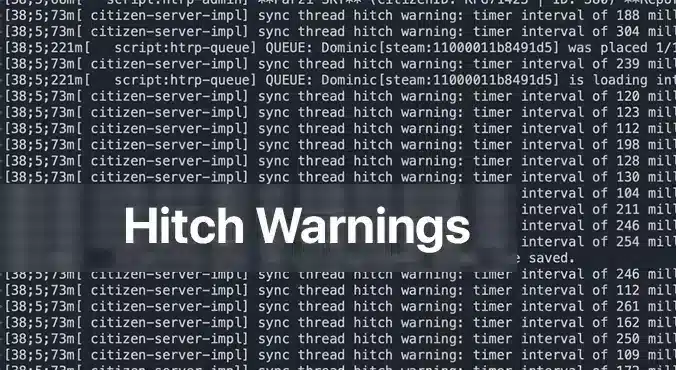
A FiveM thread hitch-waarschuwing verschijnt als een blijvende melding in je serverconsole, die je waarschuwt dat een of meer scripts te veel verwerkingstijd gebruiken. Het is de manier van de server om te zeggen: “Hé, iets duurt langer dan het zou moeten, en het zal aanvoelen als een lagpiek voor je spelers.” Voor iedereen die een FiveM-server beheert, zijn deze waarschuwingen een direct teken dat de ervaring kan lijden. De oorzaak begrijpen en deze verhelpen zorgt niet alleen voor vloeiender spel, maar houdt ook je community tevreden.
Waarom verschijnen Thread Hitch-waarschuwingen?
De meest voorkomende boosdoener is een niet-geoptimaliseerd script. In FiveM draaien scripts op de CPU van de server om alles van NPC-gedrag tot aangepaste voertuiglogica af te handelen. Wanneer een script inefficiënte lussen, zware database-aanroepen bevat, of herhaaldelijk condities controleert die nooit veranderen, kan het de serverthread doen stagneren. De serverwachtrij loopt dan vast, wat leidt tot de gevreesde hitch-waarschuwing. Een andere, minder voorkomende reden is ontoereikende hardware: een low‑end CPU of onvoldoende RAM kan een drukke server niet bijbenen, waardoor elk script moet concurreren om beperkte bronnen.
Stapsgewijze oplossingen voor Thread Hitch-waarschuwingen
1. Controleer je serverhardware
Even the best‑optimized script can choke if your hardware is underpowered. Below is a quick hardware checklist rated by player count.
| Player Count | CPU | RAM | Storage | Bandwidth | OS |
|————–|—–|—–|——–|———–|—-|
| 64 | 8‑Core 4.0 GHz | 32 GB DDR4 | 1 TB NVMe | 100 Mbps+ | Ubuntu 22.04 |
– CPU: FiveM is CPU‑bound; higher clock speeds improve single‑thread performance, which is more critical than extra cores.
– RAM: More memory means the server can cache more assets and handle more connections without swapping to disk.
– Opslag: SSD or NVMe drives cut loading times dramatically; HDDs become a bottleneck.
– Bandbreedte: Higher upload speeds ensure packets reach the server fast, especially with larger player counts.
– Besturingssysteem: Linux distributions offer lower overhead and better stability for game servers.
If you’re running on a shared host or a virtual private server, confirm these specs with your provider. Upgrade when you hit consistent hitch warnings and notice performance lag.
2. Identificeer defecte Scripts met serverprofilering
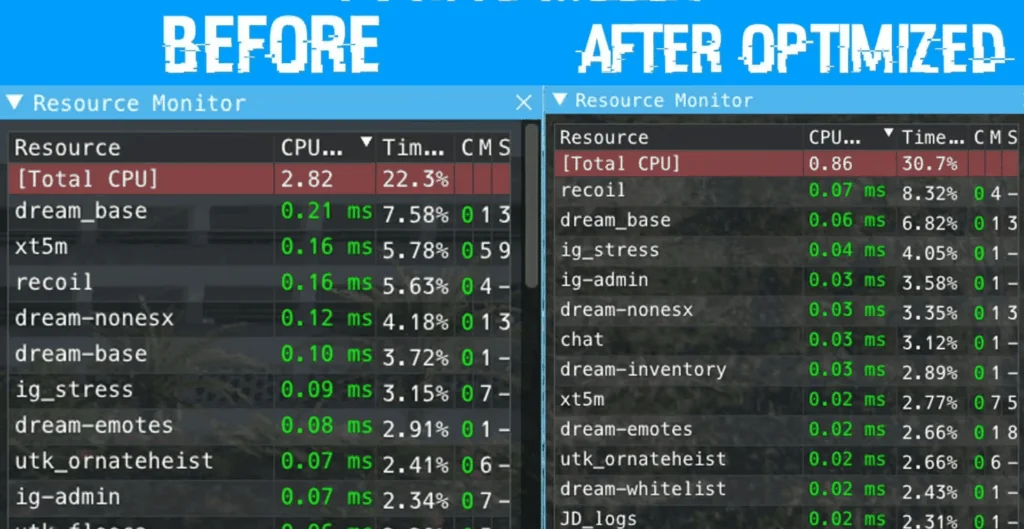
Compare the same resources before and after optimization.
The built‑in profiling tools in txAdmin or the FiveM server console let you pinpoint which script is causing the hitch.
1. Open a console or txAdmin in Administrator mode.
2. Type: `profiler record 500`
(This records 500 milliseconds of execution data.)
3. Wait for the recording to finish, then run: `profiler save myprofile`.
A file will be generated.
4. Finally, `profiler view myprofile` will open a link in your browser.
If you’re not on the same machine, you may need to use `export profilers` to send the file elsewhere.
In the profiler report, look for functions or scripts that consistently consume a large portion of the measured time. Pay attention to:
– Long loops that run every tick
– Database queries or file reads that
– External API calls or network requests that block the thread
Once you’ve located the problematic parts, you have two options: optimize or remove.
3. Optimaliseer of schakel problematische Scripts uit
Optimaliseren
If the script is essential to your server’s unique gameplay, try the following:
– Herstructureer lussen: Replace `for {}` loops that run per tick with event‑driven logic or reduce the frequency.
– Cache resultaten: Store expensive calculations or database results in memory, updating only when necessary.
– Gebruik native functies: Where possible, replace custom code with FiveM’s built‑in natives, which are usually more efficient.
– Asynchrone aanroepen: Switch blocking operations to asynchronous patterns if the API supports them.
After modifications, run the profiler again to verify the improvement.
Uitschakelen
If optimization isn’t feasible or the script is cosmetic, disable it safely:
1. Edit `server.cfg`.
2. Comment out or delete any lines that load the script, e.g. `ensure faulty_script`.
3. Restart the server to confirm the hitch warning disappears.
You can always re‑enable it later if you find a workaround or external optimization support.
4. Houd de Server Up-to-date
Oudere versies van FiveM of de afhankelijkheden ervan kunnen prestatie regressions. Ensure you’re running the latest stable server files:
“`
cd /root/fivem
git pull
sh ctl restart
“`
Also keep the operating system updated with the latest patches; this can prevent unknown bottlenecks.
Wanneer vertragingen aanhouden na het oplossen van waarschuwingen
If a hitch warning has been addressed but lag continues, consider:
– Verhogen van de tick-rate: Lowering TPS (ticks per second) reduces CPU demand but can feel less responsive. Balance it by only adjusting if other solutions fail.
– Uitschakelen van onnodige bronnen: Many servers enable mods that provide little value but consume resources. Remove or replace them.
– Bewaken van systeemstatistieken: Use tools like `htop`, `nvme-cli`, or `iftop` to watch CPU, RAM, disk, and network usage in real time.
A persistent lag can also stem from network issues outside the server’s control. Ask your players to test latency with `ping` or `traceroute` and confirm they’re in the same region as your server.
Laatste gedachten
A FiveM thread hapering-waarschuwing is een duidelijk signaal dat er iets in je serveromgeving—of het nu een eigenzinnig script is of onvoldoende hardware—aandacht nodig heeft. Door systematisch hardware te controleren, scripts te profileren en problematische code te optimaliseren of uit te schakelen, kun je deze waarschuwingen elimineren en een soepelere, aangenamere ervaring voor je community bieden. Vergeet niet dat de sleutel tot een stabiele FiveM-server proactieve monitoring en regelmatige updates is. Als je nog obstakels tegenkomt, zijn de FiveM-forums, Discord en txAdmin-bronnen uitstekende plekken om op maat gemaakt advies te krijgen. Veel succes met hosten!
Ik heb hulp nodig met dit sync-thread probleem. Al mijn scripts lijken geoptimaliseerd te zijn en ik krijg deze waarschuwing nog steeds, zelfs op een nieuwe qb-core-installatie, waardoor spelers desync ervaren.








Ik heb hulp nodig met dit sync-thread probleem. Al mijn scripts lijken geoptimaliseerd te zijn en ik krijg deze waarschuwing nog steeds, zelfs op een nieuwe qb-core-installatie, waardoor spelers desync ervaren.