
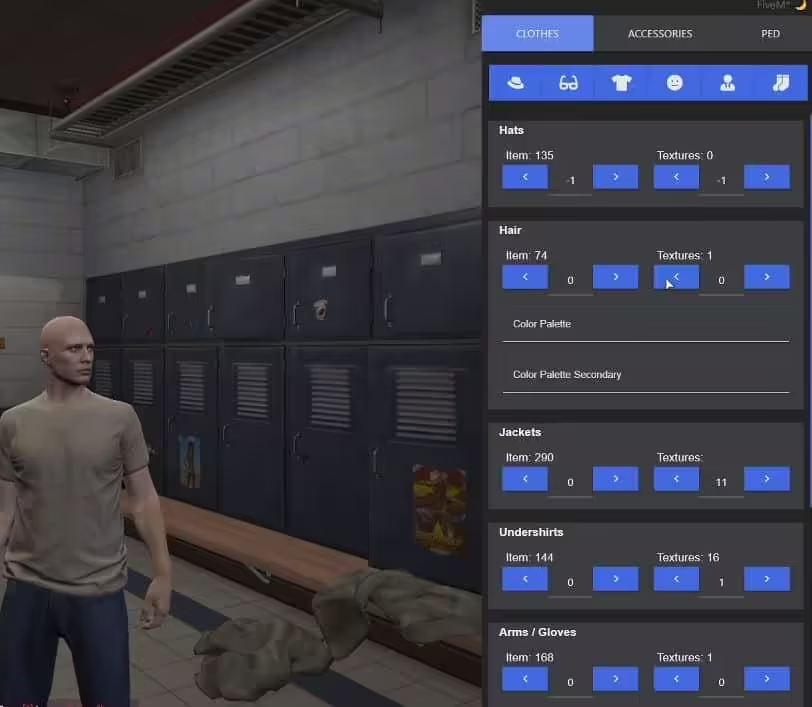
Same clothing menu like Nopixel
For ESX!
- with parents heritage option
- tattoo shops included
- barbers
 Farmer Job (+ map)
 Car Remote V2
$32.99 $12.99Original price was: $32.99. Current price is: $12.99.
ESX clothing menu resource with character heritage options, tattoo shops and barber functionality. The delivered archive contains the raid_clothes resource.
Lifetime update access. Files FiveMX publishes to this listing remain available to the original eligible purchase without a subscription. Read the exact scope
For ESX!
Only logged in customers who have purchased this product may leave a review.
NoPixel Clothing Menu is a one-time purchase. There is no subscription, no recurring fee and no per-server licence tier: you pay once and keep the files.
NoPixel Clothing Menu is listed under ESX. Check the product description and any included documentation for the exact resource versions it was built against before installing it on a live server.
The download is available immediately after payment. The link appears on the order confirmation page and in your FiveMX account under Downloads, and the same order email carries it.
NoPixel Clothing Menu is 12.99 USD at the catalogue price shown on this page. Prices in EUR and GBP are converted at checkout, and any discount currently running is already included in the price displayed here.




Reviews
There are no reviews yet.