FiveM Postal Map Recovery and Setup Notes
FiveM Postal Map is a source-backed FiveMX recovery note with legacy WordPress facts, current routing, and safe FiveM install checks.
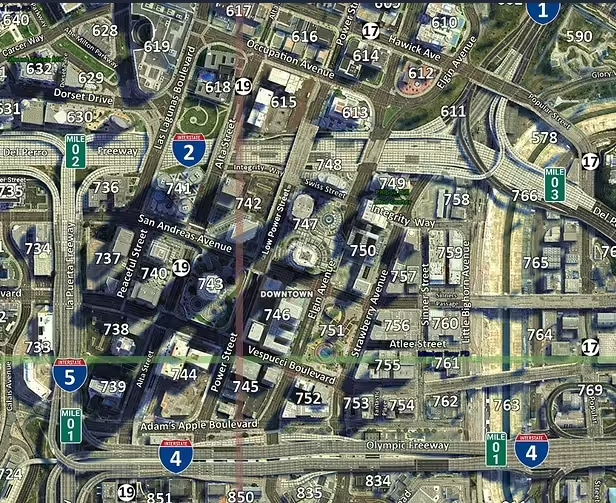
FiveM Postal Map is a recovered FiveMX WordPress free-mod record for a map resource. The local migration files identify the old WordPress title as "FiveM Postal Map (HD Satellite Postals)", published on 2024-09-21, with WordPress categories free, scripts. Search Console recovery data marked the old path /free/scripts/fivem-postal-map/ as a high-value missing free-mod URL with 1,049 recorded clicks, and the current FiveMX routing target is /free-mods/fivem/fivem-postal-map. This MDX post preserves that context as an archive-backed setup guide. It does not claim that every historical mirror is still safe or current; server owners should use the current FiveMX page, inspect the package, and test the resource in staging before adding it to production.
Verified Recovery Record
| Field | Local source-backed value |
|---|---|
| Recovered item | FiveM Postal Map |
| Old WordPress title | FiveM Postal Map (HD Satellite Postals) |
| Old WordPress date | 2024-09-21 |
| Old WordPress categories | free, scripts |
| Legacy URL path | /free/scripts/fivem-postal-map/ |
| Current FiveMX target | /free-mods/fivem/fivem-postal-map |
| Historical source status | GitHub source link recorded |
| Source review posture | reviewable |
The recorded source is reviewable before install, which makes it suitable for a normal staging workflow. The safest user-facing path is the internal FiveMX recovery target, because that route can be updated, reviewed, redirected, or retired without sending readers to stale ad-gated links.
Open the current FiveMX recovery page
What This Resource Is For
Use an MLO or map recovery item when the server needs a defined place for roleplay, dispatch, housing, events, or navigation. Map resources can look simple in a download list but still touch collision, portals, occlusion, minimap files, and routing.
For FiveM Postal Map, the source-backed facts are intentionally narrow: it existed as a published FiveMX WordPress free-mod post, it belonged to the categories listed above, it had measurable search demand, and it now resolves through the current free-mod recovery route. That is enough to rebuild a useful recovery page, but it is not enough to invent detailed performance numbers, compatibility promises, or creator support terms. Treat the old listing as a starting point for evaluation, then verify the actual package you plan to run.
A good recovery workflow separates three questions. First, does the resource still match the server need that made the old page valuable? Second, is the current package inspectable, compatible, and free from obvious risk? Third, can your team roll it back cleanly if the install creates map conflicts, UI errors, framework errors, or client performance problems? If any answer is unclear, keep the resource out of production until the gap is closed.
Source-Safe Evaluation Checklist
- Walk every entrance, staircase, roof, garage, and interior boundary with at least two players.
- Check collisions, invisible walls, light flicker, missing props, and routing problems around the location.
- Restart the resource while players are nearby to confirm it recovers cleanly.
- Verify that the map does not overlap an existing MLO already used by jobs, housing, or police scripts.
- Open the current FiveMX target instead of copying a historical shortener or mirror from old exports.
- Keep the original package name and folder name documented so future staff know which recovered item is installed.
- Scan archives before extraction, then inspect
fxmanifest.lua,__resource.lua, server files, client files, and any bundled binaries. - Search the package for webhook URLs, obfuscated code, remote loaders, suspicious exports, and commands that grant money, items, weapons, or admin power.
- Start the resource on a staging server with the same artifact, framework, inventory, voice, and database versions as production.
- Watch server console, client F8 logs, and
resmonwhile running the real roleplay actions the resource is supposed to support. - Write down the rollback steps before launch: resource removal, database rollback, cache cleanup, and any player-data cleanup.
Install Workflow For A Live FiveM Server
- Download only from the current recovery page or a source you can inspect. Do not reuse an old ad-gated mirror just because it appeared in a WordPress export.
- Create a staging branch or server profile and install the resource under a clear folder name such as
resources/[recovered]/fivem-postal-map. - Read the manifest before starting the server. Note dependencies, game build requirements, escrow state, shared scripts, and database setup instructions.
- If SQL files are included, apply them to a copy of the database first. Confirm table names, indexes, and migration reversibility before touching production data.
- Add the resource near related resources in
server.cfg; keep it after framework dependencies and before scripts that call its exports. - Start the server and fix console errors before doing gameplay tests. A resource that starts with warnings may still break later under player load.
- Test the exact feature path with two players when possible. Single-player checks miss permissions, synced state, voice, dispatch, inventory, and target-interaction issues.
- Measure client and server performance before and after the install. Keep the resource disabled if idle cost, streaming memory, or network events rise without a clear reason.
- Launch with a small staff-only or whitelisted test first. Collect reports for at least one restart cycle before marking the recovery complete.
Compatibility Notes
The old WordPress category is useful for routing, but it is not a compatibility guarantee. A resource tagged as scripts may still depend on QBCore, ESX, QBox, ox_lib, oxmysql, qb-target, ox_target, pma-voice, or a specific inventory. A resource tagged as graphics-mods, mlo, cars, or clothes may still affect streaming budgets, file replacement order, or client assets. Read the package before assuming it is standalone.
For FiveM Postal Map, start by checking the folder structure. If it includes only streamed assets and a manifest, the review is mostly asset size, collision, texture, and map overlap. If it includes server scripts, exports, events, commands, SQL, or webhooks, treat it like application code. Script resources need permission review, event validation, database review, and exploit testing. UI resources need browser-console checks inside NUI plus resolution testing on common player displays.
Production Rollout Criteria
A recovered FiveM resource is production-ready only when it meets these conditions:
- The source package is identifiable and current enough to audit.
- The server owner understands what files the resource replaces or adds.
- The resource starts without console errors on the same artifact version as production.
- The real gameplay path works after a full server restart.
- Staff can remove or disable the resource without breaking unrelated systems.
- The resource does not introduce unreviewed admin commands, money flows, item grants, or remote loaders.
- Players can understand the change without needing a support ticket for normal use.
Do not skip those criteria for an old high-traffic page. Search demand proves that players looked for the resource; it does not prove the package is safe today.
When To Use It
Use FiveM Postal Map when it solves a concrete server problem and you have time to test it properly. It is a better fit for an owner who can stage the install, inspect the files, and document dependencies than for a server that adds free resources directly to production. Skip it if the location collides with a live property, if the map requires replacement files you cannot isolate, or if interiors unload incorrectly during normal roleplay.
If the current package no longer matches the old WordPress listing, keep the blog post as an archive note and route users to a safer category hub. That is still better than pretending an old mirror is current.
Related FiveMX Resources
For adjacent recovery and install work, these FiveMX guides are the most useful next reads:
You can also browse the free FiveM mods library, the FiveM scripts category, and the FiveM mods overview when you need alternatives to an older recovered item.
Frequently Asked Questions
Is FiveM Postal Map confirmed safe to install?
No recovered free-mod page should be treated as safe just because it existed in WordPress. Use the current FiveMX target, inspect the package, scan archives, review source files, and test the resource on staging before production.
Why does this page avoid old shortener links?
The local recovery data contains historical link exports, but old shorteners and file mirrors can drift, expire, or point to packages that no longer match the listing. This page routes readers to the current FiveMX target and focuses on verification steps.
What should I test first after installation?
Start with console errors, client F8 errors, resource startup order, and the primary gameplay path. Then test restart behavior, permissions, rollback, and performance under realistic player conditions.
Can I use this on QBCore, ESX, or QBox?
The WordPress category alone does not prove framework support. Check the package manifest, readme, config files, SQL files, and exports. If framework support is unclear, treat it as unverified until staging tests prove otherwise.
What if the package differs from the old WordPress title?
Do not force the install. Keep the recovery note for search and archive context, then choose a current alternative from FiveMX or an inspectable upstream source. A clean replacement is safer than a guessed restoration.