Ir para o conteúdo principal
  • Entrega digital instantânea
  • Atualizações vitalícias em produtos selecionados
  • Aprovado por donos de servidores
FiveMX
Loja
Servidores CompletosPacotesLançamentos
  1. Início
  2. Blog
  3. Tutorials & Guides
Table of Contents
Why You Need a PatreonPreparation1\. Login to Cfx.re Keymaster2\. Create a New Key3\. Specify your Server Data4\. Enter IP Address5\. Generate License KeyAdding the License Key to Your ServerFor Zaphosting1\. Access Server Settings2\. Paste the License KeyNote for txAdmin UsersAdding the License Key to Your Self-Hosted Server1\. Access server.cfg File2\. Add Your License KeyExample Configuration3\. Save and ExitRestart Your ServerFinal StepsRelated setup resourcesFAQ - Common IssuesWhy do I need a Patreon for my FiveM server?What should I do before adding a custom license key?How do I create a new license key on the Cfx.re Keymaster website?Where can I find my server's IP address?How can I confirm that my custom license key is working correctly?

How To Add Patreon Key to FiveM Server

Publicado em 4 de setembro de 2024·por Lars Miller(Founder & Lead Editor)·Credenciais·5 min de leitura·Atualizado em 18 de maio de 2026
Tutorials & Guides

Welcome to FiveMX's tutorial on how to add your custom license key (Patreon benefits included) to your FiveM server. Follow these step-by-step...

Share
How To Add Patreon Key to FiveM Server

Welcome to FiveMX's tutorial on how to add your custom license key (Patreon benefits included) to your FiveM server. Follow these step-by-step instructions to make full use of your Patreon benefits, such as Onesync, colored server names, and more!

Why You Need a Patreon

A custom license key is essential if:

  • You want to utilize your FiveM Patreon benefits (like custom clothings or a colored server name).
  • You need to change the listed server owner.
  • The automatically generated key from your server provider is invalid.

Preparation

Before you start, ensure you have a Cfx.re Forum account.
If you don't, create one. Then, log in to the Cfx.re Keymaster website.

1. Login to Cfx.re Keymaster

Navigate to the Cfx.re Keymaster website and log in using your Cfx.re Forum account credentials. If you don't have an account, create one first. This is necessary.

2. Create a New Key
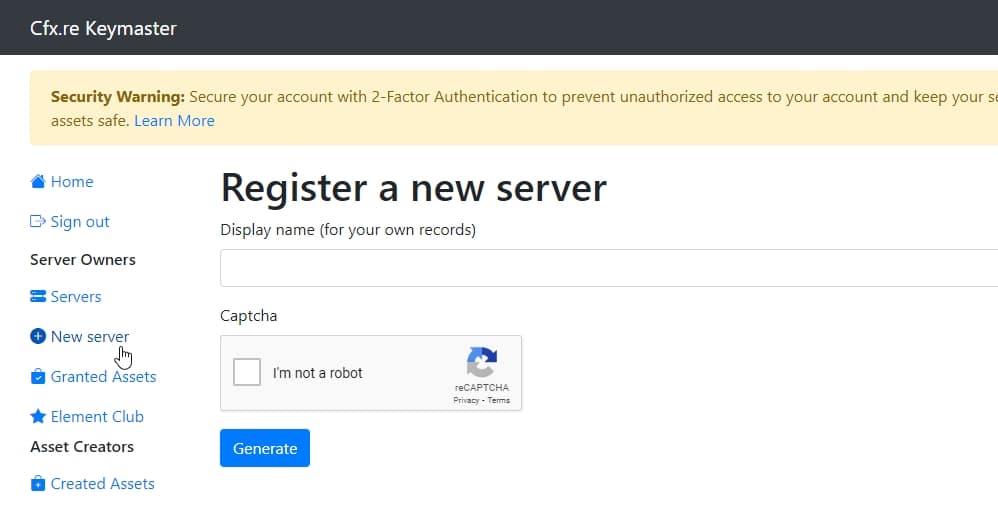
Keymaster1

After logging in, click on the New Server button in the left navigation bar. This will take you to the key creation page.

3. Specify your Server Data

Fill out the requested information as follows:

  • Label: A descriptive label for your key, e.g., 'My FiveM Server.
  • Server IP Address: The IP address of your server without the port.
  • Server Type: Select 'Server Provider (rented server).'

4. Enter IP Address

You can find your server's IP address on your server provider’s web interface panel or in the FTP-Browser section on the web interface. Ensure you enter the IP address without the port number.

5. Generate License Key
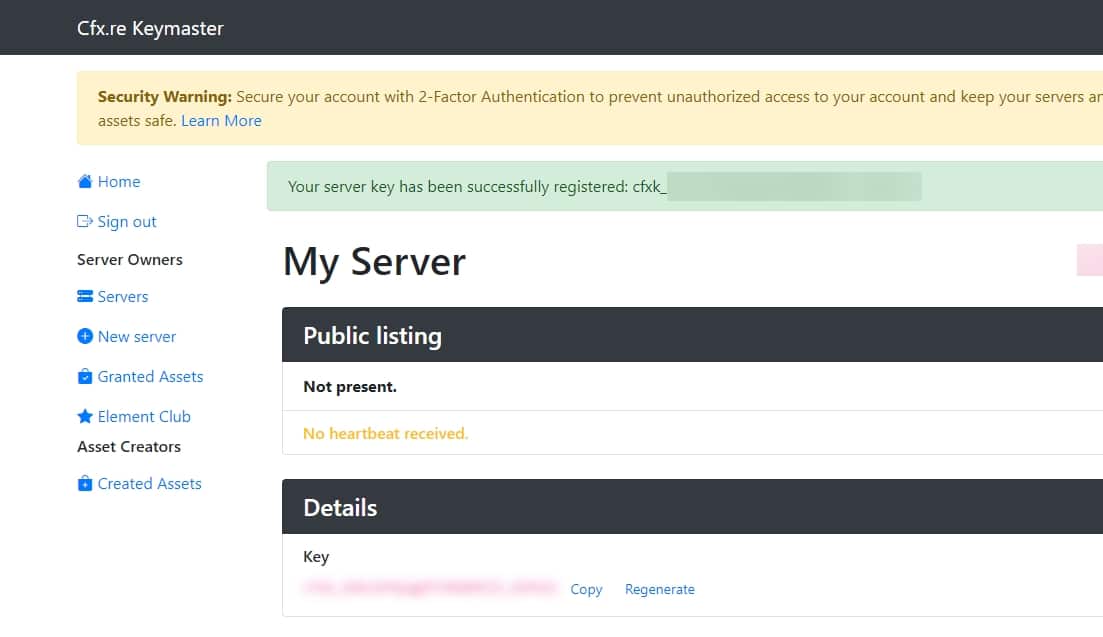
Keymaster2

Once all fields are filled, click Generate. Your new license key will be displayed on the home page under your registered servers. And you're done!


Adding the License Key to Your Server

You've generated the server key and now you have to add it to your server. Here is how:

For Zaphosting

1. Access Server Settings

Log in to your game server's web interface and navigate to the Settings section.

2. Paste the License Key

In the Custom License Key field, paste the key you generated.

Note for txAdmin Users

If you're using txAdmin, define the key under the sv_licensekey parameter. Access your server.cfg file via the txAdmin interface panel, the Configs section, or directly through FTP.

Adding the License Key to Your Self-Hosted Server

1. Access server.cfg File

Navigate to the directory where your FiveM server files are located and find the server.cfg file. Open this file using a text editor of your choice.

2. Add Your License Key

Locate the section within the server.cfg file where server configuration settings are listed. Add the following line to this file, substituting "YOUR_LICENSE_KEY" with the key you generated:

sv_licensekey "YOUR_LICENSE_KEY"

Example Configuration

Your server.cfg file should now contain a line similar to this:

sv_licensekey "abcdef1234567890abcdef1234567890"

3. Save and Exit

After adding your license key, save the changes to the server.cfg file and exit the text editor.

Restart Your Server

To activate your custom license key, restart your FiveM server. This can be done through your server management interface or by restarting the server application directly.

Final Steps

After pasting your custom license key, restart your FiveM server. Congratulations, your custom license key is now set up and activated. Sometimes it takse up to 15 minutes to be active.


Related setup resources

  • Create a FiveM server template if you are still preparing the project basics.
  • Set up txAdmin before changing production server configuration.
  • Check server costs when choosing between rented hosting and self-hosting.
  • Browse server bundles if you want a faster launch path after the key is active.
  • Open the FiveMX shop for scripts and resources to test after the license key works.

FAQ - Common Issues

Why do I need a Patreon for my FiveM server?

A Patreon account is essential for utilizing the exclusive benefits offered to FiveM patrons, such as custom clothing, colored server names, and Onesync features. Additionally, a custom license key linked to your Patreon can be used to change the listed server owner or replace an invalid key generated by your server provider.

What should I do before adding a custom license key?

Before you begin, ensure you have a Cfx.re Forum account. If you don’t have one, create it and then log in to the Cfx.re Keymaster website.

How do I create a new license key on the Cfx.re Keymaster website?

1. Log in to the Cfx.re Keymaster website using your Cfx.re Forum account credentials.
2. Click on the “New Server” button in the left navigation bar.
3. Fill out the information:Label: Provide a descriptive name for your key (e.g., 'My FiveM Server').
Server IP Address: Enter your server's IP address without the port number.
Server Type: Select 'Server Provider (rented server).'
4. Click on Generate to create your new license key. The key will appear under your registered servers on the homepage.

Where can I find my server's IP address?

You can find your server's IP address on your server provider’s web interface panel or in the FTP-Browser section of the web interface. Make sure to use the IP address without the port number.

How can I confirm that my custom license key is working correctly?

After restarting your server, check if the benefits associated with your Patreon tier (such as Onesync, custom clothing, or a colored server name) are active. If they are, your license key is successfully set up and functioning.

Table of Contents

Why You Need a PatreonPreparation1\. Login to Cfx.re Keymaster2\. Create a New Key3\. Specify your Server Data4\. Enter IP Address5\. Generate License KeyAdding the License Key to Your ServerFor Zaphosting1\. Access Server Settings2\. Paste the License KeyNote for txAdmin UsersAdding the License Key to Your Self-Hosted Server1\. Access server.cfg File2\. Add Your License KeyExample Configuration3\. Save and ExitRestart Your ServerFinal StepsRelated setup resourcesFAQ - Common IssuesWhy do I need a Patreon for my FiveM server?What should I do before adding a custom license key?How do I create a new license key on the Cfx.re Keymaster website?Where can I find my server's IP address?How can I confirm that my custom license key is working correctly?

More on This Topic

Top 5 Modelos de Servidor FiveM 2026 — Pacotes Prontos para ServidorComo criar um servidor FiveM gratuitamente em 2026 — Guia honestoComo Instalar um Template de Servidor FiveM (2026) — Guia Passo a PassoComo Criar um Servidor FiveM em 2026 — Caminhos Gratuito, por Template e ManualEstratégias de Backup para Servidores FiveM: MySQL e Recursos Automatizados

Turn framework research into a launch-ready script stack

Use this guide to narrow the framework decision, then move into the core commercial hubs for verified scripts, curated bundles, and a faster server launch path.

QBCore starter

Start from a QBCore full server

Use a complete QBCore base when the guide points to a new server launch and you want jobs, economy, UI, and admin tooling already connected.

View QBCore template

ESX starter

Review the Super ESX Server pack

Compare a full ESX server pack when you need a faster path from setup research to a working roleplay stack.

View ESX server pack

Complete server path

Compare full server packs

If the article is part of a launch plan, start with full server packs that reduce setup time and connect multiple systems faster.

Open full server packs

Launch faster

Compare curated bundles

Bundles shorten the path from planning to launch by grouping the highest-leverage scripts into a cleaner commercial starting point.

View bundles

Divulgação: Alguns links abaixo são links de afiliados para produtos FiveMX. Podemos ganhar uma comissão sem custo adicional para você.

Scripts Premium que Você Pode Gostar

Mercedes G63 Philippe Plein [Mansory] [ADD-ON/REPLACE]

Mercedes G63 Philippe Plein [Mansory] [ADD-ON/REPLACE]

$7.99
Santa Cruz Island

Santa Cruz Island

$23.99
Skatepark FiveM

Skatepark FiveM

$4.49
Jetty on Ocean (West) FiveM

Jetty on Ocean (West) FiveM

$3.49

Free Scripts You Might Like

Gameconfig for Legacy & Enhanced

Gameconfig for Legacy & Enhanced

8,243,364 downloads
PC Trainer V

PC Trainer V

1,272,946 downloads
LemonUI: Open Source UI Library

LemonUI: Open Source UI Library

1,138,096 downloads
NFS gauge - RPM Gear Speedometer & Timer

NFS gauge - RPM Gear Speedometer & Timer

1,058,515 downloads

Artigos Relacionados

Instalar carros addon em um servidor FiveM: passo a passo

Instalar carros addon em um servidor FiveM: passo a passo

Se você opera um servidor FiveM, expandir seu catálogo de veículos é uma das maneiras mais rápidas de manter os jogadores engajados.

February 5, 2024
Como Adicionar Chave do Patreon ao Servidor FiveM

Como Adicionar Chave do Patreon ao Servidor FiveM

Bem-vindo ao tutorial da FiveMX sobre como adicionar sua chave de licença personalizada (benefícios do Patreon inclusos) ao seu servidor FiveM. Siga estas instruções passo a passo...

September 4, 2024
Qual Pacote de Servidor FiveM se Adequa à Sua Comunidade de RP?

Qual Pacote de Servidor FiveM se Adequa à Sua Comunidade de RP?

Não sabe se deve escolher um template de servidor QBCore, ESX ou standalone? Use este guia de decisão para escolher o pacote certo do servidor FiveM para sua comunidade RP.

June 9, 2026
FiveMX

Comece a construir seu servidor hoje.

Recursos FiveM selecionados, entrega instantânea, mods grátis para começar e guias práticos em um marketplace tranquilo.

Navegar na lojasupport@fivemx.com

Loja

  • Loja
  • Mods FiveM
  • Todos os produtos
  • Mods grátis
  • Melhores scripts & mods
  • Scripts FiveM

Frameworks

  • Scripts QBCore
  • Scripts ESX
  • QBox
  • Standalone

Comunidade

  • Blog
  • Suporte
  • Criadores
  • Afiliados

Jurídico

  • Política de privacidade
  • Termos de serviço
  • Política de reembolso
  • Entrega digital
  • Política de cookies
  • Conformidade LGPD/GDPR
  • DMCA
  • Informações legais
  • Política editorial

Templates de Servidor

  • Template de Servidor QBCore
  • Template de Servidor ESX
  • Template de Servidor NoPixel
  • Packs de Servidor
  • Templates Grátis
  • Alternativa ao Tebex
© 2026 FiveMX. Todos os direitos reservados.·FiveMX não é afiliado à Rockstar Games, Take-Two Interactive ou CFX.re. Todas as marcas são propriedade de seus respectivos donos.
DiscordDocs

Sem tempo para configurar tudo você mesmo?

Comece com um pacote de servidor FiveM pré-construído e testado. Otimizado para frameworks, todos os scripts pré-instalados.

Super ESX Server
esxstandalone

Super ESX Server

The Super ESX Server is one of the best FiveM server templates - over 1.000 purchases! Want to know why we call it our Super Server? Check out our video to find out some of the basics details of the world. Update 10 is included, make sure to install v7 first and then use content of v10 yo

$228.32
ESX Server Base (by RibSosay)
esxstandalone

ESX Server Base (by RibSosay)

Prebuilt FiveM server with ESX framework GUARANTEE : We offer a guarantee ensuring compatibility with your setup.

$53.99
Ver todos os pacotes de servidor