Framework hub
Move into the QBCore landing page to compare verified scripts, framework fit, and install-ready products built for modern FiveM servers.
Open QBCore hubOnce you know the direction, jump into the highest-leverage commercial hubs for verified scripts, curated bundles, and framework-specific buying paths.
Framework hub
Move into the QBCore landing page to compare verified scripts, framework fit, and install-ready products built for modern FiveM servers.
Open QBCore hubPremium catalog
Move from research into the main shop to compare real products, framework labels, screenshots, and production-ready quality signals.
Open premium shopLaunch faster
Bundles shorten the path from planning to launch by grouping the highest-leverage scripts into a cleaner commercial starting point.
View bundlesVehicles are central to the FiveM experience. Players spend hours earning money to buy cars, customizing them at mechanic shops, and driving through Los Santos.
Install custom cars in FiveM with clean resource folders, correct handling files, spawn names, fxmanifest setup, and production-ready config checks.
Ever dreamed of steering your own FiveM server? Get owner approval, tweak a few config lines or database entries, and you’ll be an admin in no time—ready to enforce rules, help players, and keep the c
Want tighter brakes, grippier tires, or real drift physics? You can change vehicle handling in FiveM in two clean ways:

Want tighter brakes, grippier tires, or real drift physics? You can change vehicle handling in FiveM in two clean ways:
This guide is part of our complete FiveM content creation guide, covering everything from MLO design to scripting, vehicle modding, and building your creator brand.
handling.meta for permanent, per-model tuning.This guide shows both, explains every important value, and gives you safe testing workflows that prevent desync and chaos on your server.
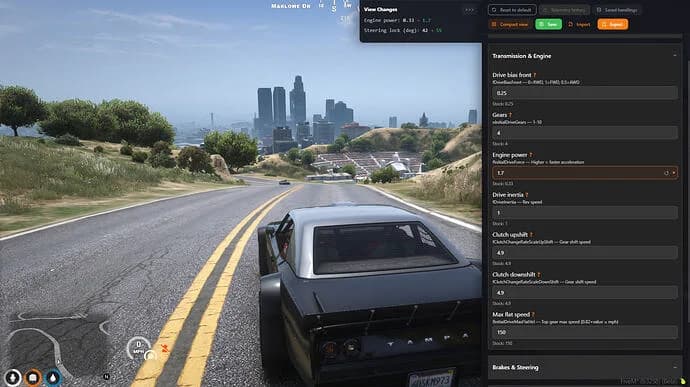
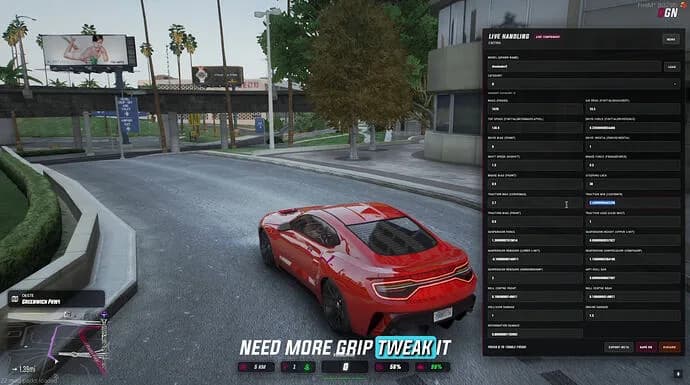
We also provide a tool to change all vehicle handlings.
handling.meta and ensure the vehicle’s vehicles.meta points to it.SetVehicleHandlingFloat/Int/Vector on the client that owns the vehicle, then lock in defaults with a server-side gate if needed.fxmanifest.lua, client.lua, server.lua.Tip: keep all handling changes in a separate resource
Tip: keep all handling changes in a separate resource
handling_tuning/so you can disable it quickly if something breaks.
handling.meta (permanent)data/handling.meta.fxmanifest.lua.resources/ handling_tuning/ fxmanifest.lua data/ handling.meta
      vehicles.meta   (only if you need to bind new handlingId)
      carvariations.meta (optional)
fxmanifest.luafx_version 'cerulean'
game 'gta5'

files {
  'data/handling.meta',
  'data/vehicles.meta'
}

-- Tell the game what each file is
data_file 'HANDLING_FILE' 'data/handling.meta' data_file 'VEHICLE_METADATA_FILE' 'data/vehicles.meta'
handling.meta entry (car)<HandlingData>
<Item type="CHandlingData">
<handlingName>MY_TUNED_SULTAN</handlingName>
<fMass value="1400.0"/>
<fInitialDragCoeff value="8.0"/>
<fPercentSubmerged value="85.0"/>
<fInitialDriveForce value="0.31"/>
<fDriveInertia value="1.0"/>
<fClutchChangeRateScaleUpShift value="2.5"/>
<fClutchChangeRateScaleDownShift value="2.0"/>
<fInitialDriveMaxFlatVel value="190.0"/>
<fBrakeForce value="1.0"/>
<fBrakeBiasFront value="0.55"/>
<fHandBrakeForce value="0.65"/>
<fSteeringLock value="40.0"/>
<fTractionCurveMax value="2.4"/>
<fTractionCurveMin value="2.1"/>
<fTractionCurveLateral value="22.0"/>
<fTractionSpringDeltaMax value="0.14"/>
<fLowSpeedTractionLossMult value="0.6"/>
<fSuspensionForce value="2.0"/>
<fSuspensionCompDamp value="1.5"/>
<fSuspensionReboundDamp value="2.0"/>
<fSuspensionUpperLimit value="0.08"/>
<fSuspensionLowerLimit value="-0.10"/>
<fSuspensionRaise value="0.00"/>
<fAntiRollBarForce value="0.7"/>
<fRollCentreHeightFront value="0.32"/>
<fRollCentreHeightRear value="0.33"/>
<strModelFlags>440010</strModelFlags>
<strHandlingFlags>0</strHandlingFlags>
</Item>
</HandlingData>
If you introduced a new <handlingName>, point your vehicle at it in vehicles.meta:
<CVehicleModelInfo__InitDataList>
  <Item>
    <modelName>sultan</modelName>
    <handlingId>MY_TUNED_SULTAN</handlingId>
  </Item>
</CVehicleModelInfo__InitDataList>
| Goal | Change these values | Notes | Faster acceleration |
|---|---|---|---|
fInitialDriveForce up slightly; fDriveInertia up a bit | Avoid huge jumps. Small increments 0.02–0.05. | Higher top speed | fInitialDriveMaxFlatVel up |
| Keep realistic for balance. | Better brakes | fBrakeForce up; bias 0.55–0.65 front | Too high locks wheels unrealistically. |
| More grip | fTractionCurveMax/Min up; lower fLowSpeedTractionLossMult | High grip reduces fun slides. | Drift setup |
Lower fTractionCurveMax/Min; raise fLowSpeedTractionLossMult; reduce fBrakeBiasFront | Combine with higher fSteeringLock. | Softer ride | Lower fSuspensionForce; lower fCompDamp/ReboundDamp |
| Watch for bottoming out. | Flatter cornering | Raise fAntiRollBarForce; adjust roll centers | Too stiff causes snap oversteer. |
Keep a changelog per vehicle: what you changed, by
Keep a changelog per vehicle: what you changed, by how much, and your test results.
Use this when you need dynamic setups (race events, jobs, rentals) or want to A/B test before locking values into handling.meta.
-- client.lua
local function setHandlingFloat(model, field, value)
  local mhash = type(model) == 'string' and GetHashKey(model) or model
SetVehicleHandlingFloat(mhash, 'CHandlingData', field, value)
end
CreateThread(function()
-- Example: buff Sultan acceleration a bit
setHandlingFloat('sultan', 'fInitialDriveForce', 0.33) setHandlingFloat('sultan', 'fInitialDriveMaxFlatVel', 195.0)
end)
The client that owns the entity should apply the change to avoid desync. If you need server authority, pair a server event with an entity owner check and reapply on playerEnteredVehicle.
-- server.lua
RegisterNetEvent('tune:apply')
AddEventHandler('tune:apply', function(netId, changes)
  local src = source
  -- validate permissions here
  TriggerClientEvent('tune:applyClient', -1, netId, changes)
end)

-- client.lua
RegisterNetEvent('tune:applyClient')
AddEventHandler('tune:applyClient', function(netId, changes)
  local veh = NetToVeh(netId)
  if DoesEntityExist(veh) and NetworkHasControlOfEntity(veh) then
    for _, c in ipairs(changes) do
      SetVehicleHandlingFloat(GetEntityModel(veh), 'CHandlingData', c.field, c.value)
    end
  end
end)
For temporary boosts (nitrous, events), store original values and restore them after the session.
resmon for spikes when you script per‑tick changes.Vehicle ignores your handlingId
vehicles.meta entry’s <handlingId> exactly matches <handlingName>.vehicles.meta via data_file 'VEHICLE_METADATA_FILE'.Handling changes don’t apply to addon car
handling.meta. Remove duplicates or ensure your file loads after theirs.Desync between players
Car flips too easily
fRollCentreHeightFront/Rear and reduce fSuspensionRaise.Understeer
fTractionCurveMin slightly and fSteeringLock. Consider more rear brake bias.Oversteer
fLowSpeedTractionLossMult.fInitialDriveForce, fDriveInertia, fInitialDriveMaxFlatVel, fClutchChangeRateScaleUpShift/DownShiftfBrakeForce, fBrakeBiasFront, fHandBrakeForcefSteeringLockfTractionCurveMax/Min/Lateral, fLowSpeedTractionLossMult, fTractionSpringDeltaMaxfSuspensionForce, fSuspensionCompDamp, fSuspensionReboundDamp, fSuspensionUpper/LowerLimit, fSuspensionRaise, fAntiRollBarForcefRollCentreHeightFront/Rear, fMass, fInitialDragCoeff<Item type="CHandlingData">
<handlingName>MX_STREET_BALANCED</handlingName>
<fMass value="1500.0"/>
<fInitialDragCoeff value="9.0"/>
<fInitialDriveForce value="0.30"/>
<fDriveInertia value="1.05"/>
<fClutchChangeRateScaleUpShift value="2.2"/>
<fClutchChangeRateScaleDownShift value="1.9"/>
<fInitialDriveMaxFlatVel value="200.0"/>
<fBrakeForce value="1.0"/>
<fBrakeBiasFront value="0.60"/>
<fHandBrakeForce value="0.55"/>
<fSteeringLock value="38.0"/>
<fTractionCurveMax value="2.35"/>
<fTractionCurveMin value="2.05"/>
<fLowSpeedTractionLossMult value="0.7"/>
<fSuspensionForce value="2.2"/>
<fSuspensionCompDamp value="1.6"/>
<fSuspensionReboundDamp value="2.2"/>
<fSuspensionUpperLimit value="0.07"/>
<fSuspensionLowerLimit value="-0.09"/>
<fAntiRollBarForce value="0.75"/>
<fRollCentreHeightFront value="0.31"/>
<fRollCentreHeightRear value="0.32"/>
</Item>
How do I change handling for a single car only?
Create a new <handlingName> in handling.meta and reference it via <handlingId> in vehicles.meta for that model.
Can I apply handling changes per player or job?
Yes. Use runtime overrides in a client script when a job starts, and restore stock values when it ends.
Why does top speed feel capped?
fInitialDriveMaxFlatVel acts as a soft cap. Aerodynamic drag and gear ratios still influence real top speed.
Do handling changes affect server performance?
Static handling.meta changes do not. Per‑tick script tweaks can; set once on spawn and avoid loops.
handling.meta documentation for GTA V values* A working FiveM server and a dev resource to test changes. * Basic knowledge of the FiveM resource structure: fxmanifest.lua, client.lua, server.lua. * A text editor (VS Code) and access to your resources folder.
Vehicle ignores your handlingId * Ensure the vehicles.meta entry’s <handlingId> exactly matches <handlingName>. * Make sure you loaded vehicles.meta via data_file 'VEHICLE_METADATA_FILE'.
<Item type="CHandlingData"> <handlingName>MX_STREET_BALANCED</handlingName> <fMass value="1500.0"/>

![[UPDATE] bnExhaust: New items and features, valet mode and mechanic dashboard.](/_next/image?url=https%3A%2F%2Fcdn.fivemx.com%2Ffree-mods%2Fupdate-bnexhaust-new-items-and-features-valet-mode-and-mechanic-dashboard%2Fimages%2F2026%2F05%2F543b4125-7498-44b8-b051-3161e027c875-update-bnexhaust-new-items-and-features-valet-mode-and-mechanic-dashboard-featured.webp&w=2048&q=75)