LB Tablet - Advanced In-Game Tablet Device with Apps & Functionality
LB Tablet brings a fully functional tablet device to your FiveM server with a sleek, mobile-inspired interface. This comprehensive script features multiple pre-installed apps, customizable UI themes, music player, calculator, settings management, integrated shop system, responsive design, dark/light mode switching, wallpaper customization, and extensive configuration options - creating an immersive multi-purpose device for players to access utilities, entertainment, and server-specific features through a realistic tablet interface.
https://www.youtube.com/watch?v=5ZILDh2V_iI
What's Included
This complete tablet package includes realistic tablet UI with smooth animations and touch-friendly interface, multiple pre-installed applications (music player, calculator, settings, shop, browser), customizable home screen with app icons and wallpapers, dark and light theme modes with automatic switching, music player with playlist management and volume controls, calculator app for in-game calculations, settings menu for tablet and game configuration, integrated shop system for item purchases through tablet, responsive design working on all screen sizes, wallpaper gallery with custom image support, notification system for incoming messages and alerts, battery indicator and time display, and full framework integration with inventory and job systems.
Key Features
- Realistic Tablet Interface - Mobile-inspired UI with app icons, home screen, notification bar, and familiar tablet aesthetics creating authentic device experience
- Pre-Installed Apps - Multiple functional applications including music player, calculator, settings, shop, browser, and more ready to use out-of-box
- Music Player App - Play music tracks from configured playlist with controls (play, pause, skip), volume adjustment, and track information display
- Calculator Application - Functional calculator for in-game math with standard operations, memory functions, and clean number pad interface
- Settings Management - Configure tablet preferences, game settings, controls, and personal customizations through intuitive settings app
- Integrated Shop System - Browse and purchase items directly from tablet with categorized products, prices, and inventory management
- Dark/Light Themes - Toggle between dark and light UI modes with smooth theme transitions and persistent preference saving
- Wallpaper Customization - Choose from pre-configured wallpapers or add custom images personalizing tablet home screen appearance
- Notification System - Receive in-app notifications for messages, alerts, and system events with notification center
- Battery & Time Display - Realistic battery percentage indicator and current time shown in status bar
- Responsive Design - UI automatically adjusts to different screen resolutions and aspect ratios maintaining proper scaling
- Custom App Support - Extensible architecture allowing developers to add custom apps using provided template and API
- Multi-Language Support - Available in multiple languages (EN, FR, ES, PT, DE) with easy language addition
- Optimized Performance - Lightweight resource usage with minimal FPS impact when tablet open
- Smooth Animations - Fluid app opening/closing, page transitions, and UI interactions creating polished experience
Perfect For
- Roleplay Servers - Adds immersive device for accessing server features in character rather than breaking immersion with menus
- Business Servers - Tablet shop enables in-game product browsing and purchases for businesses and markets
- Modern RP Settings - Contemporary tablets fit modern roleplay scenarios better than dated phone scripts
- Whitelist Servers - Professional appearance elevates server quality providing polished player experience
- Economy Servers - Integrated shop creates convenient purchasing interface supporting commerce mechanics
- Custom Servers - Extensible app system enables unique server-specific functionality through custom apps
Pre-Installed Applications
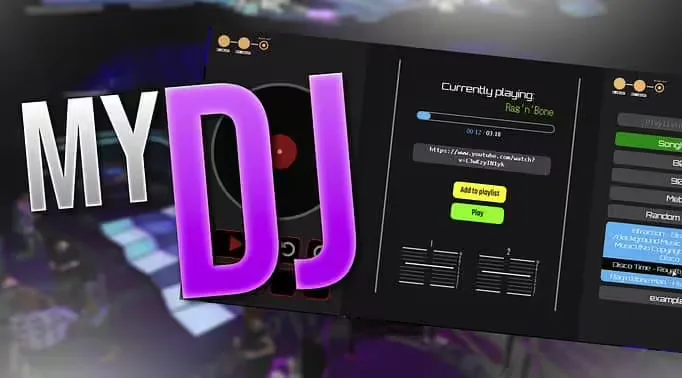
Music Player: Fully functional audio player allowing players to listen to music while playing. Configure playlist with custom tracks via URLs (YouTube, SoundCloud, direct MP3). Features include play/pause controls, skip forward/backward, volume slider, track progress bar, current track information (title, artist), shuffle and repeat modes, and minimized playback continuing while using other apps. Perfect for DJs, parties, or personal entertainment.
Calculator: Standard calculator application with number pad (0-9), basic operations (+, -, ×, ÷), decimal support, clear and backspace functions, percentage calculations, and memory functions (M+, M-, MR, MC). Useful for business transactions, tip calculations, splitting bills, or general math needs during roleplay scenarios.
Settings: Comprehensive settings menu controlling tablet preferences including dark/light theme toggle, language selection, wallpaper changes, notification preferences, sound effects enable/disable, and game settings integration (if configured). Allows personalization matching individual player preferences.
Shop Application: In-game storefront enabling item purchases through tablet interface. Features product categories, item browsing with images and descriptions, price display with currency formatting, quantity selection, shopping cart functionality, purchase confirmation, and automatic inventory integration. Shop inventory is fully configurable with custom items, prices, and availability. Can be restricted by job or location creating specialized stores.
Browser (Optional): Simple web browser app for accessing configured websites or server resources. Can display external pages, server rules, documentation, or custom content. Useful for information access without leaving game.
Theme System
The tablet supports dark and light theme modes affecting entire UI appearance. Dark mode features dark backgrounds with light text, reduced blue light for night gaming, sleek modern aesthetic, and reduced screen glare. Light mode provides bright backgrounds with dark text, classic clean appearance, better visibility in bright environments, and familiar mobile device look. Theme choice saves automatically persisting across sessions. Data-theme attribute enables custom apps to respond to theme changes maintaining visual consistency.
Technical Specifications
- Performance: ~0.02ms client impact when tablet open, zero impact when closed
- UI Technology: Modern HTML5/CSS3 with responsive design and touch-optimized interactions
- Framework: Compatible with ESX, QBCore, QBOX, and standalone with automatic detection
- Inventory Systems: Integrates with ox_inventory, qb-inventory, qs-inventory for shop purchases
- Audio Support: Plays YouTube, SoundCloud, direct MP3 URLs through HTML5 audio/video
- Database: Stores player preferences, theme selection, and wallpaper choices
- File Size: Approximately 8 MB including UI assets, default wallpapers, and app templates
Installation
- Download the LB Tablet package from your purchase confirmation
- Extract the resource to your server's resources directory
- Import the provided SQL file creating tablet preference database tables
- Configure framework in config.lua (ESX/QBCore/QBOX/Standalone)
- Set up shop items with names, prices, images, and categories in shop config
- Add music tracks to playlist config with titles, artists, and URLs
- Customize wallpaper options adding custom image URLs if desired
- Configure language preference and available translations
- Add tablet item to your inventory system item database
- Add
ensure lb-tablet to server.cfg
- Restart server and test tablet item in inventory
Framework Compatibility
- ✅ ESX Legacy - Full integration with ESX inventory, jobs, money, and player data
- ✅ QBCore - Complete QB support with inventory, metadata, and framework features
- ✅ QBOX - Compatible with modern QBOX implementations
- ✅ Standalone - Basic functionality without framework (music, calculator, settings)
Configuration Options
- Shop Items: Define unlimited products with names, descriptions, images, prices, and purchase limits
- Music Playlist: Add unlimited tracks with URLs, titles, artists, and album art links
- Wallpapers: Configure wallpaper gallery with image URLs and preview thumbnails
- Themes: Set default theme (dark/light) and enable/disable theme switching
- Languages: Select default language and enable available translations
- Permissions: Restrict shop access by job, limit tablet usage, or create VIP-only features
- UI Customization: Adjust colors, fonts, icon styles, and layout preferences
- App Configuration: Enable/disable specific apps, reorder app icons, and customize app settings
Custom App Development
The tablet supports custom app creation through provided API and template system. Developers can create apps with custom UI using separate HTML files, register apps with icon, name, and launch function, access tablet API for data and functionality, respond to theme changes (dark/light), integrate with framework for player data, add notification support, and create unique server-specific features. Template apps included as reference showing best practices for app structure, UI integration, and API usage.
Example custom apps include: company management dashboards for business owners, police MDT accessing law enforcement databases, medical records for hospital staff, real estate listings for property sales, job-specific tools and utilities, server-specific features unique to your community, and social media or communication platforms.
Integration Possibilities
- Job Systems: Create job-specific apps only accessible to certain professions
- Business Scripts: Integrate company management, employee oversight, and financial tracking
- Property Systems: Real estate app showing available properties with purchase functionality
- Vehicle Systems: GPS navigation app, vehicle management, or dealership browsing
- Communication Scripts: Messaging, email, or social media apps for player interaction
- Police/EMS Scripts: MDT integration, dispatch systems, or medical records access
What Makes It Stand Out
LB Tablet provides more immersive alternative to traditional F1/ESC menus for server features. Instead of breaking character to open generic menus, players use realistic tablet device matching modern roleplay settings. The multiple pre-installed apps provide immediate utility value rather than being empty shell requiring custom development. The integrated shop system eliminates need for separate market scripts or NPC vendors. The extensible app architecture means servers can add unlimited custom functionality creating unique tablet experiences. The polished UI with smooth animations and responsive design matches quality of commercial mobile apps rather than amateur FiveM resources. Most importantly, the tablet is optional - players who prefer traditional menus aren't forced to use it, while those wanting immersion get beautiful device interface.
Shop System Features
The integrated shop provides complete e-commerce functionality including product categories organizing items logically, product images with descriptions and specifications, price display with currency formatting, quantity selection for bulk purchases, shopping cart for multiple items, purchase confirmation preventing accidental buys, automatic inventory integration adding items, insufficient funds prevention, stock limit enforcement (optional), and purchase history tracking. Server owners configure product catalog with any items from their inventory system creating convenience stores, electronics shops, vehicle dealerships, or specialty markets accessible from tablet.
Music Player Details
The music app supports various audio sources providing entertainment flexibility. Configure playlist with YouTube URLs (audio extracted automatically), SoundCloud tracks, direct MP3/OGG file URLs, or radio stream URLs. Player features volume controls (0-100%), track scrubbing to specific time, shuffle randomizing playback order, repeat modes (off, one, all), background playback while using other apps, and synchronized playback if desired. Perfect for DJ characters playing music at venues, personal entertainment during activities, or atmospheric audio for specific scenarios. Volume is client-side ensuring players control their audio experience independently.
Multilingual Support
The tablet includes multiple language translations with easy language management. Available languages include English (EN), French (FR), Spanish (ES), Portuguese (PT), and German (DE). Adding new languages requires simple JSON file with translated strings. Players select preferred language in settings with choice persisting across sessions. All UI text, app names, notifications, and system messages translate automatically. Perfect for international servers or multi-language communities ensuring all players understand interface regardless of native language.
Admin Features
Server administrators control tablet system through configuration including defining shop products and pricing, configuring music playlist, managing wallpaper options, setting default preferences, restricting features by permission/job, monitoring purchase activity, viewing player usage statistics, and updating content without restart (certain configs). Admin commands allow granting/removing tablet item, clearing player preferences, and managing tablet-related data.
Support & Updates
Includes lifetime updates with new apps, feature additions, framework compatibility updates, and bug fixes. Comprehensive documentation covers installation, all configuration options, custom app development, troubleshooting, and integration guides. Active support via ticket system for technical assistance and customization help. Regular updates add community-requested apps and features expanding tablet functionality. Example apps and templates provided helping developers create custom applications.
Related Phone Scripts