  • Instant digital delivery
  • Lifetime updates on selected products
  • Trusted by server owners
FiveMX
Shop
Full ServersBundlesNew releases
Compatibility:

VMS Multicharacter

5.0·2 reviews
$7.491 sold

Secure Checkout

Cards, Apple Pay, Google Pay, iDEAL/Wero, Bancontact, EPS, Przelewy24, and optional Crypto where available via Stripe.

Instant file access after paymentSupport and refund policy shown before checkout
Ask support before buyingRead refund policy
Instant Access
SSL Encrypted
Cards, wallets, bank redirects
Frameworksesx, qbcore, qbox, standalone
Setup

Requires a FiveM server, esx or qbcore or qbox or standalone, access to server resources, and permission to restart the resource after configuration.

RequirementsPublished on this page
PreviewAvailable
FiveMX

Start building your server today.

Curated FiveM resources, instant delivery, free starter mods, and practical guides in one calm marketplace.

Browse the shopsupport@fivemx.com

Shop

  • Shop
  • FiveM Mods
  • All Products
  • Free Mods
  • Best Scripts & Mods
  • FiveM Scripts

Frameworks

  • QBCore Scripts
  • ESX Scripts
  • QBox
  • Standalone

Community

  • Blog
  • Support
  • Creators
  • Affiliate

Legal

  • Privacy Policy
  • Terms of Service
  • Refund Policy
  • Digital Delivery
  • Cookie Policy
  • GDPR Compliance
  • DMCA
  • Imprint
  • Editorial Policy

Server Templates

  • QBCore Server Template
  • ESX Server Template
  • NoPixel Server Template
  • Server Packs
  • Free Server Templates
  • Tebex Alternative
© 2026 FiveMX. All rights reserved.·FiveMX is not affiliated with Rockstar Games, Take-Two Interactive, or CFX.re. All trademarks are property of their respective owners.
DiscordDocs

Description

VMS Multicharacter | Premium Character Selection System for FiveM

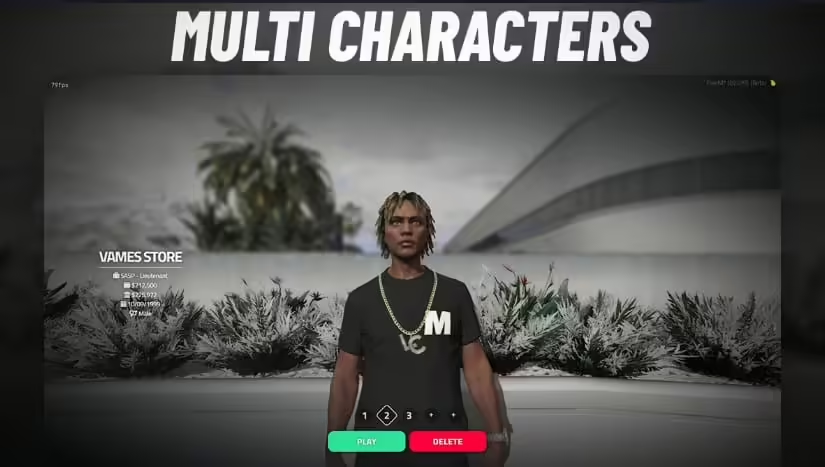
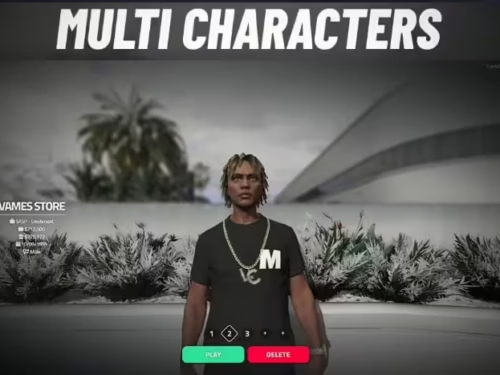
Transform your server's first impression with VMS Multicharacter, a visually stunning character selection screen that sets the tone for premium roleplay. This isn't just a character picker - it's a cinematic experience that showcases your server's professionalism from the moment players connect. With smooth camera work, modern UI design, and seamless framework integration, VMS Multicharacter makes character management feel polished and intuitive.

What Makes VMS Stand Out

  • Cinematic Camera System - Smooth camera movements showcasing each character with professional cinematography
  • Modern UI Design - Clean, intuitive interface with character cards and quick actions
  • Visual Character Preview - See your characters fully rendered with clothing and accessories
  • Background Customization - Set custom backgrounds per character or server-wide themes
  • Framework Native - Deep integration with ESX, QBCore, or QBOX character systems
  • Performance Optimized - Lightweight rendering during character selection phase

Perfect For

  • Serious roleplay servers wanting a professional first impression
  • Communities with players managing multiple characters (civilian, criminal, LEO alts)
  • Server owners replacing basic character selection with something memorable
  • Roleplay servers where visual polish and user experience matter

Character Selection Features

  • Character Slots - Support for multiple character slots per player (configurable limit)
  • Quick Preview - Hover over character cards to preview appearance and details
  • Character Info Display - Shows name, job, bank balance, last played date
  • Create New - Streamlined character creation flow from selection screen
  • Delete Characters - Safe deletion with confirmation prompts
  • Character Sorting - Organize by most recently played, creation date, or custom order
https://www.youtube.com/watch?v=wC8ng3MqtIQ

Framework Compatibility

  • ✅ ESX Legacy - Full support for ESX multicharacter system and identity data
  • ✅ QBCore - Native QBCore integration with player metadata
  • ✅ QBOX - Compatible with QBOX character management

Visual Customization

  • Background Images - Upload custom backgrounds for server branding
  • Color Schemes - Customize UI colors to match server theme
  • Logo Integration - Add server logo to character selection screen
  • Camera Angles - Configure character preview camera positions
  • Animation Timing - Control transition speeds and fade effects
  • Music/Sound - Optional background music and UI sound effects

Character Card Information

  • Character Name - Full name displayed prominently
  • Job Title - Current employment or gang affiliation
  • Bank Balance - Total wealth (bank + cash)
  • Play Time - Hours played on this character
  • Last Login - When character was last used
  • Character Level - If using progression/leveling system

Camera System

The cinematic camera system is what makes VMS special. When you select a character, the camera smoothly transitions to showcase them - rotating around to show clothing details, zooming in on facial features, and creating a dynamic preview experience. The camera intelligently positions itself based on character height and proportions, ensuring every character looks their best.

Character Creation Integration

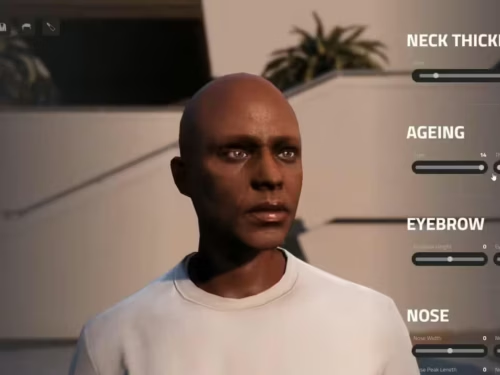
  • Seamless Flow - Click New Character and transition directly to character creator
  • Creator Compatibility - Works with popular creators (fivem-appearance, qb-clothing)
  • Return to Selection - Easy back button if player changes their mind
  • Slot Management - Automatically tracks available character slots

Installation

  1. Extract VMS Multicharacter to your server resources folder
  2. Configure framework settings in config.lua (ESX/QBCore/QBOX)
  3. Set character slot limits and camera positions
  4. Customize background images and UI colors (optional)
  5. Add ensure vms_multicharacter to your server.cfg
  6. Restart server and verify character selection appears on login

Technical Details

  • Performance: 0.00-0.01ms resmon during selection (pre-spawn phase)
  • File Size: Moderate package around 15MB including UI assets
  • Dependencies: Framework required (ESX/QBCore/QBOX)
  • Compatibility: Works with most character creators and clothing systems

Security Features

  • Ownership Verification - Players can only access their own characters
  • Delete Confirmation - Multi-step confirmation prevents accidental deletion
  • Slot Limits - Enforce maximum character limits per player
  • Admin Override - Server admins can manage all characters (configurable)

Configuration Options

  • Max Character Slots - Set per-player character limit (default 3-5)
  • Character Data Display - Choose which info to show on character cards
  • Camera Settings - Customize camera angles, zoom, and rotation speed
  • UI Positioning - Adjust character card layout and spacing
  • Transition Effects - Control fade speeds and animation timings
  • Background Options - Static images, videos, or dynamic backgrounds

Multi-Character Roleplay Benefits

VMS Multicharacter enables rich multi-character roleplay experiences. Players can maintain a law-abiding civilian character for day jobs, a criminal alt for gang activities, and a police officer character for cop RP - all cleanly separated and managed through one elegant interface. The visual preview system helps players quickly remember which character is which, especially useful for communities with complex storylines across multiple personas.

Why Players Love VMS

First impressions matter, and VMS makes character selection feel special. Instead of a boring text list or basic UI, players are greeted with a cinematic showcase of their characters. The smooth camera work and polished design signals that this is a serious server that cares about quality. Switching between characters becomes enjoyable rather than tedious, and the visual reminders of each character's appearance and stats help players maintain separate roleplay identities.

Server Owner Benefits

VMS Multicharacter is one of the first things every player sees when they join your server - make it count. A professional character selection screen immediately communicates that your server is well-maintained and high-quality. The system reduces support tickets about character switching, prevents accidental character deletion with confirmation prompts, and seamlessly integrates with your existing framework without conflicts. For the minimal setup required, VMS delivers a significant upgrade to player onboarding experience.

Update & Support

Lifetime updates included with purchase. Regular updates add new visual effects, framework compatibility improvements, and customization options based on community feedback.

Related ESX Scripts

  • Core Job Utils
  • LMX iFruitPods
  • Dream Miner (ESX/QB)
  • Police/EMS Menu

Installation notes

Requires a FiveM server, esx or qbcore or qbox or standalone, access to server resources, and permission to restart the resource after configuration.
Installation notes
Requires a FiveM server, esx or qbcore or qbox or standalone, access to server resources, and permission to restart the resource after configuration.

Buy this when it saves setup time

Use this checklist to decide quickly whether the resource fits your current server build, framework, and support expectations.

Server-owner payoff

VMS Multicharacter is positioned to reduce Character & Appearance instead of making you rebuild the same system from scratch.

Compatibility

Works with esx, qbcore, qbox, standalone. Check the requirements block before adding it to a live stack.

Purchase confidence

Instant download, Stripe checkout, support access, and refund policy context are shown before payment.

Decision assets

Requirements, Preview video, Product Q&A

Product fit, setup, and proof at a glance

Use the published facts on this page to confirm whether VMS Multicharacter matches your server before checkout.

Compatibility

Frameworks
ESX, QBCore, QBOX, Standalone
Category
Character & Appearance

Setup & requirements

Install flow
Download → resources folder → ensure in server.cfg
Requirements
Published on this page
File size
51.47 KB

Proof & buyer questions

Reviews
5.0 / 5 (2)
Sales
1

Only the facts published on this page should be treated as confirmed. If you need more detail, review the description, requirements, changelog, reviews, and product Q&A before checkout.

DescriptionRequirementsPreview videoReviews
Character & Appearance
Compatibility:
ESX
QBCore
QBOX
Standalone

VMS Multicharacter

5.0·2 reviews
$7.491 sold

Secure Checkout

Cards, Apple Pay, Google Pay, iDEAL/Wero, Bancontact, EPS, Przelewy24, and optional Crypto where available via Stripe.

Instant file access after paymentSupport and refund policy shown before checkout
Ask support before buyingRead refund policy
Instant Access
SSL Encrypted
Cards, wallets, bank redirects
Frameworksesx, qbcore, qbox, standalone
Setup

Requires a FiveM server, esx or qbcore or qbox or standalone, access to server resources, and permission to restart the resource after configuration.

RequirementsPublished on this page
PreviewAvailable
Home
Shop
Character & Appearance
ESX
QBCore
QBOX
Standalone

Key Features

  • Cinematic Camera System

    Smooth camera movements showcase each character with professional cinematography, rotating around to display clothing details and zooming in on facial features while intelligently positioning based on character height and proportions.

  • Modern UI Design with Character Cards

    Clean, intuitive interface featuring character cards and quick actions that display character name, job title, bank balance, play time, last login, and character level.

  • Visual Character Preview

    See characters fully rendered with clothing and accessories during selection, with hover-over preview functionality to see appearance and details before committing to a character.

  • Background Customization

    Set custom backgrounds per character or server-wide themes, with the ability to upload custom background images for server branding and customize UI colors to match server theme.

  • Framework Native Integration

    Deep integration with ESX Legacy, QBCore, and QBOX character systems, with seamless compatibility that works with most character creators and clothing systems.

Frequently Asked Questions

Related Products

$7.49
$9.49
$10.49
$10.49

More from VMS

vms Housing

vms Housing

VMS HUD

VMS HUD

VMS Character Creator

VMS Character Creator

VMS SPAWNSELECTOR

VMS SPAWNSELECTOR

View all from VMS

Related Tutorials & Guides

Learn more about setting up, configuring, and using this type of resource.

ESX vs QBCore vs QBOX: Technical Framework Comparison 2026

ESX vs QBCore vs QBOX: Technical Framework Comparison 2026

Choosing a framework is the single most consequential decision when building a FiveM server. It determines which scripts you can use, how your developers write code, the…

FiveM Frameworks Explained: Complete Guide to ESX, QBCore & QBOX

FiveM Frameworks Explained: Complete Guide to ESX, QBCore & QBOX

FiveM frameworks form the backbone of roleplay servers. They're not just code libraries—they're complete systems that manage player identity, jobs, inventory, permissions,…

QBox Framework Guide: Migrate from QBCore and Boost Performance (2026)

QBox Framework Guide: Migrate from QBCore and Boost Performance (2026)

QBox has firmly established itself as the natural successor to QBCore in the FiveM roleplay ecosystem.

Continue Building Your FiveM Server

Use this product as part of a larger setup. Explore related categories, alternative frameworks, premium bundles, and free companion downloads.

Browse all scriptsCharacter & Appearance scriptsesx scriptsTry QBCore insteadTry QBox insteadFree FiveM modsCompare bundles
CodeV MultiCharacter

CodeV MultiCharacter

Cyber Multichar

Cyber Multichar

ZSX Multicharacter

ZSX Multicharacter

Spawn Selector with Modern Design

Spawn Selector with Modern Design