$ ABD Doları
FiveM Sunucu Yedeklemeleri Nasıl Otomatikleştirilir
Bu eğitimde, bir PowerShell betiği ve Windows Görev Zamanlayıcısı kullanarak FiveM sunucunuz için otomatik yedeklemeleri nasıl ayarlayacağınızı öğreneceksiniz. Yedeklemelerinizi otomatikleştirmek, sunucu verilerinizin güvende olmasını ve gerektiğinde geri yüklenebilmesini sağlar.
Adım 1: Yedekleme Komut Dosyasını İndirin
- Yedekleme betiğini şuradan indirin: GitHub deposu.
- Kaydet
SunucuYedeklemeScripti.ps1dosyayı sunucunuzun erişebileceği bir konuma kaydedin.
Komut dosyasını buradan indirin
Adım 2: Yedekleme Klasörlerini Ayarlayın
- Yedekleme Dizini Oluştur:
- Sunucunuzun kök dizinine gidin (FX Server başlatıcısının bulunduğu yer).
- Adında yeni bir klasör oluşturun
yedek.
- PowerShell Betiğini Düzenleyin:
- Açın
SunucuYedeklemeScripti.ps1Bir metin düzenleyicide (örneğin Not Defteri). - Güncelle
$kaynakYoluyedeklemek istediğiniz klasöre. Örneğin:$sourcePath = "C:MyServerresources" - Güncelle
$hedefYoluto the folder where backups should be stored. For example:$destinationPath = "C:BackupsServerBackup_$backupDate" - The
$yedeklemeTarihideğişkeni, daha iyi bir organizasyon için yedekleme klasörü adına geçerli tarih ve saati ekler.
- Açın
Adım 3: Zamanlanmış Görev Ayarlayın
- Görev Zamanlayıcısını açın:
- Basmak
Kazan + Sve ara Görev Zamanlayıcı, sonra açın.
- Basmak
- Yeni Görev Oluştur:
- Sağ tıklama Görev Zamanlayıcı Kütüphanesi ve seç Temel Görev Oluştur.
- Göreve bir ad verin (örneğin, “FiveM Sunucu Yedekleme”) ve tıklayın Sonraki.
- Tetiği Ayarlayın:
- Yedeklemenin ne sıklıkla çalışmasını istediğinizi seçin (örneğin, Günlük, Haftalık).
- Başlangıç tarihini, saatini ve sıklığını gerektiği gibi ayarlayın, ardından tıklayın Sonraki.
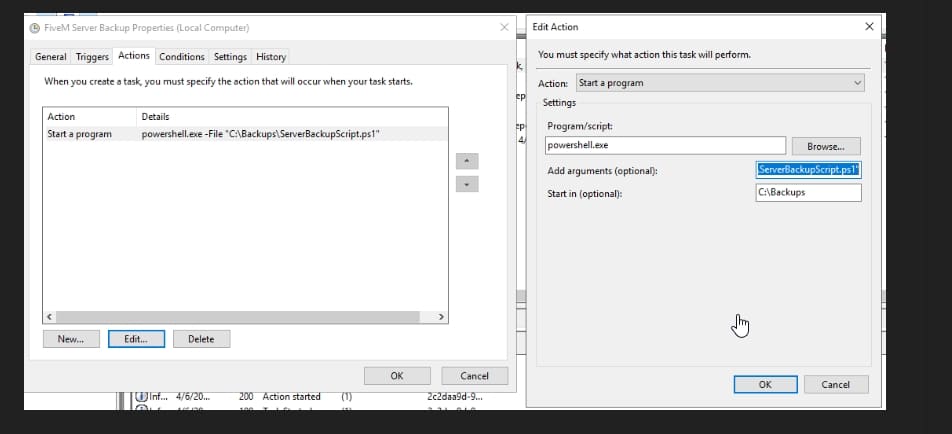
- Eylemi Ayarla:
- Seçme Bir Program Başlat ve tıkla Sonraki.
- İçinde Program/senaryo alan, tür:
powershell.exe - İçinde Argümanları ekle (isteğe bağlı) alan, tür:
-File "C:BackupsServerBackupScript.ps1"Komut dosyası başka bir yerde saklanıyorsa dosya yolunu ayarlayın. - İçinde Başla (isteğe bağlı) alanına, betiğin bulunduğu klasör yolunu yazın, örneğin:
C:Backups
- Görevi Bitir:
- Tıklamak Sona ermek görevi kaydetmek için.
Adım 4: Görevi Test Edin
- Görev Zamanlayıcı'da yeni oluşturulan göreve sağ tıklayın ve şunu seçin: Koşmak.
- Çıktı klasörünü kontrol edin (örneğin,
C:Backups) yedeklemenin başarıyla oluşturulduğunu onaylamak için. Yedekleme dosyası veya klasörü, adına güncel tarihin eklenmesi gerekir (örn.SunucuYedekleme_2024-11-15).
Adım 5: Yedekleme Tutarlılığını Doğrulayın
- Tüm kritik dosyaların dahil edildiğinden emin olmak için yedeklerinizi düzenli olarak kontrol edin.
- İşlevselliğini doğrulamak için bir geliştirme sunucusunda yedeklemeyi geri yüklemeyi deneyin.
İpuçları:
- Yedekleme Boyutunu İzle: Hedef klasörünüzdeki disk alanına dikkat edin.
- Saklama Politikası: Depolama alanı sorun teşkil ediyorsa eski yedekleri otomatik olarak silecek bir komut dosyası düşünün.
- Günlükler: Daha kolay hata ayıklama için PowerShell betiğine günlük kaydı ekleyin.
Artık yedeklemeleri başarıyla otomatikleştirdiniz FiveM sunucusu!
Practical checklist
Use this guide as a staging checklist before changing a live FiveM server. Confirm the current server artifact version, framework version, resource dependencies, database changes, and any client-side files before you apply the change.
- Back up the affected configuration files and database tables.
- Apply the change on a test server first.
- Watch the server console and client F8 console for errors.
- Check whether the change affects jobs, inventory, vehicles, maps, voice, permissions, or player data.
- Document the exact file, command, or setting you changed so it can be reverted quickly.
Testing before production
After the first test, join with a normal player account and repeat the flow from the player perspective. If the topic involves performance, measure before and after with the same player count, route, and resource set. If it involves admin tools or permissions, verify both allowed and denied users.
Yaygın hatalar
Most FiveM issues come from missing dependencies, stale cache, wrong folder names, framework mismatch, or configuration copied from another server. Avoid changing multiple systems at once; make one change, test it, and then continue.
Related resources
For production-ready assets, compare paid resources in the FiveMX shop. For free resources, browse free FiveM scripts and test each resource before using it publicly.
Production rollout notes
Before using this guidance on a live FiveM server, define the exact outcome you expect from the change. For How to Automate FiveM Server Backups, that means checking which resource, setting, command, or workflow is affected and confirming that the change fits your current framework, artifact version, and server rules. Keep the rollout small enough that you can reverse it quickly if players report errors.
Use a staging server with the same framework, database schema, resource order, and key dependencies as production. If the topic changes gameplay, permissions, visuals, voice, vehicles, maps, inventory, or economy behavior, test with at least one admin account and one normal player account. Watch server console output, client F8 logs, and resource timing while repeating the exact player flow that will happen on the live server.
Rollback checklist
- Save the previous configuration file, resource folder, and database state before changing anything.
- Record the resource version, commit, download page, or setting value you tested.
- Restart only the affected resource first when possible, then restart the full server if dependencies require it.
- If errors appear, revert the single changed resource or setting before testing another fix.
Maintenance guidance
Review this setup again after FiveM artifact updates, framework updates, or major resource changes. A configuration that works today can break after dependency updates, renamed exports, changed events, or database migrations. Keep notes with your server documentation so future admins understand what was changed, why it was changed, and how to verify it again.
Ongoing review
Recheck How to Automate FiveM Server Backups after major FiveM artifact updates, framework changes, or resource migrations. Confirm that the advice still matches current server behavior, that any linked source remains available, and that installation steps still match the files a server owner will actually download or configure.
For public servers, keep a short changelog beside your server documentation. Note what was tested, what changed, which accounts were used for verification, and how to roll back. This makes future maintenance faster and prevents old setup notes from becoming unclear or unsafe for players.