$ ABD Doları
FiveM Tek Oyunculu Nasıl Kullanılır
Hızlı cevap: FiveM is mainly built around multiplayer servers. If you want to test scripts or resources alone, a local or private FiveM server is often more reliable than trying to treat FiveM like GTA V story mode.
Son güncelleme: 25 Haziran 2026
GTA V modlarını tek oyunculu, bağımsız bir ortamda deneyimleme fikri sizi cezbediyor mu? FiveM'in tek oyunculu moduna hoş geldiniz! Bu rehber, tek oyunculu bir deneyim için FiveM'i kurma ve kullanma sürecinde size yol gösterecek. Takip edin ve tek oyunculu oyununuzu modlama sanatında kısa sürede ustalaşın!
1. Ön koşullar
Bu yolculuğa çıkmadan önce aşağıdakilere sahip olduğunuzdan emin olun:
- GTA V'in meşru bir kopyası.
- An Internet connection for downloading FiveM
- Dosya yönetiminin temel bilgisi.
- Geliştirilmiş tek oyunculu deneyim arzusu!
2. FiveM'i Yükleme
To get started, you need to install the FiveM client.
FiveM'i indirin:
- Ziyaret edin FiveM resmi web sitesi.
- İndirme butonuna tıklayın ve kurulum talimatlarını izleyin.
Yükleyiciyi çalıştırın: İndirilen yükleyiciyi çalıştırın (FiveM.exe). Kurulum talimatlarını izleyin ve GTA V'nin yükleneceği dizini belirtin
3. Tek Oyunculu Modun Yapılandırılması
FiveM kurulduktan sonra tek oyunculu modu ayarlayalım.
FiveM'i açın: Masaüstünüzden veya başlat menünüzden FiveM'i başlatın.
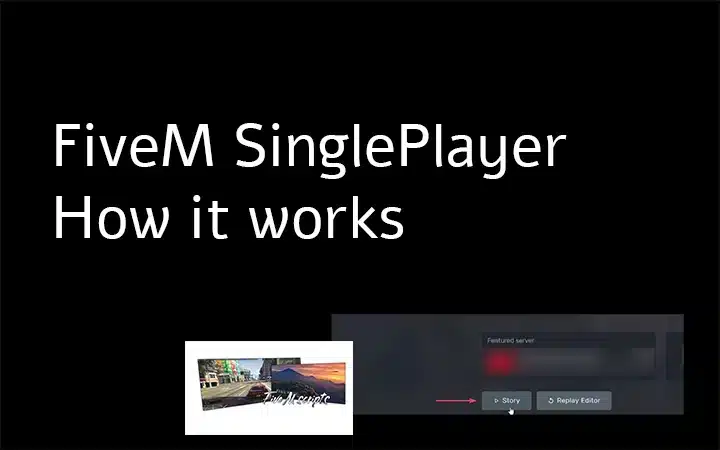
Tek Oyunculu Seç: FiveM başlatıcısında sunucular için farklı seçenekler göreceksiniz. "FiveM Tek Oyunculu" seçeneğini bulup seçin!
Bu noktada FiveM, GTA V kurulumunuzla senkronize olacak ve gerekli dosyaları ayarlayacaktır.
4. Modların Kurulumu
Şimdi eğlenceli kısma geliyoruz: modları yüklemek! Çeşitli modlar ekleyerek tek oyunculu deneyiminizi özelleştirebilirsiniz.
Modları Bul: Popüler mod sitelerine göz atın: GTA5-Modları veya FiveM forumları Tercihlerinize uygun modları bulmak için.
Modları Yükle:
- Yüklemek istediğiniz modları indirin.
- Extract the downloaded files if they are in a ZIP or RAR format.
- Place the mod files in the
modlarfolder within your FiveM application data directory. If this folder doesn’t exist, create it./FiveM Uygulama Verileri/eklentiler/
5. FiveM / Tek Oyunculu Oyununuzu Başlatma
Her şey hazır, artık modlanmış tek oyunculu oyununuzu başlatmanın zamanı geldi.
FiveM'i Başlat: Masaüstünüzden veya başlat menünüzden FiveM'i başlatın.
Tek Oyunculuya Girin: Başlatıcıdan tekrar “FiveM Single Player” seçeneğini seçin.
Modlarınızın tadını çıkarın: Artık FiveM tek oyunculu modundasınız! Yüklü modlarınızla gelişmiş deneyimin tadını çıkarın.
6. İpuçları ve Sorun Giderme
Oyun Dosyalarını Doğrula:GTA V kurulumunuzun sağlam olduğundan emin olmak için ilgili başlatıcı (Steam, Epic Games, Rockstar) aracılığıyla dosyaları doğrulayın.
Mod Uyumluluğunu Kontrol Edin: Yüklediğiniz modların FiveM tek oyunculu moduyla uyumlu olduğundan emin olun. Çok oyunculu sunucular için tasarlanmış bazı modlar düzgün çalışmayabilir.
FiveM'i yeniden yükleyin: Sorunlar devam ederse, FiveM'i yeniden yüklemeyi deneyin. Bazen yeni bir yükleme öngörülemeyen sorunları çözebilir.
Topluluk Desteği: Ziyaret edin FiveM forumları veya Discord kanalları Topluluk tabanlı destek ve sorun giderme ipuçları için!
Çözüm
Tebrikler! Bu eğitimi takip ederek, FiveM'i tek oyunculu bir deneyim için başarıyla kurdunuz ve özelleştirdiniz. Oyuna daha önce hiç olmadığı kadar derinlemesine dalın, modların sınırsız olanaklarını keşfedin ve kişiselleştirilmiş GTA V maceralarınızın tadını çıkarın.
For more guides, mods, and resources, make sure to visit fivemx.com
Practical checklist
Use this guide as a staging checklist before changing a live FiveM server. Confirm the current server artifact version, framework version, resource dependencies, database changes, and any client-side files before you apply the change.
- Back up the affected configuration files and database tables.
- Apply the change on a test server first.
- Watch the server console and client F8 console for errors.
- Check whether the change affects jobs, inventory, vehicles, maps, voice, permissions, or player data.
- Document the exact file, command, or setting you changed so it can be reverted quickly.
Testing before production
After the first test, join with a normal player account and repeat the flow from the player perspective. If the topic involves performance, measure before and after with the same player count, route, and resource set. If it involves admin tools or permissions, verify both allowed and denied users.
Yaygın hatalar
Most FiveM issues come from missing dependencies, stale cache, wrong folder names, framework mismatch, or configuration copied from another server. Avoid changing multiple systems at once; make one change, test it, and then continue.
Related resources
For production-ready assets, compare paid resources in the FiveMX shop. For free resources, browse free FiveM scripts and test each resource before using it publicly.
Production rollout notes
Before using this guidance on a live FiveM server, define the exact outcome you expect from the change. For How to Use FiveM Single Player, that means checking which resource, setting, command, or workflow is affected and confirming that the change fits your current framework, artifact version, and server rules. Keep the rollout small enough that you can reverse it quickly if players report errors.
Use a staging server with the same framework, database schema, resource order, and key dependencies as production. If the topic changes gameplay, permissions, visuals, voice, vehicles, maps, inventory, or economy behavior, test with at least one admin account and one normal player account. Watch server console output, client F8 logs, and resource timing while repeating the exact player flow that will happen on the live server.
Rollback checklist
- Save the previous configuration file, resource folder, and database state before changing anything.
- Record the resource version, commit, download page, or setting value you tested.
- Restart only the affected resource first when possible, then restart the full server if dependencies require it.
- If errors appear, revert the single changed resource or setting before testing another fix.
Maintenance guidance
Review this setup again after FiveM artifact updates, framework updates, or major resource changes. A configuration that works today can break after dependency updates, renamed exports, changed events, or database migrations. Keep notes with your server documentation so future admins understand what was changed, why it was changed, and how to verify it again.
Ongoing review
Recheck How to Use FiveM Single Player after major FiveM artifact updates, framework changes, or resource migrations. Confirm that the advice still matches current server behavior, that any linked source remains available, and that installation steps still match the files a server owner will actually download or configure.
For public servers, keep a short changelog beside your server documentation. Note what was tested, what changed, which accounts were used for verification, and how to roll back. This makes future maintenance faster and prevents old setup notes from becoming unclear or unsafe for players.
Best solo testing setup
- Create a local FXServer or private test server.
- Install only the resource you want to test plus dependencies.
- Join alone, test commands, and inspect F8/server logs.
- Add other resources one at a time.
- Move to staging before using it on production.
Related guides