





![White Widow Job Script (Script + MLO) [QBCore] FiveM Ressourcenvorschau](https://cdn.fivemx.com/wp-content/uploads/2022/09/chrome_FhYmrdvmoR-png-500x375.avif)
0r Chat V2 – Modern Chat System with Advanced Features for FiveM
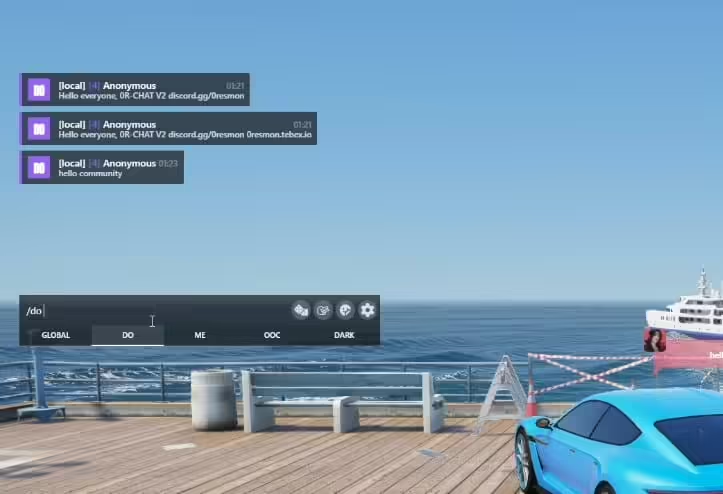
The 0r Chat V2 replaces FiveM’s default chat system with a modern, feature-rich communication interface designed for enhanced roleplay and server management. This comprehensive chat overhaul includes proximity-based chat with voice range indicators, command suggestions, rich formatting options, customizable themes, and advanced moderation tools. Perfect for roleplay servers wanting realistic communication mechanics where messages fade based on distance, or any server looking to upgrade from the basic GTA chat interface to something more polished and functional.
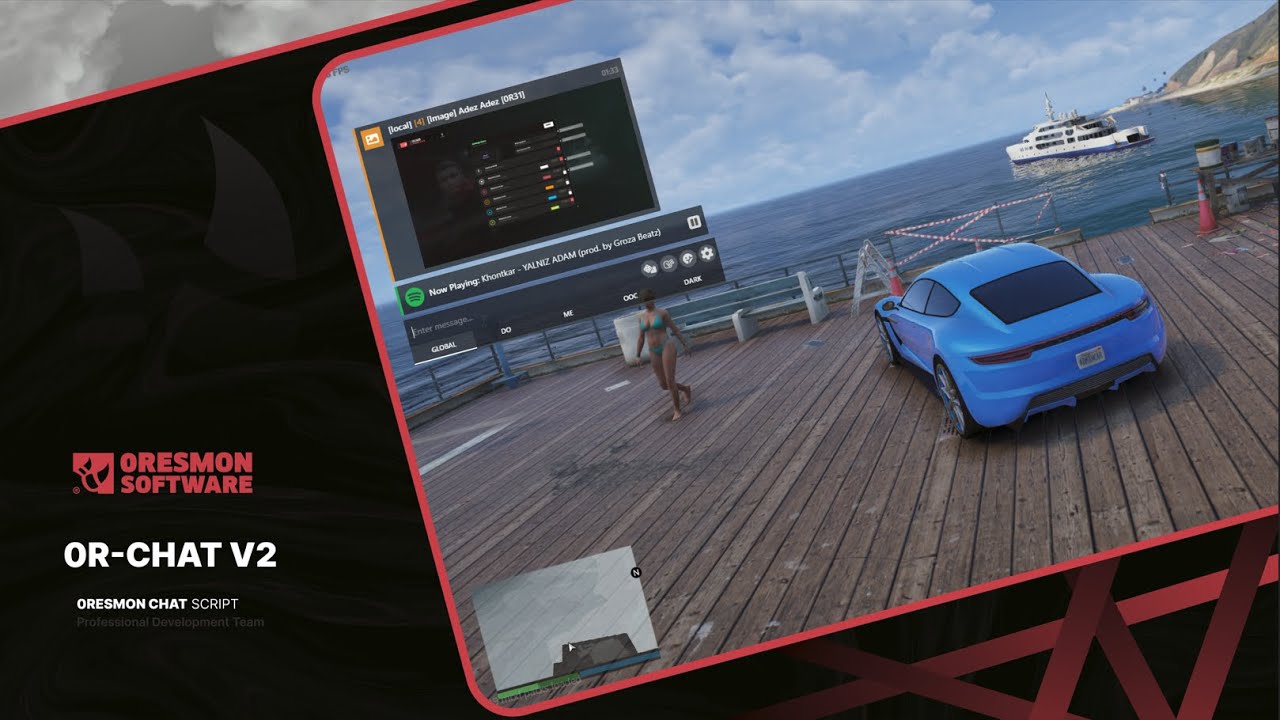
Im Leistungsumfang enthalten
This complete chat replacement includes proximity-based messaging where text fades as distance increases, multiple chat channels (local, department radio, global OOC), rich text formatting with colors and emotes, command auto-completion, message history, and fully customizable themes. Server owners get moderation features including chat logs, message filtering, mute systems, and anti-spam protection. The system integrates seamlessly with framework Arbeit systems to provide department-specific chat channels and automated announcements.
Hauptmerkmale
- Proximity-Based Chat – Messages fade with distance for realistic local communication
- Mehrere Kanäle – Local, radio, department, global OOC, and custom channels
- Rich-Text-Formatierung – Colors, bold, italics, and emote integration
- Befehlsvorschläge – Auto-complete for commands as you type
- Nachrichtenverlauf – Scroll through previous messages with timestamps
- Custom Themes – Fully customizable colors, fonts, and positioning
- Moderationswerkzeuge – Chat logs, filters, mute system, and anti-spam
- Department Radio – Job-specific channels for Polizei, EMS, mechanics, etc.
- Staff Chat – Separate channel for admin communication
- Ankündigungssystem – Broadcast server-wide messages with styling
Perfekt für
- Roleplay servers requiring proximity-based communication
- Communities with multiple departments needing private channels
- Servers wanting professional, modern chat aesthetics
- Communities requiring strong chat moderation
- Any server upgrading from the default FiveM chat
Chat Channels & Ranges
- Local Chat – Proximity-based with configurable fade distance (default: normal speaking range)
- Shout – Extended range for yelling or loud speech
- Whisper – Very short range for private conversations
- Department Radio – Job-specific channels (police, EMS, fire, mechanics, etc.)
- Global OOC – Server-wide out-of-character communication
- Admin-Chat – Staff-only communication channel
- Custom Channels – Create additional channels for gangs, businesses, etc.
Installationshandbuch
- IMPORTANT: Remove your current chat script and “chat-theme-gtao” from your server
- Extract the 0r Chat V2 folder to your resources directory
- Review and configure settings in the config.lua file
- Set up chat ranges, channels, and theme preferences
- Configure department channels to match your framework jobs
- Add “ensure 0r-chat-v2” to your server.cfg
- Start the resource and test all chat channels
- Customize colors and fonts to match your server branding
Framework-Kompatibilität
- â ESX – Integrates with ESX job system for department channels
- â QBCore – Kompatibel mit QB-Jobs und Gangsystemen
- â QBOX – Works with QBOX job management
- â Standalone – Can function without framework (basic channels only)
Was es auszeichnet
Version 2 of 0r Chat improves upon the original with better performance, more customization, and enhanced roleplay features. The proximity-based chat system creates realistic communication where you can’t read messages from across the city – players must be close to see local chat, making radios essential for coordination. The command suggestion system helps new players discover available commands while typing. Unlike basic chat replacements, this system includes proper moderation tools so admins can combat spam and toxicity effectively. The theme system is incredibly flexible, allowing complete visual customization without editing code.
Anpassungsoptionen
- Configure chat position, size, and transparency
- Set custom colors for each chat channel type
- Customize fonts, text size, and message spacing
- Define proximity ranges for local, shout, and whisper
- Set up custom emote commands and formatting
- Configure timestamp formats and display options
- Create custom chat channels with permissions
Moderationsfunktionen
- Chatprotokollierung – Complete server-side logs of all messages
- Word Filter – Automatically block or replace prohibited words
- Spam-Schutz – Prevents message flooding and rapid posting
- Mute System – Temporary or permanent chat mutes for players
- Channel Restrictions – Control who can access specific channels
- Admin Oversight – View all channels even when not in them
Technische Spezifikationen
- Leistung: Optimized rendering, minimal FPS impact
- Datenbank: Optional database for persistent mutes and logs
- UI-Framework: Custom HTML/CSS/JS with smooth animations
- Kompatibilität: Replaces default chat entirely, no conflicts
- Exporte: Includes exports for custom message types and channels
Befehlsintegration
- Auto-suggestion shows available commands while typing
- Supports all framework commands automatically
- Custom command registration via exports
- Parameter hints for complex commands
- Command history with up/down arrow navigation
Department Radio Setup
- Automatically creates channels for all framework jobs
- Police, EMS, fire, mechanics, and more get dedicated radios
- Messages only visible to players in the same job
- Optional cross-department channels for emergencies
- Configurable radio command (default: /radio or /r)
Support & Konfiguration
The resource includes a comprehensive config file with clear documentation for all settings. If you encounter any issues during setup or have questions about configuration, you can create a support ticket through the developer’s Discord server. The config allows you to enable/disable features individually, so you can start with basic functionality and gradually add more advanced features as your community grows.
Videovorschau
Installation
– Entferne das Chat-Skript und das “chat-theme-gtao”-Skript, das du auf deinem Server verwendest.
– Lade den Ordner auf deinen Server hoch.
– Füge es hinzu zu server.cfg und fang an.
– Vergiss nicht, einen Blick in die Konfigurationsdatei zu werfen.
– Wenn du Probleme hast, kannst du ein Unterstützung Ticket erstellen, indem du zu unserer Discord-Adresse kommst.
– aliko. <Discord>
Verwandte ESX-Skripte
Installation
– Entferne das Chat-Skript und das “chat-theme-gtao”-Skript, das du auf deinem Server verwendest.
– Lade den Ordner auf deinen Server hoch.
– Füge ihn zu server.cfg hinzu und starte ihn.
– Vergiss nicht, einen Blick in die Konfigurationsdatei zu werfen.
– Wenn du Probleme hast, kannst du ein Unterstützung Ticket erstellen, indem du zu unserer Discord-Adresse kommst.
– aliko. <Discord>

Crystel (Verifizierter Käufer) –
Der Support reagierte schnell und half mir, mein Einrichtungsproblem zu lösen. Sehr professioneller Service.
JanaFury189 (Verifizierter Käufer) –
Sauber, optimiert und zuverlässig.
Lesly (Verifizierter Käufer) –
Fünf Sterne von mir.
Jules (Verifizierter Käufer) –
Eine der besten FiveM-Ressourcen, die ich gekauft habe. Sauberer Code, gute Dokumentation und viele Konfigurationsmöglichkeiten.
DukeMarie910 (Verifizierter Käufer) –
Ich bin erwischt :) Finde meine Liebe und werde nie in einem anderen Laden kaufen.
Norwood (Verifizierter Käufer) –
Hätte mir gewünscht, ich hätte das früher gefunden, es hat mich viel Geld und Zeit gekostet, bis ich hier mein Traumprodukt gefunden habe!
Lila (Verifizierter Käufer) –
Liebe einfach das Design und der Kundensupport ist der netteste.