






Vehicle Control UI – Complete Vehicle Management at Your Fingertips
Stop fumbling with console commands to control your vehicle. This sleek UI puts every car function – engine, doors, windows, lights, and more – into one intuitive interface that opens with a single keypress. Whether you’re roleplaying a cautious driver who checks every door before leaving, or you just want quick access to vehicle features, this control panel makes car interaction feel natural instead of cumbersome.
With 227 servers using this solution, Vehicle Control UI has proven itself as the go-to system for communities that want realistic vehicle management without the hassle of memorizing dozens of keybinds or typing commands.
Qué está incluido
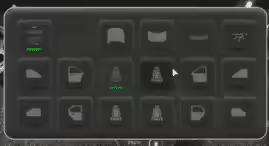
You’re getting a complete vehicle management system that works with any car, bike, boat, or aircraft in FiveM. The UI displays all available controls for your current vehicle type, automatically adapting to show relevant options. Cars get full door and window controls, aircraft show landing gear options, boats include anchor controls – the system is smart enough to present appropriate choices based on what you’re driving.
The interface is clean, modern, and performance-optimized. It appears instantly when you need it and disappears just as quickly, never cluttering your screen or causing lag. Everything is mouse-driven for easy selection, or you can use keyboard shortcuts if you prefer speed over precision.
Características principales
- Control del motor – Toggle your engine on/off without holding keys or using commands
- Individual Door Management – Open/close each door separately (front left, front right, back left, back right, hood, trunk)
- Controles de ventana – Roll windows up or down for each position independently
- Seat Switching – Move to any available seat in the vehicle without exiting
- Interior Lights Toggle – Control dome lights for nighttime visibility
- Indicators & Hazards – Signal left, right, or activate hazard lights
- Neon Light System – Control underglow neons if your vehicle has them installed
- Seatbelt Toggle – Buckle up for safety (integrates with seatbelt scripts)
- Control de Crucero – Set and maintain speed on long highway drives
- Landing Gear – Aircraft-specific control for gear up/down
- Boat Anchor – Drop anchor to keep your vessel stationary
- Convertible Roof – Raise or lower the roof on compatible vehicles
- Sistema de bloqueo – Lock/unlock your vehicle from the control panel
- One-Key Access – Single configurable keybind opens the entire menu
Perfecto para
- Roleplay servers wanting realistic vehicle interaction
- Communities where vehicle detail matters (car clubs, racing scenes)
- Servers with custom vehicles that have working doors and features
- Players who prefer UI-based controls over command typing
- Any server wanting to enhance the driving experience
- Communities with law enforcement (door controls for traffic stops)
Cómo funciona
Access the Menu: Press your configured key (default F6 or similar) while in any vehicle. The control panel appears showing all available options for your current vehicle type.
Control Selection: Click any control to activate it. Doors, windows, and lights toggle between states with each click. Some options (like seat switching) show additional choices when selected.
Quick Actions: Frequently used controls like engine and locks can be accessed with quick-select buttons at the top of the menu. Less common features are organized in collapsible categories to keep the interface clean.
Auto-Adaptation: The menu automatically detects your vehicle type and shows relevant controls. Motorcycles don’t display door options. Aircraft show landing gear. Boats include anchor controls. The system is intelligent about what features make sense for each vehicle.
Instalación y configuración
- Download and extract the Vehicle Control UI resource
- Agrega el recurso a tu archivo server.cfg
- Configure the keybind for opening the menu (config.lua)
- Optionally integrate with existing seatbelt or vehicle scripts
- Restart your server and test with various vehicle types
- Customize colors and UI position if desired
The resource is standalone and works with any FiveM server. No specific framework required, though it integrates nicely with ESX, QBCore, or custom systems.
Detalles Técnicos
- Estructura: Standalone (works with ESX, QBCore, QBOX, or no framework)
- Actuación: <0.01ms idle, minimal impact when menu is open
- Personalización: Fully configurable keybinds, colors, and features
- Soporte de vehículos: Cars, bikes, boats, aircraft, helicopters
- Compatibilidad: Works alongside existing vehicle scripts
- Actualizaciones: Lifetime access to future updates and improvements
Compatibilidad del marco
- ✅ ESX – Compatibilidad total con todas las versiones de ESX
- ✅ QBCore – Funciona perfectamente con el marco QBCore
- ✅ QBOX – Compatible con servidores QBOX
- ✅ Standalone – No se requiere dependencia de framework
Casos de uso del mundo real
Police Traffic Stops: Officers can open specific doors to talk to drivers, check rear seats, or access the trunk during searches. Realistic traffic stop roleplay becomes possible when you can control each door independently.
Car Shows & Meets: Players showing off custom vehicles can pop the hood to display engine work, open doors to show interior mods, and activate neon lights to showcase their build. The UI makes vehicle presentation interactive.
Mechanic Roleplay: When working on vehicles, mechanics can access specific areas by opening relevant doors. Need to check the engine? Pop the hood. Working on rear suspension? Open the trunk. The control system enables realistic repair scenarios.
Taxi & Transport: Drivers can unlock specific doors for passengers without unlocking the entire vehicle. Open the rear passenger door for your client while keeping the driver’s area secure. Professional transport becomes more immersive.
Aviation Operations: Pilots get proper landing gear controls and door management for aircraft. Raise gear after takeoff, lower it before landing, control passenger doors at the terminal – all through one consistent interface.
Lo que lo hace destacar
Most vehicle control scripts either overwhelm players with complex keybind combinations or force them to type slash commands mid-drive. This UI takes a different approach: one key opens everything, and you interact with visual controls rather than memorizing key combinations.
The interface is genuinely intuitive. New players figure it out within seconds because the controls mirror what they expect – a door icon opens doors, a window icon controls windows. No tutorial needed, no learning curve, just immediate usability.
Performance optimization means the menu doesn’t stutter or lag even on heavily modded servers. The UI renders cleanly at all resolutions and doesn’t conflict with other HUD elements. It’s the kind of polish that makes it feel like a native GTA feature rather than a mod.
Opciones de personalización
The config file lets you tailor the system to your server’s needs. Change which key opens the menu, adjust UI colors to match your server’s theme, enable or disable specific features, and set default states for things like seatbelts and engine behavior.
You can also configure which vehicle types show which controls. If you don’t want boats to have certain features or you want to restrict aircraft controls, the config makes those adjustments straightforward. The system adapts to your rules rather than forcing a one-size-fits-all approach.
Why Servers Choose Vehicle Control UI
With 227 active installations, this script has become a favorite for servers focused on vehicle realism and player convenience. It solves the age-old problem of vehicle controls being awkward and immersion-breaking. When players can interact with their cars naturally, the entire driving experience improves.
Server owners report that players start using vehicle features they previously ignored because the controls are actually accessible. Doors get opened, lights get toggled, cruise control gets used – the UI makes features discoverable and easy instead of hidden and frustrating.
The minimal performance footprint means you can run this alongside all your other vehicle mods, HUDs, and systems without slowdowns. It’s a quality-of-life improvement that enhances gameplay without technical downsides.
Productos relacionados que podrían gustarte
- HUD de vehículo premium – Velocímetro profesional confiado por 429+ servidores
- Radio de coche en todas partes – Complete vehicle entertainment system
- Script de inventario premium – UI-consistent inventory for vehicle items
- Servidor Super ESX – Complete server package with vehicle systems
Vista previa del video
Este recurso le permite controlar su vehículo FÁCILMENTESin comandos, simplemente presiona una tecla para abrir el HUD y podrás CONTROLAR TOTALMENTE tu vehículo (auto, moto, etc.).

Gaetano (propietario verificado) –
Excelente calidad y soporte excepcional.
ShadowRex (propietario verificado) –
Recibí un trato personalizado y atento. Gracias a este trato, pude encontrar una solución a mi problema en poco tiempo. :)
Cristiana (propietario verificado) –
No está mal, pero el servicio no cumple con mis expectativas.
Mosquito (propietario verificado) –
Muy buen producto. La instalación fue rápida y la documentación respondió todas mis preguntas.
Seth (propietario verificado) –
¡Gracias chicos por esta creación increíble! ¡Absolutamente alucinante!