








ESX Battlepass / XP Script – GTA Online Style Progression System
Transform your FiveM server into an engaging progression experience with this comprehensive battle pass and XP system inspired by GTA Online’s tier-based rewards. Players start at level 0 and earn experience through gameplay activities you define, unlocking increasingly valuable rewards as they climb through customizable tiers. This isn’t just another rewards script – it’s a complete player retention system that keeps your community engaged with long-term goals and meaningful progression.
Qué está incluido
You’re getting a fully-functional leveling framework built with NativeNUI for a sleek, modern interface. The system tracks individual player XP totals, manages tier progression, handles reward distribution, and provides comprehensive progress tracking. Everything is stored in your database for persistence, so players maintain their progress across sessions and can work toward high-tier rewards over weeks or months.
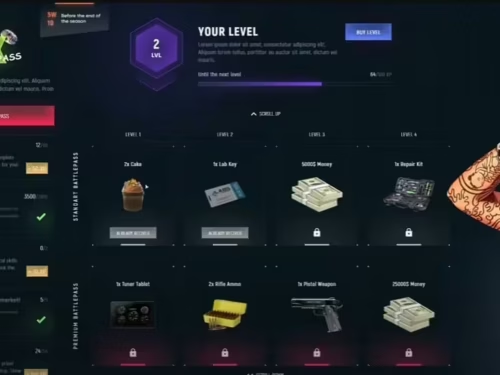
The included NativeUI menu integration provides an intuitive interface where players check their current level, view upcoming rewards, see XP requirements for the next tier, track time remaining in the current battle pass season, and explore all available rewards across all tiers. The visual presentation matches GTA Online’s aesthetic while being fully customizable to your server’s branding.
Customizable Progression Tiers
The system comes with a default tier structure that you’ll want to customize for your server. Define exactly how many levels exist (5, 10, 25, 50, or even 100 tiers), set XP requirements for each level (linear progression or exponential scaling), and specify rewards for every tier. Rewards can be anything your ESX server supports: cash payments, bank deposits, black money, physical items, weapons with specific ammo counts, vehicles, or custom items from your economy.
Lower tiers typically offer small rewards (starting money, basic items) to give new players quick wins, while higher tiers provide premium rewards (expensive weapons, rare vehicles, large cash payouts) that require significant time investment. This creates natural progression curves where casual players still earn rewards, but dedicated players get exclusive high-tier items.
XP Earning System (Your Implementation)
The script provides the framework for tracking XP – you decide how players earn it. The developer intentionally left XP earning events for you to implement in your server’s existing scripts, giving you complete control over progression speed and earning methods. This flexibility means the system works with any server type and gameplay style.
Common XP Implementations:
- Sistemas de Trabajos – Award XP for completing trucking deliveries, mining runs, fishing catches, or any job activity
- Actividades delictivas – Grant XP for successful heists, drug sales, or territory control
- Aplicación de la ley – Give XP for arrests, evidence collection, or case closures
- Social Activities – Reward XP for playtime, attending events, or participating in server activities
- Mission Completion – Award XP for quest completions, achievement unlocks, or milestone hits
- Eventos personalizados – Create special double-XP events, seasonal bonuses, or limited-time XP opportunities
The server-sided XP addition event is simple to trigger from any script: just call the provided function with player identifier and XP amount. This makes integration with existing systems straightforward – add one line of code to your job scripts, heist systems, or activity trackers.
Seasonal Reset System
Battle passes work best with seasonal resets that create fresh starts and maintain player engagement. The script includes a configurable reset system that automatically wipes all player XP and levels on a specific date, preparing for the next season. This creates natural “seasons” where everyone starts equal and competes for top ranks.
Before implementing resets, consider offering exclusive rewards for players who complete the entire battle pass each season – special titles, rare items, or exclusive access. This incentivizes players to actively participate each season rather than casually grinding.
Progress Tracking & Transparency
Players can check their battle pass status at any time through two methods: the /bplvl command shows current level and XP in a quick display (also accessible via hotkey – default: I key), while /mybp opens the full NativeUI menu showing all tiers, rewards, time remaining, and detailed progression statistics (also accessible via hotkey – default: O key). Both hotkeys are configurable.
The detailed view shows: total levels in the battle pass, current player level and percentage to next tier, exact XP required to level up, time remaining in current season, and complete reward lists for all tiers with indicators showing claimed vs. unclaimed rewards. This transparency helps players set goals and plan their progression strategy.
Reward Distribution
When players reach a new tier, rewards are automatically distributed to their character: cash and bank deposits are added directly to ESX accounts, items are inserted into inventory with quantity tracking, weapons are given with configured ammo amounts, and custom rewards trigger server events for special handling. All distributions are logged for administrative oversight and troubleshooting.
The reward system prevents duplicate claims – players can’t re-claim rewards for tiers they’ve already unlocked. If a player disconnects during reward distribution, the system tracks claimed status in the database and won’t re-grant rewards on reconnect.
Detalles Técnicos
- Estructura: ESX V1.1+ (Legacy, Final, EXM supported – can be adapted to other frameworks)
- UI Library: NativeUI (can be adapted to ESX Menu or other menu systems)
- Base de datos: MySQL/MariaDB with MysqlAsync or ghmattimysql (adaptable to oxmysql)
- Dependencias: ESX, NativeUI, Cron (for scheduled resets), database connector
- Actuación: Minimal impact, XP tracking occurs server-side only when events triggered
- Personalización: Extensive config file with all tiers, rewards, and timings adjustable
Perfecto para
- Servers wanting long-term player retention through progression systems
- Communities looking to reward active players with meaningful incentives
- Competitive servers creating seasonal leaderboards and rankings
- Roleplay servers adding depth beyond simple economy grinding
- New servers establishing player loyalty with clear progression goals
- Event-focused communities creating special seasonal content
Configuración y personalización
The script ships with detailed configuration showing how to structure tiers, define rewards, and set XP requirements. Server owners modify config files to create their own tier structures: set the number of levels (config.Levels = 50), define XP per level (linear or exponential scaling), specify rewards for each tier (cash, items, weapons), configure season dates for automatic resets, and adjust UI colors and styling.
Advanced customization options include: changing menu libraries from NativeUI to ESX Menu or custom UIs, adapting ESX framework dependencies to QBCore or custom frameworks, modifying database connectors for different MySQL libraries, creating custom reward types beyond standard ESX items, and implementing complex XP formulas for dynamic progression curves.
Instalación y configuración
- Ensure all dependencies are installed (ESX, NativeUI, Cron, database connector)
- Importe el archivo SQL para crear las tablas de base de datos necesarias
- Configure your battle pass tiers, rewards, and XP requirements in config.lua
- Set season duration and reset dates for automatic progression resets
- Implement XP earning events in your server’s job scripts, heist systems, or activity trackers
- Test progression by manually awarding XP and verifying reward distribution
- Customize UI colors, hotkeys, and menu styling to match server branding
- Announce the battle pass system to your community with reward previews
Support & Adaptation
The developer offers customization services for servers that need framework adaptations, menu system changes, or custom reward implementations. If you’re running QBCore instead of ESX, using a different menu system, or need unique reward types, contact the developer on Discord for paid adaptation services.
All configuration changes must be discussed with the developer before implementation to ensure compatibility. Don’t modify core files without backup – the developer can provide guidance on safe customization approaches that won’t break functionality.
Lo que lo hace destacar
Most FiveM servers rely solely on economy grinding for player retention. A battle pass system adds structured progression that appeals to completionist players and competitive communities. Players log in with clear goals – “I need 5,000 more XP to unlock the assault rifle tier” – rather than aimlessly farming money.
The seasonal reset mechanic creates natural engagement cycles. Players who complete the battle pass early can help newcomers, creating mentor relationships. Fresh seasons bring everyone back to level 0, giving new players a fair chance to compete for top ranks against veterans.
Flexibility in XP earning methods means this works for any server type. Roleplay servers can award XP for quality RP interactions, racing servers can grant XP for race completions and best times, survival servers can tie XP to combat achievements. The framework adapts to your gameplay style rather than forcing you into predefined mechanics.
Explicación del guión:
This BattlePass system combines the GTA Online tier system with NativeNUI. All players start with 0 XP, by doing certain actions they will earn XP that will increase their levels. As you level up you will earn rewards, such as money, weapons, items ⦠Everything must be customized in your own way. This script has not included missions, you must implement them wherever you want (on the server sided.)
Es un sistema de nivelación/habilidad de FiveM
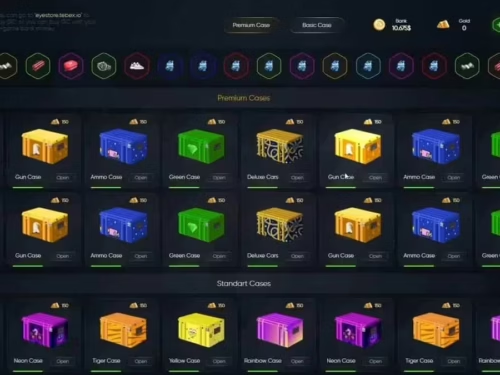
Escaparate
Nota:
Each buyer must configure the rewards and levels they want. I left the default model, but you can always change items, weapons, XP levels, and even add new levels ⦠Each one should do what they like. Also note that each buyer must enter the event of adding XP in the place they want the player to earn XP.
Características principales:
- Gana recompensas subiendo de nivel
- Consultar su propio progreso en BattlePass
- Restablecer el BattlePass en una fecha específica
- Personalizado y único
- Optimizado, seguro y fácil de usar
Todas las características se pueden cambiar si lo deseas, si quieres que haga una versión personalizada contáctame en discord.
Dependencias:
- Administrador de bases de datos (MysqlAsync or ghmattimysqlâ¦)
- ESX V1.2 o EXM y ahora ESX 1.1 es estable (podría hacer una adaptación a otro framework si lo desea)
- NativeUI (Puedo hacer una adaptación a otros menús)
- Cron
Todas las dependencias se pueden cambiar o adaptar al framework/gestor de bases de datos que usa tu servidor. Para cualquier cambio, contáctame primero en Discord.
Alto nivel de configuración:
A continuación os mostraré un print, de todas las posibles configuraciones a cambiar en la versión 1.0:
Sistema de interfaz de usuario:
I am currently using the NativeUI to display the BattlePass information. There you can see the total levels, the current level, the progress, the required XP, the time remaining, and the rewards for each levelâ¦You can customize as you want. If you want me to change the system on your server, send me DM so we can talk.
Comandos disponibles para usar y para qué sirven:
- /bplvl
Este comando permite a los jugadores comprobar su propio nivel. También se puede activar pulsando (i) para cambiarlo.
- /mibp
Este comando se usa para consultar toda la información del Pase de Batalla. También se puede activar pulsando (o) para modificarlo.
Productos relacionados que podrían gustarte
- Servidor Super ESX – Paquete de servidor ESX completo confiable para 306+ servidores
- Base del servidor ESX (por RibSosay) – Fundación ESX popular con 292+ ventas
- Script de búsqueda de FiveM ESX – Engaging XP-earning activity for players
- GIMNASIO Y HABILIDADES (ESX/QB) – Skill progression system that complements battlepass
Explicación del guión:
Este sistema de BattlePass combina el sistema de niveles de GTA Online con NativeNUI. Todos los jugadores comienzan con 0 XP; al realizar ciertas acciones, obtendrán XP que aumentará sus niveles. A medida que subas de nivel, obtendrás recompensas como dinero, armas, objetos… Todo se puede personalizar a tu gusto. Este script no incluye misiones; debes implementarlas donde quieras (en el servidor).
Es un sistema de nivelación/habilidad de FiveM
Escaparate
Nota:
Cada comprador debe configurar las recompensas y los niveles que desee. He dejado el modelo predeterminado, pero siempre se pueden cambiar los objetos, las armas, los niveles de XP e incluso añadir nuevos niveles. Cada uno puede hacer lo que quiera. También hay que tener en cuenta que cada comprador debe participar en el evento de añadir XP donde quiera que el jugador gane XP.
Características principales:
- Gana recompensas subiendo de nivel
- Consultar su propio progreso en BattlePass
- Restablecer el BattlePass en una fecha específica
- Personalizado y único
- Optimizado, seguro y fácil de usar
Todas las características se pueden cambiar si lo deseas, si quieres que haga una versión personalizada contáctame en discord.
Dependencias:
- Administrador de bases de datos (MysqlAsync o ghmattimysql…)
- ESX V1.2 o EXM y ahora ESX 1.1 es estable (podría hacer una adaptación a otro framework si lo desea)
- NativeUI (Puedo hacer una adaptación a otros menús)
- Cron
Todas las dependencias se pueden cambiar o adaptar al framework/gestor de bases de datos que usa tu servidor. Para cualquier cambio, contáctame primero en Discord.
Alto nivel de configuración:
A continuación os mostraré un print, de todas las posibles configuraciones a cambiar en la versión 1.0:
Sistema de interfaz de usuario:
Actualmente uso NativeUI para mostrar la información del Pase de Batalla. Ahí puedes ver los niveles totales, el nivel actual, el progreso, la XP necesaria, el tiempo restante y las recompensas de cada nivel. Puedes personalizarlo como quieras. Si quieres que cambie el sistema en tu servidor, envíame un mensaje directo para hablar.
Comandos disponibles para usar y para qué sirven:
- /bplvl
Este comando permite a los jugadores comprobar su propio nivel. También se puede activar pulsando (i) para cambiarlo.
- /mibp
Este comando se usa para consultar toda la información del Pase de Batalla. También se puede activar pulsando (o) para modificarlo.



Marc (propietario verificado) –
Este recurso me ahorró mucho tiempo de desarrollo. Funcionó casi inmediatamente después de la instalación.
Emma (propietario verificado) –
Después de probar múltiples alternativas, este es el recurso que decidimos mantener.
Tess (propietario verificado) –
Me encanta el diseño y el servicio al cliente es el más amable.
Alysa (propietario verificado) –
La documentación es clara y cubre todos los pasos de configuración importantes.
Aylin (propietario verificado) –
Limpio, optimizado y confiable.
Drake (propietario verificado) –
Lo he estado usando por un tiempo, normalmente no escribo una reseña, pero esta vez estoy realmente convencido de hacerlo.
Adalberto (propietario verificado) –
Hemos utilizado este recurso durante múltiples sesiones ocupadas, y ha permanecido estable.
Ámbar (propietario verificado) –
Obtuve un excelente soporte para este objeto. Fueron pacientes conmigo y me ayudaron a resolver mi problema. Recomiendo esta empresa 100%
Sydney (propietario verificado) –
Un producto excelente con gran flexibilidad. El soporte al cliente es superb. Lo recomiendo sin ninguna duda.