





FFA | TDM | Arena Script – Complete PvP Combat System for FiveM
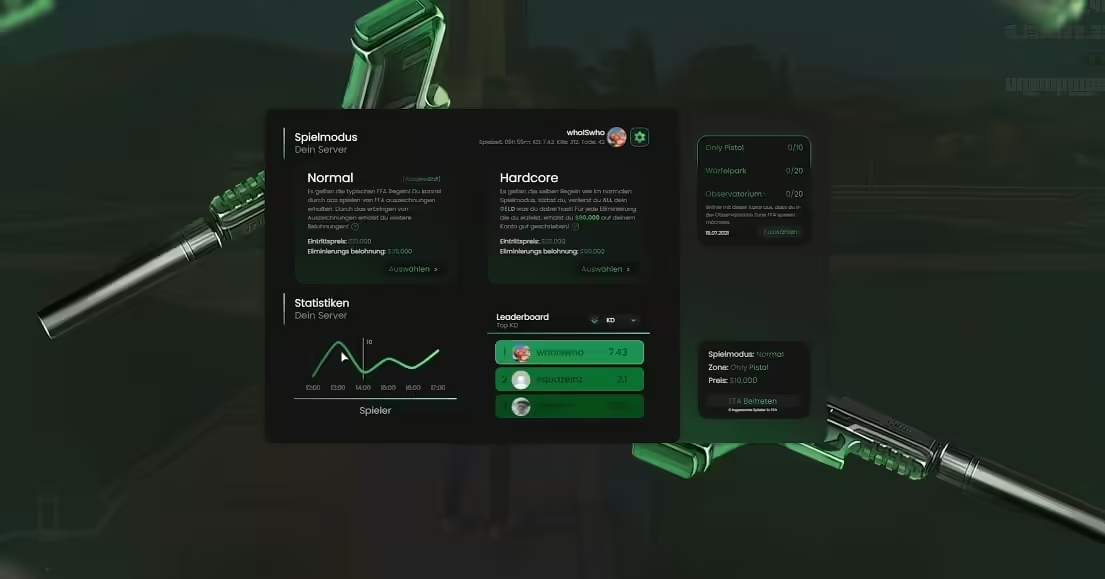
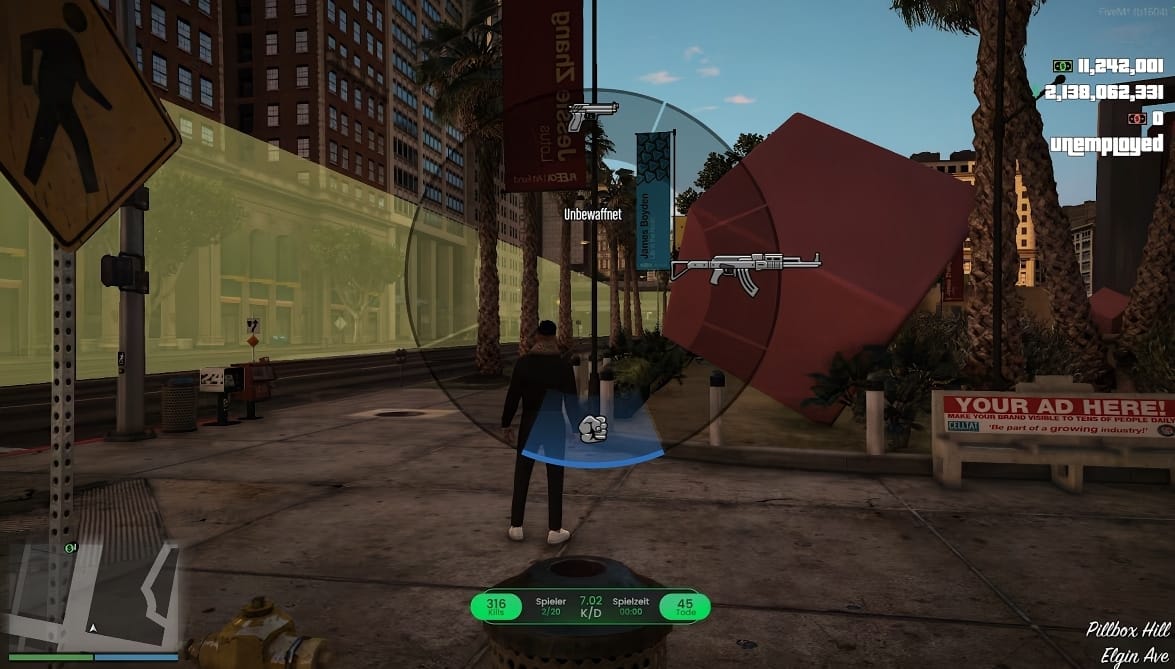
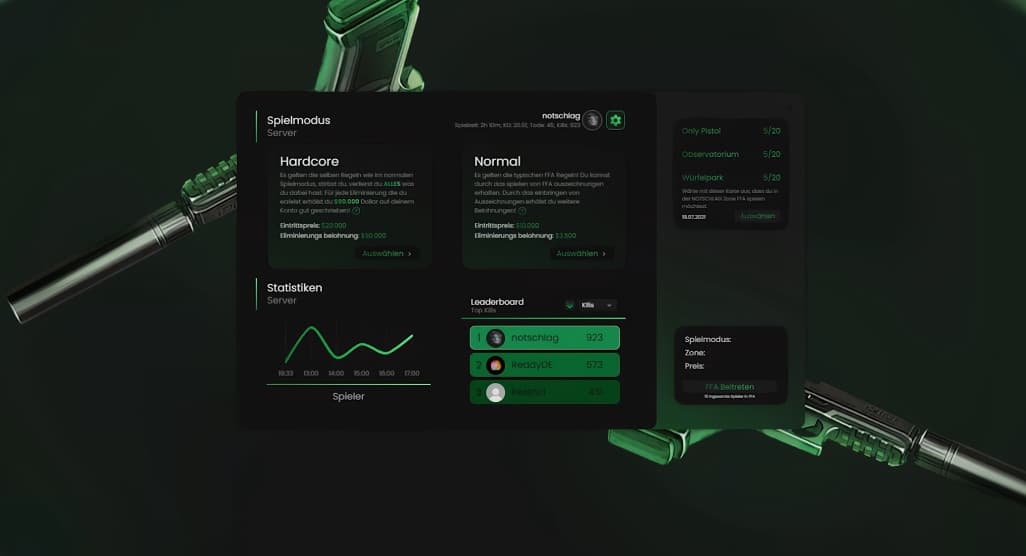
Transform your FiveM server into an action-packed combat arena with this comprehensive PvP script featuring Free-For-All, Team Deathmatch, and custom arena modes. Players can join competitive matches, earn rewards, track statistics, and participate in organized combat without affecting roleplay server dynamics. This script provides complete separation between arena combat and main server gameplay, making it perfect for servers wanting optional PvP content alongside serious roleplay. Full matchmaking, spectator systems, and customizable arenas create engaging competitive experiences.
What’s Included
This all-in-one combat system provides multiple game modes, automated matchmaking, customizable arenas, comprehensive statistics tracking, and reward systems. Players can queue for matches, spectate ongoing games, view leaderboards, and earn currency or items through victories. The script handles all combat mechanics, respawning, scoring, and match management automatically while keeping arena combat completely separate from main server activities. Supports unlimited concurrent matches across different arenas.
Game Modes
- Free-For-All (FFA) – Every player for themselves in chaotic combat, first to reach kill limit wins
- Team Deathmatch (TDM) – Two teams battle for supremacy, team with most kills within time limit wins
- 1v1 Duels – Challenge specific players to private duels with optional wagers
- King of the Hill – Control designated zone to earn points, hold longest to win
- Gun Game – Progress through weapon tiers by getting kills, first through all weapons wins
- Elimination – No respawns, last player/team standing wins the round
- Custom Modes – Create unique game modes with specific rules and victory conditions
Matchmaking System
- Quick Join – Automatically match players into available games based on mode preference
- Skill-Based Matching – Optional ELO system matches similarly skilled players for balanced games
- Party System – Queue with friends and get placed on same team
- Private Matches – Host custom games with invited players only
- Auto-Balance – System balances teams based on player count and skill ratings
- Queue Notifications – Players receive alerts when matches are ready to start
- Lobby Waiting Room – Pre-match area where players prepare before game starts
Arena Management
- Multiple Arena Locations – Set up arenas anywhere on the map with custom boundaries
- Arena Themes – Desert battlegrounds, urban combat zones, warehouse fights, rooftop battles
- Custom Spawn Points – Configure multiple spawn locations per arena for balanced starts
- Spectator Areas – Designated zones for watching ongoing matches
- Weapon Pickups – Place weapon spawns, ammo crates, and equipment throughout arena
- Safe Zones – Non-combat areas for match preparation and post-game
- Dynamic Arenas – Different arenas activate based on game mode or player count
Combat Mechanics
- Loadout Selection – Choose from preset weapon loadouts or customize personal loadouts
- Weapon Balance – All weapons configured for fair competitive play
- Instant Respawn – Fast respawn times keep action flowing in applicable modes
- Health & Armor – Standardized stats ensure fair fights regardless of main server progression
- Kill Confirmation – Optional mode requires collecting tags from kills to score points
- Killstreak Rewards – Earn bonuses like health regeneration or armor for consecutive kills
- Headshot Bonus – Extra points for precision kills encouraging skill development
Statistics & Leaderboards
- Personal Stats – Track kills, deaths, K/D ratio, win rate, accuracy, and headshot percentage
- Match History – View detailed results from previous games including opponents and performance
- Global Leaderboards – Compare stats with all server players across different timeframes
- Mode-Specific Stats – Separate tracking for FFA, TDM, and other game modes
- Weapon Statistics – See performance breakdown by weapon type
- Rank System – Progress through ranks based on total wins or ELO rating
- Achievement System – Unlock achievements for milestones and special accomplishments
Perfect For
- Roleplay servers offering optional combat content without RP interference
- Hybrid servers balancing serious roleplay with competitive PvP
- Communities wanting skill-based competition separate from character progression
- Servers with active police/gang factions needing combat practice areas
- Networks providing mini-games and alternative gameplay modes
- Tournament-focused servers hosting organized competitive events
Technical Specifications
- Performance: 0.02-0.04ms resmon per active match (scales efficiently)
- Player Capacity: Supports 2-32 players per arena depending on size
- Concurrent Matches: Unlimited simultaneous matches across different arenas
- Database: Efficient stat storage with optimized queries for leaderboards
- Synchronization: Smooth combat sync with anti-cheat validation
- Network Optimization: Minimal bandwidth usage even with multiple active arenas
Installation & Configuration
- Import SQL database file to create stats and leaderboard tables
- Place resource in your server resources folder
- Configure arena locations, boundaries, and spawn points in config.lua
- Set up weapon loadouts, game mode parameters, and match settings
- Configure framework integration for economy and inventory systems (optional)
- Adjust reward payouts for wins, kills, and achievements
- Set up arena entry points and lobby locations
- Test each game mode with various player counts
- Restart server and verify stat tracking and leaderboards function correctly
Framework Compatibility
- ✅ ESX Legacy – Optional integration for money rewards, inventory blocking, and job restrictions
- ✅ QBCore – Compatible with QB economy, inventory systems, and player data
- ✅ QBOX – Works with QBOX framework features and systems
- ✅ Standalone – Fully functional without any framework dependencies
- ✅ Custom Frameworks – Easily adaptable to any server framework
Reward System
Players earn rewards through match participation and performance. Configure payouts for wins, kills, assists, objectives completed, and achievements unlocked. Rewards can be server currency, items, exclusive cosmetics, or ranking points. The system supports daily/weekly challenges offering bonus rewards for specific objectives like “Win 5 FFA matches” or “Get 50 headshots.” Progressive reward tiers encourage continued participation and skill improvement.
Spectator Features
- Free Camera – Spectate matches from any angle with unrestricted camera movement
- Player Follow – Lock camera to specific players to watch their perspective
- First-Person View – See exactly what players see during combat
- Kill Feed – Real-time updates showing all eliminations and how they occurred
- Scoreboard Access – View current match statistics and player standings
- Team Selection – Choose which team to spectate in team-based modes
- Commentary Mode – Ideal for tournament streaming and content creation
Customization Options
- Configurable match durations, kill limits, and win conditions per mode
- Custom weapon loadout creation with specific attachments and ammo counts
- Adjustable respawn times, spawn protection duration, and invulnerability periods
- Editable UI colors, layouts, and notification styles
- Language file support for multilingual servers
- Discord webhook integration for match results and leaderboard updates
- Custom sound effects for kills, victories, and special events
What Makes It Stand Out
Unlike simple deathmatch scripts, this comprehensive system provides complete competitive infrastructure with matchmaking, rankings, and statistics comparable to dedicated FPS games. The separation from main server mechanics means roleplay servers can offer combat without compromising realism, while the variety of game modes keeps competitive players engaged long-term. The skill-based matching ensures fair games, spectator features enable tournaments and content creation, and the achievement system provides progression beyond just killing. This script turns combat from a roleplay disruption into a valued server feature.
Anti-Cheat & Fair Play
- Server-Side Validation – All damage, kills, and scoring verified server-side preventing manipulation
- Damage Cap – Prevents modified weapons from dealing unrealistic damage
- Spawn Protection – New spawns protected briefly from spawn camping
- AFK Detection – Auto-kick inactive players freeing slots for active participants
- Exploit Prevention – Blocks common exploits like weapon switching glitches
- Report System – Players can report suspected cheaters for admin review
- Admin Spectate – Staff can invisibly spectate suspected cheaters
Tournament Support
The script includes features specifically designed for organized competitive events. Admins can create bracketed tournaments, schedule matches, assign teams, and track results through multiple rounds. Spectator mode supports streaming and commentary, while the admin panel provides match control, player management, and rule enforcement. Tournament brackets automatically advance winners, track overall standings, and can award special prizes to champions.
Training & Practice
- Bot Matches – Practice against AI opponents before facing real players (if bot system integrated)
- Private Training – Reserve arena for individual practice or coaching sessions
- Weapon Testing – Try all weapons without match pressure to find preferred loadouts
- Map Learning – Explore arenas freely to learn optimal positions and routes
- 1v1 Practice – Spar with friends to improve specific skills
Social Features
- Friends system to easily invite acquaintances to matches
- Clan/team support for organized group competitions
- Chat channels for pre-match coordination and post-game discussion
- Reputation system based on sportsmanship and skill
- Player profiles displaying stats, achievements, and match history
- Commendation system for recognizing good teammates
Economic Integration
The arena system can integrate with server economy through entry fees, wager matches, and prize pools. Players pay to enter premium matches with higher rewards, bet on their own performance in wager games, or contribute to community tournament prize pools. This creates money sinks preventing inflation while giving competitive players ways to earn through skill. Customize fee structures and payout ratios to balance your server economy.
Performance Optimization
Despite supporting multiple concurrent matches with full stat tracking, the script maintains excellent performance through efficient database queries, client-side prediction, and optimized network events. Match data only syncs to relevant participants, leaderboard updates occur in batches, and the system automatically cleans old match history. Arenas use instanced zones preventing interference with main server gameplay, and resource usage scales appropriately with player count.
Admin Control Panel
- Start, stop, or reset matches manually for events
- Force-balance teams if auto-balance fails
- Kick disruptive players from arenas
- Modify match settings mid-game if needed
- View real-time match statistics and player performance
- Reset player stats or rankings for seasons
- Configure seasonal events with special rules and rewards
Seasonal Content
Keep your community engaged with rotating seasonal events, limited-time game modes, special weapon rotations, and exclusive cosmetic rewards. The script supports seasonal leaderboards that reset periodically, maintaining long-term competitiveness. Offer seasonal battlepass-style progression with unlockable rewards for active participants, creating recurring engagement similar to major competitive games.
Support & Documentation
Comprehensive documentation includes installation guide, configuration examples for each game mode, framework integration instructions, troubleshooting section, and admin command reference. Video tutorials demonstrate setup process and feature usage. Regular updates add new game modes, improve balance, fix bugs, and maintain compatibility with latest FiveM builds. Lifetime access to all updates and future enhancements.




Leann (verified owner) –
Updates are frequent, and the developer clearly continues improving the product.
Petra (verified owner) –
A promising product, worth trying
Karelle (verified owner) –
Very flexible and well designed.
Domenick (verified owner) –
By far the best item on the market, you will not be disappointed.
Dejah (verified owner) –
This has quickly become one of my favorite resources on our server.
Candida (verified owner) –
great
Orion (verified owner) –
Not bad, but the service does not meet my expectations.
Kaylah (verified owner) –
Easy to install and easy to customize.
CodyCrush (verified owner) –
I appreciate how customizable this resource is. We were able to make it match our server branding perfectly.