If you’re running a FiveM server in a language other than English, you’ll soon realise that players crave an experience that feels native to them. Whether your community speaks German, French, Spanish, or any other language, the easiest way to win their hearts is to translate your server’s scripts so every menu, notification, and chat message feels right at home. Below is a step‑by‑step guide that shows you the safest way to translate FiveM scripts without breaking your server.
Get the Right Editor – Notepad++ Is the Best Choice
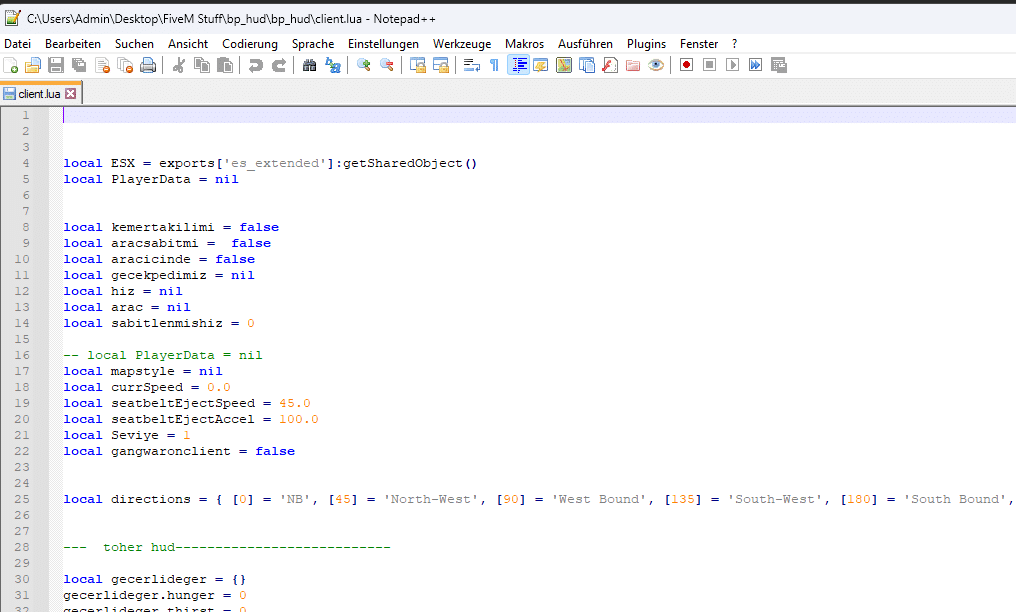
Open the script in a code-aware editor such as Notepad++.
Don’t waste time with Windows Notepad. Lua files in FiveM are full of syntax that needs highlighting, line‑number navigation, and proper character support. Notepad++ is a free, lightweight editor designed exactly for this purpose. It:
Highlights Lua syntax, making code easier to read
Handles different file types documentedly, including `.lua` and `.json`
Provides a clean, customizable interface that keeps you focused
Download it from the official site: . A single installation will be your best ally when editing any FiveM resource.
Locate the Script Files You Want to Translate
Open the relevant Lua or HTML file from the resource folder.
The first step is finding the exact files you’ll edit.
1. Navigate to the `resources` folder inside your FiveM server directory.
2. Inside, locate the specific resource you want to translate. Resources are usually stored in a folder named after the script, for example:
`[esx]/esx_jobs`
`[standalone]/my_cool_script`
3. Look for files ending in `.lua`. Three files are typically the focus:
`client.lua` – handles client‑side logic (player interactions)
`server.lua` – runs on the server (data handling, admin commands)
`config.lua` – often contains human‑readable text and settings
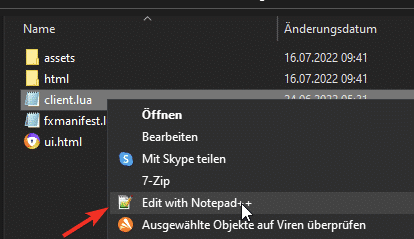
Right‑click the file and choose Edit with Notepad++. If you prefer other editors, the same rules apply.
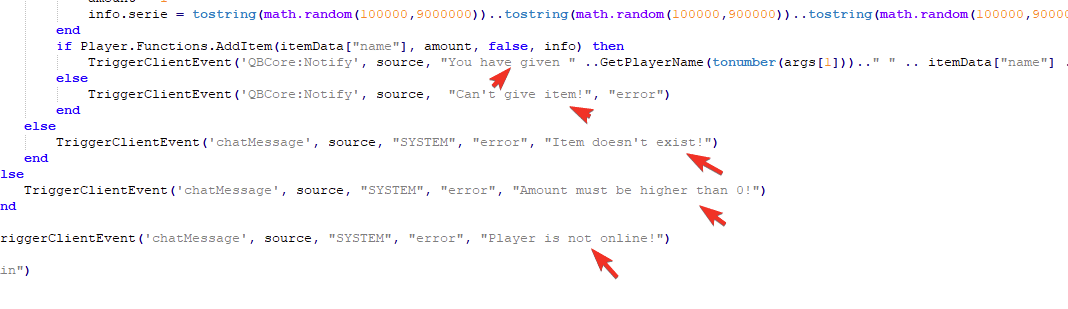
Only Translate the Text Inside Quotes
Translate player-facing strings while preserving code, events and placeholders.
Inside each Lua file you’ll see a blend of code and text. The only thing that should change is the user‑facing strings, the words inside quotation marks (` ` or `’ ‘`). Leave everything else untouched—variable names, function calls, and language keywords like `if`, `then`, `end`, `local`, and `function` are part of the programming language and must remain unchanged.
Example: Translating a Client‑side Notification
Original (English):
“`lua
TriggerEvent(‘chat:addMessage’, { args = { ‘SYSTEM’, ‘Welcome to the server!’ } })
ESX.ShowNotification(You received $500 for your job.)
local message = Press E to interact
“`
Translated (German):
“`lua
TriggerEvent(‘chat:addMessage’, { args = { ‘SYSTEM’, ‘Willkommen auf dem Server!’ } })
ESX.ShowNotification(Du hast 500$ für deinen Job erhalten.)
local message = Drücke E zum Interagieren
“`
Notice that the code structure, variable names (`message`), and function names (`TriggerEvent`, `ESX.ShowNotification`) are intact.
Key Rule: Preserve Placeholders
Many strings contain placeholders that the script will replace at runtime. These can be `%s`, `%d`, `{1}`, `{name}`, `${amount}`, etc. Never alter or remove placeholders.
Wrong: `local welcome = Willkommen, %s!`
Correct: `local welcome = Willkommen, %s!`
If you change the placeholder, the script will throw errors or display garbage text.
Save Files with the Correct Encoding
Special characters (ä, ö, ü, é, ñ, etc.) require UTF‑8 encoding to display properly in game. In Notepad++:
1. Click Encoding in the top menu.
2. Select Encode in UTF‑8 (do not choose UTF‑8‑BOM).
3. Click the Save icon or use File → Save.
This simple step verifys that your translations appear correctly in the FiveM client and server console.
Watch Out for Common Pitfalls
| Issue | What to Avoid | How to Fix |
|——-|—————|————|
| Changing variable names | `local hello = Hello` → `local hallo = Hallo` | Leave variable names unchanged. |
| Removing comments | `– This is a comment` → deleted | Keep comments as they are; translations of comments are optional but not required. |
| Altering placeholders | `Welcome, %s!` → `Willkommen, %d!` | Preserve placeholders exactly. |
| Using wrong encoding | Strange symbols appear | Always use UTF‑8 without BOM. |
| Inconsistent terminology | Some script parts say “Police” while others say “Cops” | Use a consistent translation throughout the script (ideally across all resources). |
Back up the original script folder before you start editing. If anything goes wrong, you can simply re‑copy the original files back into place.
Test Your Work
After translating, restart the resource or the entire server. Test in the FiveM client:
Play a few interactions to ensure notifications show up as expected.
Check the chat for proper formatting.
Watch the F8 console for any Lua errors or warnings.
If you spot a problem, revert to the backup, tweak the translation, and re‑test.
Using AI to Assist Your Translation
If you have access to an AI language model such as ChatGPT or Gemini, you can feed it a block of text and ask for a precise translation. AI can save time on large scripts, but always double‑check the output for placeholders and punctuation. A simple workflow:
1. Copy the relevant lines from the original script.
2. Paste them into the AI with a clear instruction: “Translate these strings from English to German, preserving placeholders like %s.”*
3. Review the AI’s output, copy it back, and replace only the text inside the quotation marks.
Remember, AI is a tool, not a substitute for careful proofreading and testing.
Recap: Quick Steps to Translate FiveM Scripts Safely
1. Use a proper editor (Notepad++ recommended).
2. Open the `.lua` files in your chosen resource.
3. Translate only the text inside quotes, preserving placeholders and code syntax.
4. Encode the file as UTF‑8 (no BOM).
5. Back up originals before editing.
6. Restart the server and test thoroughly.
By following these guidelines, you’ll create a polished, multilingual experience that feels native to players across the globe. Happy translating, and may your FiveM community thrive!