Ir para o conteúdo principal
FiveMX
Loja
Scripts
MLOs
Servidores Completos
Mods Grátis
Ferramentas
Guias
Todos os Produtos
FiveMX

Comece a construir seu servidor hoje.

Recursos FiveM selecionados, entrega instantânea, mods grátis para começar e guias práticos em um marketplace tranquilo.

Navegar na lojasupport@fivemx.com

Loja

  • Loja
  • Todos os produtos
  • Mods grátis
  • Melhores scripts & mods
  • Scripts FiveM

Frameworks

  • Scripts QBCore
  • Scripts ESX
  • QBox
  • Standalone

Comunidade

  • Blog
  • Suporte
  • Criadores
  • Afiliados

Jurídico

  • Política de privacidade
  • Termos de serviço
  • Política de reembolso
  • Entrega digital
  • Política de cookies
  • Conformidade LGPD/GDPR
  • DMCA
  • Informações legais
  • Política editorial
© 2026 FiveMX. Todos os direitos reservados.·FiveMX não é afiliado à Rockstar Games, Take-Two Interactive ou CFX.re. Todas as marcas são propriedade de seus respectivos donos.
GitHubDiscordDocs
Compatibilidade:

BB Multichar (QB)

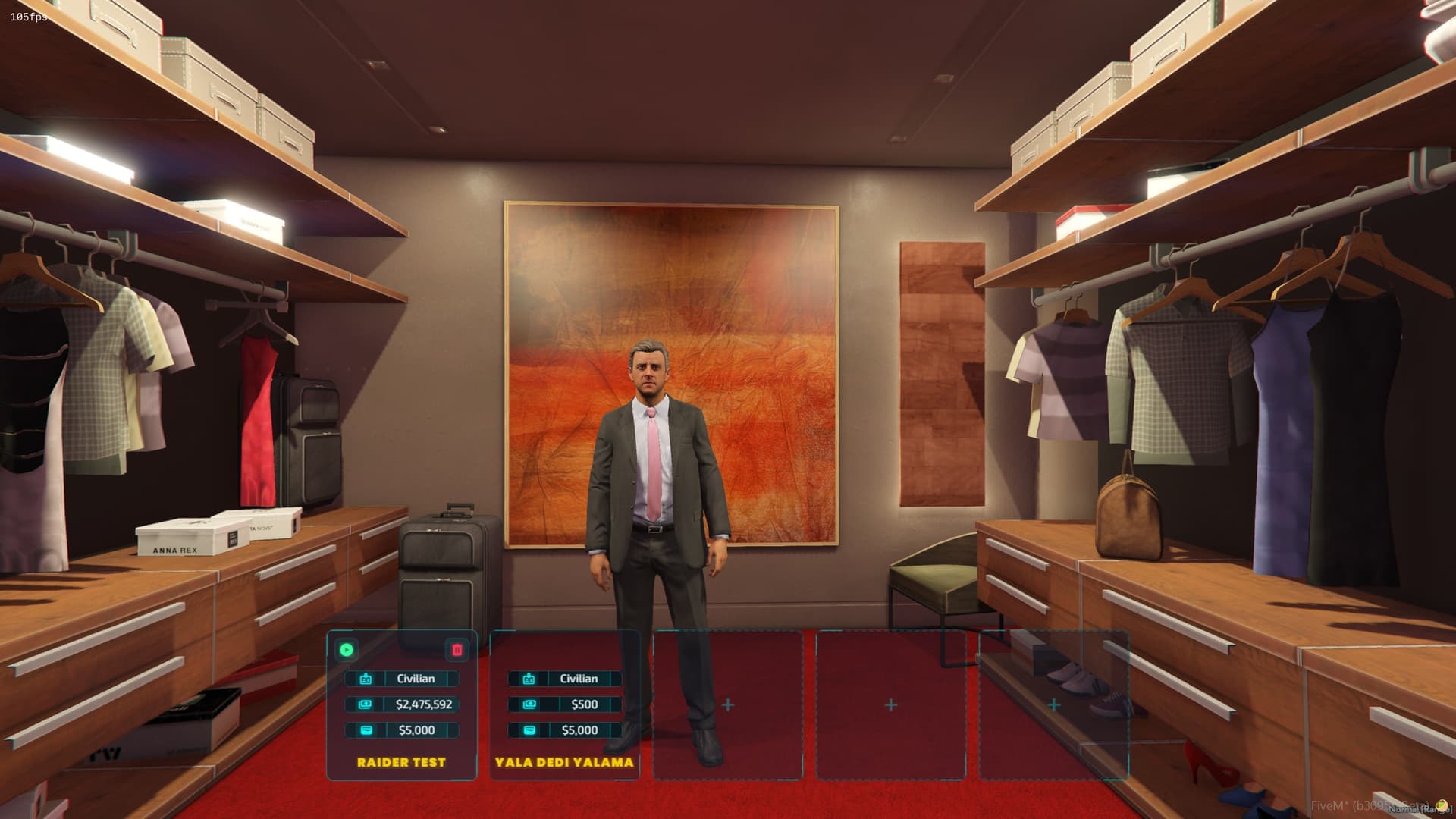
Features - UI: Modern & Sleek UI, A UI that will make people on your server fall in love. - CLOTHING: Default support for QB-clothing, RAID & FiveM-Appearance with the options to add/edit as you like. - DISCORD: Allow players to have more characters with a discord role.

Acesso Instantâneo
Política de reembolso de 14 dias

Compatibilidade, configuração e comprovação do produto em um olhar

Use os dados publicados nesta página para confirmar se BB Multichar (QB) é compatível com seu servidor antes do checkout.

Compatibilidade

Frameworks
QBCore
Categoria
Character & Appearance

Configuração e requisitos

Fluxo de instalação
Download → pasta resources → ensure no server.cfg
Requisitos
Publicado nesta página
Tamanho do arquivo
14.12 KB

Comprovação e perguntas de compradores

Avaliações
Sem avaliações ainda
Perguntas Respondidas
Pergunte antes de comprar
Checkout Seguro
$12.49
Acesso imediato aos arquivos após o pagamento
Suporte e política de reembolso visíveis antes do checkout
Funciona com qbcore
  • Acesso Instantâneo
  • SSL Criptografado
  • Cartão, Klarna, carteiras
Frameworks

qbcore

Requisitos

Publicado nesta página

Pré-visualização

Disponível

Cartão, Klarna e carteiras compatíveis via Stripe. Outros métodos locais podem aparecer quando disponíveis na sua região.

Falar com suporte antes de comprarLer política de reembolso

Expectativa de suporte

O suporte cobre acesso ao download, arquivos entregues que estejam faltando e dúvidas com base nas notas de instalação publicadas.

Instalação personalizada, conversão de framework, configuração em servidor ao vivo e trabalho em recursos personalizados não estão incluídos, salvo quando indicado na página do produto.

Pergunte antes de comprar se seu servidor usa recursos de framework, inventário ou banco de dados muito modificados.

Montando um servidor maior?Compare pacotes selecionados antes do checkout se você precisa de vários scripts compatíveis.Ver pacotes FiveM

Compre quando isso economizar tempo de configuração

Use esta checklist para decidir rapidamente se o recurso combina com seu servidor, framework e expectativas de suporte.

Ganho para o administrador

BB Multichar (QB) foi posicionado para reduzir Character & Appearance, em vez de você reconstruir o mesmo sistema do zero.

Compatibilidade

Funciona com qbcore. Verifique o bloco de requisitos antes de usar em um servidor ativo.

Confiança na compra

Download instantâneo, checkout Stripe, acesso ao suporte e contexto de reembolso são exibidos antes do pagamento.

Elementos de decisão

Requisitos, detalhes de instalação, Vídeo de pré-visualização, Perguntas do Produto

Descrição

BB-MULTICHARACTER

https://www.youtube.com/watch?v=rDTCuyhPz9M

Installation

  1. Drag & drop to your server, stop qb-multicharacter or whatever multicharacter you're using.
  2. Edit the server config as you like to fit your server.
  3. Enjoy.

Config

CoreConfig = {
    core = 'qb-core', -- your core name for the exports
    prefix = 'qb-', -- your trigger prefixes
    notify = 'QBCore:Notify', -- your notification trigger
    char_english_only = true, -- block to option to create character with non english names

    clothing_base = 'qb', -- Whether qb, raid, fivem-appearance or other
    clothing_name = 'qb-clothing' -- Your clothing resource name
}

Clothing

Default support for 2 clothing stores: qb-clothing & raid-clothing.

  • If youre using qb-clothing make sure to set it to qb even if your core name is different.
  • If youre using raid-clothing, make sure to add the following function to your client.
    [1] Paste the following code to the bottom of your raid-clothing/client/client.lua: function SetPedMetadata(ped, data) for i = 1, #drawable_names do if data.drawables[0] == nil then if drawable_names[i] == undershirts and data.drawables[tostring(i-1)][2] == -1 then SetPedComponentVariation(ped, i-1, 15, 0, 2) else SetPedComponentVariation(ped, i-1, data.drawables[tostring(i-1)][2], data.drawtextures[i][2], 2) end else if drawable_names[i] == undershirts and data.drawables[i-1][2] == -1 then SetPedComponentVariation(ped, i-1, 15, 0, 2) else SetPedComponentVariation(ped, i-1, data.drawables[i-1][2], data.drawtextures[i][2], 2) end end end for i = 1, #prop_names do local propZ = (data.drawables[0] == nil and data.props[tostring(i-1)][2] or data.props[i-1][2]) ClearPedProp(ped, i-1) SetPedPropIndex(ped, i-1, propZ, data.proptextures[i][2], true) end Wait(100) if data.headBlend then SetPedHairColor(ped, tonumber(data.hairColor[1]), tonumber(data.hairColor[2])) SetPedHeadBlend(data.headBlend) SetPedHeadBlendData(ped, tonumber(data.headBlend['shapeFirst']), tonumber(data.headBlend['shapeSecond']), tonumber(data.headBlend['shapeThird']), tonumber(data.headBlend['skinFirst']), tonumber(data.headBlend['skinSecond']), tonumber(data.headBlend['skinThird']), tonumber(data.headBlend['shapeMix']), tonumber(data.headBlend['skinMix']), tonumber(data.headBlend['thirdMix']), false) for i = 1, #face_features do SetPedFaceFeature(ped, i-1, data.headStructure[i]) end if json.encode(data) ~= [] then for i = 1, #head_overlays do SetPedHeadOverlay(ped, i-1, tonumber(data.headOverlay[i].overlayValue), tonumber(data.headOverlay[i].overlayOpacity)) end SetPedHeadOverlayColor(ped, 0, 0, tonumber(data.headOverlay[1].firstColour), tonumber(data.headOverlay[1].secondColour)) SetPedHeadOverlayColor(ped, 1, 1, tonumber(data.headOverlay[2].firstColour), tonumber(data.headOverlay[2].secondColour)) SetPedHeadOverlayColor(ped, 2, 1, tonumber(data.headOverlay[3].firstColour), tonumber(data.headOverlay[3].secondColour)) SetPedHeadOverlayColor(ped, 3, 0, tonumber(data.headOverlay[4].firstColour), tonumber(data.headOverlay[4].secondColour)) SetPedHeadOverlayColor(ped, 4, 2, tonumber(data.headOverlay[5].firstColour), tonumber(data.headOverlay[5].secondColour)) SetPedHeadOverlayColor(ped, 5, 2, tonumber(data.headOverlay[6].firstColour), tonumber(data.headOverlay[6].secondColour)) SetPedHeadOverlayColor(ped, 6, 0, tonumber(data.headOverlay[7].firstColour), tonumber(data.headOverlay[7].secondColour)) SetPedHeadOverlayColor(ped, 7, 0, tonumber(data.headOverlay[8].firstColour), tonumber(data.headOverlay[8].secondColour)) SetPedHeadOverlayColor(ped, 8, 2, tonumber(data.headOverlay[9].firstColour), tonumber(data.headOverlay[9].secondColour)) SetPedHeadOverlayColor(ped, 9, 0, tonumber(data.headOverlay[10].firstColour), tonumber(data.headOverlay[10].secondColour)) SetPedHeadOverlayColor(ped, 10, 1, tonumber(data.headOverlay[11].firstColour), tonumber(data.headOverlay[11].secondColour)) SetPedHeadOverlayColor(ped, 11, 0, tonumber(data.headOverlay[12].firstColour), tonumber(data.headOverlay[12].secondColour)) end endend [2] Paste the following code to the bottom of youre fxmanifest/__resource.lua in the raid clothing resource:
    export 'SetPedMetadata'
  • If youre using any other clothing store, set it to @other and make sure to edit all the functions related to the clothing,
    server/functions.lua --> edit the getOtherClothing function.
    client/main.lua --> search for @other and change all of the functions in there

Support

  • Write a ticket for any questions!

Notas de instalação

Requires a FiveM server, QBCore, access to server resources, and permission to restart the resource after configuration.

Apenas os dados publicados nesta página devem ser considerados confirmados. Se você precisar de mais detalhes, revise a descrição, requisitos, histórico de alterações, avaliações e perguntas do produto antes do checkout.

DescriçãoRequisitosVídeo de pré-visualização
Início
Loja
Character & Appearance
QBCore
Processo de revisão
Processo de revisão

Características Principais

  • Modern & Sleek UI

    Provides a modern and sleek user interface designed to enhance player experience on the server.

  • Default Clothing Store Support

    Includes default support for QB-clothing, RAID-clothing, and FiveM-Appearance clothing systems with options to add or edit as needed.

  • Discord Role Integration

    Allows players to have more characters based on discord role assignments.

  • Configurable Core Integration

    Supports customizable core name, trigger prefixes, and notification triggers through server config to fit different server setups.

  • English Name Restriction Option

    Includes configuration option to block character creation with non-English names.

Perguntas Frequentes

Perguntas e Respostas da Comunidade

0 perguntas

Sem Perguntas

Seja o primeiro a fazer uma pergunta!

0/500 caracteres (mínimo 10)

Sua pergunta será revisada antes de aparecer publicamente.

Produtos Relacionados

$7.49
$9.49
$10.49
$9.49

Related Tutorials & Guides

Learn more about setting up, configuring, and using this type of resource.

QBCore Admin Commands — Complete FiveM Reference

QBCore Admin Commands — Complete FiveM Reference

Complete QBCore admin command reference for FiveM servers: permissions, admin menu commands, player moderation, vehicle tools, money/job commands, reports, warnings, and troubleshooting.

Best QBCore Scripts 2026: Essential Server Stack

Best QBCore Scripts 2026: Essential Server Stack

A practical QBCore script stack for FiveM server owners in 2026. Covers police, jobs, HUD, phone, inventory, housing, economy, vehicles, and free starter options.

FiveM Multicharacter Setup Guide 2026 — Multiple Characters on One Account

FiveM Multicharacter Setup Guide 2026 — Multiple Characters on One Account

Letting players run multiple characters on a single FiveM account is one of the most impactful features you can add to a roleplay server.

Continue Construindo Seu Servidor FiveM

Use este produto como parte de uma configuração maior. Explore categorias relacionadas, frameworks alternativos, pacotes premium e downloads gratuitos complementares.

Explorar todos os scriptsScripts de Character & AppearanceScripts qbcoreExperimente ESXExperimente QBoxMods FiveM grátisComparar pacotes
CodeV MultiCharacter

CodeV MultiCharacter

Cyber Multichar

Cyber Multichar

ZSX Multicharacter

ZSX Multicharacter

ata Spawn Selector

ata Spawn Selector