Ir para o conteúdo principal
  • Entrega digital instantânea
  • Atualizações vitalícias em produtos selecionados
  • Aprovado por donos de servidores
FiveMX
Loja
Servidores CompletosPacotesLançamentos
FiveMX

Comece a construir seu servidor hoje.

Recursos FiveM selecionados, entrega instantânea, mods grátis para começar e guias práticos em um marketplace tranquilo.

Navegar na lojasupport@fivemx.com

Loja

  • Loja
  • Mods FiveM
  • Todos os produtos
  • Mods grátis
  • Melhores scripts & mods
  • Scripts FiveM

Frameworks

  • Scripts QBCore
  • Scripts ESX
  • QBox
  • Standalone

Comunidade

  • Blog
  • Suporte
  • Criadores
  • Afiliados

Jurídico

  • Política de privacidade
  • Termos de serviço
  • Política de reembolso
  • Entrega digital
  • Política de cookies
  • Conformidade LGPD/GDPR
  • DMCA
  • Informações legais
  • Política editorial

Templates de Servidor

  • Template de Servidor QBCore
  • Template de Servidor ESX
  • Template de Servidor NoPixel
  • Packs de Servidor
  • Templates Grátis
  • Alternativa ao Tebex
© 2026 FiveMX. Todos os direitos reservados.·FiveMX não é afiliado à Rockstar Games, Take-Two Interactive ou CFX.re. Todas as marcas são propriedade de seus respectivos donos.
DiscordDocs
  1. Início
  2. Loja
  3. HUDs

9 imagens do produto disponíveis.

HUDs
Compatibilidade:
QBCore
QBOX

wais eHUD (qbCore)

Processo de revisão
$30.99

Checkout Seguro

Cartões, Apple Pay, Google Pay, iDEAL/Wero, Bancontact, EPS, Przelewy24 e Crypto opcional quando disponível via Stripe.

Acesso imediato aos arquivos após o pagamentoSuporte e política de reembolso visíveis antes do checkout
Falar com suporte antes de comprarLer política de reembolso
Acesso Instantâneo
SSL Criptografado
Cartões, carteiras, redirecionamentos bancários
Frameworksqbcore, qbox
Instalação

Requires a FiveM server, qbcore or qbox, access to server resources, and permission to restart the resource after configuration.

RequirementsPublicado nesta página
PreviewDisponível

Descrição

wais eHUD - Modern QBCore HUD Interface

Transform your QBCore server's user interface with wais eHUD, a sleek and modern HUD system designed specifically for QBCore framework. This isn't just another status bar - it's a complete interface overhaul that presents player information in an elegant, easy-to-read format that enhances immersion without cluttering the screen.

https://www.youtube.com/watch?v=zneQmbw22A0

Modern Interface Design

wais eHUD brings contemporary UI design principles to your FiveM server. The interface uses clean lines, smooth animations, and intuitive information placement that lets players focus on gameplay while keeping essential stats visible. Every element has been carefully positioned to minimize visual clutter while maximizing information accessibility.

Comprehensive Player Information

The HUD displays all critical player statistics in an organized, at-a-glance format:

  • Health Status - Clear visual representation of current health levels
  • Armor Display - Separate armor indicator for tactical awareness
  • Hunger & Thirst - Needs system integration with clean icons
  • Stamina Bar - Real-time stamina tracking for physical activities
  • Oxygen Level - Underwater breathing indicator when diving
  • Vehicle Information - Speed, fuel, and vehicle health when driving
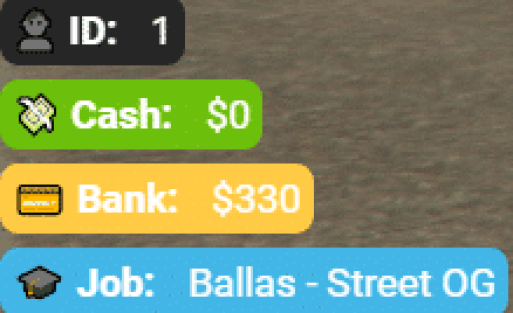
  • Money Display - Current cash and bank balance visibility
  • Job Information - Active job and rank display

Key Features

  • QBCore Native - Built specifically for QBCore framework integration
  • Smooth Animations - Professional transitions and state changes
  • Performance Optimized - Minimal resource usage for smooth gameplay
  • Customizable Layout - Adjust positioning and element visibility
  • Color Schemes - Multiple color options or custom color configuration
  • Icon Pack - Clean, modern icons for all HUD elements
  • Responsive Design - Adapts to different screen resolutions
  • Vehicle HUD - Integrated speedometer and vehicle information

Perfect For

  • QBCore servers wanting modern UI aesthetics
  • Roleplay communities valuing clean interfaces
  • Servers looking to replace default QBCore HUD
  • Communities that prioritize user experience
  • Servers wanting professional-looking interfaces

Framework Compatibility

  • ✅ QBCore - Designed exclusively for QBCore framework
  • ✅ Latest Versions - Compatible with current QBCore releases
  • ✅ QB-Menu - Works with standard QBCore menu systems

Installation Process

Setting up wais eHUD is straightforward:

  1. Download the eHUD resource package
  2. Extract to your server resources folder
  3. Configure colors and positioning in the config file
  4. Disable your current HUD resource
  5. Add ensure wais-ehud to your server.cfg
  6. Restart and enjoy your new interface

Customization Options

The HUD comes with extensive customization capabilities through its configuration file. Adjust element positions to match your preferred layout, change color schemes to align with your server branding, toggle individual elements on or off based on your needs, and fine-tune animation speeds for the perfect feel. Server owners can create a unique interface that matches their community's aesthetic.

Vehicle HUD Integration

When players enter vehicles, the HUD seamlessly transitions to display driving-relevant information. The speedometer shows current speed in your configured units (MPH/KPH), fuel levels are clearly visible to prevent unexpected breakdowns, vehicle health helps players know when repairs are needed, and all information is presented without blocking important screen areas. The transition in and out of vehicle mode is smooth and non-intrusive.

Performance Considerations

Despite its modern appearance and smooth animations, wais eHUD maintains excellent performance. The code is optimized to minimize resource usage, ensuring players don't sacrifice FPS for a pretty interface. The HUD uses efficient rendering techniques and only updates elements when values change, not constantly redrawing the entire interface.

Status Indicators

All player needs and statuses are represented with clear, easily understood icons and progress bars. The color coding makes it immediately obvious when levels are critical - health bars turn red when low, hunger and thirst indicators change color as needs increase, and stamina depletion is visually obvious during intense activities. Players can assess their status with a quick glance without needing to interpret complex information.

Image Gallery Reference

Be sure to check the product images for detailed views of the HUD in various states - on foot, in vehicles, during different activities, and with different status levels. The screenshots show exactly what your players will experience, including all the visual elements and their positions on screen.

Community Feedback

Server owners who've implemented wais eHUD consistently report positive player feedback about the clean interface and improved information accessibility. Players appreciate being able to monitor their status without the HUD dominating their screen, and the modern design enhances the overall server experience.

What Makes It Stand Out

While many HUDs simply rearrange the default information, wais eHUD completely reimagines how player data should be presented. The design philosophy prioritizes clarity and minimalism - showing you what you need when you need it, without overwhelming you with constant information. The QBCore-specific integration means perfect compatibility without awkward workarounds or missing features. You're getting a professionally designed interface that makes your server feel polished and modern from the moment players log in.

Related FiveM HUD

  • LD HUD 4.0
  • r4 HUD (ESX)
  • SNZ HUD (ESX/QB)
  • Nation HUD

Compre quando isso economizar tempo de configuração

Use esta checklist para decidir rapidamente se o recurso combina com seu servidor, framework e expectativas de suporte.

Ganho para o administrador

wais eHUD (qbCore) foi posicionado para reduzir HUDs, em vez de você reconstruir o mesmo sistema do zero.

Compatibilidade

Funciona com qbcore, qbox. Verifique o bloco de requisitos antes de usar em um servidor ativo.

Confiança na compra

Download instantâneo, checkout Stripe, acesso ao suporte e contexto de reembolso são exibidos antes do pagamento.

Elementos de decisão

Requisitos, Vídeo de pré-visualização, Perguntas do Produto

Compatibilidade, configuração e comprovação do produto em um olhar

Use os dados publicados nesta página para confirmar se wais eHUD (qbCore) é compatível com seu servidor antes do checkout.

Compatibilidade

Frameworks
QBCore, QBOX
Category
HUDs

Configuração e requisitos

Install flow
Download → pasta resources → ensure no server.cfg
Requirements
Publicado nesta página
File size
4.9 MB

Comprovação e perguntas de compradores

Reviews
Sem avaliações ainda
Answered Q&A
Pergunte antes de comprar

Apenas os dados publicados nesta página devem ser considerados confirmados. Se você precisar de mais detalhes, revise a descrição, requisitos, histórico de alterações, avaliações e perguntas do produto antes do checkout.

Compatibilidade:

wais eHUD (qbCore)

$30.99

Checkout Seguro

Cartões, Apple Pay, Google Pay, iDEAL/Wero, Bancontact, EPS, Przelewy24 e Crypto opcional quando disponível via Stripe.

Acesso imediato aos arquivos após o pagamentoSuporte e política de reembolso visíveis antes do checkout
Falar com suporte antes de comprarLer política de reembolso
Acesso Instantâneo
SSL Criptografado
Cartões, carteiras, redirecionamentos bancários
Frameworksqbcore, qbox
Instalação

Requires a FiveM server, qbcore or qbox, access to server resources, and permission to restart the resource after configuration.

RequirementsPublicado nesta página
PreviewDisponível

Notas de instalação

Requires a FiveM server, qbcore or qbox, access to server resources, and permission to restart the resource after configuration.
Notas de instalação
Requires a FiveM server, qbcore or qbox, access to server resources, and permission to restart the resource after configuration.
DescriçãoRequisitosVídeo de pré-visualização

Características Principais

  • QBCore Native Integration

    Built specifically for QBCore framework with compatibility for current QBCore releases and QB-Menu systems

  • Comprehensive Player Statistics Display

    Shows health status, armor display, hunger & thirst, stamina bar, oxygen level, vehicle information, money display, and job information in organized format

  • Smooth Animations and Professional Transitions

    Features professional transitions and state changes that update only when values change rather than constantly redrawing the interface

  • Vehicle HUD Integration

    Seamlessly displays driving-relevant information including speedometer (MPH/KPH), fuel levels, vehicle health, and transitions smoothly in and out of vehicle mode

  • Customizable Layout and Color Schemes

    Allows adjustment of element positioning, color configuration, individual element toggles, and animation speed tuning through configuration file

Perguntas Frequentes

HUDs
QBCore
QBOX
Processo de revisão

Produtos Relacionados

$6.99
$4.49
$7.49
$4.49

Related Tutorials & Guides

Learn more about setting up, configuring, and using this type of resource.

Guia do QBox Framework: Migre do QBCore e Aumente o Desempenho (2026)

Guia do QBox Framework: Migre do QBCore e Aumente o Desempenho (2026)

O QBox se consolidou firmemente como o sucessor natural do QBCore no ecossistema de roleplay do FiveM.

ESX vs QBCore vs QBOX: Comparação Técnica de Frameworks 2026

ESX vs QBCore vs QBOX: Comparação Técnica de Frameworks 2026

Escolher um framework é a decisão mais importante ao montar um servidor FiveM. Ele determina quais scripts você pode usar, como seus desenvolvedores escrevem código, o…

FiveM Frameworks Explicados: Guia Completo para ESX, QBCore e QBOX

FiveM Frameworks Explicados: Guia Completo para ESX, QBCore e QBOX

Os frameworks do FiveM formam a espinha dorsal dos servidores de roleplay. Eles não são apenas bibliotecas de código — são sistemas completos que gerenciam identidade do jogador, empregos, inventário, permissões,…

Continue Construindo Seu Servidor FiveM

Use este produto como parte de uma configuração maior. Explore categorias relacionadas, frameworks alternativos, pacotes premium e downloads gratuitos complementares.

Explorar Phone ScriptsExplorar Inventory ScriptsExplorar todos os scriptsScripts de HUDsScripts qbcoreExperimente ESXExperimente QBoxMods FiveM grátisComparar pacotes
Premium Vehicle HUD

Premium Vehicle HUD

Simple ESX HUD

Simple ESX HUD

Circle HUD

Circle HUD

HUD Coords

HUD Coords