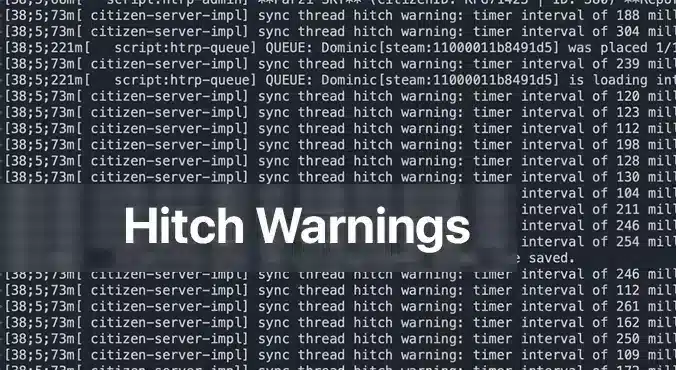
A FiveM iplik bağlantı uyarısı sunucu konsolunuzda yapışkan bir mesaj olarak görünür ve bir veya daha fazla betiğin çok fazla işlem süresi kullandığı konusunda sizi uyarır. Bu, sunucunun “Hey, bir şey olması gerekenden uzun sürüyor ve oyuncularınız için gecikme gibi hissettirecek” demenin bir yoludur. FiveM sunucusu çalıştıran herkes için bu uyarılar, deneyimin acı çekebileceğinin acil bir işaretidir. Nedenini anlamak ve düzeltmek, oynanışı daha akıcı hale getirmekle kalmaz, aynı zamanda topluluğunuzu mutlu tutar.
İplik Takılma Uyarıları Neden Ortaya Çıkıyor?
En yaygın suçlu bir optimize edilmemiş betik. FiveM'de, betikler sunucunun CPU'sunda çalışarak NPC davranışından özel araç mantığına kadar her şeyi yönetir. Bir betik verimsiz döngüler, yoğun veritabanı çağrıları içeriyorsa veya asla değişmeyen koşulları tekrar tekrar kontrol ediyorsa, sunucu iş parçacığını durdurabilir. Sunucu kuyruğu daha sonra takılır ve korkunç takılma uyarısına yol açar. Daha az yaygın olan başka bir neden ise yetersiz donanımdır: düşük seviye bir CPU veya yetersiz RAM yoğun bir sunucuyla başa çıkamaz, bu da her betiği sınırlı kaynaklar için rekabet etmeye zorlar.
İplik Takılma Uyarıları İçin Adım Adım Düzeltmeler
1. Sunucu Donanımınızı Doğrulayın
Even the best‑optimized script can choke if your hardware is underpowered. Below is a quick hardware checklist rated by player count.
| Player Count | CPU | RAM | Storage | Bandwidth | OS |
|————–|—–|—–|——–|———–|—-|
| 64 | 8‑Core 4.0 GHz | 32 GB DDR4 | 1 TB NVMe | 100 Mbps+ | Ubuntu 22.04 |
– İşlemci: FiveM is CPU‑bound; higher clock speeds improve single‑thread performance, which is more critical than extra cores.
– Veri deposu: More memory means the server can cache more assets and handle more connections without swapping to disk.
– Depolamak: SSD or NVMe drives cut loading times dramatically; HDDs become a bottleneck.
– Bant Genişliği: Higher upload speeds ensure packets reach the server fast, especially with larger player counts.
– İşletim Sistemi: Linux distributions offer lower overhead and better stability for game servers.
If you’re running on a shared host or a virtual private server, confirm these specs with your provider. Upgrade when you hit consistent hitch warnings and notice performance lag.
2. Sunucu Profil Oluşturma ile Hatalı Betikleri Belirleyin
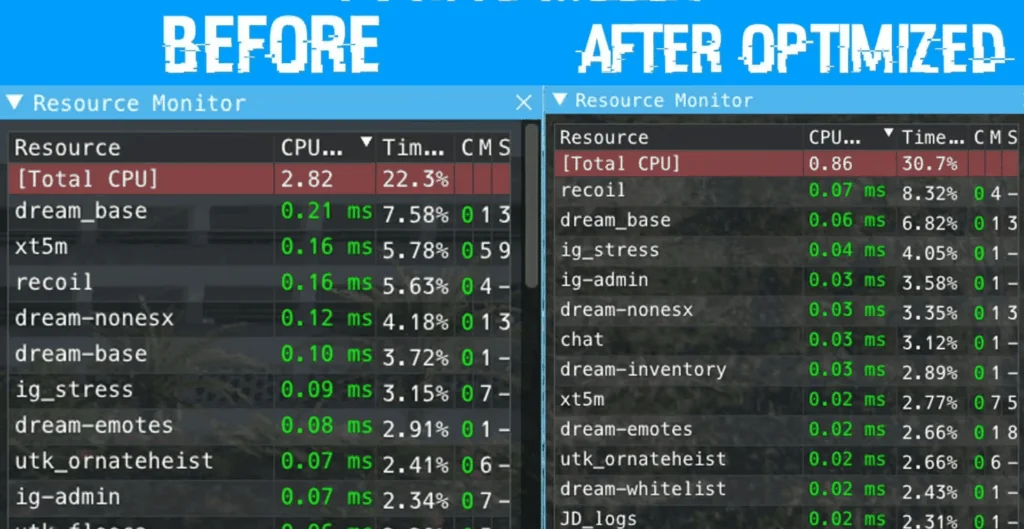
Compare the same resources before and after optimization.
The built‑in profiling tools in txAdmin or the FiveM server console let you pinpoint which script is causing the hitch.
1. Open a console or txAdmin in Yönetici mode.
2. Type: `profiler record 500`
(This records 500 milliseconds of execution data.)
3. Wait for the recording to finish, then run: `profiler save myprofile`.
A file will be generated.
4. Finally, `profiler view myprofile` will open a link in your browser.
If you’re not on the same machine, you may need to use `export profilers` to send the file elsewhere.
In the profiler report, look for functions or scripts that consistently consume a large portion of the measured time. Pay attention to:
– Long loops that run every tick
– Database queries or file reads that
– External API calls or network requests that block the thread
Once you’ve located the problematic parts, you have two options: optimize or remove.
3. Sorunlu Scripts'yi Optimize Edin veya Devre Dışı Bırakın
Optimize Edin
If the script is essential to your server’s unique gameplay, try the following:
– Döngüleri yeniden düzenleyin: Replace `for {}` loops that run per tick with event‑driven logic or reduce the frequency.
– Sonuçları önbelleğe alın: Store expensive calculations or database results in memory, updating only when necessary.
– Yerel işlevleri kullanın: Where possible, replace custom code with FiveM’s built‑in natives, which are usually more efficient.
– Zaman uyumsuz çağrılar: Switch blocking operations to asynchronous patterns if the API supports them.
After modifications, run the profiler again to verify the improvement.
Devre Dışı Bırak
If optimization isn’t feasible or the script is cosmetic, disable it safely:
1. Edit `server.cfg`.
2. Comment out or delete any lines that load the script, e.g. `ensure faulty_script`.
3. Restart the server to confirm the hitch warning disappears.
You can always re‑enable it later if you find a workaround or external optimization support.
4. Sunucuyu Güncel Tutun
Eski sürümleri FiveM veya bağımlılıkları performans regressions. Ensure you’re running the latest stable server files:
“`
cd /root/fivem
git pull
sh ctl restart
“`
Also keep the operating system updated with the latest patches; this can prevent unknown bottlenecks.
Uyarılar Giderildikten Sonra Gecikmeler Devam Ederse
If a hitch warning has been addressed but lag continues, consider:
– Tick hızını artırma: Lowering TPS (ticks per second) reduces CPU demand but can feel less responsive. Balance it by only adjusting if other solutions fail.
– Gereksiz kaynakları devre dışı bırakma: Many servers enable mods that provide little value but consume resources. Remove or replace them.
– Sistem metriklerini izleme: Use tools like `htop`, `nvme-cli`, or `iftop` to watch CPU, RAM, disk, and network usage in real time.
A persistent lag can also stem from network issues outside the server’s control. Ask your players to test latency with `ping` or `traceroute` and confirm they’re in the same region as your server.
Son Düşünceler
A FiveM thread takılma uyarısı sunucu ortamınızda bir şeyin—ister başıboş bir betik ister yetersiz donanım olsun—dikkat gerektirdiğine dair net bir işarettir. Donanımı sistematik olarak kontrol ederek, betikleri profilleme yaparak ve sorunlu kodu optimize ederek veya devre dışı bırakarak bu uyarıları ortadan kaldırabilir ve topluluğunuza daha akıcı, daha keyifli bir deneyim sunabilirsiniz. Unutmayın, istikrarlı bir FiveM sunucusunun anahtarı proaktif izleme ve düzenli güncellemelerdir. Hala engellerle karşılaşırsanız, FiveM forumları, Discord ve txAdmin kaynakları özel tavsiyeler almak için mükemmel yerlerdir. Mutlu barındırmalar!
bu senkronizasyon dizisi sorunuyla ilgili yardıma ihtiyacım var, tüm komut dosyalarım optimize edilmiş gibi görünüyor ve hala yeni bir qb-core kurulumunda bile oyuncuların senkronizasyonunu bozan bu uyarıyı alıyorum








bu senkronizasyon dizisi sorunuyla ilgili yardıma ihtiyacım var, tüm komut dosyalarım optimize edilmiş gibi görünüyor ve hala yeni bir qb-core kurulumunda bile oyuncuların senkronizasyonunu bozan bu uyarıyı alıyorum