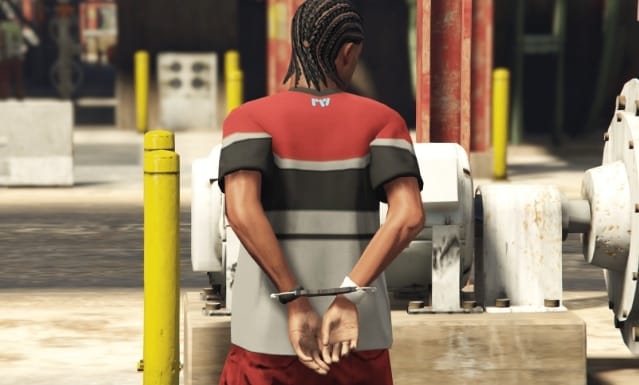
Kılavuz: Kelepçeliyken Hareket Etme İzni (FiveM)
FiveM ile rol yapma sunucularında kelepçeler, gerçekçilik ve gerilim katar. Birçok oyuncu, varsayılan dondurma davranışının çok kısıtlayıcı olabileceğini ve deneyimi yapay hale getirdiğini keşfeder. Bu kılavuz, oyuncuların kelepçeliyken tüm popüler çerçevelerde—QBCore, ESX ve vRP—hareket etmelerine nasıl izin vereceğinizi, aynı zamanda ateş etme veya araç kullanma gibi en belirgin eylemleri engellemeyi gösterir.
—
Kelepçeleme Akışını Anlama
Bir oyuncu kelepçelendiğinde, sunucu genellikle birkaç istemci tarafı ayarını değiştirir:
Kelepçe animasyonu oynatılır (örneğin, `’mp_arresting’, ‘idle’`).
Kelepçe kontrolleri etkinleştirilir (`SetEnableHandcuffs`).
Varlık genellikle oyuncuyu yerine kilitlemek için dondurulur.
Harekete izin vermek için varlığın donmasını kaldırmanız gerekir önce diğer tüm kısıtlayıcı kontrolleri aktif tutarak. Zorluk, her çerçevedeki tam satırları bulmak ve mevcut mantığınızı bozmadan ayarlamaktır.
—
1. Kelepçe Kodunu Bulun
Polis işi veya yardımcı betiklerde kelepçelemeyi tetikleyen işareti arayın. Normalde şuna benzer:
“`lua
TaskPlayAnim(playerPed, ‘mp_arresting’, ‘idle’, 8.0, -8, -1, 49, 0, 0, 0, 0)
SetEnableHandcuffs(playerPed, true)
FreezeEntityPosition(playerPed, true)
“`
2. Hareketi Etkinleştirin
Dondurma çağrısını değiştirin:
“`lua
FreezeEntityPosition(playerPed, false) — Serbest yürümeye izin verir
“`
Güncellenmiş kod parçanız şöyle olur:
“`lua
TaskPlayAnim(playerPed, ‘mp_arresting’, ‘idle’, 8.0, -8, -1, 49, 0, 0, 0, 0)
SetEnableHandcuffs(playerPed, true)
FreezeEntityPosition(playerPed, false)
“`
3. Kontrolleri Kısıtlı Tutun
Potansiyel olarak sorunlu eylemleri devre dışı bırakan sürekli bir iş parçacığı oluşturun:
“`lua
Citizen.CreateThread(function()
while true do
Citizen.Wait(10)
if IsHandcuffed then
DisableControlAction(0, 24, true) — Saldırı
DisableControlAction(0, 25, true) — Nişan Al
DisableControlAction(0, 142, true) — YakınDövüşSaldırısıAlternatifi
DisableControlAction(0, 75, true) — Araçtan Ayrıl
DisableControlAction(0, 92, true) — Araçta Ateş Et
end
end
end)
“`
`IsHandcuffed` ifadesini, belirli betiğiniz için kelepçeleme durumunu gösteren değişkenle değiştirin.
—
1. Ana Kelepçe Bölümünü Bulun
`esx_policejob\/client\/main.lua` dosyasını bulun ve aşağıdaki kodu bulun:
“`lua
TaskPlayAnim(playerPed, ‘mp_arresting’, ‘idle’, 8.0, -8, -1, 49, 0, 0, 0, 0)
SetEnableHandcuffs(playerPed, true)
SetPedCanPlayGestureAnims(playerPed, false)
FreezeEntityPosition(playerPed, true)
“`
2. Donmayı Kaldırın
`FreezeEntityPosition(playerPed, true)` ifadesini `false` olarak değiştirin, böylece yürüme mümkün olur.
3. Tuş Kontrollerini Devre Dışı Bırakın
Silah ve araç kontrollerini uzak tutmak için benzer bir iş parçacığı uygulayın:
“`lua
Citizen.CreateThread(function()
while true do
Citizen.Wait(10)
if IsHandcuffed then
DisableControlAction(0, 142, true) — YakınDövüşSaldırısıAlternatifi
DisableControlAction(0, 30, true) — SağaSolaHareket
DisableControlAction(0, 31, true) — YukarıAşağıHareket
DisableControlAction(0, 24, true) — Ateş Et
DisableControlAction(0, 92, true) — Araçta Ateş Et
DisableControlAction(0, 75, true) — Araçtan Ayrıl
end
end
end)
“`
`IsHandcuffed` ifadesini ESX kelepçe bayrağınıza bağladığınızdan emin olun.
—
1. Kelepçe Bildirimini Bulun
Temel mantık genellikle `vrp\/modules\/police.lua` veya özel bir kaynakta bulunur. Şunu arayın:
“`lua
vRPclient.playAnim(player, {true, {{mp_arresting, idle}}, true})
vRPclient.setHandcuffed(player, true)
vRPclient.setFreeze(player, true)
“`
2. Hareket İçin Donmayı Kaldırın
Dondurma satırını değiştirin:
“`lua
vRPclient.setFreeze(player, false)
“`
3. Belirli Eylemleri Kilitleyin
İstenmeyen kontrolleri sürekli olarak devre dışı bırakmak için bir istemci betiği ekleyin veya değiştirin:
“`lua
Citizen.CreateThread(function()
while true do
Citizen.Wait(10)
if IsHandcuffed then
DisableControlAction(0, 24, true) — Saldırı
DisableControlAction(0, 25, true) — Nişan Al
DisableControlAction(0, 142, true) — YakınDövüşSaldırısıAlternatifi
DisableControlAction(0, 75, true) — Araçtan Ayrıl
DisableControlAction(0, 92, true) — Araçta Ateş Et
DisableControlAction(0, 30, true) — Sola\/Sağa Hareket
DisableControlAction(0, 31, true) — Yukarı\/Aşağı Hareket
end
end
end)
“`
4. Kelepçe Bayrağını Senkronize Edin
Küresel bir değişken tanımlayın ve bir sunucu tarafı olayını dinleyin:
“`lua
local IsHandcuffed = false
RegisterNetEvent(‘vrp:handcuff’)
AddEventHandler(‘vrp:handcuff’, function(status)
IsHandcuffed = status
end)
“`
Bir oyuncu kelepçelendiğinde veya serbest bırakıldığında bu olayı tetikleyin.
—
Son Değerlendirmeler
Kapsamlı bir şekilde test edin değişiklikleri canlıya göndermeden önce sunucunuzun bir kopyasında.
`DisableControlAction` listesini rol yapma kurallarınıza uyacak şekilde ayarlayın—bazı sunucular belirli hareketlere veya değişikliklere izin vermek isteyebilir.
Değişkenlerinizi her zaman net ve tutarlı tutun; `IsHandcuffed` gibi yer tutucular gerçek betik bayraklarına bağlanmalıdır.
—
Sonuç – Nihai Kelepçe Hareketlilik Planınız
Bu adımları izleyerek
Kılavuz: Kelepçeliyken Hareket Etme İzni (FiveM), oyuncuların kısıtlanmış hissederken dolaşmasına olanak tanıyan gerçekçi kelepçe mekanikleri ekleyebilirsiniz. Bu yaklaşım, QBCore, ESX ve vRP sunucuları için ayrıntılı oynanışı korur, rol‑yapma karşılaşmalarını herkes için daha akıcı ve ilgi çekici hale getirir.
İlgili FiveMX yolları