




DebuX Radialmenü – Anpassbares Interaktionssystem mit zwei Stilen für FiveM
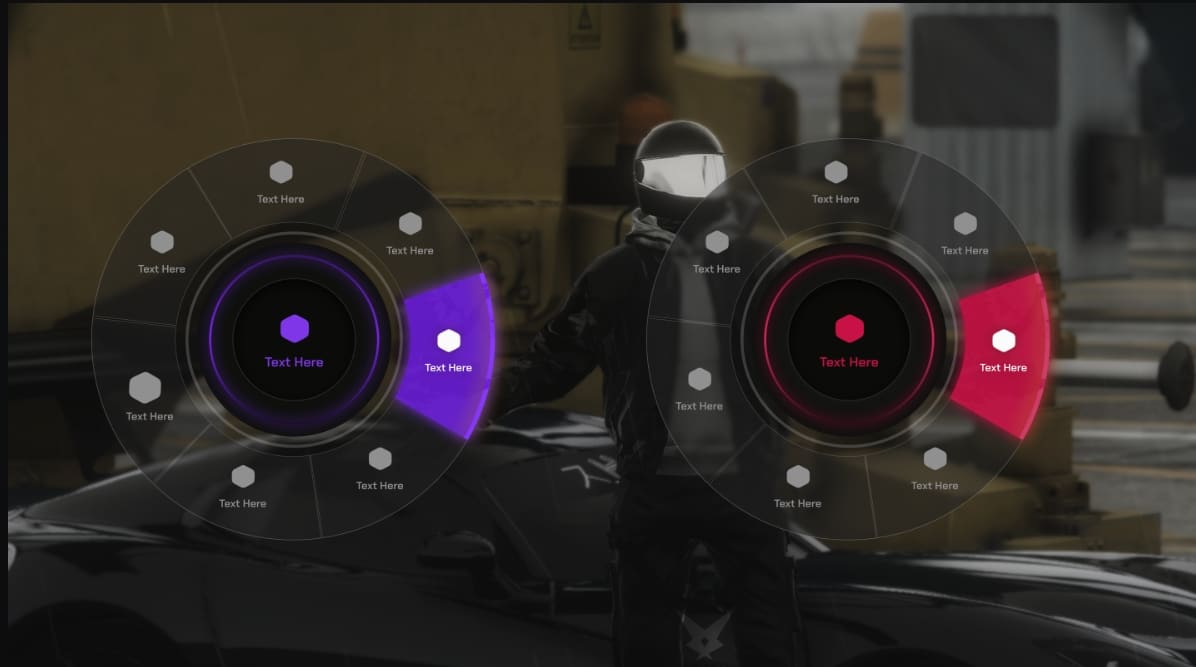
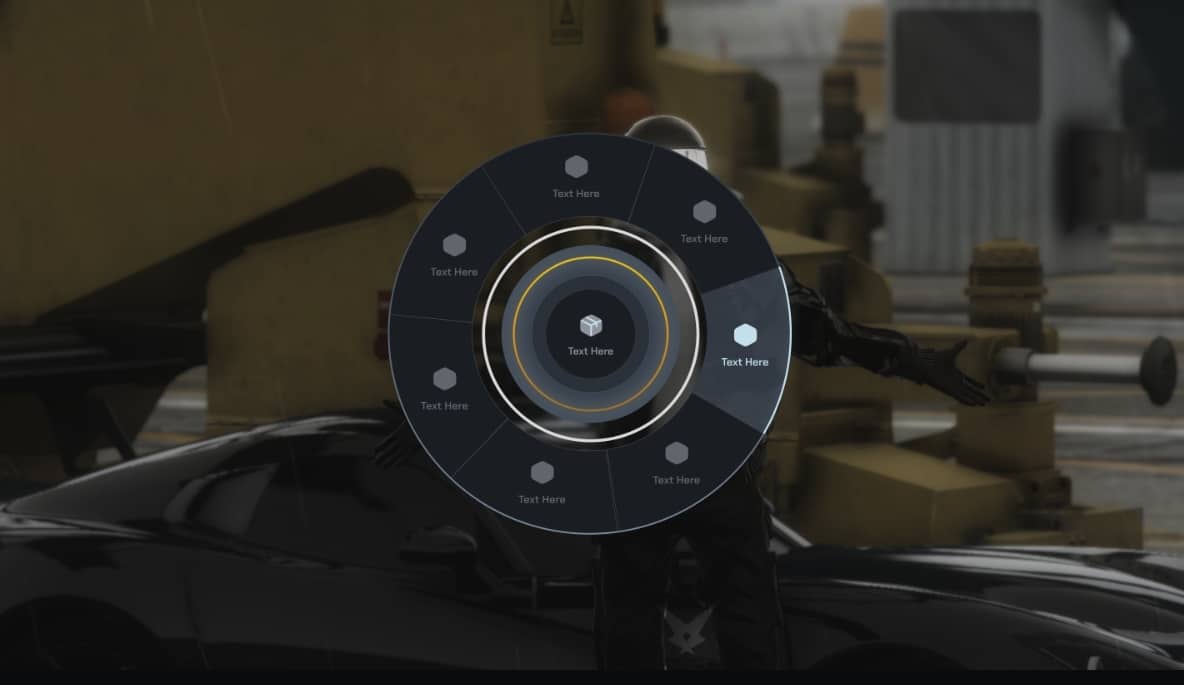
DebuX Radial Menu revolutioniert die Spielerinteraktion auf deinem FiveM-Server mit einer eleganten, vollständig anpassbaren Radialoberfläche, die alle wichtigen Aktionen direkt zugänglich macht. Mit zwei unterschiedlichen visuellen Stilen, zwischen denen du wechseln oder die Spieler wählen können, ersetzt dieses Radialmenü umständliche Befehlslisten und unpraktische Tastenkombinationen durch ein intuitives, kreisförmiges Menü. Dieses organisiert Aktionen, Gegenstände, Fahrzeuge, Jobs und Animationen in einem optisch ansprechenden und benutzerfreundlichen Format. ESX, Abonnieren, Und Standalone Mit seinen Frameworks bietet DebuX das moderne Interaktionserlebnis, das Spieler von professionellen FiveM-Servern erwarten.
Was DebuX Radial Menu essenziell macht, ist die Kombination aus ästhetischem Feinschliff und praktischer Funktionalität. Die beiden enthaltenen Stile – ein modernes minimalistisches Design und ein detailliertes ikonenreiches Layout – verleihen deinem Server eine visuelle Identität, während die hervorragende Benutzerfreundlichkeit erhalten bleibt. Das Menü reagiert sofort auf Eingaben, zeigt relevante Optionen kontextbezogen an (unterschiedliche Menüs für Fahrzeuge vs. zu Fuß, Arbeit-spezifische Aktionen usw.) und unterstützt unbegrenzte verschachtelte Kategorien, sodass du Dutzende von Aktionen organisieren kannst, ohne die Spieler zu überfordern. Dies ist nicht nur eine schöne Oberfläche – es ist eine wirklich bessere Art und Weise, wie Spieler mit den Funktionen deines Servers interagieren können.
Im Leistungsumfang enthalten
Das DebuX Radial Menu-Paket bietet ein vollständiges Interaktionssystem, das bereit ist, in deinen FiveM-Server integriert zu werden. Du erhältst zwei professionell gestaltete UI-Stile mit flüssigen Animationen, umfassende Konfigurationsdateien, mit denen du jede Menükategorie und Aktion anpassen kannst, und eine vollständige Framework-Integration, die ESX, QBCore und benutzerdefinierte Systeme unterstützt. Das Skript enthält vorkonfigurierte Menüs für häufige Aktionen (Fahrzeugsteuerungen, Animationen, Inventarinteraktionen, Jobaufgaben), die sofort funktionieren, sowie ausführliche Dokumentation zum Hinzufügen benutzerdefinierter Aktionen und zur Integration in deine bestehenden Skripte.
Die Installation ist mit automatischer Framework-Erkennung und sinnvollen Standardeinstellungen, die minimale Konfiguration erfordern, um loszulegen, optimiert. Das Paket enthält Beispielkonfigurationen für beliebte Skripte, Exportfunktionen für Entwickler, um Radialmenü-Optionen aus anderen Ressourcen hinzuzufügen, und detaillierte Anpassungsleitfäden, die alles abdecken, vom Ändern von Farben und Symbolen bis hin zum Umstrukturieren ganzer Menühierarchien. Beide UI-Stile sind in einem einzigen Paket enthalten – du entscheidest, welches du über eine einfache Konfiguration verwenden möchtest, oder aktiviere die Spielerwahl, damit jeder seinen bevorzugten Stil wählen kann.
Zwei unterschiedliche visuelle Stile
- Stil 1: Moderner Minimalismus
- Klares, schnörkelloses Design mit dezenten Animationen und minimalem visuellen Rauschen
- Konzentriere dich auf Textbeschriftungen mit kleinen Akzent-Icons für schnelle Lesbarkeit
- Sanfte Überblendeffekte und zarte Farbübergänge
- Perfekt für Server, bei denen Leistung und ein klares Design im Vordergrund stehen.
- Hintergrund mit geringerer Deckkraft, um die Sichtbarkeit der Spielwelt zu erhalten
- Stil 2: Detailreich und mit vielen Symbolen
- Lebendiges Design mit markanten Symbolen und farblich gekennzeichneten Kategorien
- Größere visuelle Elemente machen Touchscreen-freundlich für Tablet-Nutzer
- Deutlichere Animationen und visuelles Feedback zur Auswahl
- Ideal für Server, die eine markante, leicht erkennbare Benutzeroberfläche wünschen.
- Verbesserte Kategorienunterscheidung durch Farbthemen und Symbolsets
Hauptmerkmale
- Zwei UI-Stile – Zwei professionelle Designs enthalten, umschaltbar über die Konfiguration oder die Spielereinstellungen
- Unbegrenzte Kategorien – Erstelle unendliche Menü-Kategorien und Unterkategorien, um beliebige Aktionen zu organisieren
- Kontextbewusstsein – Das Menü zeigt automatisch die relevanten Optionen basierend auf dem Kontext an (im Fahrzeug, in der Nähe des Spielers, berufsbezogen usw.).
- Framework-Integration – Volle Unterstützung für ESX und QBCore mit automatischer Auftragserkennung, Artikelverwendung und Fahrzeugsteuerung
- Benutzerdefinierte Tastenkombination – Spieler können über das integrierte Tastenbelegungssystem ihre bevorzugte Taste zum Öffnen des Radialmenüs festlegen.
- Jobspezifische Menüs – Je nach Beruf des Spielers erscheinen unterschiedliche Menüoptionen (Polizei Werkzeuge, Rettungsdienstausrüstung, mechanische Tätigkeiten)
- Fahrzeugsteuerung – Radialmenü im Fahrzeug mit Optionen für Motor, Türen, Fenster, Kofferraum, Motorhaube und benutzerdefinierte Fahrzeugaktionen
- Animationsrad – Eigene Animationskategorie mit übersichtlichen Emotes, Stimmungen und Aktionen für Rollenspiele
- Artikelintegration – Direkte Artikelverwendung über das Radialmenü, integriert in Ihr Inventarsystem
- Exportfunktionen – Entwickler können Radialmenüoptionen aus anderen Skripten über einfache Exporte hinzufügen.
- Symbolanpassung – Ändere Symbole, Farben und visuelle Elemente, ohne den Kerncode zu berühren
- Leistungsoptimiert – Leichtgewichtiger Code mit 0,00 ms Leerlaufzeit und sofortiger Menüreaktion
- Berechtigungssystem – Steuere, welche Aktionen basierend auf Jobs, Rängen, Berechtigungen oder benutzerdefinierten Bedingungen angezeigt werden
- Verschachtelte Untermenüs – Die mehrstufige Menüstruktur ermöglicht die logische Organisation komplexer Aktionslisten.
Perfekt für
- Rollenspielserver – Bereitstellung eines übersichtlichen, immersiven Interaktionssystems, das die Immersion nicht durch Befehlsspam stört.
- Öffentliche Server – Neuen Spielern eine intuitive Benutzeroberfläche bieten, mit der sie Serverfunktionen entdecken können, ohne Befehle auswendig lernen zu müssen.
- Jobsysteme – Erstelle jobspezifische Aktionsmenüs für die Polizei, EMS, Mechaniker und benutzerdefinierte Jobs
- Server mit hohem Animationsaufkommen – Organisiere Hunderte von Emotes und Animationen in leicht durchsuchbare Kategorien
- Fahrzeugzentrierte Gemeinschaften – Bereitstellung eines umfassenden Fahrzeugsteuerungsmenüs anstelle umständlicher Tastenkombinationen.
- Benutzerdefinierte Framework-Server – Integration mit kundenspezifischen Systemen über Exporte und Konfigurations-Hooks
- Premium-/Whitelist-Server – Biete eine professionelle, polierte Benutzererfahrung, die von ernsthaften Rollenspielern erwartet wird
Menükategorien (Standardkonfiguration)
- Allgemeine Maßnahmen – Häufige Interaktionen wie Ausweis zeigen, Uhrzeit prüfen, Inventar öffnen, HUD ein-/ausschalten.
- Fahrzeugsteuerung – Motorumschaltung, Türbedienung, Fensterbedienung, Kofferraum-/Motorhaubenbedienung, Sitzverstellung
- Animationen – Organisierte Emotes und Animationen: Begrüßungen, Stimmungen, Aktionen, Sitzen, Anlehnen, Tanzen
- Arbeitsmaßnahmen – Kontextspezifische Werkzeuge und Maßnahmen für Polizei, Rettungsdienst, Mechaniker und Sonderaufträge
- Artikel – Schnellzugriff auf Lieblingselemente direkt aus dem Radialmenü
- Spielerinteraktionen – Aktionen, die auf Spieler in der Nähe abzielen: Gegenstände geben, Handschellen anlegen, eskortieren, durchsuchen
- Einstellungen – Spielereinstellungen, Auswahl des UI-Stils, Konfiguration der Tastenbelegung
Technische Details
- Framework-Kompatibilität: ESX (alle Versionen), QBCore, Standalone
- Leistung: 0,00 ms Leerlauf, <0,05 ms aktiv, optimierte React-basierte Benutzeroberfläche
- UI-Technologie: Modernes HTML5/CSS3 mit JavaScript, flüssige 60-fps-Animationen
- Anpassung: Konfigurationsbasierte Anpassung, für grundlegende Änderungen ist keine Codebearbeitung erforderlich.
- Abhängigkeiten: Frameworkspezifisch (es_extended ODER qb-core), keine zusätzlichen Abhängigkeiten
- Exportunterstützung: Vollständige Export-API zum Hinzufügen benutzerdefinierter Menüoptionen aus anderen Skripten
- Sprachen: Mehrsprachige Unterstützung mit einfachem Übersetzungsdateisystem
Installation
- Herunterladen und Entpacken – Extrahieren Sie das DebuX Radial Menü in den Ressourcenordner Ihres Servers
- Framework auswählen – Öffne config.lua und setze deinen Framework (ESX oder QBCore, erkennt automatisch, wenn nicht angegeben)
- UI-Stil auswählen – Wähle in den Darstellungseinstellungen Stil 1 (minimalistisch) oder Stil 2 (detailliert) oder aktiviere die Spielerauswahl.
- Tastenkombination konfigurieren – Standardtaste zum Öffnen des Radialmenüs festlegen (Standard: F1, im Spiel pro Spieler konfigurierbar)
- Menüs anpassen – Bearbeiten Sie Menü-Kategorien, Aktionen und Berechtigungen in config/menus.lua, um sie an Ihren Server anzupassen
- Zu Server.cfg hinzufügen – Füge ensure debux-radial zu deiner Server-Konfigurationsdatei hinzu
- Server neu starten – Starte den Server neu und teste die Radial-Menü-Funktionalität mit den konfigurierten Tastenkombinationen
- Skripte integrieren – Füge Radialmenü-Optionen aus bestehenden Skripten mit Exportfunktionen hinzu (siehe Dokumentation)
Framework-Kompatibilität
- ✅ ESX-Vermächtnis – Vollständige Integration mit Berufen, Gegenständen, Fahrzeugen und Spielerinteraktionen
- ✅ ESX 1.9.x – Kompatibel mit älteren ESX-Versionen und benutzerdefinierten Modifikationen
- ✅ Abonnieren – Vollständige QBCore-Unterstützung mit Joberkennung, Berechtigungen und Inventarintegration
- ✅ Standalone – Kann ohne Framework mithilfe benutzerdefinierter Konfigurationen und Exporte betrieben werden.
Was es auszeichnet
DebuX Radial Menu hebt sich durch die seltene Kombination aus ästhetischer Exzellenz und tiefer Anpassung hervor. Viele radiale Menüs sehen gut aus, bieten aber begrenzte Konfiguration, oder bieten viele Optionen, aber mit veralteten, klobigen Schnittstellen. DebuX liefert beides – wirklich schöne UI-Designs, die modern und professionell wirken, plus umfassende Konfiguration, die es dir ermöglicht, Menüs genau so zu strukturieren, wie dein Server sie benötigt. Das Dual-Style-System ist besonders wertvoll, weil es anerkennt, dass verschiedene Server unterschiedliche ästhetische Ziele haben. Ein ernsthafter Whitelist-Roleplay-Server könnte den minimalistischen Stil für seine Subtilität bevorzugen, während ein öffentlicher Server von der ikonenreichen Klarheit des visuellen Stils für neue Spieler profitiert.
Das Kontextbewusstsein und das Berechtigungssystem machen dieses Radialmenü wirklich funktional und nicht nur dekorativ. Das Menü zeigt intelligente relevante Optionen an – Fahrzeugsteuerungen erscheinen, wenn du in einem Auto bist, jobspezifische Werkzeuge erscheinen, wenn du im Dienst bist, Spielerinteraktionsoptionen erscheinen, wenn jemand in der Nähe ist. Diese kontextbezogene Filterung bedeutet, dass Spieler immer die passenden Optionen sehen, ohne durch irrelevante Optionen zu scrollen. Das Berechtigungssystem ist in das Job- und Gradsystem deines Frameworks eingebunden, sodass die Polizei Festnahmeoptionen sieht, Mechaniker Reparaturwerkzeuge sehen, EMS medizinische Ausrüstung sieht – alles über dieselbe einheitliche Schnittstelle, die sich an die Rolle jedes Spielers anpasst. Dies schafft ein professionelles, zusammenhängendes Benutzererlebnis, das deinen gesamten Server aufwertet.
Anpassungsbeispiele
- Farbschemata – Ändere Akzentfarben, Hintergründe, Textfarben, um sie an das Branding deines Servers anzupassen
- Symbolsets – Verwende die enthaltenen Symbolbibliotheken oder füge benutzerdefinierte Symbole für eine einzigartige visuelle Identität hinzu
- Menüstruktur – Kategorien neu organisieren, jobbezogene Menüs erstellen, benutzerdefinierte Aktionshierarchien hinzufügen
- Aktionsintegration – Verbinde das radiale Menü mit jedem serverseitigen Ereignis oder clientseitigen Funktion
- Bedingte Anzeige – Menüoptionen je nach Standort, Zeit, Spielerlevel und Inventargegenständen ein-/ausblenden
Entwicklerintegration
Für Entwickler bietet DebuX saubere Exportfunktionen, um Radialmenü-Optionen aus anderen Skripten hinzuzufügen. Eine einfache Syntax ermöglicht das Registrieren neuer Menüelemente, das Erstellen verschachtelter Kategorien und das Auslösen benutzerdefinierter Funktionen, wenn Spieler Optionen auswählen. Das bedeutet, dass deine benutzerdefinierten Skripte nahtlos mit dem Radialmenü integriert werden können, anstatt separate Interaktionssysteme zu erstellen. Die Dokumentation enthält Beispiele für häufige Integrationen: Hinzufügen von benutzerdefinierten Job-Tools, Registrieren von Shop-Interaktionen, Erstellen von ortsbasierten Menüs und Implementieren von Verknüpfungen für die Item-Nutzung.
Leistung und Optimierung
Trotz seiner ansprechenden Optik ist das DebuX Radial Menu bemerkenswert ressourcenschonend. Das Menü wird nur beim Öffnen gerendert, wodurch unnötiger Ressourcenverbrauch vermieden wird. Die UI-Animationen sind GPU-beschleunigt und sorgen so für flüssige Performance auch auf leistungsschwächeren Systemen. Das Kontexterkennungssystem prüft Bedingungen effizient und ohne ständiges Abfragen. Dank diverser Optimierungstechniken wird die Serverleistung auch bei Hunderten von Menüoptionen nicht beeinträchtigt – Spieler profitieren von einer sofortigen Menüreaktion, unabhängig von der Menükomplexität.
Support und Updates
DebuX bietet fortlaufenden Support mit regelmäßigen Updates, um die Kompatibilität mit FiveM-Updates und Framework-Änderungen zu gewährleisten. Das Skript wird basierend auf Community-Feedback um neue Funktionen erweitert, Fehler werden behoben und es werden regelmäßig visuelle Verbesserungen vorgenommen. Die Dokumentation ist umfassend und behandelt Installation, Konfiguration, Anpassung, Entwicklerintegration und die Fehlerbehebung in gängigen Szenarien.





Alyson (Verifizierter Käufer) –
Dies ist schnell zu einer meiner Lieblingsressourcen auf unserem Server geworden.
Rhea (Verifizierter Käufer) –
Hätte mir gewünscht, ich hätte das früher gefunden, es hat mich viel Geld und Zeit gekostet, bis ich hier mein Traumprodukt gefunden habe!
Elinore (Verifizierter Käufer) –
4* :)
Concepción (Verifizierter Käufer) –
Ein vielversprechendes Produkt, das sich lohnt auszuprobieren
FuryMika (Verifizierter Käufer) –
Nachdem wir mehrere Alternativen ausprobiert haben, haben wir uns für diese Ressource entschieden.
PhantomPaul (Verifizierter Käufer) –
Updates sind häufig, und der Entwickler verbessert das Produkt offensichtlich weiter.