




Respuesta rápida: Resmon es el monitor de recursos del lado del cliente de FiveM. Abre la consola F8 y ejecuta resmon true para inspeccionar el costo de recursos en el cliente. Úsalo para encontrar scripts, mapas, HUDs y recursos UI costosos antes de adivinar qué causa bajos FPS.
Última actualización: 25 de junio de 2026
Resmon abierto
- Únete a tu servidor.
- Prensa
F8. - Ejecuta:
resmon trueSi se deniega el acceso, la documentación de Cfx.re señala que puede ser necesario el modo desarrollador para algunos diagnósticos. Prueba en un cliente de desarrollo o usa el perfilador para una depuración más profunda.
Qué te dice Resmon
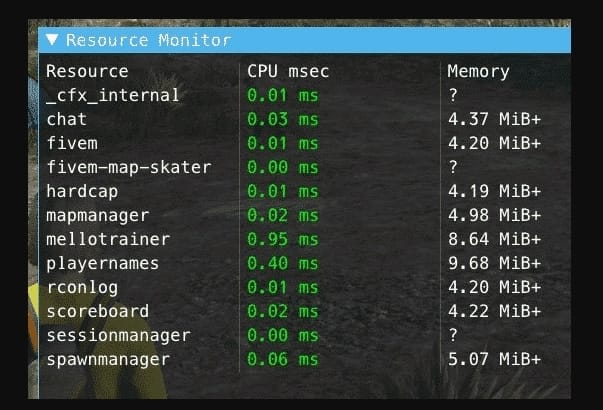
| Columna/señal | Significado |
|---|---|
| CPU msec | Cuánto tiempo de CPU del cliente consume un recurso. |
| Memoria | Cuánta memoria usa el recurso en el cliente. |
| Picos | Ráfagas cortas que pueden ocurrir durante UI, transmisión o bucles. |
| Costo alto constante | Un recurso que probablemente necesita trabajo en código o activos. |
Método de prueba práctico
- Párate en una ubicación tranquila y anota los recursos más costosos.
- Muévete a una zona concurrida de la ciudad, MLO, o a una ubicación con muchos vehículos.
- Abre menús, inventario, teléfono, HUD y trabajo UI uno a la vez.
- Registra qué recurso aumenta y qué acción lo causó.
- Desactiva un recurso sospechoso en staging y repite la misma prueba.
Cuándo usar el perfilador
Usa Resmon para una evaluación rápida. Usa el perfilador Cfx.re cuando necesites depuración a nivel de línea o más profunda de recursos. El perfilador es mejor cuando un recurso es consistentemente costoso pero la razón no es obvia desde el juego.
Causas comunes de valores altos de Resmon
- Bucles sin suficiente
Wait()tiempo. - Scripts NUI que se actualizan en cada fotograma.
- Mapas grandes o paquetes de ropa cerca de áreas densas.
- Scripts HUD que verifican demasiados estados de jugadores con demasiada frecuencia.
- Eventos del cliente que realizan trabajo del servidor.
Guías de optimización relacionadas
- Optimización del servidor FiveM
- Cómo mostrar FPS en FiveM
- Corregir advertencias de hilos FiveM
- Guía oficial del perfilador Cfx.re
Cómo leer Resmon sin reaccionar exageradamente
Un pico breve no siempre es un error. Abrir un teléfono, inventario, menú de ropa o mapa puede costar un poco más de CPU temporalmente. El problema es cuando un recurso se mantiene costoso mientras está inactivo o presenta picos cada pocos segundos durante el juego normal.
Notas útiles de prueba
- Prueba siempre con la misma ruta por la ciudad.
- Anota los tres recursos principales antes de hacer cualquier cambio.
- Desactiva un recurso sospechoso a la vez.
- Vuelve a probar después de un reinicio completo, no solo una recarga rápida.
- Verifica tanto con pocos jugadores como con muchos.
Correcciones de desarrollador que suelen funcionar
Aumenta las esperas en los bucles, evita actualizaciones constantes de NUI, cachea búsquedas repetidas, mueve el trabajo exclusivo del servidor fuera del código del cliente y deja de verificar el estado de cada jugador en cada fotograma. Si un script necesita reaccionar a eventos, usa eventos en lugar de sondeo cuando sea posible.
Cómo decidir qué arreglar primero
No elimines recursos aleatorios solo porque un número parece alto por un momento. Primero prueba la misma ruta por la ciudad, anota los tres recursos más costosos, luego cambia una cosa a la vez. Un menú de teléfono, inventario o vestimenta puede dispararse solo mientras está abierto; eso es diferente de un script que se mantiene costoso mientras el jugador está inactivo.
Correcciones comunes que los desarrolladores deberían revisar
- Aumenta las esperas en bucles que no necesitan verificaciones en cada fotograma.
- Almacena en caché las búsquedas repetidas de jugadores, vehículos o entidades.
- Reduce los mensajes constantes NUI de los recursos HUD y de teléfono.
- Mueve la validación solo del servidor fuera de los bucles del cliente.
- Usa eventos donde el sondeo es solo una conveniencia.
Lo que Resmon no puede probar
Resmon es del lado del cliente. Ayuda a identificar recursos que cuestan tiempo de fotograma de un jugador, pero no reemplaza los registros del servidor, la creación de perfiles de base de datos ni la monitorización de txAdmin. Un recurso puede parecer barato en el cliente y aún así crear presión en la base de datos del servidor. Usa Resmon para la sensación del cliente, luego usa herramientas del servidor para problemas de backend.
Notas antes y después
Toma una captura de pantalla o anota los valores en milisegundos antes de cambiar el código. Después de cada corrección, vuelve a probar la misma ruta con la misma cantidad de jugadores si es posible. Sin una prueba repetible, el trabajo de rendimiento se convierte en adivinanzas.
Cuando el problema es intermitente, registra la hora, la cantidad de jugadores y la ubicación. Eso ayuda a comparar los datos de Resmon con los registros de txAdmin y los cambios recientes de recursos.
Para equipos compartidos, mantén un pequeño registro de rendimiento para que los desarrolladores puedan ver qué cambió antes de que apareciera el pico.
Las buenas notas hacen que la optimización sea más rápida que las conjeturas.
También facilitan revertir la actualización exacta del recurso que causó la regresión.
Mantén las notas lo suficientemente cortas para que el personal realmente las use.