



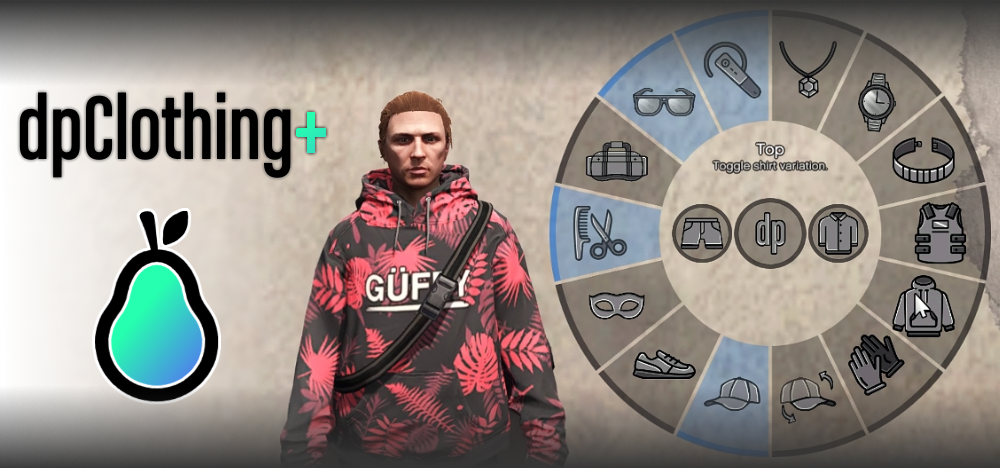
¿Buscas darle un toque especial a tu servidor de FiveM con un poco de moda? ¡Nuestro mod del Menú de Ropa es justo lo que necesitas! Este increíble mod permite a los jugadores personalizar fácilmente los atuendos de sus personajes en el juego, ofreciendo una experiencia inmersiva como nunca antes. Ya sea que estés... ejecutar un servidor de juegos de rol o simplemente quieres darles a los jugadores más control sobre su apariencia, este mod es imprescindible.
Avance
Acerca del Mod
El mod Clothing Menu mejora tu servidor FiveM al permitir a los jugadores cambiar rápida y fácilmente sus prendas de vestir directamente en el juego. Usando comandos simples, los jugadores pueden alternar varios artículos de ropa como sombreros, gafas y camisas, e incluso cambiar el estilo de su ropa equipada. Aquí hay una lista de algunos comandos que los jugadores pueden usar:
/hat(Palanca)/glasses(Palanca)/shirt(Palanca)/pants(Palanca)/shoes(Palanca)/top(Variantes)
¡Y mucho más! Estos comandos facilitan enormemente vestir a tu personaje exactamente como quieras y realizar cambios de atuendo rápidos sobre la marcha. Una característica única de este mod es el comando "revertir ropa", que te permite volver al instante a tu atuendo guardado, lo que lo hace perfecto para juegos de rol.
Descargar
Instrucciones de instalación
¡Instalar el mod del Menú de Ropa es facilísimo! Sigue estos sencillos pasos:
- Descargar el Mod: Descargar el archivo mod del menú de ropa
- Extraer los archivos: Utilice una herramienta de extracción de archivos como WinRAR o 7-Zip para extraer el contenido del archivo descargado.
- Subir al servidor: Mueva la carpeta extraída a su servidor
resourcesdirectorio. - Actualizar la configuración del servidor: Abre tu
server.cfgarchivo y agregue la siguiente línea para garantizar que se cargue el mod:start clothingmenu - Reiniciar el servidor: Reinicia tu servidor FiveM para cargar el nuevo mod.
¡Listo! ¡Ya puedes disfrutar de una nueva gama de opciones de ropa en tu juego!
Compatibilidad
El mod "Menú de Ropa" es compatible con los frameworks QBCore y ESX y funciona a la perfección con las últimas versiones de FiveM. Asegúrate de que tu servidor esté actualizado para disfrutar de la mejor experiencia.