








Risposta rapida: Resmon è il monitor delle risorse lato client di FiveM. Apri la console F8 ed esegui resmon true per ispezionare il costo delle risorse sul client. Usalo per trovare script, mappe, HUD e risorse UI costosi prima di indovinare cosa causa un basso FPS.
Ultimo aggiornamento: 25 giugno 2026
Apri Resmon
- Unisciti al tuo server.
- Premere
F8. - Esegui:
resmon trueSe l'accesso è negato, la documentazione di Cfx.re nota che potrebbe essere necessaria la modalità sviluppatore per alcune diagnostiche. Testa su un client di sviluppo o usa il profiler per un debug più approfondito.
Cosa ti dice Resmon
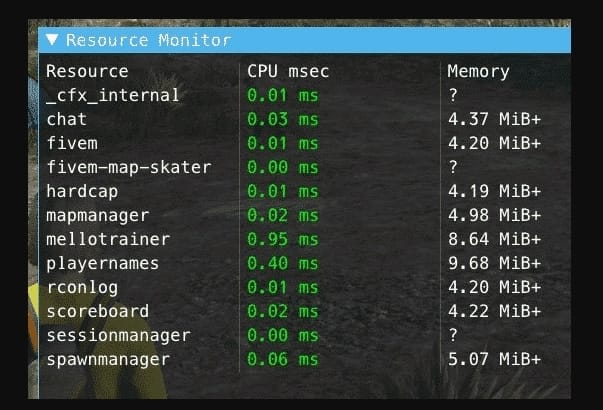
| Colonna/Segnale | Significato |
|---|---|
| CPU msec | Quanto tempo CPU del client consuma una risorsa. |
| Memoria | Quanta memoria utilizza la risorsa sul client. |
| Picchi | Brevi picchi che possono verificarsi durante UI, streaming o cicli. |
| Costo elevato costante | Una risorsa che probabilmente necessita di lavoro sul codice o sugli asset. |
Metodo di test pratico
- Mettiti in un luogo tranquillo e annota le risorse più costose in cima.
- Spostati in un'area cittadina trafficata, MLO o luogo denso di veicoli.
- Apri menu, inventario, telefono, HUD e UI dei lavori uno alla volta.
- Registra quale risorsa ha picchi e quale azione li ha causati.
- Disabilita una risorsa sospetta in staging e ripeti lo stesso test.
Quando usare il profiler
Usa Resmon per una diagnosi rapida. Usa il profiler Cfx.re quando hai bisogno di un debug a livello di linea o più approfondito della risorsa. Il profiler è migliore quando una risorsa è costantemente pesante ma il motivo non è ovvio dal gameplay.
Cause comuni di valori Resmon elevati
- Cicli senza abbastanza
Wait()tempo. - Script NUI che si aggiornano ogni frame.
- Mappe grandi o pacchetti di abbigliamento vicino ad aree dense.
- HUD che controllano troppi stati dei giocatori troppo spesso.
- Eventi client che eseguono lavoro in stile server.
Guide all'ottimizzazione correlate
- Ottimizzazione del server FiveM
- Come mostrare gli FPS in FiveM
- Correggi gli avvisi di blocco dei thread di FiveM
- Guida ufficiale al profiler Cfx.re
Come leggere Resmon senza reagire in modo eccessivo
Un breve picco non è sempre un bug. Aprire un telefono, inventario, menu di abbigliamento o mappa può costare brevemente più CPU. Il problema è una risorsa che rimane costosa mentre è inattiva o che ha picchi ogni pochi secondi durante il gioco normale.
Note di test utili
- Testa sempre con lo stesso percorso attraverso la città.
- Annota le prime tre risorse prima di cambiare qualsiasi cosa.
- Disabilita una risorsa sospetta alla volta.
- Ritesta dopo un riavvio completo, non solo una ricarica a caldo.
- Controlla sia con un numero basso di giocatori che con un numero alto.
Correzioni per sviluppatori che di solito funzionano
Aumenta le attese nei cicli, evita aggiornamenti costanti di NUI, memorizza nella cache le ricerche ripetute, sposta il lavoro solo lato server fuori dal codice client e smetti di controllare ogni stato del giocatore ogni frame. Se uno script deve reagire agli eventi, usa gli eventi invece del polling quando possibile.
Come decidere cosa sistemare per primo
Non rimuovere risorse a caso solo perché un numero sembra alto per un momento. Prima testa lo stesso percorso attraverso la città, annota le tre risorse più costose, poi modifica una cosa alla volta. Un menu del telefono, dell'inventario o dell'abbigliamento potrebbe aumentare solo quando è aperto; è diverso da uno script che rimane costoso mentre il giocatore è inattivo.
Correzioni comuni che gli sviluppatori dovrebbero controllare
- Aumenta le attese nei loop che non necessitano di controlli a ogni frame.
- Memorizza nella cache le ricerche ripetute di giocatori, veicoli o entità.
- Riduci i messaggi costanti NUI dalle risorse HUD e del telefono.
- Sposta la validazione solo server fuori dai loop client.
- Usa eventi dove il polling è solo una comodità.
Cosa Resmon non può provare
Resmon è lato client. Aiuta a identificare le risorse che costano tempo di frame al giocatore, ma non sostituisce i log del server, il profiling del database o il monitoraggio di txAdmin. Una risorsa può sembrare economica sul client e comunque creare pressione sul database lato server. Usa Resmon per l'esperienza client, poi usa gli strumenti server per i problemi di backend.
Note prima e dopo
Fai uno screenshot o annota i valori in msec prima di modificare il codice. Dopo ogni correzione, ripeti lo stesso test dello stesso percorso con lo stesso numero di giocatori, se possibile. Senza un test ripetibile, il lavoro sulle prestazioni diventa un'ipotesi.
Quando il problema è intermittente, registra l'ora, il numero di giocatori e la posizione. Questo aiuta a confrontare i dati di Resmon con i log di txAdmin e le recenti modifiche alle risorse.
Per i team condivisi, tieni un piccolo log delle prestazioni in modo che gli sviluppatori possano vedere cosa è cambiato prima del picco.
Buone note rendono l'ottimizzazione più veloce delle ipotesi.
Rendono anche più facile annullare l'esatto aggiornamento della risorsa che ha causato la regressione.
Mantieni le note abbastanza corte in modo che lo staff le usi effettivamente.