








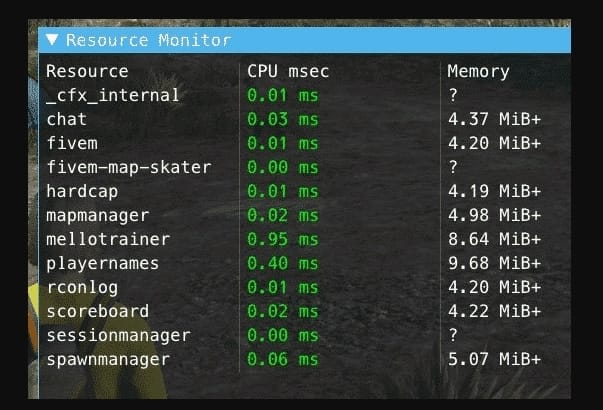
Hızlı cevap: Resmon, FiveM'nin istemci tarafı kaynak izleyicisidir. F8 konsolunu açın ve çalıştırın resmon true istemci üzerindeki kaynak maliyetini incelemek için. Düşük FPS'ye neyin sebep olduğunu tahmin etmeden önce pahalı script'leri, map'leri, HUD'leri ve UI kaynaklarını bulmak için kullanın.
Son güncelleme: 25 Haziran 2026
Resmon'u açın
- Sunucunuza katılın.
- Basmak
F8. - Çalıştırın:
resmon trueErişim reddedilirse, Cfx.re belgeleri bazı tanılamalar için geliştirici modunun gerekli olabileceğini belirtir. Daha derin hata ayıklama için bir geliştirme istemcisinde test edin veya profil oluşturucuyu kullanın.
Resmon size ne söyler
| Sütun/sinyal | Anlamı |
|---|---|
| CPU msec | Bir kaynağın ne kadar istemci CPU süresi tükettiği. |
| Hafıza | İstemcide kaynağın ne kadar bellek kullandığı. |
| Spikes (Ani yükselmeler) | UI, akış veya döngüler sırasında meydana gelebilecek kısa patlamalar. |
| Sürekli yüksek maliyet | Muhtemelen kod veya varlık çalışması gerektiren bir kaynak. |
Pratik test yöntemi
- Sessiz bir konumda durun ve en pahalı kaynakları not edin.
- Kalabalık bir şehir alanına, MLO'ye veya araç yoğun bir konuma taşının.
- Menüleri, envanteri, telefonu, HUD'yi ve iş UI'sini tek tek açın.
- Hangi kaynağın yükseldiğini ve hangi eylemin buna neden olduğunu kaydedin.
- Aşamalı ortamda şüpheli bir kaynağı devre dışı bırakın ve aynı testi tekrarlayın.
Profil oluşturucu ne zaman kullanılır
Hızlı ön değerlendirme için Resmon'u kullanın. Satır düzeyinde veya daha derin kaynak hata ayıklamasına ihtiyacınız olduğunda Cfx.re profil oluşturucuyu kullanın. Profil oluşturucu, bir kaynak sürekli olarak pahalı olduğunda ancak nedenin oynanıştan belli olmadığı durumlarda daha iyidir.
Resmon'da yüksek değerlerin yaygın nedenleri
- Yetersiz döngüler
Wait()zaman. - Her karede güncellenen NUI scriptler.
- Yoğun alanların yakınındaki büyük harita veya giyim paketleri.
- Çok sık çok fazla oyuncu durumunu kontrol eden HUD'ler.
- Sunucu tarzı işler yapan istemci olayları.
İlgili optimizasyon kılavuzları
- FiveM sunucu optimizasyonu
- FiveM'de FPS nasıl gösterilir
- FiveM iş parçacığı takılma uyarılarını düzeltme
- Resmi Cfx.re profil oluşturucu kılavuzu
Resmon'u aşırı tepki vermeden okuma
Kısa bir ani yükseliş her zaman bir hata değildir. Telefon, envanter, giyim menüsü veya harita açmak kısa süreliğine daha fazla CPU maliyetine neden olabilir. Sorun, boştayken pahalı kalan veya normal oyun sırasında her birkaç saniyede bir ani yükseliş yapan bir kaynaktır.
Faydalı test notları
- Her seferinde şehirde aynı rotayı kullanarak test edin.
- Herhangi bir şeyi değiştirmeden önce en iyi üç kaynağı yazın.
- Bir seferde şüpheli bir kaynağı devre dışı bırakın.
- Sadece sıcak yeniden yükleme değil, tam bir yeniden başlatmadan sonra tekrar test edin.
- Hem düşük oyuncu sayısını hem de yoğun oyuncu sayısını kontrol edin.
Genellikle işe yarayan geliştirici düzeltmeleri
Döngülerde bekleme sürelerini artırın, sürekli NUI güncellemelerinden kaçının, tekrarlanan aramaları önbelleğe alın, yalnızca sunucuya ait işleri istemci kodundan çıkarın ve her karede her oyuncu durumunu kontrol etmeyi bırakın. Bir scriptin olaylara tepki vermesi gerekiyorsa, mümkün olduğunda yoklama yerine olayları kullanın.
İlk olarak neyi düzeltmeye karar vermeli
Bir anlığına yüksek görünen bir sayı yüzünden rastgele kaynakları kaldırmayın. Önce şehir içinde aynı rotayı test edin, en pahalı üç kaynağı not alın, ardından her seferinde tek bir şeyi değiştirin. Bir telefon, envanter veya giyim menüsü yalnızca açıkken yükselebilir; bu, oyuncu boştayken pahalı kalan bir betikten farklıdır.
Geliştiricilerin kontrol etmesi gereken yaygın düzeltmeler
- Her karede kontrol gerektirmeyen döngülerde bekleme sürelerini artırın.
- Tekrarlanan oyuncu, araç veya varlık aramalarını önbelleğe alın.
- HUD ve telefon kaynaklarından gelen sürekli NUI mesajlarını azaltın.
- Yalnızca sunucu tarafı doğrulamasını istemci döngülerinden çıkarın.
- Yoklamanın yalnızca bir kolaylık olduğu durumlarda olayları kullanın.
Resmon'un kanıtlayamadığı şeyler
Resmon istemci tarafındadır. Bir oyuncunun kare süresine mal olan kaynakları belirlemeye yardımcı olur, ancak sunucu günlüklerinin, veritabanı profillemesinin veya txAdmin izlemesinin yerini almaz. Bir kaynak istemcide ucuz görünebilir ve yine de sunucu tarafında veritabanı baskısı oluşturabilir. İstemci deneyimi için Resmon'u, arka uç sorunları için sunucu araçlarını kullanın.
Öncesi ve sonrası notları
Kodu değiştirmeden önce bir ekran görüntüsü alın veya msec değerlerini not edin. Her düzeltmeden sonra, mümkünse aynı oyuncu sayısıyla aynı rotayı yeniden test edin. Tekrarlanabilir bir test olmadan, performans çalışması tahmine dönüşür.
Sorun aralıklı olduğunda, zamanı, oyuncu sayısını ve konumu kaydedin. Bu, Resmon verilerini txAdmin günlükleri ve yakın zamandaki kaynak değişiklikleriyle karşılaştırmaya yardımcı olur.
Paylaşılan ekipler için, geliştiricilerin ani yükselişten önce neyin değiştiğini görebilmesi için küçük bir performans günlüğü tutun.
İyi notlar, optimizasyonu tahminden daha hızlı hale getirir.
Ayrıca, gerilemeye neden olan tam kaynak güncellemesini geri almayı da kolaylaştırır.
Notları, personelin gerçekten kullanacağı kadar kısa tutun.