O suporte cobre acesso ao download, arquivos entregues que estejam faltando e dúvidas com base nas notas de instalação publicadas.
Instalação personalizada, conversão de framework, configuração em servidor ao vivo e trabalho em recursos personalizados não estão incluídos, salvo quando indicado na página do produto.
Pergunte antes de comprar se seu servidor usa recursos de framework, inventário ou banco de dados muito modificados.
Compatibilidade, configuração e comprovação do produto em um olhar
Use os dados publicados nesta página para confirmar se CodeM mHUD — Advanced HUD System é compatível com seu servidor antes do checkout.
Compatibilidade
Frameworks
ESX, QBCore, QBOX, Standalone
Categoria
HUDs
Configuração e requisitos
Fluxo de instalação
Download → pasta resources → ensure no server.cfg
Requisitos
Publicado nesta página
Tamanho do arquivo
13.59 MB
Comprovação e perguntas de compradores
Avaliações
Sem avaliações ainda
Perguntas Respondidas
Pergunte antes de comprar
Compre quando isso economizar tempo de configuração
Use esta checklist para decidir rapidamente se o recurso combina com seu servidor, framework e expectativas de suporte.
Ganho para o administrador
CodeM mHUD — Advanced HUD System foi posicionado para reduzir HUDs, em vez de você reconstruir o mesmo sistema do zero.
Compatibilidade
Funciona com esx, qbcore, qbox, standalone. Verifique o bloco de requisitos antes de usar em um servidor ativo.
Confiança na compra
Download instantâneo, checkout Stripe, acesso ao suporte e contexto de reembolso são exibidos antes do pagamento.
Elementos de decisão
Requisitos, detalhes de instalação, Vídeo de pré-visualização, Perguntas do Produto
Descrição
mHUD - Modern Minimalist HUD for FiveM
Elevate your server's visual experience with this sleek, performance-optimized HUD that displays all essential player information in a clean, modern interface. Designed for servers that want a professional look without the bloated features and performance drain of heavyweight HUD systems, mHUD strikes the perfect balance between functionality and aesthetics.
What's Included
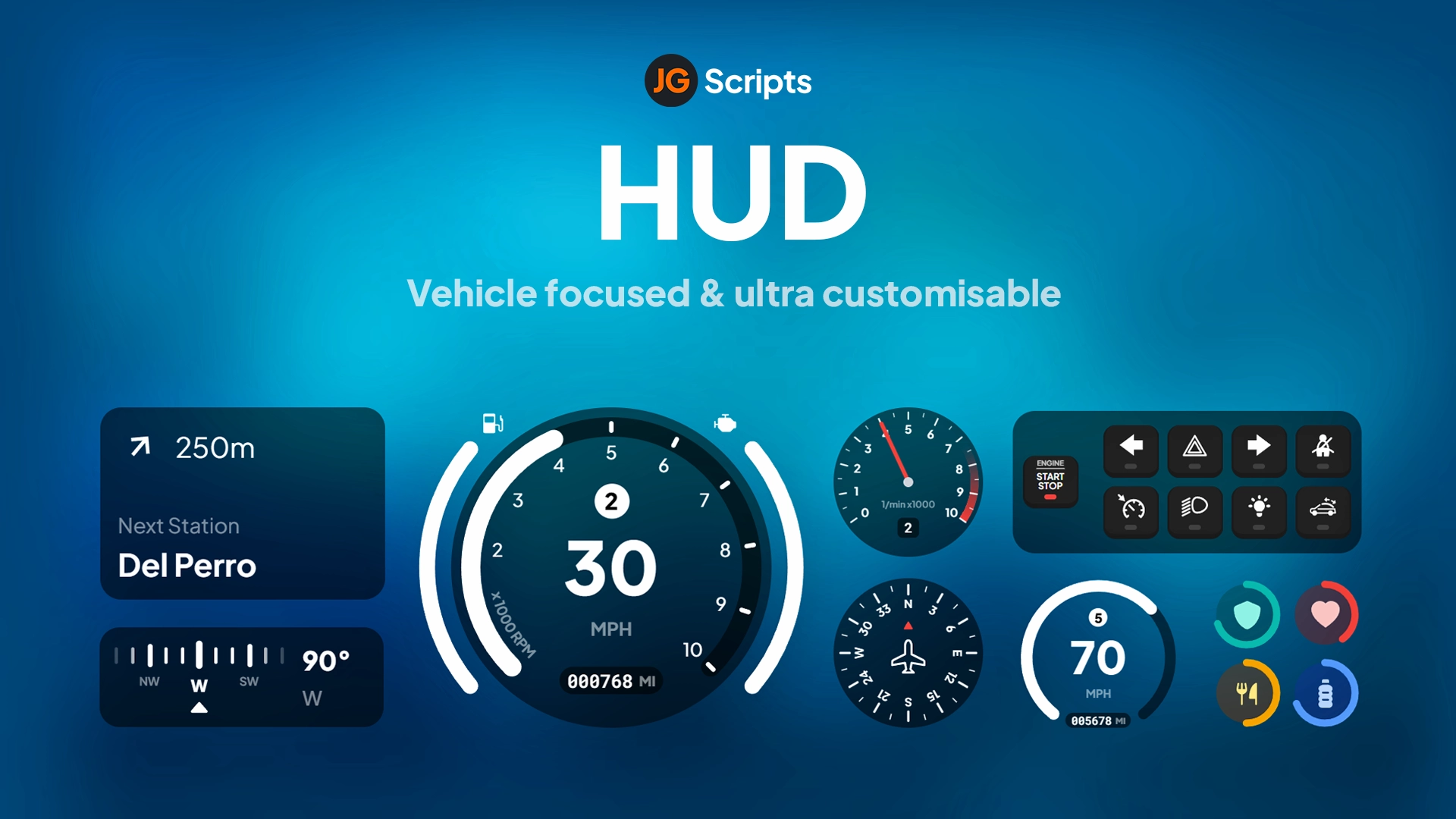
This complete HUD replacement features a minimalist status display showing health, armor, hunger, thirst, and stress indicators with smooth animated transitions. The integrated vehicle speedometer activates automatically when entering vehicles, displaying speed (MPH/KPH), fuel level, gear indicator, and engine status. The HUD is fully customizable through easy configuration files, allowing you to adjust colors, positioning, visibility toggles, and which status bars are shown.
Key Features
Player Status Display - Health, armor, hunger, thirst, stress with color-coded progress bars
UI Framework: HTML/CSS/JavaScript NUI with optimized rendering
Status Updates: Real-time synchronization with framework status systems
Resolution Support: Responsive design works on all screen resolutions
Commands: /toggleui or configurable command to hide/show HUD
Dependencies: Framework-specific status system (ESX/QBCore)
Installation
Extract mHUD to your resources folder
Configure framework in config.lua (ESX or QBCore)
Customize colors, positioning, and displayed elements in config
Set unit preference (MPH or KPH for speedometer)
Add to server.cfg: ensure mhud
Restart server and verify HUD displays correctly
Test toggle command and vehicle speedometer activation
Framework Compatibility
✅ ESX - Full integration with ESX status system (hunger, thirst, etc.)
✅ QBCore - Native support for QB-Core stress, hunger, thirst mechanics
✅ QBOX - Compatible with QBOX player status framework
⚠️ Standalone - Requires framework for status tracking (not fully standalone)
Customization Options
The configuration file provides extensive customization without touching code. Adjust the position of HUD elements anywhere on screen, change progress bar colors to match your server theme, toggle individual status indicators on or off, set percentage thresholds for when certain bars appear (armor only above 0%, stamina only below 100%), choose between MPH and KPH units, and configure the toggle command to your preference. This flexibility means mHUD adapts to your server rather than forcing a specific look.
Display Logic
mHUD uses smart display logic to reduce screen clutter. Armor only appears when you actually have armor equipped. Stamina and oxygen bars only show when they're below 100% (during sprinting or underwater). The vehicle speedometer automatically appears when you enter a vehicle and disappears on exit. This conditional display keeps the screen clean during normal gameplay while ensuring critical information appears exactly when you need it.
What Makes It Stand Out
In a market flooded with bloated, feature-heavy HUDs that tank performance, mHUD focuses on doing the essentials perfectly. The minimalist design philosophy means no distracting animations, no unnecessary information, and no FPS drops. It's inspired by modern UI design principles where less is more - every element serves a purpose, nothing is there for decoration. The result is a HUD that looks professional, performs flawlessly, and gets out of the way so players can focus on roleplay rather than interface elements.
Requires a FiveM server, ESX or QBCore, access to server resources, and permission to restart the resource after configuration.
Apenas os dados publicados nesta página devem ser considerados confirmados. Se você precisar de mais detalhes, revise a descrição, requisitos, histórico de alterações, avaliações e perguntas do produto antes do checkout.
Shows health, armor, hunger, thirst, and stress indicators with color-coded progress bars
Vehicle Speedometer
Automatically activates when entering vehicles, displaying speed in MPH or KPH, fuel level, gear indicator, and engine status
Smooth Animations
Fluid transitions when status values change or HUD elements appear and disappear
Toggle Visibility Command
Hide or show the entire HUD using /toggleui or a configurable command for screenshots and cinematic moments
Conditional Display Logic
Armor only appears when equipped, stamina and oxygen bars only show when below 100%, and speedometer automatically appears and disappears with vehicle entry/exit
Use este produto como parte de uma configuração maior. Explore categorias relacionadas, frameworks alternativos, pacotes premium e downloads gratuitos complementares.