

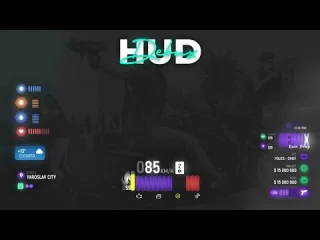
mHUD – HUD minimalista moderno para FiveM
Aprimore a experiência visual do seu servidor com este HUD elegante e otimizado para desempenho, que exibe todas as informações essenciais do jogador em uma interface limpa e moderna. Projetado para servidores que desejam uma aparência profissional sem os recursos excessivos e a sobrecarga de desempenho de sistemas HUD pesados, o mHUD encontra o equilíbrio perfeito entre funcionalidade e estética.
O que está incluído
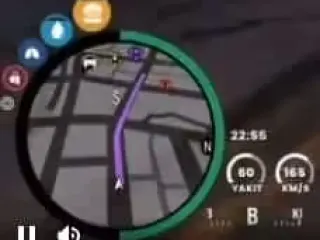
Esta interface completa de substituição apresenta um visor minimalista que exibe indicadores de saúde, armadura, fome, sede e estresse com transições animadas suaves. O velocímetro integrado ativa-se automaticamente ao entrar em veículos, exibindo a velocidade (MPH/KPH), o nível de combustível, o indicador de marcha e o status do motor. A interface é totalmente personalizável através de arquivos de configuração fáceis de usar, permitindo ajustar cores, posicionamento, ativação/desativação da visibilidade e quais barras de status são exibidas.
Principais características
- Exibição do status do jogador – Saúde, armadura, fome, sede e estresse com barras de progresso codificadas por cores.
- Velocímetro do veículo – Exibição automática de velocidade com alternância entre MPH/KPH, indicador de marcha, indicador de combustível
- Design Minimalista – Interface limpa e discreta que não sobrecarrega a tela.
- Animações suaves – Transições fluidas quando os valores de status mudam ou elementos da interface aparecem.
- Alternar visibilidade – Comando para ocultar/exibir a interface (perfeito para capturas de tela ou momentos cinematográficos)
- Exibição condicional – Alguns elementos (armadura, resistência, oxigênio) só aparecem quando relevantes.
- Personalização de cores – Ajuste as cores da barra de progresso para combinar com o tema do seu servidor.
- Desempenho otimizado – Uso mínimo de recursos, normalmente 0,00-0,01 ms em estado ocioso
Perfeito para
- Servidores de roleplay que buscam uma interface limpa que não atrapalhe a imersão.
- Servidores em transição do HUD padrão do GTA para uma interface personalizada.
- Comunidades que priorizam o desempenho e buscam reduzir os custos com recursos.
- Servidores com esquemas de cores personalizados que exigem correspondência de tema do HUD
- Streamers e criadores de conteúdo que precisam de uma interface de usuário minimalista para gravações impecáveis.
Detalhes técnicos
- Uso de recursos: Tempo ocioso de 0,00 a 0,01 ms, impacto insignificante no FPS.
- Estrutura da interface do usuário: NUI HTML/CSS/JavaScript com renderização otimizada
- Atualizações de status: Sincronização em tempo real com sistemas de status de estrutura
- Suporte à resolução: O design responsivo funciona em todas as resoluções de tela.
- Comandos: /toggleui ou comando configurável para ocultar/exibir o HUD
- Dependências: Sistema de status específico da estrutura (ESX/qbNúcleo)
Instalação
- Extraia o mHUD para a sua pasta de recursos.
- Configure o framework em config.lua (ESX ou QBCore)
- Personalize cores, posicionamento e elementos exibidos na configuração.
- Defina a unidade de medida preferida (MPH ou KPH para o velocímetro).
- Adicione ao server.cfg: ensure mhud
- Reinicie o servidor e verifique se o HUD está sendo exibido corretamente.
- Teste o comando de alternância e a ativação do velocímetro do veículo.
Compatibilidade de Framework
- ✅ ESX – Integração completa com o sistema de status ESX (fome, sede, etc.)
- ✅ qbNúcleo – Suporte nativo para os mecanismos de estresse, fome e sede do QB-Core
- ✅ QBOX – Compatível com a estrutura de status do player QBOX
- ⚠️ Standalone – Requer uma estrutura para rastreamento de status (não é totalmente independente)
Opções de personalização
O arquivo de configuração oferece ampla personalização sem a necessidade de mexer no código. Ajuste a posição dos elementos da interface em qualquer lugar da tela, altere as cores da barra de progresso para combinar com o tema do seu servidor, ative ou desative indicadores de status individuais, defina limites percentuais para quando certas barras aparecerem (armadura apenas acima de 0%, resistência apenas abaixo de 100%), escolha entre unidades de MPH e KPH e configure o comando de ativação/desativação de acordo com sua preferência. Essa flexibilidade significa que o mHUD se adapta ao seu servidor em vez de impor uma aparência específica.
Lógica de exibição
O mHUD utiliza lógica de exibição inteligente para reduzir a poluição visual da tela. A armadura só aparece quando você a está equipando. As barras de resistência e oxigênio só são exibidas quando estão abaixo de 100% (durante corrida ou debaixo d'água). O velocímetro do veículo aparece automaticamente ao entrar em um veículo e desaparece ao sair. Essa exibição condicional mantém a tela organizada durante o jogo normal, garantindo que as informações essenciais apareçam exatamente quando você precisa delas.
O que o torna especial
Em um mercado inundado por HUDs inchados e repletos de recursos que comprometem o desempenho, o mHUD se concentra em executar o essencial com perfeição. A filosofia de design minimalista significa ausência de animações que distraem, informações desnecessárias e quedas de FPS. Ele é inspirado nos princípios modernos de design de interface, onde menos é mais – cada elemento tem uma função, nada está ali apenas para decoração. O resultado é um HUD com aparência profissional, desempenho impecável e que não atrapalha, permitindo que os jogadores se concentrem na interpretação de personagens em vez de elementos da interface.
Scripts ESX relacionados
- 0R-HUD | Script HUD
- Negócio de drogas T1GER (+ conchas) – mega pacote
- Assalto ao Pacífico (Rainmad)
- VexCreator – Trocador de Pele




Dustin (comprador verificado) –
Amo muito o design e o atendimento ao cliente é o mais legal.
EscopoSasha833 (comprador verificado) –
Um dos melhores scripts que já usei.
Eunice (comprador verificado) –
Recurso incrível, obrigado!
Letra (comprador verificado) –
Muito flexível e bem projetado.
Della (comprador verificado) –
Exatamente o que nosso servidor precisava. Fácil de instalar, fácil de usar e confiável.