





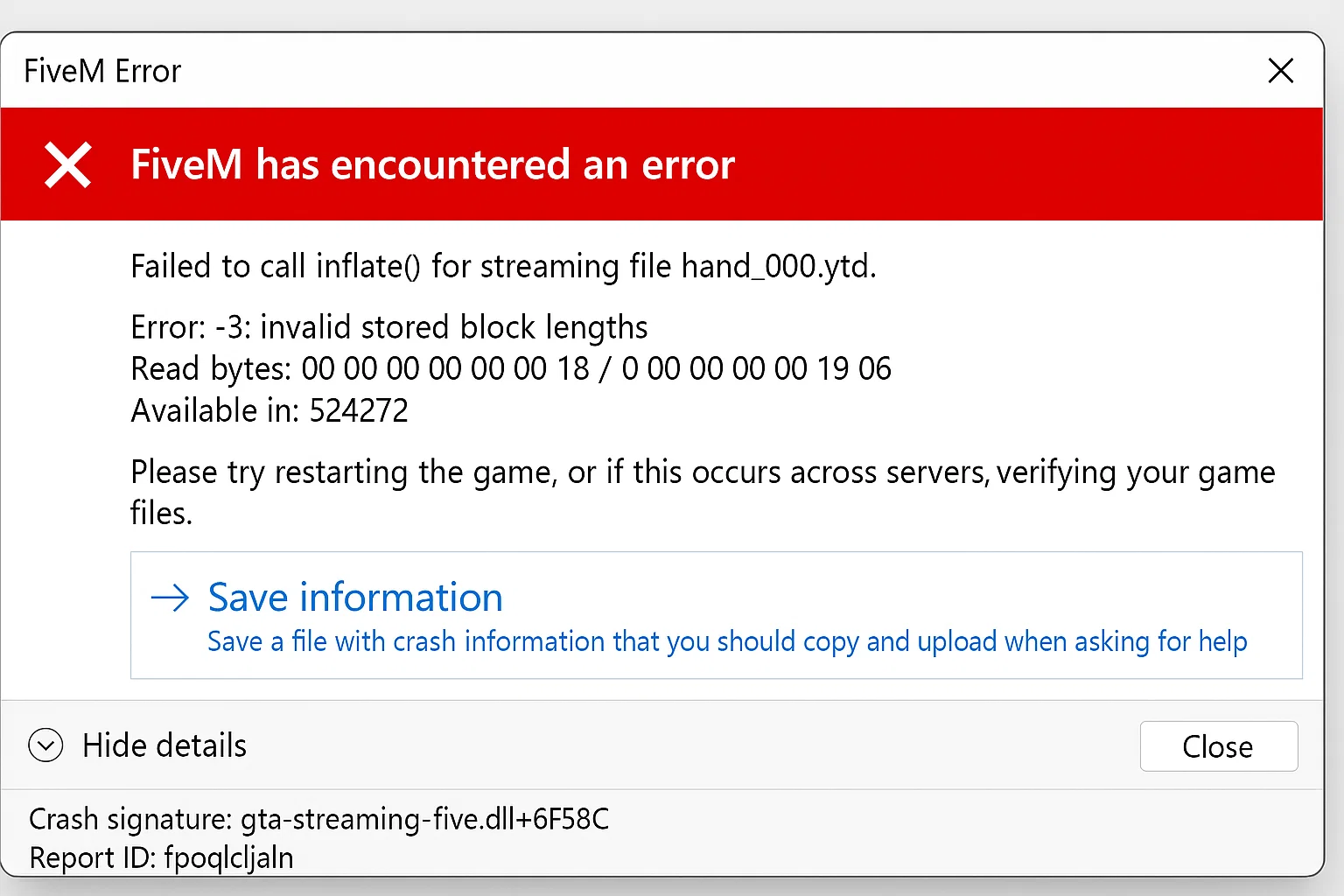
FiveM Crash Help: Troubleshooting Guide
Quick‑Start FiveM Crash Fix Guide
> Got a “no‑launch” error? Follow these simple steps and you’ll have your FiveM client up and running in minutes.
Ön koşullar
- Windows 10/11 (64 bit)
- Güncellenmiş grafik sürücüleri
- Yönetimsel ayrıcalıklar
- FiveM resmi başlatıcı aracılığıyla yüklendi
Tanı Adımları
1. Çökme Kayıtlarını Kontrol Edin
FiveM kurulum dizinine gidin ve çökme dökümanlarını bulun:
%localappdata%FiveMFiveM.appcrashes
En sonuncuyu aç .dmp Belirli hata kodlarını tanımlamak için dosya zaman damgası.
2. Oyun Önbelleğinin Bütünlüğünü Doğrulayın
Grand Theft Auto V (Steam):
- Steam Kütüphanesinde GTA V'e sağ tıklayın
- Özellikler → Yüklü Dosyalar → Oyun dosyalarının bütünlüğünü doğrula
- Doğrulamayı bekleyin (15-30 dakika)
Grand Theft Auto V (Rockstar Başlatıcısı):
- Rockstar Games Başlatıcısını açın
- Ayarlar → GTA V → Bütünlüğü Doğrula
- Doğrulama sürecini tamamlayın
Grand Theft Auto V (Epic Oyunları):
- Kütüphane → GTA V → Üç nokta menüsü
- Yönet → Doğrula
- İşlemin tamamlanmasına izin ver
3. Hata Türüne Göre Yaygın Çözümler
Error: “Could not find game executable”
cd /d "%localappdata%FiveMFiveM.app" FiveM.exe -sp_BackupDirectory "C:FiveM_Backup"
Daha sonra istendiğinde GTA V dizinini manuel olarak seçin.
Error: “Corrupted game cache”
Önbellek klasörlerini silin:
rmdir /s /q "%localappdata%FiveMFiveM.appcache" rmdir /s /q "%localappdata%FiveMFiveM.appdatacache"
Error: “DLL injection detected”
Çakışan yazılımları devre dışı bırakın:
- MSI Afterburner
- RivaTuner İstatistik Sunucusu
- Discord kaplaması
- GeForce Experience kaplaması
- Windows Oyun Modu
FiveM'i antivirüs istisnalarına ekleyin:
%localappdata%FiveMFiveM.appFiveM.exe %localappdata%FiveMFiveM.appFiveM_b*.exe %localappdata%FiveMFiveM.appFiveM_ROSService.exe
4. Gelişmiş Sorun Giderme
Temiz Önyükleme FiveM:
- Silmek
CitizenFX.iniitibaren%localappdata%FiveMFiveM.app - Shift tuşunu basılı tutarak FiveM'i başlatın
- Select “Safe Mode” when prompted
Visual C++ Redistributables'ı yeniden yükleyin:
Sırasıyla indirin ve kurun:
GPU Sürücüsünün Temiz Kurulumu:
- İndirmek Ekran Sürücüsü Kaldırma Aracı (DDU)
- Güvenli Modda Başlat
- DDU'yu çalıştırın → Temizleyin ve yeniden başlatın
- Üreticiden en son GPU sürücülerini yükleyin
5. Kaynak-Belirli Çökmeler
Çökmeler yalnızca belirli sunucularda meydana geliyorsa:
-- Server-data klasöründeki client.cfg'ye sv_enforceGameBuild 2802'yi ekleyin ve glue_cdnKey'i "" olarak ayarlayın
Yüksek kaynak sayısına sahip sunucular için (>150):
-- Increase heap size in FiveM shortcut target "%localappdata%FiveMFiveM.appFiveM.exe" +set citizen_dir C:FiveMFiveM.app
Tutorial: Performance Issues – Ideal FiveM Settings
6. Donanımla İlgili Çözümler
RAM Sorunları:
Windows Bellek Tanılama'yı çalıştırın:
mdsched.exe
Choose “Restart now and check for problems”
CPU Uyumluluğu:
CPU sanallaştırma özelliklerini geçici olarak devre dışı bırakın:
- BIOS'ta Intel VT-x
- BIOS'ta AMD-V
- Windows'daki Hyper-V Özellikleri
7. Ağ Bağlantılı Çökmeler
Ağ yığınını sıfırla:
netsh winsock sıfırlama netsh int ip sıfırlama ipconfig /release ipconfig /renew ipconfig /flushdns
8. Son Çare Seçenekleri
FiveM Yeniden Kurulumunu Tamamlayın:
- Yedekleme
%appdata%CitizenFX - Uninstall FiveM via Control Panel
- Kalan klasörleri sil:
rmdir /s /q "%localappdata%FiveM"rmdir /s /q "%appdata%CitizenFX" - Yeniden yükleyin fivem.net
Belirsizlikler ve Sınırlamalar
- Bazı anticheat systems may cause false positive crashes (EasyAntiCheat, BattlEye integration varies)
- Windows 11 22H2+ henüz belgelenmemiş belirli uyumluluk ayarları gerektirebilir
- AMD FSR 3.0 uygulamaları belirli kaynak paketlerinde kararsızlığa neden olabilir
Referanslar
- FiveM Teknik Dokümantasyonu
- Cfx.re Topluluk Standartları
- Çökme dökümü analizi için Windows Hata Bildirimi (WER) standartları
Çözüm: Yazılım çakışmalarının, önbellek bozulmasının ve sürücü sorunlarının sistematik olarak ortadan kaldırılması, FiveM başlatma çökmelerinin 95%'sini çözer.
Practical checklist
Use this guide as a staging checklist before changing a live FiveM server. Confirm the current server artifact version, framework version, resource dependencies, database changes, and any client-side files before you apply the change.
- Back up the affected configuration files and database tables.
- Apply the change on a test server first.
- Watch the server console and client F8 console for errors.
- Check whether the change affects jobs, inventory, vehicles, maps, voice, permissions, or player data.
- Document the exact file, command, or setting you changed so it can be reverted quickly.
Testing before production
After the first test, join with a normal player account and repeat the flow from the player perspective. If the topic involves performance, measure before and after with the same player count, route, and resource set. If it involves admin tools or permissions, verify both allowed and denied users.
Yaygın hatalar
Most FiveM issues come from missing dependencies, stale cache, wrong folder names, framework mismatch, or configuration copied from another server. Avoid changing multiple systems at once; make one change, test it, and then continue.
Related resources
For production-ready assets, compare paid resources in the FiveMX shop. For free resources, browse free FiveM scripts and test each resource before using it publicly.
Production rollout notes
Before using this guidance on a live FiveM server, define the exact outcome you expect from the change. For FiveM Crash Help: Troubleshooting Guide, that means checking which resource, setting, command, or workflow is affected and confirming that the change fits your current framework, artifact version, and server rules. Keep the rollout small enough that you can reverse it quickly if players report errors.
Use a staging server with the same framework, database schema, resource order, and key dependencies as production. If the topic changes gameplay, permissions, visuals, voice, vehicles, maps, inventory, or economy behavior, test with at least one admin account and one normal player account. Watch server console output, client F8 logs, and resource timing while repeating the exact player flow that will happen on the live server.
Rollback checklist
- Save the previous configuration file, resource folder, and database state before changing anything.
- Record the resource version, commit, download page, or setting value you tested.
- Restart only the affected resource first when possible, then restart the full server if dependencies require it.
- If errors appear, revert the single changed resource or setting before testing another fix.
Maintenance guidance
Review this setup again after FiveM artifact updates, framework updates, or major resource changes. A configuration that works today can break after dependency updates, renamed exports, changed events, or database migrations. Keep notes with your server documentation so future admins understand what was changed, why it was changed, and how to verify it again.
Ongoing review
Recheck FiveM Crash Help: Troubleshooting Guide after major FiveM artifact updates, framework changes, or resource migrations. Confirm that the advice still matches current server behavior, that any linked source remains available, and that installation steps still match the files a server owner will actually download or configure.
For public servers, keep a short changelog beside your server documentation. Note what was tested, what changed, which accounts were used for verification, and how to roll back. This makes future maintenance faster and prevents old setup notes from becoming unclear or unsafe for players.

![[citizen-server-impl] Gerekli haklara sahip değilsiniz…](https://cdn.fivemx.com/wp-content/uploads/2025/07/fivem-error-768x512.webp)


