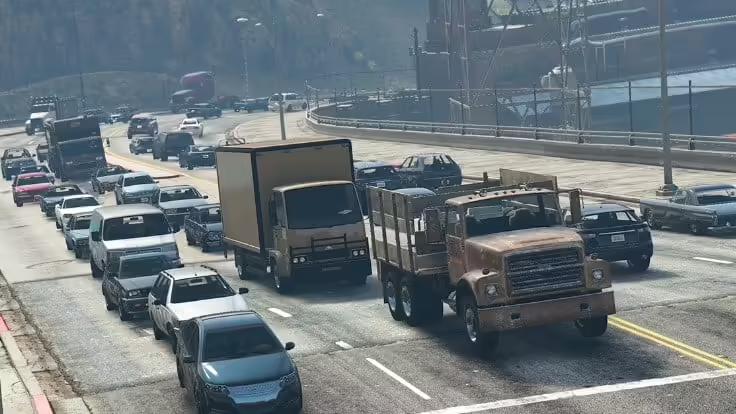
Hızlı cevap: reduce ambient NPCs and traffic with a small client resource that calls the density multiplier natives every frame. Include both fxmanifest.lua and the client Lua file, start with a moderate value on staging, and measure the same route before and after. Do not promise an FPS gain: the result depends on the wider client resource and asset workload.
Bazen, sunucu performansını iyileştirmek veya belirli oyun senaryoları oluşturmak için oyun dünyasında oynanamayan karakterlerin (NPC'ler) sayısını veya yoğunluğunu azaltmak isteyebilirsiniz. Bu eğitimde, FiveM'de NPC'leri nasıl azaltacağınızı göstereceğiz.
Not: NPC yoğunluğunu azaltmak FiveM'de sunucu tarafı betikleme konusunda biraz bilgi gerektirebilir. FiveM sunucunuza yönetici erişiminiz olduğundan ve Lua betikleme konusunda temel bir anlayışa sahip olduğunuzdan emin olun.
Ön koşullar:
- Bir FiveM sunucusu.Kurulum nasıl yapılır)
- Sunucuya yönetici erişimi.
- Bir metin düzenleyici (örneğin, Not defteri++) Lua betiklerini düzenlemek için.
- Lua betiğinin temel bilgisi.
Adımlar:
1. FiveM sunucunuza erişin:
- FiveM sunucunuza SSH veya RDP erişiminiz olduğundan veya kontrol paneline erişiminiz olduğundan emin olun.
2. Kaynaklar klasörünüzü bulun:
- FiveM sunucunuzun ana dizinine gidin.
- "Kaynaklar" klasörünü bulun; sunucunuzun betikleri ve kaynakları burada bulunur.
3. Yeni bir Lua betiği oluşturun:
- Gerekirse "kaynaklar" klasörünün içinde yeni bir dizin oluşturun, örneğin "npc_reducer."
- İçeri
npc_reducer, yaratmakfxmanifest.luaand a client script such asreduce_npc_density.lua. The manifest must declare the Lua file as aclient_scriptor FiveM will not detect and load it as described below.
4. Lua betiğini düzenleyin:
- Tercih ettiğiniz metin düzenleyicisiyle “reduce_npc_density.lua” dosyasını açın.
- Aşağıdaki Lua kodunu dosyaya ekleyin:
 Citizen.CreateThread(function()
 while true do
 Citizen.Wait(0)
 -- Adjust the number below to set the desired NPC density.
 local newDensity = 0.1 -- Modify this value as needed.
 SetVehicleDensityMultiplierThisFrame(newDensity)
 SetPedDensityMultiplierThisFrame(newDensity)
 SetRandomVehicleDensityMultiplierThisFrame(newDensity)
 SetParkedVehicleDensityMultiplierThisFrame(newDensity)
 SetScenarioPedDensityMultiplierThisFrame(newDensity, newDensity)
 end
 end)
- Yukarıdaki kodda şunları değiştirebilirsiniz:
newDensityOyun dünyasındaki çeşitli NPC ve araç türlerinin yoğunluğunu kontrol etmek için değişken. Bir değer1.0varsayılan yoğunluğu temsil ederken, daha küçük değerler bunu azaltır.
5. Lua betiğini kaydedip kapatın:
- Lua betiğinde yaptığınız değişiklikleri kaydedin ve metin düzenleyicisini kapatın.
6. server.cfg dosyanızı yapılandırın:
- FiveM sunucunuzun ana dizinine gidin.
- “server.cfg” dosyasını bir metin düzenleyiciyle açın.
- Dosyaya aşağıdaki satırı ekleyin:
ensure npc_reducer
- Bu satır, sunucu başlatıldığında “reduce_npc_density.lua” betiğinizin yüklenmesini sağlar.
7. FiveM sunucunuzu yeniden başlatın:
- Kaydet “server.cfg” dosyası ve değişiklikleri uygulamak için FiveM sunucunuzu yeniden başlatın.
8. NPC yoğunluğunu gerçek zamanlı olarak ayarlayın:
- Sunucunuz tekrar açıldığında, NPC yoğunluğunu gerçek zamanlı olarak ayarlayabilirsiniz.
newDensityLua betiğinde değişken. Daha düşük değerler NPC yoğunluğunu azaltacak, daha yüksek değerler ise artıracaktır.
FiveM'de NPC'leri (yoğunluğu) nasıl azaltacağınızı bir Lua betiği oluşturarak ve sunucunuzu onu yükleyecek şekilde yapılandırarak başarıyla öğrendiniz. Bu, sunucu performansını optimize etmenize veya GTA V FiveM sunucunuzda daha az NPC ile belirli oyun senaryoları oluşturmanıza yardımcı olabilir.
Eğer size yardımcı olduysa lütfen beğenin, paylaşın ve yorum yapın. :)
İlgili kaynaklar
Add the required resource manifest
Cfx.re’s Lua resource guide states that a resource folder needs a manifest to be detected and that client_script tells the client runtime which file to load. Add this beside reduce_npc_density.lua:
fx_version 'cerulean'
game 'gta5'

client_script 'reduce_npc_density.lua'
The example uses SetPedDensityMultiplierThisFrame, SetScenarioPedDensityMultiplierThisFrame, SetVehicleDensityMultiplierThisFrame, SetRandomVehicleDensityMultiplierThisFrame Ve SetParkedVehicleDensityMultiplierThisFrame. Keep the loop client-side and yield every frame as shown. Test populated interiors, emergency traffic, missions and job scripts before rollout because reduced ambient populations can change gameplay as well as load.
Do not combine this approach with undocumented popcycle.dat edits during the same test. Change one control at a time, record the value, compare client performance and restore the previous resource if behavior regresses.
Primary references: Cfx.re Lua resource guide ve official CitizenFX native documentation repository.