







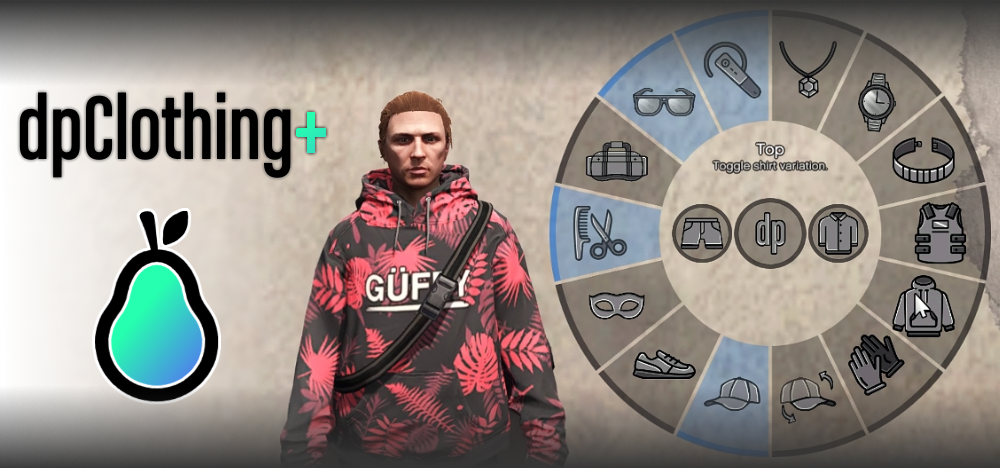
FiveM sunucunuzu yeni modayla renklendirmek mi istiyorsunuz? Giyim Menüsü modumuz tam da ihtiyacınız olan şey! Bu harika mod, oyuncuların karakterlerinin kıyafetlerini oyun içinde kolayca özelleştirmelerine olanak tanıyarak daha önce hiç olmadığı kadar sürükleyici bir deneyim sunuyor. rol yapma sunucusunu çalıştırmak veya oyunculara görünümleri üzerinde daha fazla kontrol sağlamak istiyorsanız, bu mod mutlaka edinilmesi gereken bir özellik.
Önizleme

Mod Hakkında
The Clothing Menu mod enhances your FiveM server by allowing players to quickly and easily change their outfit pieces directly in-game. Using simple commands, players can toggle various clothing items such as hats, glasses, and shirts, and even change the style of their equipped clothes. Here’s a list of some commands players can use:
/hat(Geçiş)/glasses(Geçiş)/shirt(Geçiş)/pants(Geçiş)/shoes(Geçiş)/top(Varyantlar)
Ve çok daha fazlası! Bu komutlar, karakterinizi tam istediğiniz gibi giydirmenizi ve anında hızlı kıyafet değişiklikleri yapmanızı son derece kolaylaştırır. Bu modun benzersiz özelliklerinden biri, kayıtlı kıyafetinize anında geri dönmenizi sağlayan "giysiyi geri al" komutudur ve bu da onu rol yapma senaryoları için mükemmel kılar.
İndirmek
Kurulum Talimatları
Clothing Menu modunu kurmak çok kolay! Şu basit adımları izleyin:
- Modu İndirin: Giyim Menüsü mod dosyasını indirin
- Dosyaları Çıkarın: İndirilen dosyanın içeriğini çıkarmak için WinRAR veya 7-Zip gibi bir dosya çıkarma aracı kullanın.
- Sunucuya Yükle: Çıkarılan klasörü sunucunuzun klasörüne taşıyın
resourcesdizin. - Sunucu Yapılandırmasını Güncelle: Aç şunu
server.cfgdosyaya gidin ve modun yüklendiğinden emin olmak için aşağıdaki satırı ekleyin:start clothingmenu - Sunucuyu Yeniden Başlat: Yeni modu yüklemek için FiveM sunucunuzu yeniden başlatın.
İşte bu kadar! Artık oyununuzda yepyeni giyim seçeneklerinin tadını çıkarmaya hazırsınız!
Uyumluluk
Clothing Menu modu hem QBCore hem de ESX çerçeveleriyle uyumludur ve FiveM'in en son sürümleriyle sorunsuz bir şekilde çalışır. En iyi deneyim için sunucunuzun güncel olduğundan emin olun.