


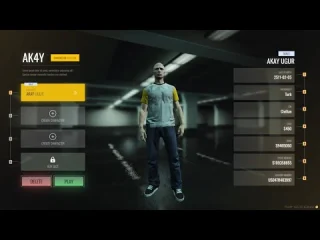
VIP PauseMenu (QB) – Premium-Pausenmenü-Benutzeroberfläche für Abonnieren Server
VIP PauseMenu verwandelt das Standard-FiveM-Pausemenü in eine schicke, professionelle Oberfläche, die die Präsentation und das Nutzererlebnis deines QBCore-Servers aufwertet. Dieser umfassende UI-Ersatz gestaltet jedes Element des Pausemenüs mit modernem Stil, flüssigen Animationen, erweiterter Funktionalität und anpassbarer Markenidentität neu – und schafft so einen polierten ersten Eindruck, der Spielern sofort Qualität vermittelt. Egal, ob du einen ernsthaften Rollenspiel-Server, eine wettbewerbsorientierte PvP-Community oder ein lockeres Gaming-Netzwerk aufbaust, dieses Premium-Pausemenü bietet das professionelle Äußere, das Spitzen-Server von generischen Alternativen abhebt.
Das VIP PauseMenu wurde speziell für die QBCore-Framework-Integration entwickelt und bietet neben kosmetischen Verbesserungen auch funktionale Erweiterungen wie Echtzeit-Spielerstatistiken, Serverinformationen, Schnellzugriffsbefehle und Social-Media-Integration. Spieler erhalten einen ansprechenden und informativen Pausenbildschirm, der ihr Spielerlebnis verbessert, anstatt nur grundlegende Einstellungen anzuzeigen. Serverbesitzer können das Menü mit Logos, Farben, Social-Media-Links und serverspezifischen Informationen individuell gestalten und so jeden Pausenbildschirm dezent für ihre Community nutzen.
Im Leistungsumfang enthalten
Das vollständige VIP PauseMenu-Paket bietet eine vollständig überarbeitete Pause-Menü-Schnittstelle, optimiert für QBCore-Server. Du erhältst das Kern-UI-Skript mit HTML/CSS/JavaScript-Quellcode, modernes responsives Design, das sich über Auflösungen hinweg skaliert, anpassbare Farbschemata und Themenoptionen, Server-Informationen-Anzeigetafeln, die Regeln, Personal, Statistiken anzeigen, Spielerstatistiktafel mit Spielzeit, Level, Arbeit, Geld, Schnellzugriffsschaltflächen für häufige Aktionen, Social-Media-Integration mit anklickbaren Discord-/Website-Links, animierte Übergänge und reibungslose Interaktionen, mehrseitige Navigation für übersichtliche Informationen, Screenshot-Modus mit Ausblenden der Benutzeroberfläche für saubere Aufnahmen, Integration von Admin-Tools mit Anzeige des Online-Personals und eine umfassende Konfigurationsdatei zur einfachen Anpassung.
Kernfunktionen
Visuelles Design
- Modernes UI/UX – Klares, modernes Interface-Design, das den aktuellen Webdesign-Trends entspricht
- Flüssige Animationen – Einblendübergänge, Hover-Effekte für Schaltflächen und Seitenübergänge
- Responsives Layout – Passt sich automatisch an verschiedene Bildschirmauflösungen an (1080p, 1440p, 4K)
- Benutzerdefiniertes Branding – Füge Server-Logos und benutzerdefinierte Farbschemata hinzu, die zu deiner Markenidentität passen
- Hintergrundoptionen – Verschwommener Spielhintergrund, benutzerdefinierte Bilder oder einfarbige Farben
- Schriftartanpassung – Wähle aus den enthaltenen Schriftarten oder füge benutzerdefinierte Typografie hinzu
Informationstafeln
- Spielerstatistiken – Anzeige von Charaktername, Beruf/Rang, Bankguthaben/Bargeld, Spielzeit, Level/EP
- Serverinformationen – Servernamen, aktuelle Spieleranzahl, Neustart-Timer und Version anzeigen
- Regelanzeige – Scrollbarer Regelbereich, der die Serverrichtlinien zugänglich hält
- Mitarbeiterliste – Online-Administratoren und Supportmitarbeiter mit Verfügbarkeitsstatus anzeigen
- Ankündigungen – Aktuelle Updates, Ereignisse oder wichtige Serverneuigkeiten
- Soziale Medien – Klickbare Links zu Discord, Website, Foren und Spendenseiten
Schnellaktionen
- Befehlskombinationen – Zugriff mit einem Klick auf /id, /report, /ticket, gängige Spielerbefehle
- Zugriff auf die Einstellungen – Schneller Zugriff auf die Spieleinstellungen ohne Navigation durch mehrere Menüs
- Hilfesystem – Integrierte Hilfebefehle und Anleitungen für neue Spieler
- Screenshot-Modus – Benutzeroberflächensichtbarkeit umschalten für saubere Screenshots und Aufnahmen
- Admin-Tools – Mitarbeiter sehen zusätzliche Schnellzugriffstasten für die Moderation.
Spielerstatistik-Tracking
- Sitzungszeit – Aktuelle Sitzungsdauer und gesamte Server-Spielzeit
- Finanzinformationen – Anzeige des Bankguthabens, der verfügbaren Bargeldreserven und des Gesamtvermögens
- Stelleninformationen – Aktuelle Tätigkeit, Positionsebene, tätigkeitsbezogene Statistiken (Verhaftungen wegen …) Polizei, (Lieferungen für LKW-Fahrer)
- Zeichendaten – Charaktername, ID, Telefonnummer, vorhandene Lizenzen
- Erfolge – Optionale Integration eines Erfolgssystems, das Freischaltungen und Fortschritte anzeigt
Perfekt für
- QBCore Rollenspielserver – Professionelle Präsentation, die den hohen Standards seriöser RP-Server entspricht
- Gaming-Communities – Markenkonforme Benutzeroberfläche zur Förderung der Community-Identität
- VIP-/Whitelist-Server – Hochwertige Ästhetik, die Exklusivität und Qualität vermittelt
- Große Netzwerke – Netzwerke mit mehreren Servern, die eine einheitliche Benutzeroberfläche auf allen Servern wünschen.
- Wettbewerbsfähige Server – Statistikverfolgung und Ranglistenintegration für wettbewerbsorientierte Communities
- Einführung neuer Spieler – Zugängliche Regeln und Hilfeinformationen zur Einbindung neuer Mitglieder
Anpassungsoptionen
Branding-Konfiguration
- Servername/Logo – Lade benutzerdefinierte Logo-Bilder hoch, die prominent im Menü angezeigt werden
- Farbschemata – Auswahl von Primär- und Sekundärfarben mit über 10 voreingestellten Designs oder benutzerdefinierten Hex-Codes
- Hintergrundbilder – Benutzerdefinierte Hintergrundbilder oder verschwommene Spielansicht
- Soziale Links – Discord-Einladung, Website-URL, Spendenseite, Social-Media-Konten
- Server-Slogan – Benutzerdefinierter Slogan oder Serverbeschreibungstext
Informationsmanagement
- Serverregeln – Füge unbegrenzt Regeln in kategorisierten Abschnitten hinzu (allgemein, RP, fail RP usw.)
- Personalverzeichnis – Mitarbeiterränge konfigurieren (Inhaber, Hauptadministrator, Administrator, Moderator, Support)
- Ankündigungen – Füge wechselnde Ankündigungen für Veranstaltungen, Aktualisierungen und Aktionen hinzu.
- Statistikanzeige – Wähle aus, welche Spielerdaten du basierend auf dem Servertyp anzeigen/ausblenden möchtest
Funktionseinstellungen
- Tastenzuweisung – Benutzerdefinierte Tastenkombination zum Öffnen des Pausenmenüs festlegen (Standard: ESC-Taste überschreibt)
- Befehlsintegration – Verknüpfe Schnellaktions-Buttons mit den spezifischen Befehlen deines Servers
- Berechtigungsstufen – Unterschiedliche Menüfunktionen für normale Spieler, VIPs und Administratoren
- Seitensichtbarkeit – Je nach Bedarf bestimmte Tabs (Statistiken, Regeln, Personal) aktivieren/deaktivieren.
Technische Details
- Dateigröße: ~2 MB (HTML/CSS/JS/Bilder)
- Leistung: <0,01 ms Reaktionszeit im geschlossenen Zustand, 0,00 ms im geöffneten Zustand (reine Benutzeroberfläche, keine Serverauswirkungen)
- Rahmen: QBCore-spezifisch (nutzt Spielerdaten und Funktionen von qb-core)
- Abhängigkeiten: QBCore-Framework erforderlich
- Datenbank: Es werden keine zusätzlichen Datenbanktabellen benötigt, die Daten werden aus QBCore-Spielerdaten abgerufen.
- Verschlüsselung: Unverschlüsseltes HTML/CSS/JS für volle Anpassungsmöglichkeiten
- Aktualisierung: Regelmäßige Updates mit neuen Designs und Funktionen
Installation
- Extrahiere VIP PauseMenu-Dateien in deinen QBCore-Server-Ressourcenordner
- Ressource zu server.cfg hinzufügen:
sicherstellen, dass das VIP-Pausenmenü - Bearbeiten
config.luaServernamen, Logo-URL und Social-Media-Links festlegen - Konfiguriere das Farbschema, indem du ein voreingestelltes Thema auswählst oder benutzerdefinierte Hex-Codes eingibst
- Füge Serverregeln, eine Mitarbeiterliste und Ankündigungen in den Konfigurationsabschnitten hinzu
- Tastenbelegung festlegen (Standard-ESC-Taste überschreiben oder benutzerdefinierte Taste)
- Konfiguriere, welche Statistiken für deinen Servertyp angezeigt werden sollen
- Starte den Server neu und teste das Öffnen des Menüs mit der konfigurierten Tastenkombination
- Stil und Inhalte basierend auf dem Feedback der Spieler anpassen
Framework-Kompatibilität
- ✅ Abonnieren – Speziell für QBCore entwickelt mit nativer Integration für Spielerdaten, Jobs und Geld
- ✅ QBOX – Kompatibel mit QBOX (QBCore-Fork) unter Verwendung derselben Datenstrukturen
- ❌ ESX – Nicht kompatibel (QBCore-spezifisch, separate ESX-Version von anderen Entwicklern erhältlich)
- ❌ Standalone – Benötigt das QBCore-Framework für die Funktionalität
Integration mit QBCore-Systemen
Das VIP-Pause-Menü integriert sich nahtlos in die Kernsysteme von QBCore und zeigt Spielerinformationen in Echtzeit an. Die Jobdaten werden aus den QBCore-Jobzuweisungen abgerufen und zeigen den aktuellen Beruf und die Stufe an. Die Geldanzeige wird mit den QBCore-Bank- und Kassensystemen synchronisiert und zeigt korrekte Kontostände an. Charakterinformationen stammen aus den QBCore-Spielermetadaten, einschließlich Bürger-ID und Telefonnummer. Gangzugehörigkeiten werden angezeigt, sofern QB-Gangs verwendet wird. Das Menü berücksichtigt die QBCore-Berechtigungen – Administratorfunktionen sind nur für Spieler mit den entsprechenden QBCore-Berechtigungen sichtbar. Dank dieser tiefen Integration zeigt das Menü ohne zusätzliche Konfiguration stets aktuelle und korrekte Informationen an.
Was es auszeichnet
Die meisten Alternativen zum Pausenmenü sind entweder rein kosmetische Änderungen ohne funktionalen Mehrwert oder so stark angepasst, dass ein Update alles durcheinanderbringt. VIP PauseMenu bietet die perfekte Balance: Es verbessert die visuelle Darstellung deutlich und fügt gleichzeitig wirklich nützliche Funktionen wie Schnellbefehle und Echtzeitstatistiken hinzu. Dank des QBCore-spezifischen Designs ist es für die Datenstrukturen dieses Frameworks optimiert, anstatt universell und mittelmäßig sein zu wollen. Der unverschlüsselte Quellcode ermöglicht Serverbetreibern, alles nach Belieben anzupassen, während das Basisdesign so professionell ist, dass die meisten Server es mit minimalen Änderungen verwenden.
Auswirkungen auf das Spielerlebnis
Erste Eindrücke sind in FiveM-Servern enorm wichtig. Wenn neue Spieler beitreten und das Spiel pausieren, um die Einstellungen zu überprüfen oder die Regeln zu lesen, stoßen sie entweder auf den hässlichen Standard-FiveM-Pausebildschirm oder auf deine benutzerdefinierte professionelle Oberfläche. Das VIP PauseMenu vermittelt sofort, dass dieser Server anders ist, durch visuelle Veredelung und organisierte Informationen. Spieler können schnell die Regeln finden, über Discord-Links mit dem Personal Kontakt aufnehmen, ihre Statistiken überprüfen und auf Hilfe zugreifen – was die Frustration neuer Spieler reduziert und die Bindung verbessert. Die psychologische Wirkung professioneller UI sollte nicht unterschätzt werden; Spieler empfinden gut gestaltete Server als legitimer und lohnenswert, um Zeit zu investieren.
Gemeinschaftsbildende Merkmale
Die Integration sozialer Medien und die Sichtbarkeit des Teams dienen nicht nur der Dekoration, sondern auch dem Community-Aufbau. Der direkte Discord-Zugriff aus dem Pausenmenü erhöht die Beitrittszahlen zum Discord-Server deutlich – Spieler müssen weder nach Einladungslinks suchen noch das Spiel verlassen. Die Anzeige der Online-Teammitglieder informiert Spieler darüber, wann Hilfe verfügbar ist, wodurch Frustration bei Support-Anfragen reduziert wird. Ankündigungen halten Spieler über Events und Updates auf dem Laufenden, ohne dass sie das Forum besuchen müssen. Diese Funktionen verwandeln das Pausenmenü von einem Einstellungsmenü in einen zentralen Treffpunkt für die Community, der die Spieler mit dem Ökosystem deines Servers verbindet.
Vorteile für Administratoren und Moderatoren
Für Serveradministratoren bietet das VIP-Pausemenü subtile Vorteile bei der Moderation. Schnellzugriffsbuttons erleichtern das Melden von Vorfällen und fördern so die Kooperation der Spieler bei der Einhaltung der Regeln. Die Anzeige des Teammitglieds ermöglicht es Administratoren, ihre Verfügbarkeit oder Abwesenheit zu signalisieren. Die professionelle Präsentation schafft klare Verhaltenserwartungen – Spieler nehmen Regeln ernster, wenn diese in übersichtlichen und gut gestalteten Oberflächen anstatt im Chat-Spam präsentiert werden. Einige Server berichten von einer verbesserten Regelkonformität allein durch die verbesserte Zugänglichkeit und professionelle Präsentation der Regeln.
Marken- und Marketingwert
Jedes Mal, wenn ein Spieler das Spiel pausiert, sieht er das Branding deines Servers – Logo, Farben, Name, Slogan. Diese kontinuierliche Präsenz stärkt die Markenbekanntheit und die Community-Identität. Streamer und Content-Creator, die auf deinem Server spielen, präsentieren dein Branding ihren Zuschauern bei jeder Pause und betreiben so kostenloses Marketing. Das professionelle Erscheinungsbild macht deinen Server attraktiver für Screenshots und Streams und fördert so die Erstellung von organischen Inhalten. Einige große Communities stimmen sogar ihren Discord-Server, ihre Website und die Benutzeroberfläche im Spiel aufeinander ab, um ein einheitliches Branding zu verwenden und so einen professionellen und stimmigen Auftritt auf allen Plattformen zu gewährleisten.
Anpassungsmöglichkeiten für Servertypen
Verschiedene Servertypen profitieren von der Hervorhebung unterschiedlicher Menüfunktionen. Ernsthafte RP-Server könnten Regeln und die Verfügbarkeit des Personals hervorheben. Wirtschaftsorientierte Server könnten Finanzstatistiken und Jobinformationen in den Vordergrund stellen. PvP-Server könnten Kill/Death-Verhältnisse und Ranglisten integrieren. Gang-Server könnten Gebietskontrolle und die Anzahl der Gangmitglieder anzeigen. Das modulare Design ermöglicht es Serverbetreibern, individuell anzupassen, welche Funktionen hervorgehoben, welche ausgeblendet und welche individuell implementiert werden – so kann dasselbe Basismenü für völlig unterschiedliche Serverkonzepte genutzt werden.
Empfohlene Zusatzfunktionen
- Individuell gestalteter Ladebildschirm im Stil des VIP-Pausemenüs für einheitliche Markenidentität
- Discord-Integrationsbot synchronisiert In-Game-Rollen mit Discord-Rollen
- Erfolgssystem zur Verfolgung von Spielermeilensteinen, die in den Statistiken angezeigt werden
- Screenshot-Tool, das in den Screenshot-Modus des Menüs integriert ist
- Benutzerdefinierte HUD-Elemente, die farblich auf das Pausenmenü abgestimmt sind
- Statusanzeigen für Ereignisse, Serverzustand und Spieleranzahl
Leistung und Optimierung
Trotz aufwendiger Grafik und Animationen beeinträchtigt das VIP-Pausemenü die Performance in keiner Weise. Die Benutzeroberfläche besteht aus reinem HTML/CSS und wird vom integrierten Browser des Spiels ohne serverseitige Verarbeitung gerendert. Im geschlossenen Zustand benötigt die Ressource praktisch keinen Speicher und keine Rechenleistung. Da das Öffnen des Menüs das Spiel ohnehin pausiert, ist der kurze Render-Anstieg für die Spieler nicht sichtbar. Dank dieser Optimierung können selbst preisgünstige Server eine Premium-Benutzeroberfläche nutzen, ohne die Spielperformance zu beeinträchtigen – eine seltene Kombination aus Form und Funktion.
![[ESX/QB] 0BUG Pause Menu FiveM resource preview](https://fivemx.com/wp-content/fivemx-cache/product-thumbs/108786-6864b0b69f8e-320x240.webp)





Wilburn (Verifizierter Käufer) –
Tolle Ressource für GTA RP-Server.
Monika (Verifizierter Käufer) –
Große Qualität und hervorragender Support.
Gayle (Verifizierter Käufer) –
Unsere Spieler bemerkten sofort die Verbesserung. Es bringt viel Qualität auf den Server.
GamerOlli (Verifizierter Käufer) –
Eine der besten FiveM-Ressourcen, die ich gekauft habe. Sauberer Code, gute Dokumentation und viele Konfigurationsmöglichkeiten.
Constanze (Verifizierter Käufer) –
Sehr anfängerfreundliche Einrichtung. Die Anleitung hat den Installationsprozess einfach gemacht.
Zola (Verifizierter Käufer) –
Das Skript wirkt professionell und produktionsreif, anstatt unvollendet oder experimentell.
Deanna (Verifizierter Käufer) –
Nicht das Beste, aber sein Geld wert