Video Voorbeeld
Functies
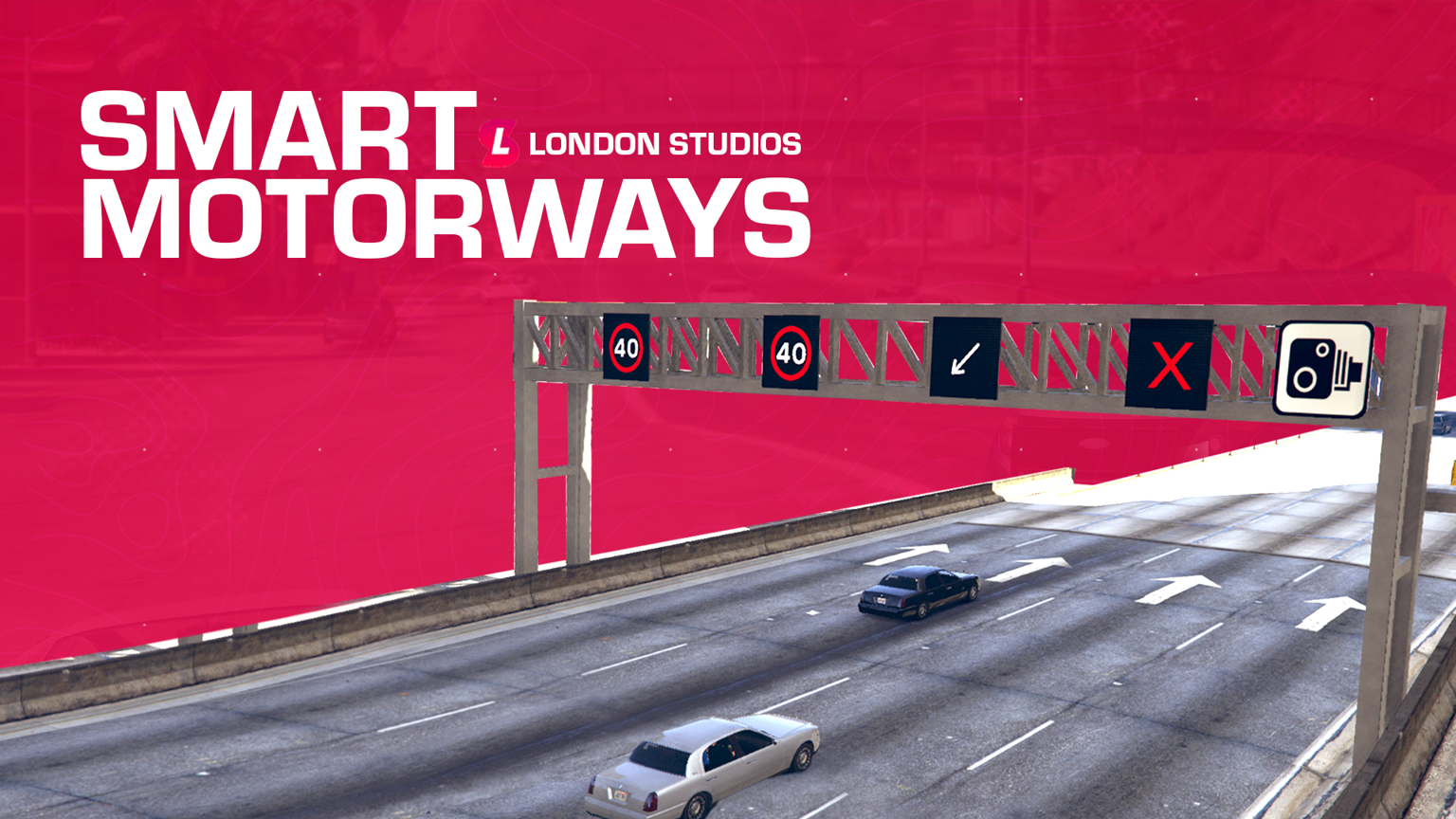
- Configuratiescherm – Ons in-game configuratiescherm stelt uw spelers in staat om het pictogram of de snelheid die boven de rijstroken wordt gebruikt in realtime in te stellen.
- Wijzigingen op afstand – Snelwegportalen kunnen over de hele kaart worden bijgewerkt met één commando, met een kaart waarmee u de gewenste locatie kunt selecteren om te bewerken.
- CCTV-systeem – Bekijk en verplaats eenvoudig CCTV-camera's op portalen over de hele kaart vanuit het configuratiescherm.
- US / UK / EU-modus – Smart Motorways ondersteunt drie modi, waaronder US, UK en EU. Dit betekent dat we een breed scala aan verschillende snelheden direct uit de doos ondersteunen voor uw server.
- Smart Signs Integratie – Smart Motorways is geïntegreerd met Smart Signs, wat betekent dat als u een kopie van beide heeft, u berichten/pictogrammen op een nieuw bord boven elk portaal kunt toevoegen.
- Smart Speed Cameras Integratie – Smart Motorways is geïntegreerd met Smart Speed Cameras, wat betekent dat als u een kopie van beide heeft, de camera's op alle portalen actief worden en zich dynamisch aanpassen aan de snelheidslimiet die boven elke individuele rijstrook is ingesteld, wat helpt bij snelheidshandhaving.
- Pictogramondersteuning – Naast ondersteuning voor de snelheden hebben we pictogrammen zoals pijl links en rijstrook gesloten.
- Discord Logging – Onze resource kan integreren in Discord met logboekregistratie via webhooks. Hiermee kunnen eventuele wijzigingen aan de snelwegportalen worden vastgelegd en voor de toekomst worden bewaard.
- Vooraf geconfigureerde borden – We hebben meer dan 60 locaties rond de kaart vooraf geconfigureerd, wat betekent dat Smart Motorways direct uit de doos klaar is voor gebruik.
- Geheugenbesparing – Alle wijzigingen aan Smart Motorways op de kaart worden in het geheugen opgeslagen, wat betekent dat ze na herstarten nog steeds aanwezig zijn. U kunt eenvoudig alle borden wissen met ons /resetsmartmotorways-commando.
- Emissieve texturen – Deze pictogrammen zijn zowel overdag als 's nachts helder, waardoor ze de aandacht van bestuurders te allen tijde trekken.
- Ondersteuning voor meerdere rijstroken – We ondersteunen wegen met twee, drie en vier rijstroken.
- Locaties eenvoudig toevoegen – Met ons ontwikkelaarscommando kunt u eenvoudig nieuwe locaties in-game toevoegen die automatisch worden opgeslagen voor de volgende keer.
Config
config = {

    -- We've included speed options for the UK, EU, and US based servers
    -- Simply type "UK", "EU", or "US" to change the speed options
    iconPack = "UK",

    -- If you add custom icons, you can add them here
    -- Speed-related icons will be used for speed cameras, and must contain the speed limit in the name as numbers only.
    -- E.g. an icon of speed_60 will be used for a speed limit of 60. An icon of 3_speed_40 would result in a speed limit of 340.
    -- Do NOT edit this section unless you know what you are doing and have modelled custom icons.
    iconPacks = {
        ["UK"] = {
            "arrow_left",
            "arrow_right",
            "red_x",
            "speed_20",
            "speed_30",
            "speed_40",
            "speed_50",
            "speed_60",
            "national_speed",
        },
        ["EU"] = {
            "arrow_left",
            "arrow_right",
            "red_x",
            "speed_20",
            "speed_30",
            "speed_40",
            "speed_50",
            "speed_60",
            "speed_70",
            "speed_80",
            "speed_90",
            "speed_100",
            "speed_110",
            "speed_120",
            "speed_130",
            "speed_140",
            "speed_150",
        },
        ["US"] = {
            "arrow_left",
            "arrow_right",
            "red_x",
            "bv_motorway_speed_15",
            "bv_motorway_speed_20",
            "bv_motorway_speed_25",
            "bv_motorway_speed_30",
            "bv_motorway_speed_35",
            "bv_motorway_speed_40",
            "bv_motorway_speed_45",
            "bv_motorway_speed_50",
            "bv_motorway_speed_55",
            "bv_motorway_speed_60",
            "bv_motorway_speed_65",
            "bv_motorway_speed_70",
            "bv_motorway_speed_75",
            "bv_motorway_speed_80",
            "bv_motorway_speed_85",
        },
    },


    cctvKeys = {
        up = {0, 172},
        down = {0, 173},
        left = {0, 174},
        right = {0, 175},
        leaveCam = {0, 200},
    },

    -- The distance in which the sign and its speed limits will load/unload at
    loadDistance = 200.0,

    -- This will enable debug printing on both the client and the server. This should be set to false most of the time.
    developerMode = false,

    integrations = {

        smartSpeedCameras = {
            enabled = false, -- Only enable if you have the Smart Speed Cameras resource installed and up to date
            resourceName = "SmartSpeedCameras", -- This is the name of the resource which Smart Speed Cameras is installed under
            cooldown = 60, -- This is the cooldown in seconds between speed camera detections. This is to prevent spam fines.
        },

        smartSigns = {
            enabled = false, -- Only enable if you have the Smart Signs resource installed and up to date
            resourceName = "SmartSigns", -- This is the name of the resource which Smart Signs is installed under
        }

    },

    saveSpeedsOnChange = true, -- If this is set to true, the speeds will be saved to locations.json when changed. If false, the speeds will reset on restart.
    saveTextOnChange = true, -- If this is set to true, the text will be saved to locations.json when changed. If false, the text will reset on restart.
    saveIconOnChange = true, -- If this is set to true, the icon will be


    closeMenuButton = {0, 177},

    -- This allows you to enable Discord logging for the signs
    -- You must add your webhook in sv_utils.lua
    logging = {
        enabled = false,
        displayName = "Smart Motorways",
        colour = 31487,
        title = "**New Sign Log**",
        icon = "https://i.imgur.com/dcOQmpA.jpg",
        footerIcon = "https://i.imgur.com/n3n7JNW.png",
        dateFormat = "%d-%m-%Y %H:%M:%S", -- Day-Month-Year Hour-Minute-Second
    },

    resetSignsCommand = {
        enabled = true,
        commandName = "resetsmartmotorway",
        Permissions = {
                EnablePermissions = false, -- If set to false, all below job checks will be disabled, even if they are enabled in the config.lua
                AcePermissions = {
                    Permission = "update.motorway.sign",
                    Enabled = false,
                },

                ESX = {
                    Enabled = false,
                    CheckJob = {
                        Enabled = false, -- Enable this to use ESX job check
                        Jobs = {"police"} -- A user can have any of the following jobs, allowing you to add multiple
                    }
                },
                -- We've added vRP integration. All you need to do is enable it below. Then, configure if you wish to check for groups or permissions, or even both
                vRP = {
                    Enabled = false,
                    CheckGroup = {
                        Enabled = false, -- Enable this to use vRP group check
                        Groups = {"police"}, -- A user can have any of the following groups, meaning you can add different jobs
                    },
                    CheckPermission = {
                        Enabled = false, -- Enable this to use vRP permission check
                        Permissions = {"police"} -- A user can have any of the following permissions, allowing you to add multiple
                    },
                },
                -- We've added QBCore integration. All you need to do is enable it below. Then, configure if you wish to check for jobs or permissions, or even both
                QBCore = {
                    Enabled = false,
                    CheckJob = {
                        Enabled = false, -- Enable this to use QBCore job check
                        Jobs = {"police"}, -- A user can have any of the following jobs, meaning you can add different jobs
                    },
                    CheckPermission = {
                        Enabled = false, -- Enable this to use QBCore permission check
                        Permissions = {"police"}, -- A user can have any of the following permissions, allowing you to add multiple
                    },
                },
                -- We've added QBX integration. All you need to do is enable it below. Then, configure if you wish to check for jobs or permissions, or even both
                QBX = {
                    Enabled = false,
                    CheckJob = {
                        Enabled = false, -- Enable this to use QBX job check
                        Jobs = {"police"}, -- A user can have any of the following jobs, meaning you can add different jobs
                    }
                },
        },
    },

    selectSignCommand = {
        commandName = "selectsign",
        Permissions = {
                EnablePermissions = false, -- If set to false, all below job checks will be disabled, even if they are enabled in the config.lua
                AcePermissions = {
                    Permission = "update.motorway.sign",
                    Enabled = false,
                },

                ESX = {
                    Enabled = false,
                    CheckJob = {
                        Enabled = false, -- Enable this to use ESX job check
                        Jobs = {"police"} -- A user can have any of the following jobs, allowing you to add multiple
                    }
                },
                -- We've added vRP integration. All you need to do is enable it below. Then, configure if you wish to check for groups or permissions, or even both
                vRP = {
                    Enabled = false,
                    CheckGroup = {
                        Enabled = false, -- Enable this to use vRP group check
                        Groups = {"police"}, -- A user can have any of the following groups, meaning you can add different jobs
                    },
                    CheckPermission = {
                        Enabled = false, -- Enable this to use vRP permission check
                        Permissions = {"police"} -- A user can have any of the following permissions, allowing you to add multiple
                    },
                },
                -- We've added QBCore integration. All you need to do is enable it below. Then, configure if you wish to check for jobs or permissions, or even both
                QBCore = {
                    Enabled = false,
                    CheckJob = {
                        Enabled = false, -- Enable this to use QBCore job check
                        Jobs = {"police"}, -- A user can have any of the following jobs, meaning you can add different jobs
                    },
                    CheckPermission = {
                        Enabled = false, -- Enable this to use QBCore permission check
                        Permissions = {"police"}, -- A user can have any of the following permissions, allowing you to add multiple
                    },
                },
                -- We've added QBX integration. All you need to do is enable it below. Then, configure if you wish to check for jobs or permissions, or even both
                QBX = {
                    Enabled = false,
                    CheckJob = {
                        Enabled = false, -- Enable this to use QBX job check
                        Jobs = {"police"}, -- A user can have any of the following jobs, meaning you can add different jobs
                    }
                },
        },
    },

    directionColours = {
        ["north"] = 17,
        ["south"] = 18,
        ["east"] = 17,
        ["west"] = 18,
    },

    -- Here you can translate the resource into another language
    translations = {
        selectSignHelp = "Select a smart motorways sign",
        editingSign = "Now editing sign ID: ",
        hasBeenSetTo = " has been set to: ",
        speedLimitOfLane = "Speed limit of lane ",
        symbolOfLane = "Symbol of lane ",
        speedUnit = "mph",
        resetAll = "All lanes have been reset.",
        resetSignsHelp = "Reset all Smart Motorways",
    },

    -- We do not recommend editing below this section:
    -- The offsets which the signs are placed at in comparison to the sign
    spawnOffsets = {
        -- Offsets for two lane setups
        [2] = {
            [1] = {x = -3.9, y = -2.1, z = 3.65},
            [2] = {x = 1.61, y = -2.1, z = 3.65}
        },
        -- Offsets for three lane setups
        [3] = {
            [1] = {x = -6.04, y = -2.2, z = 3.65},
            [2] = {x = -0.925, y = -2.2, z = 3.65},
            [3] = {x = 3.82, y = -2.2, z = 3.65}
        },
        -- Offsets for four lane setups
        [4] = {
            [1] = {x = -9.7801, y = -2.2, z = 3.65},
            [2] = {x = -3.21, y = -2.2, z = 3.65},
            [3] = {x = 2.52, y = -2.1, z = 3.65},
            [4] = {x = 8.0501, y = -2.1, z = 3.65}
        }
    },

    -- Here you can define the various locations of the signs around the map.
    -- Here you can configure the sound effect which is played when a sign is successfully updated
    soundEffect = {
        enabled = true,
        name = "CONFIRM_BEEP",
        dict = "HUD_MINI_GAME_SOUNDSET",
    },

    gantryModels = {
        [2] = `2_lane`,
        [3] = `3_lane`,
        [4] = `4_lane`,
    },
}











![Smart Motorways [v2] - Resource Demonstration Video - [Standalone/QBCore/ESX/QBX/vRP]](https://i.ytimg.com/vi/0UCBJGTo94s/hqdefault.jpg)
![FiveM - Smart Motorways [Standalone/QBCore/vRP/ESX]](https://i.ytimg.com/vi/J9UuugTUcC4/hqdefault.jpg)