$30.00El precio original era: $30.00.$25.50El precio actual es: $25.50.
-15%
Los precios suben cuando el temporizador llega a cero
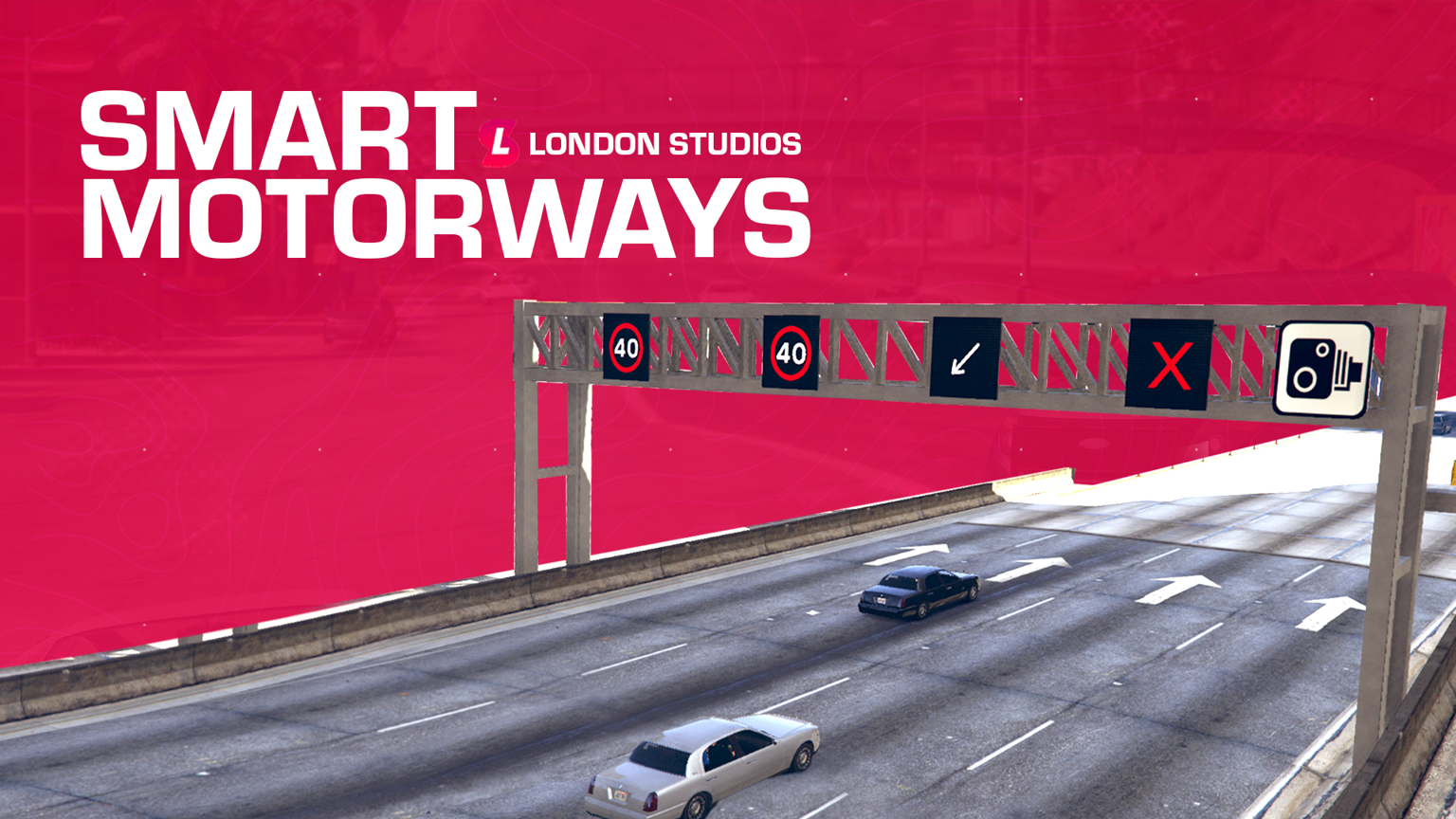
London Studios Smart Motorways
Live Updates – You can make live updates to signs around the map with our in-game menu.
Multiple Icons – We’ve got multiple icons including speeds (20, 30, 40, 50, 50 & National Speed (UK)) along with arrow left, arrow right and lane closed.
Textures Editable – You can re-texture the speeds should you wish to do so.
Custom Menu – We’ve designed an in-game menu which is realistic for you to easily update the lanes.
Fully Synced – This is fully synced to all players.
Permissions – We’ve added support for QBCore, ESX and vRP permissions straight out of the box.
Valorado con 5.00 de 5 en base a 8 valoraciones de clientes
Panel de control – Nuestro panel de control en el juego permite a tus jugadores configurar fácilmente el icono o la velocidad utilizada sobre los carriles en tiempo real.
Cambios remotos – Las pórticos de autopista se pueden actualizar en todo el mapa con un solo comando, con un mapa que te permite seleccionar la ubicación deseada para editar.
Sistema de CCTV – Ve y mueve fácilmente las cámaras CCTV en los pórticos de todo el mapa desde el panel de control.
Modo EE. UU. / Reino Unido / UE – Smart Motorways es compatible con tres modos, incluidos EE. UU., Reino Unido y UE. Esto significa que admitimos una amplia gama de diferentes velocidades listas para usar en tu servidor.
Integración con Smart Signs – Smart Motorways está integrado con Smart Signs, lo que significa que si tienes una copia de ambos, podrás agregar mensajes/iconos en un nuevo panel sobre cada pórtico.
Integración con Smart Speed Cameras – Smart Motorways está integrado con Smart Speed Cameras, lo que significa que si tienes una copia de ambos, las cámaras en todos los pórticos se activarán y se ajustarán dinámicamente al límite de velocidad establecido sobre cada carril individual, ayudando con el control de velocidad.
Soporte de Iconos – Además de la compatibilidad con las velocidades, tenemos iconos que incluyen flecha izquierda y carril cerrado.
Registro de Discord – Nuestro recurso puede integrarse en Discord con registro mediante webhooks. Esto puede registrar cualquier cambio en los pórticos de la autopista y mantener un registro para el futuro.
Señales preconfiguradas – Hemos preconfigurado más de 60 ubicaciones en todo el mapa, lo que significa que Smart Motorways está listo para usar desde el primer momento.
Ahorro de memoria – Cualquier cambio realizado en Smart Motorways en todo el mapa se guardará en la memoria, lo que significa que seguirán ahí después de los reinicios. Puedes borrar fácilmente todas las señales con nuestro comando /resetsmartmotorways.
Texturas emisivas – Estos iconos son brillantes tanto de día como de noche, lo que los hace destinados a captar la atención de los conductores en todo momento del día.
Compatibilidad con múltiples carriles – Tenemos compatibilidad con carreteras de dos, tres y cuatro carriles.
Agregar ubicaciones fácilmente – Con nuestro comando de desarrollador, puedes agregar fácilmente nuevas ubicaciones en el juego que se guardan automáticamente para el próximo reinicio.
Configuración
config = {

    -- We've included speed options for the UK, EU, and US based servers
    -- Simply type "UK", "EU", or "US" to change the speed options
    iconPack = "UK",

    -- If you add custom icons, you can add them here
    -- Speed-related icons will be used for speed cameras, and must contain the speed limit in the name as numbers only.
    -- E.g. an icon of speed_60 will be used for a speed limit of 60. An icon of 3_speed_40 would result in a speed limit of 340.
    -- Do NOT edit this section unless you know what you are doing and have modelled custom icons.
    iconPacks = {
        ["UK"] = {
            "arrow_left",
            "arrow_right",
            "red_x",
            "speed_20",
            "speed_30",
            "speed_40",
            "speed_50",
            "speed_60",
            "national_speed",
        },
        ["EU"] = {
            "arrow_left",
            "arrow_right",
            "red_x",
            "speed_20",
            "speed_30",
            "speed_40",
            "speed_50",
            "speed_60",
            "speed_70",
            "speed_80",
            "speed_90",
            "speed_100",
            "speed_110",
            "speed_120",
            "speed_130",
            "speed_140",
            "speed_150",
        },
        ["US"] = {
            "arrow_left",
            "arrow_right",
            "red_x",
            "bv_motorway_speed_15",
            "bv_motorway_speed_20",
            "bv_motorway_speed_25",
            "bv_motorway_speed_30",
            "bv_motorway_speed_35",
            "bv_motorway_speed_40",
            "bv_motorway_speed_45",
            "bv_motorway_speed_50",
            "bv_motorway_speed_55",
            "bv_motorway_speed_60",
            "bv_motorway_speed_65",
            "bv_motorway_speed_70",
            "bv_motorway_speed_75",
            "bv_motorway_speed_80",
            "bv_motorway_speed_85",
        },
    },


    cctvKeys = {
        up = {0, 172},
        down = {0, 173},
        left = {0, 174},
        right = {0, 175},
        leaveCam = {0, 200},
    },

    -- The distance in which the sign and its speed limits will load/unload at
    loadDistance = 200.0,

    -- This will enable debug printing on both the client and the server. This should be set to false most of the time.
    developerMode = false,

    integrations = {

        smartSpeedCameras = {
            enabled = false, -- Only enable if you have the Smart Speed Cameras resource installed and up to date
            resourceName = "SmartSpeedCameras", -- This is the name of the resource which Smart Speed Cameras is installed under
            cooldown = 60, -- This is the cooldown in seconds between speed camera detections. This is to prevent spam fines.
        },

        smartSigns = {
            enabled = false, -- Only enable if you have the Smart Signs resource installed and up to date
            resourceName = "SmartSigns", -- This is the name of the resource which Smart Signs is installed under
        }

    },

    saveSpeedsOnChange = true, -- If this is set to true, the speeds will be saved to locations.json when changed. If false, the speeds will reset on restart.
    saveTextOnChange = true, -- If this is set to true, the text will be saved to locations.json when changed. If false, the text will reset on restart.
    saveIconOnChange = true, -- If this is set to true, the icon will be


    closeMenuButton = {0, 177},

    -- This allows you to enable Discord logging for the signs
    -- You must add your webhook in sv_utils.lua
    logging = {
        enabled = false,
        displayName = "Smart Motorways",
        colour = 31487,
        title = "**New Sign Log**",
        icon = "https://i.imgur.com/dcOQmpA.jpg",
        footerIcon = "https://i.imgur.com/n3n7JNW.png",
        dateFormat = "%d-%m-%Y %H:%M:%S", -- Day-Month-Year Hour-Minute-Second
    },

    resetSignsCommand = {
        enabled = true,
        commandName = "resetsmartmotorway",
        Permissions = {
                EnablePermissions = false, -- If set to false, all below job checks will be disabled, even if they are enabled in the config.lua
                AcePermissions = {
                    Permission = "update.motorway.sign",
                    Enabled = false,
                },

                ESX = {
                    Enabled = false,
                    CheckJob = {
                        Enabled = false, -- Enable this to use ESX job check
                        Jobs = {"police"} -- A user can have any of the following jobs, allowing you to add multiple
                    }
                },
                -- We've added vRP integration. All you need to do is enable it below. Then, configure if you wish to check for groups or permissions, or even both
                vRP = {
                    Enabled = false,
                    CheckGroup = {
                        Enabled = false, -- Enable this to use vRP group check
                        Groups = {"police"}, -- A user can have any of the following groups, meaning you can add different jobs
                    },
                    CheckPermission = {
                        Enabled = false, -- Enable this to use vRP permission check
                        Permissions = {"police"} -- A user can have any of the following permissions, allowing you to add multiple
                    },
                },
                -- We've added QBCore integration. All you need to do is enable it below. Then, configure if you wish to check for jobs or permissions, or even both
                QBCore = {
                    Enabled = false,
                    CheckJob = {
                        Enabled = false, -- Enable this to use QBCore job check
                        Jobs = {"police"}, -- A user can have any of the following jobs, meaning you can add different jobs
                    },
                    CheckPermission = {
                        Enabled = false, -- Enable this to use QBCore permission check
                        Permissions = {"police"}, -- A user can have any of the following permissions, allowing you to add multiple
                    },
                },
                -- We've added QBX integration. All you need to do is enable it below. Then, configure if you wish to check for jobs or permissions, or even both
                QBX = {
                    Enabled = false,
                    CheckJob = {
                        Enabled = false, -- Enable this to use QBX job check
                        Jobs = {"police"}, -- A user can have any of the following jobs, meaning you can add different jobs
                    }
                },
        },
    },

    selectSignCommand = {
        commandName = "selectsign",
        Permissions = {
                EnablePermissions = false, -- If set to false, all below job checks will be disabled, even if they are enabled in the config.lua
                AcePermissions = {
                    Permission = "update.motorway.sign",
                    Enabled = false,
                },

                ESX = {
                    Enabled = false,
                    CheckJob = {
                        Enabled = false, -- Enable this to use ESX job check
                        Jobs = {"police"} -- A user can have any of the following jobs, allowing you to add multiple
                    }
                },
                -- We've added vRP integration. All you need to do is enable it below. Then, configure if you wish to check for groups or permissions, or even both
                vRP = {
                    Enabled = false,
                    CheckGroup = {
                        Enabled = false, -- Enable this to use vRP group check
                        Groups = {"police"}, -- A user can have any of the following groups, meaning you can add different jobs
                    },
                    CheckPermission = {
                        Enabled = false, -- Enable this to use vRP permission check
                        Permissions = {"police"} -- A user can have any of the following permissions, allowing you to add multiple
                    },
                },
                -- We've added QBCore integration. All you need to do is enable it below. Then, configure if you wish to check for jobs or permissions, or even both
                QBCore = {
                    Enabled = false,
                    CheckJob = {
                        Enabled = false, -- Enable this to use QBCore job check
                        Jobs = {"police"}, -- A user can have any of the following jobs, meaning you can add different jobs
                    },
                    CheckPermission = {
                        Enabled = false, -- Enable this to use QBCore permission check
                        Permissions = {"police"}, -- A user can have any of the following permissions, allowing you to add multiple
                    },
                },
                -- We've added QBX integration. All you need to do is enable it below. Then, configure if you wish to check for jobs or permissions, or even both
                QBX = {
                    Enabled = false,
                    CheckJob = {
                        Enabled = false, -- Enable this to use QBX job check
                        Jobs = {"police"}, -- A user can have any of the following jobs, meaning you can add different jobs
                    }
                },
        },
    },

    directionColours = {
        ["north"] = 17,
        ["south"] = 18,
        ["east"] = 17,
        ["west"] = 18,
    },

    -- Here you can translate the resource into another language
    translations = {
        selectSignHelp = "Select a smart motorways sign",
        editingSign = "Now editing sign ID: ",
        hasBeenSetTo = " has been set to: ",
        speedLimitOfLane = "Speed limit of lane ",
        symbolOfLane = "Symbol of lane ",
        speedUnit = "mph",
        resetAll = "All lanes have been reset.",
        resetSignsHelp = "Reset all Smart Motorways",
    },

    -- We do not recommend editing below this section:
    -- The offsets which the signs are placed at in comparison to the sign
    spawnOffsets = {
        -- Offsets for two lane setups
        [2] = {
            [1] = {x = -3.9, y = -2.1, z = 3.65},
            [2] = {x = 1.61, y = -2.1, z = 3.65}
        },
        -- Offsets for three lane setups
        [3] = {
            [1] = {x = -6.04, y = -2.2, z = 3.65},
            [2] = {x = -0.925, y = -2.2, z = 3.65},
            [3] = {x = 3.82, y = -2.2, z = 3.65}
        },
        -- Offsets for four lane setups
        [4] = {
            [1] = {x = -9.7801, y = -2.2, z = 3.65},
            [2] = {x = -3.21, y = -2.2, z = 3.65},
            [3] = {x = 2.52, y = -2.1, z = 3.65},
            [4] = {x = 8.0501, y = -2.1, z = 3.65}
        }
    },

    -- Here you can define the various locations of the signs around the map.
    -- Here you can configure the sound effect which is played when a sign is successfully updated
    soundEffect = {
        enabled = true,
        name = "CONFIRM_BEEP",
        dict = "HUD_MINI_GAME_SOUNDSET",
    },

    gantryModels = {
        [2] = `2_lane`,
        [3] = `3_lane`,
        [4] = `4_lane`,
    },
}