$ ABD Doları
Performansı Artırma: FiveM Optimize Scripts
Ücretsiz bir komut dosyasını mı test ediyorsunuz?
Hızlı kontroller için ücretsiz komut dosyaları uygundur. Üretim sunucuları için, çerçeveye ve kullanım senaryosuna göre tam sunucu paketlerini veya ücretli, bakımı yapılan komut dosyalarını karşılaştırın.
If you’re a FiveM server owner or developer, you know the importance of optimizing your server scripts to ensure smooth and efficient gameplay. In this guide, we’ll walk you through the process of optimizing your FiveM scripts to boost performance and provide a better experience for your players.
YENİ: Script Optimizer'ımızı burada kullanın
Adım 1: Performans Darboğazlarını Belirleyin
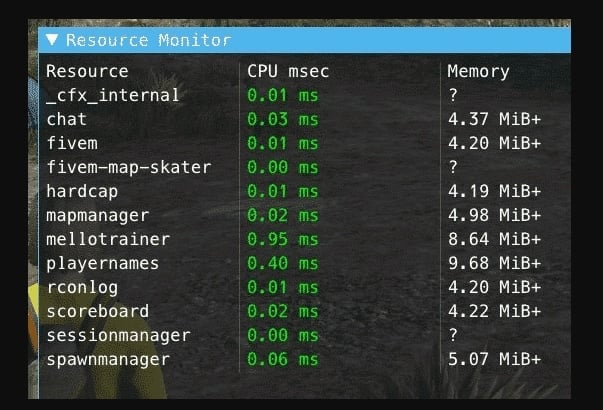
Optimizasyona başlamadan önce, performans sorunlarına neden olan betikleri veya kaynakları belirlemek çok önemlidir. Kaynak kullanımını izlemek için profil oluşturucu gibi yerleşik FiveM araçlarını kullanın.
- Basmak
F8konsolu açmak için. - Tip
resmon 1Kaynak İzleyicisini görüntülemek için. - Hangi betiklerin en fazla CPU veya bellek tükettiğine dikkat edin.
Adım 2: Sunucu Tarafı Komut Dosyalarını Optimize Edin
Sunucu tarafı betikleri performansı önemli ölçüde etkileyebilir. İşte bunları optimize etmek için bazı ipuçları:
Kaynak Yoğunluğunu Azaltın
Yoğun operasyonların gerçekleştirilme sayısını sınırlayın.
Önce:
AddEventHandler('playerSpawned', fonksiyon()
  -- Yoğun operasyon
  Ağır Varlıkları Yükle()
son)
Sonrasında:
yerel varlıklarYüklendi = false
AddEventHandler('playerSpawned', fonksiyon()
  eğer varlıklar yüklü değilse o zaman
    Ağır Varlıkları Yükle()
    varlıklarYüklendi = true
  son
son)
Veritabanı Sorgularını Optimize Edin
Ana iş parçacığının bloke olmasını önlemek için asenkron sorguları kullanın.
Engellemeyen veritabanı çağrıları için MySQL.Async kullanımı:
MySQL.Async.fetchAll('SELECT * FROM users', {}, fonksiyon(sonuç)
  -- Sonuçları işle
son)
YENİ: Script Optimizer'ımızı burada kullanın
Adım 3: İstemci Tarafı Komut Dosyalarını Optimize Edin
Sorunsuz bir oyun deneyimi için istemci tarafında optimizasyon da bir o kadar önemlidir.
Verimli Olay Yönetimi
Gereksiz işlemleri önlemek için olay işleyicilerini verimli kullanın.
Önce:
Vatandaş.CreateThread(fonksiyon()
  doğru yaparken
    -- Yoğun kontroller
    GerçekleştirKontroller()
    Vatandaş.Bekle(0)
  son
son)
Sonrasında:
AddEventHandler('onResourceStart', işlev(kaynakAdı)
  eğer GetCurrentResourceName() == resourceName ise o zaman
    GerçekleştirKontroller()
  son
son)
Çerçeve Süresini Azaltın
Her karede gerçekleştirilen işlemleri en aza indirin.
Önce:
DrawTextOnScreen() işlevi
  MetinYazıTipiniAyarla(0)
  SetTextOrantılı(1)
  Metin Ölçeğini Ayarla(0,0, 0,55)
  MetinRenkleriniAyarla(255, 255, 255, 255)
  SetTextEntry("DİZGE")
  AddTextComponentString("Optimize Edilmiş Metin")
  Metin Çiz(0,5, 0,5)
son

Vatandaş.CreateThread(fonksiyon()
  doğru yaparken
    Ekranda Metin Çiz()
    Vatandaş.Bekle(0)
  son
son)
Sonrasında:
Vatandaş.CreateThread(fonksiyon()
  doğru yaparken
    eğer ShouldDrawText ise o zaman
      Ekranda Metin Çiz()
    son
    Citizen.Wait(100) -- Kontrollerin sıklığını azaltın
  son
son)
Adım 4: Performans Optimizasyon Araçlarını Kullanın
Optimizasyonunuza yardımcı olacak çeşitli araçlar ve kaynaklar mevcuttur. FiveM scriptleri:
- TxYöneticisi: A powerful tool for managing and optimizing your FiveM server.
- FiveM Eserleri: Sunucunuzu güncel tutun en son FiveM eserleri Performans iyileştirmelerinden yararlanmak için.
Ek İpuçları
Topluluktan elde edilen bazı ek en iyi uygulamalar ve ipuçları şunlardır:
Koordinat Mesafesi Hesaplaması için Yerel'i Kaldırma
Yereller yavaştır. Mesafe kontrolleri için yereller yerine vektör işlemlerini kullanın.
Önce:
yerel mesafe = GetDistanceBetweenCoords(coords.x, coords.y, coords.z, v.coords.x, v.coords.y, v.coords.z, true)
Sonrasında:
yerel mesafe = #(koordinatlar - v.koordinatlar)Döngüleri Bölme
Performans üzerindeki etkilerini en aza indirmek için döngüleri yeniden düzenleyin. Tüm kontrolleri her tik'te çalıştırmak yerine, mümkünse bölün.
Etkinlikleri Kullan
Koşulları sürekli olarak kontrol etmek yerine eylemleri işlemek için olayları kullanın. Örneğin, şunu kullanın: temel olaylar her birkaç milisaniyede bir kontrol etmek yerine araç giriş ve çıkışlarını yönetmek için. (FiveM re… nasıl iyileştirilir)
Optimize etme FiveM scriptleri Oyuncularınız için sorunsuz ve keyifli bir deneyim sağlamanın anahtarıdır. Bu adımları izleyerek ve sunucunuzun performansını sürekli izleyerek, FiveM sunucusu en iyi şekilde çalışır.
For more tips and resources, visit HiFiveM.com – your one-stop destination for FiveM mods, scripts, downloads, and resources.
Yardımcı olmadı mı? Sunucunuzu iyi bir FiveM Server Hosting'inde çalıştırdığınızdan emin olun
Practical checklist
Use this guide as a staging checklist before changing a live FiveM server. Confirm the current server artifact version, framework version, resource dependencies, database changes, and any client-side files before you apply the change.
- Back up the affected configuration files and database tables.
- Apply the change on a test server first.
- Watch the server console and client F8 console for errors.
- Check whether the change affects jobs, inventory, vehicles, maps, voice, permissions, or player data.
- Document the exact file, command, or setting you changed so it can be reverted quickly.
Testing before production
After the first test, join with a normal player account and repeat the flow from the player perspective. If the topic involves performance, measure before and after with the same player count, route, and resource set. If it involves admin tools or permissions, verify both allowed and denied users.
Yaygın hatalar
Most FiveM issues come from missing dependencies, stale cache, wrong folder names, framework mismatch, or configuration copied from another server. Avoid changing multiple systems at once; make one change, test it, and then continue.
Related resources
For production-ready assets, compare paid resources in the FiveMX shop. For free resources, browse free FiveM scripts and test each resource before using it publicly.
Production rollout notes
Before using this guidance on a live FiveM server, define the exact outcome you expect from the change. For Boosting Performance: FiveM Optimize Scripts, that means checking which resource, setting, command, or workflow is affected and confirming that the change fits your current framework, artifact version, and server rules. Keep the rollout small enough that you can reverse it quickly if players report errors.
Use a staging server with the same framework, database schema, resource order, and key dependencies as production. If the topic changes gameplay, permissions, visuals, voice, vehicles, maps, inventory, or economy behavior, test with at least one admin account and one normal player account. Watch server console output, client F8 logs, and resource timing while repeating the exact player flow that will happen on the live server.
Rollback checklist
- Save the previous configuration file, resource folder, and database state before changing anything.
- Record the resource version, commit, download page, or setting value you tested.
- Restart only the affected resource first when possible, then restart the full server if dependencies require it.
- If errors appear, revert the single changed resource or setting before testing another fix.
Maintenance guidance
Review this setup again after FiveM artifact updates, framework updates, or major resource changes. A configuration that works today can break after dependency updates, renamed exports, changed events, or database migrations. Keep notes with your server documentation so future admins understand what was changed, why it was changed, and how to verify it again.
Ongoing review
Recheck Boosting Performance: FiveM Optimize Scripts after major FiveM artifact updates, framework changes, or resource migrations. Confirm that the advice still matches current server behavior, that any linked source remains available, and that installation steps still match the files a server owner will actually download or configure.
For public servers, keep a short changelog beside your server documentation. Note what was tested, what changed, which accounts were used for verification, and how to roll back. This makes future maintenance faster and prevents old setup notes from becoming unclear or unsafe for players.