





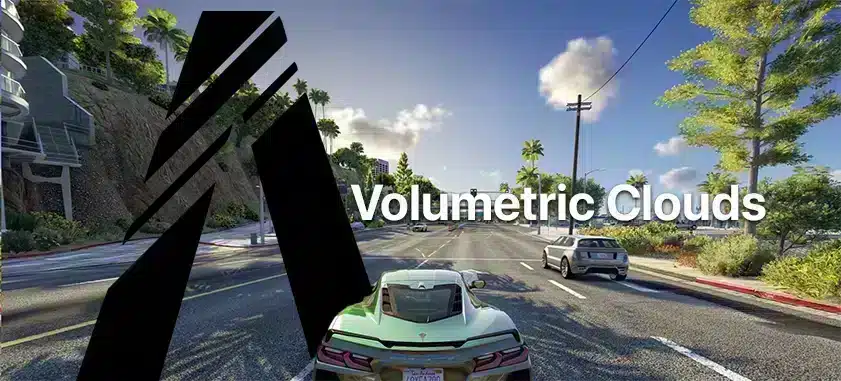
Eğitim: FiveM'de Volumetrik Bulutları Kullanma
Volumetrik bulutlar, FiveM'deki görsel deneyimi önemli ölçüde iyileştirebilir ve daha dinamik ve gerçekçi sahneler sunabilir. Bu kılavuz, volumetrik bulutları FiveM kurulumunuzda etkili bir şekilde uygulamak için gereken adımlarda size yol gösterecektir.
Video Eğitimi
Bu eğitim, Abou Malik'in hassas bir kurulum sağladığı kapsamlı bir YouTube videosuna atıfta bulunmaktadır
Metin-Öğretici (Kolay!)
Adım 1: Gerekli Dosyaları İndirin
Kuruluma başlamadan önce gerekli tüm dosyaları indirin:
- NaturalVision Geliştirildi (NVE): Naturalvision'ı indirmek için buraya tıklayın
- Reshade Gölgelendirici Paketi: Şurada mevcuttur: Reshade'in resmi web sitesi.
Adım 2: NaturalVision Evolved'ı (NVE) yükleyin
- 5M Uygulama Veri Klasörünü Bulun:
- On your desktop, right-click on the FiveM icon, and select “Open file location.
- Dosyaları açın ve taşıyın:
- NVE paketini açın.
- Navigate to the ‘main package’ folder, and drag all files into the ‘mods’ folder within the FiveM application data directory.
- İsteğe bağlı eklentiler:
- Görsel deneyiminizi daha da kişiselleştirmek isterseniz NVE isteğe bağlı eklentilerle birlikte gelir.
Sıkışıp kaldınız mı? RoboMods'un bu video eğitimine göz atın
Adım 3: Reshade ve Gölgelendiricileri Kurun
- Reshade'i indirin ve yükleyin:
- Reshade'i resmi sitesinden indirin ve kurulumunu yapın, hedef olarak 'gta5.exe' dosyasını seçin.
- Gölgelendiricileri ekleyin:
- Kurulum tamamlandıktan sonra Reshade kurulum dizinini açın.
- Varsayılan gölgelendiricileri hacimsel bulutlar gölgelendirici dosyasıyla değiştirin.
Adım 4: Hacimsel Bulutların Eklenmesi
- Reshade Ön Ayarlarını Bulun ve Açın:
- FiveM eklentileri dizinine geri dönün, reshade shaders klasörünü açın ve 'volumetric_clouds.fx' dosyasını içine yerleştirin.
- Oyun İçi Kurulum:
- FiveM'i başlatın ve bir sunucuya katılın.
- 'Ekle' tuşuna basarak Reshade menüsünü açın.
- Reshade menüsünde 'volumetric_clouds.fx' dosyasına gidin ve etkinleştirin.
- Bulut yoğunluğu, hızı ve kalitesi gibi ayarları kendi tercihlerinize göre ayarlayın.
Adım 5: En İyi Performans İçin Oyun Grafiklerini Yapılandırın
- Oyun Ayarlarını Aç:
- 'Ayarlar' > ' bölümüne gidinGrafikler.' Seti Daha iyi grafikler için render çözünürlüğünü bilgisayarınızın kaldırabileceği en yüksek değere ayarlayın.
- Reshade menüsünden yüksek kaliteli hacimsel bulutları etkinleştirin.
- Render Çözünürlüğünü Ayarla:
- Monitörünüz olmasa bile Destek yüksek çözünürlükler, daha iyi netlik için oyunun render çözünürlüğünü yükseltin. Performans kıyaslamalarınıza göre ayarlayın.
Tamamdır! Zor değilmiş değil mi?
Gelişmiş Özelleştirme için İpuçları
- Bulut Kalitesi:
- Düşük, Orta veya Yüksek: Bilgisayarınızın yeteneklerine göre seçim yapın.
- En iyi performansı elde etmek için bu ayarları oyun oynarken bile değiştirebilirsiniz.
- Bulut Türleri ve Hızı:
- Yeniden gölgelendirme menüsünde bulut türleri ayarına gidin. '1' ve '3' türleri, dramatik bir görünüm için daha yoğun bulutlar sunar.
- Çeşitli hava koşullarını simüle etmek için hızınızı ayarlayın.
Volumetrik bulutlar oyununuza sürükleyici bir his verebilir ve FiveM'i daha da keyifli hale getirebilir. Sizin için en çekici olanı bulmak için farklı ayarlar ve ön ayarlarla denemeler yapmaya devam ettiğinizden emin olun.
Not: Herhangi bir değişiklik yapmadan önce her zaman orijinal dosyalarınızı yedekleyin. Bu, varsayılan ayarlara geri dönmeniz gerekirse olası kayıpları önler.
Practical checklist
Use this guide as a staging checklist before changing a live FiveM server. Confirm the current server artifact version, framework version, resource dependencies, database changes, and any client-side files before you apply the change.
- Back up the affected configuration files and database tables.
- Apply the change on a test server first.
- Watch the server console and client F8 console for errors.
- Check whether the change affects jobs, inventory, vehicles, maps, voice, permissions, or player data.
- Document the exact file, command, or setting you changed so it can be reverted quickly.
Testing before production
After the first test, join with a normal player account and repeat the flow from the player perspective. If the topic involves performance, measure before and after with the same player count, route, and resource set. If it involves admin tools or permissions, verify both allowed and denied users.
Yaygın hatalar
Most FiveM issues come from missing dependencies, stale cache, wrong folder names, framework mismatch, or configuration copied from another server. Avoid changing multiple systems at once; make one change, test it, and then continue.
Related resources
For production-ready assets, compare paid resources in the FiveMX shop. For free resources, browse free FiveM scripts and test each resource before using it publicly.
Production rollout notes
Before using this guidance on a live FiveM server, define the exact outcome you expect from the change. For Tutorial: Use Volumetric Clouds in FiveM, that means checking which resource, setting, command, or workflow is affected and confirming that the change fits your current framework, artifact version, and server rules. Keep the rollout small enough that you can reverse it quickly if players report errors.
Use a staging server with the same framework, database schema, resource order, and key dependencies as production. If the topic changes gameplay, permissions, visuals, voice, vehicles, maps, inventory, or economy behavior, test with at least one admin account and one normal player account. Watch server console output, client F8 logs, and resource timing while repeating the exact player flow that will happen on the live server.
Rollback checklist
- Save the previous configuration file, resource folder, and database state before changing anything.
- Record the resource version, commit, download page, or setting value you tested.
- Restart only the affected resource first when possible, then restart the full server if dependencies require it.
- If errors appear, revert the single changed resource or setting before testing another fix.
Maintenance guidance
Review this setup again after FiveM artifact updates, framework updates, or major resource changes. A configuration that works today can break after dependency updates, renamed exports, changed events, or database migrations. Keep notes with your server documentation so future admins understand what was changed, why it was changed, and how to verify it again.
Ongoing review
Recheck Tutorial: Use Volumetric Clouds in FiveM after major FiveM artifact updates, framework changes, or resource migrations. Confirm that the advice still matches current server behavior, that any linked source remains available, and that installation steps still match the files a server owner will actually download or configure.
For public servers, keep a short changelog beside your server documentation. Note what was tested, what changed, which accounts were used for verification, and how to roll back. This makes future maintenance faster and prevents old setup notes from becoming unclear or unsafe for players.


