Se você estiver executando um servidor FiveM em um idioma diferente do inglês, logo perceberá que os jogadores anseiam por uma experiência que lhes pareça nativa. Não importa se sua comunidade fala alemão, francês, espanhol ou qualquer outro idioma, a maneira mais fácil de conquistar seus corações é traduzir os scripts do seu servidor para que cada menu, notificação e mensagem de bate-papo pareçam familiares. Abaixo, um guia passo a passo que mostra a maneira mais segura de traduzir scripts FiveM sem quebrar seu servidor.
Obtenha o editor certo – Notepad++ é a melhor escolha
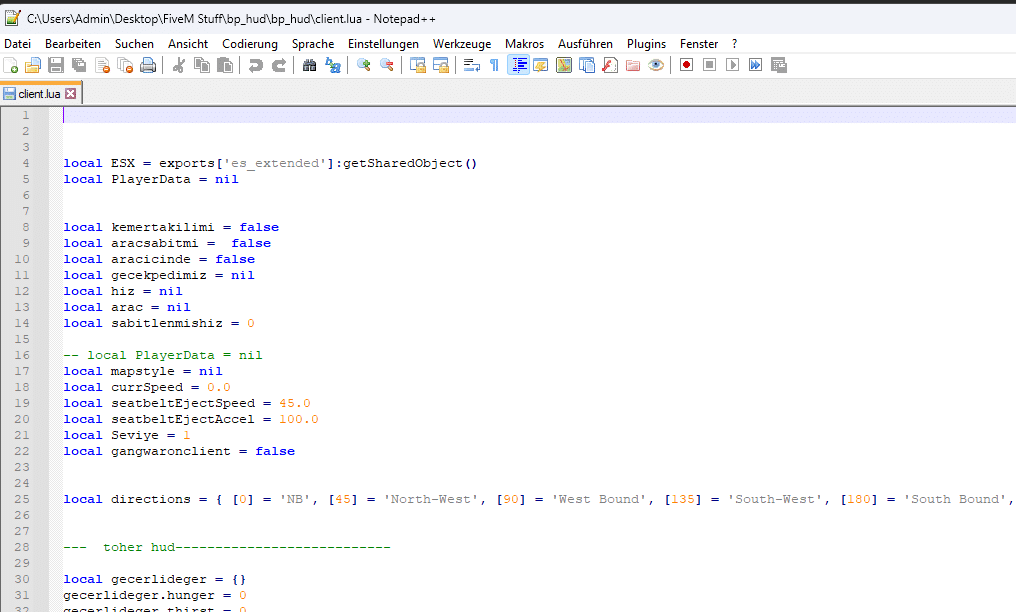
Open the script in a code-aware editor such as Notepad++.
Não perca tempo com o Bloco de Notas do Windows. Arquivos Lua no FiveM são cheios de sintaxe que precisa de destaque, navegação por números de linha e suporte adequado a caracteres. O Notepad++ é um editor leve e gratuito, projetado exatamente para esse propósito. Ele:
Destaca a sintaxe Lua, tornando o código mais fácil de ler
Lida com diferentes tipos de arquivo conforme documentado, incluindo `.lua` e `.json`
Provides a clean, customizable interface that keeps you focused
Download it from the official site: . A single installation will be your best ally when editing any FiveM resource.
Localize os arquivos de script que você deseja traduzir
Open the relevant Lua or HTML file from the resource folder.
The first step is finding the exact files you’ll edit.
1. Navegar to the `resources` folder inside your FiveM server directory.
2. Inside, locate the specific resource you want to translate. Resources are usually stored in a folder named after the script, for example:
`[esx]/esx_jobs`
`[standalone]/my_cool_script`
3. Look for files ending in `.lua`. Three files are typically the focus:
`client.lua` – manipula a lógica do lado do cliente (interações do jogador)
`server.lua` – roda no servidor (manipulação de dados, comandos de administração)
`config.lua` – often contains human‑readable text and settings
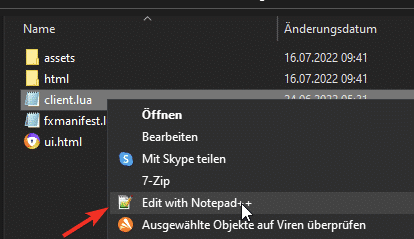
Right‑click the file and choose Editar com o Notepad++. Se preferir outros editores, as mesmas regras se aplicam.
Traduza apenas o texto entre aspas
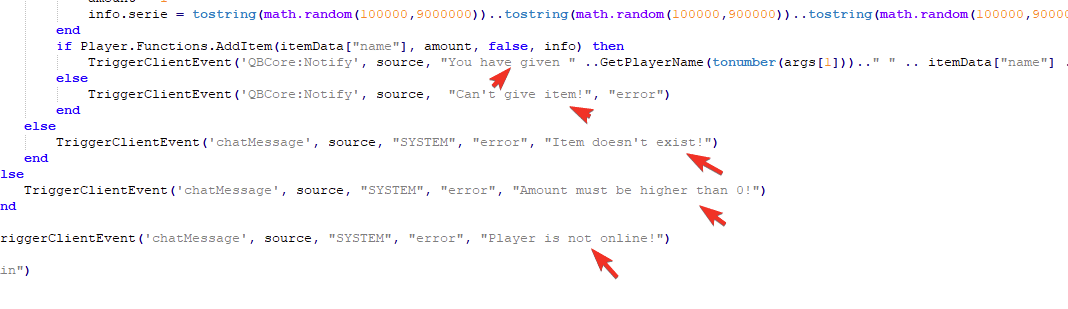
Translate player-facing strings while preserving code, events and placeholders.
Dentro de cada arquivo Lua, você verá uma mistura de código e texto. A única coisa que deve mudar são as strings exibidas para o usuário, as palavras entre aspas (` ` ou `' ``). Deixe todo o resto inalterado — nomes de variáveis, chamadas de função e palavras-chave da linguagem como `if`, `then`, `end`, `local` e `function` fazem parte da linguagem de programação e devem permanecer inalteradas.
Exemplo: Traduzindo uma Notificação do Lado do Cliente
Original (English):
“`lua
TriggerEvent(‘chat:addMessage’, { args = { ‘SYSTEM’, ‘Welcome to the server!’ } })
ESX.ShowNotification(You received $500 for your job.)
local message = Press E to interact
“`
Translated (German):
“`lua
TriggerEvent(‘chat:addMessage’, { args = { ‘SYSTEM’, ‘Willkommen auf dem Server!’ } })
ESX.ShowNotification(Du hast 500$ für deinen Job erhalten.)
local message = Drücke E zum Interagieren
“`
Notice that the code structure, variable names (`message`), and function names (`TriggerEvent`, `ESX.ShowNotification`) are intact.
Regra-chave: preservar os espaços reservados
Muitas strings contêm marcadores de posição que o script substituirá em tempo de execução. Podem ser `%s`, `%d`, `{1}`, `{nome}`, `${quantidade}`, etc. Nunca altere ou remova marcadores de posição.
Wrong: `local welcome = Willkommen, %s!`
Correct: `local welcome = Willkommen, %s!`
If you change the placeholder, the script will throw errors or display garbage text.
Salvar arquivos com a codificação correta
Special characters (ä, ö, ü, é, ñ, etc.) require UTF‑8 encoding to display properly in game. In Notepad++:
1. Click Codificação in the top menu.
2. Select Codificar em UTF-8 (fazer não choose UTF‑8‑BOM).
3. Click the Salvar ícone ou uso Arquivo → Salvar.
This simple step verifys that your translations appear correctly in the Cliente e servidor FiveM console.
Cuidado com as armadilhas comuns
| Issue | What to Avoid | How to Fix |
|——-|—————|————|
| Changing variable names | `local hello = Hello` → `local hallo = Hallo` | Leave variable names unchanged. |
| Removing comments | `– This is a comment` → deleted | Keep comments as they are; translations of comments are optional but not required. |
| Altering placeholders | `Welcome, %s!` → `Willkommen, %d!` | Preserve placeholders exactly. |
| Using wrong encoding | Strange symbols appear | Always use UTF‑8 without BOM. |
| Inconsistent terminology | Some script parts say “Police” while others say “Cops” | Use a consistent translation throughout the script (ideally across all resources). |
Back up the original script folder before you start editing. If anything goes wrong, you can simply re‑copy the original files back into place.
Teste seu trabalho
Após a tradução, reinicie o recurso ou todo o servidor. Teste no cliente FiveM:
Reproduza algumas interações para garantir que as notificações apareçam conforme o esperado.
Verifique se o chat está formatado corretamente.
Assista o F8 console for any Lua errors or warnings.
If you spot a problem, revert to the backup, tweak the translation, and re‑test.
Usando IA para auxiliar sua tradução
If you have access to an AI language model such as ChatGPT or Gemini, you can feed it a block of text and ask for a precise translation. AI can save time on large scripts, but always double‑check the output for placeholders and punctuation. A simple workflow:
1. Copy the relevant lines from the original script.
2. Paste them into the AI with a clear instruction: “Translate these strings from English to German, preserving placeholders like %s.”*
3. Review the AI’s output, copy it back, and replace only the text inside the quotation marks.
Remember, AI is a tool, not a substitute for careful proofreading and testing.
Recapitulação: Etapas rápidas para traduzir scripts do FiveM com segurança
1. Use um editor adequado (Notepad++ recommended).
2. Abrir the `.lua` files in your chosen resource.
3. Traduzir apenas the text inside quotes, preserving placeholders and code syntax.
4. Codificar the file as UTF‑8 (no BOM).
5. Fazer backup originals before editing.
6. Reiniciar o servidor e teste thoroughly.
By following these guidelines, you’ll create a polished, multilingual experience that feels native to players across the globe. Happy translating, and may your FiveM community thrive!