







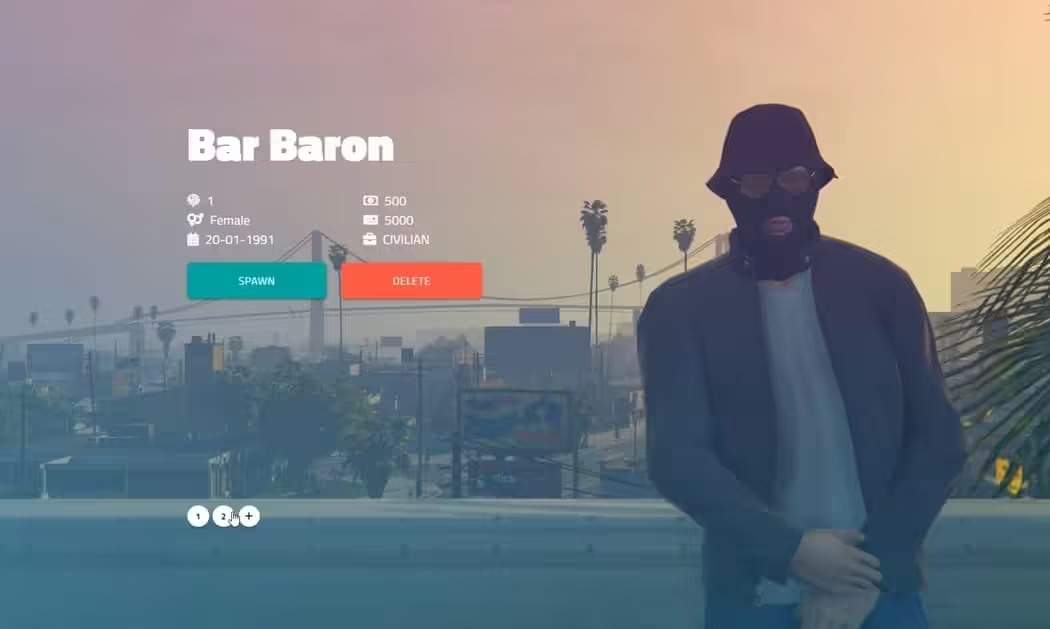

BB-MULTICHARACTER
Installatie
- Sleep en plaats naar je server, stop qb-multicharacter of welke multicharacter je ook gebruikt.
- Edit the server config as you like to fit your server.
- Geniet ervan.
Config
CoreConfig = {
    core = 'qb-core', -- your core name for the exports
    prefix = 'qb-', -- your trigger prefixes
    notify = 'QBCore:Notify', -- your notification trigger
    char_english_only = true, -- block to option to create character with non english names

    clothing_base = 'qb', -- Whether "qb", "raid", "fivem-appearance" or "other"
    clothing_name = 'qb-clothing' -- Your clothing resource name
}
Kleding
Standaard ondersteuning voor 2 kledingwinkels: qb-clothing & raid-clothing.
- If youre using qb-clothing make sure to set it to “qb” even if your core name is different.
- If youre using raid-clothing, make sure to add the following function to your client.
[1] Plak de volgende code onderaan uw “raid-clothing/client/client.lua”:function SetPedMetadata(ped, data) for i = 1, #drawable_names do if data.drawables[0] == nil then if drawable_names[i] == "undershirts" and data.drawables[tostring(i-1)][2] == -1 then SetPedComponentVariation(ped, i-1, 15, 0, 2) else SetPedComponentVariation(ped, i-1, data.drawables[tostring(i-1)][2], data.drawtextures[i][2], 2) end else if drawable_names[i] == "undershirts" and data.drawables[i-1][2] == -1 then SetPedComponentVariation(ped, i-1, 15, 0, 2) else SetPedComponentVariation(ped, i-1, data.drawables[i-1][2], data.drawtextures[i][2], 2) end end end for i = 1, #prop_names do local propZ = (data.drawables[0] == nil and data.props[tostring(i-1)][2] or data.props[i-1][2]) ClearPedProp(ped, i-1) SetPedPropIndex(ped, i-1, propZ, data.proptextures[i][2], true) end Wait(100) if data.headBlend then SetPedHairColor(ped, tonumber(data.hairColor[1]), tonumber(data.hairColor[2])) SetPedHeadBlend(data.headBlend) SetPedHeadBlendData(ped, tonumber(data.headBlend['shapeFirst']), tonumber(data.headBlend['shapeSecond']), tonumber(data.headBlend['shapeThird']), tonumber(data.headBlend['skinFirst']), tonumber(data.headBlend['skinSecond']), tonumber(data.headBlend['skinThird']), tonumber(data.headBlend['shapeMix']), tonumber(data.headBlend['skinMix']), tonumber(data.headBlend['thirdMix']), false) for i = 1, #face_features do SetPedFaceFeature(ped, i-1, data.headStructure[i]) end if json.encode(data) ~= "[]" then for i = 1, #head_overlays do SetPedHeadOverlay(ped, i-1, tonumber(data.headOverlay[i].overlayValue), tonumber(data.headOverlay[i].overlayOpacity)) end SetPedHeadOverlayColor(ped, 0, 0, tonumber(data.headOverlay[1].firstColour), tonumber(data.headOverlay[1].secondColour)) SetPedHeadOverlayColor(ped, 1, 1, tonumber(data.headOverlay[2].firstColour), tonumber(data.headOverlay[2].secondColour)) SetPedHeadOverlayColor(ped, 2, 1, tonumber(data.headOverlay[3].firstColour), tonumber(data.headOverlay[3].secondColour)) SetPedHeadOverlayColor(ped, 3, 0, tonumber(data.headOverlay[4].firstColour), tonumber(data.headOverlay[4].secondColour)) SetPedHeadOverlayColor(ped, 4, 2, tonumber(data.headOverlay[5].firstColour), tonumber(data.headOverlay[5].secondColour)) SetPedHeadOverlayColor(ped, 5, 2, tonumber(data.headOverlay[6].firstColour), tonumber(data.headOverlay[6].secondColour)) SetPedHeadOverlayColor(ped, 6, 0, tonumber(data.headOverlay[7].firstColour), tonumber(data.headOverlay[7].secondColour)) SetPedHeadOverlayColor(ped, 7, 0, tonumber(data.headOverlay[8].firstColour), tonumber(data.headOverlay[8].secondColour)) SetPedHeadOverlayColor(ped, 8, 2, tonumber(data.headOverlay[9].firstColour), tonumber(data.headOverlay[9].secondColour)) SetPedHeadOverlayColor(ped, 9, 0, tonumber(data.headOverlay[10].firstColour), tonumber(data.headOverlay[10].secondColour)) SetPedHeadOverlayColor(ped, 10, 1, tonumber(data.headOverlay[11].firstColour), tonumber(data.headOverlay[11].secondColour)) SetPedHeadOverlayColor(ped, 11, 0, tonumber(data.headOverlay[12].firstColour), tonumber(data.headOverlay[12].secondColour)) end endend[2] Plak de volgende code onderaan je fxmanifest/__resource.lua in de raid clothing resource:
export ‘SetPedMetadata’ - If youre using any other clothing op te slaan, set it to “@other” and make sure to edit all the functions related to the clothing,
server/functions.lua -> bewerk de getOtherClothing functie.
client/main.lua -> zoek naar @other en wijzig alle functies daarin

![White Widow Job Script (Script + MLO) [QBCore] FiveM resource preview](https://cdn.fivemx.com/wp-content/uploads/2022/09/chrome_FhYmrdvmoR-png-500x375.avif)
UltraUma (geverifieerde eigenaar) –
Great quality overall. The animations, interface, and functionality all feel polished.
HunterSarah (geverifieerde eigenaar) –
The quality is noticeably better than many alternatives I have tried.
Reagan (geverifieerde eigenaar) –
The integration with [ESX/QBCore/Qbox] was smooth and required minimal changes.
Marilie (geverifieerde eigenaar) –
Thank you guys for this amazing creation! Absolutely mind-blowing!