3 imagens do produto disponíveis.
Compatibilidade:
Venice HUD
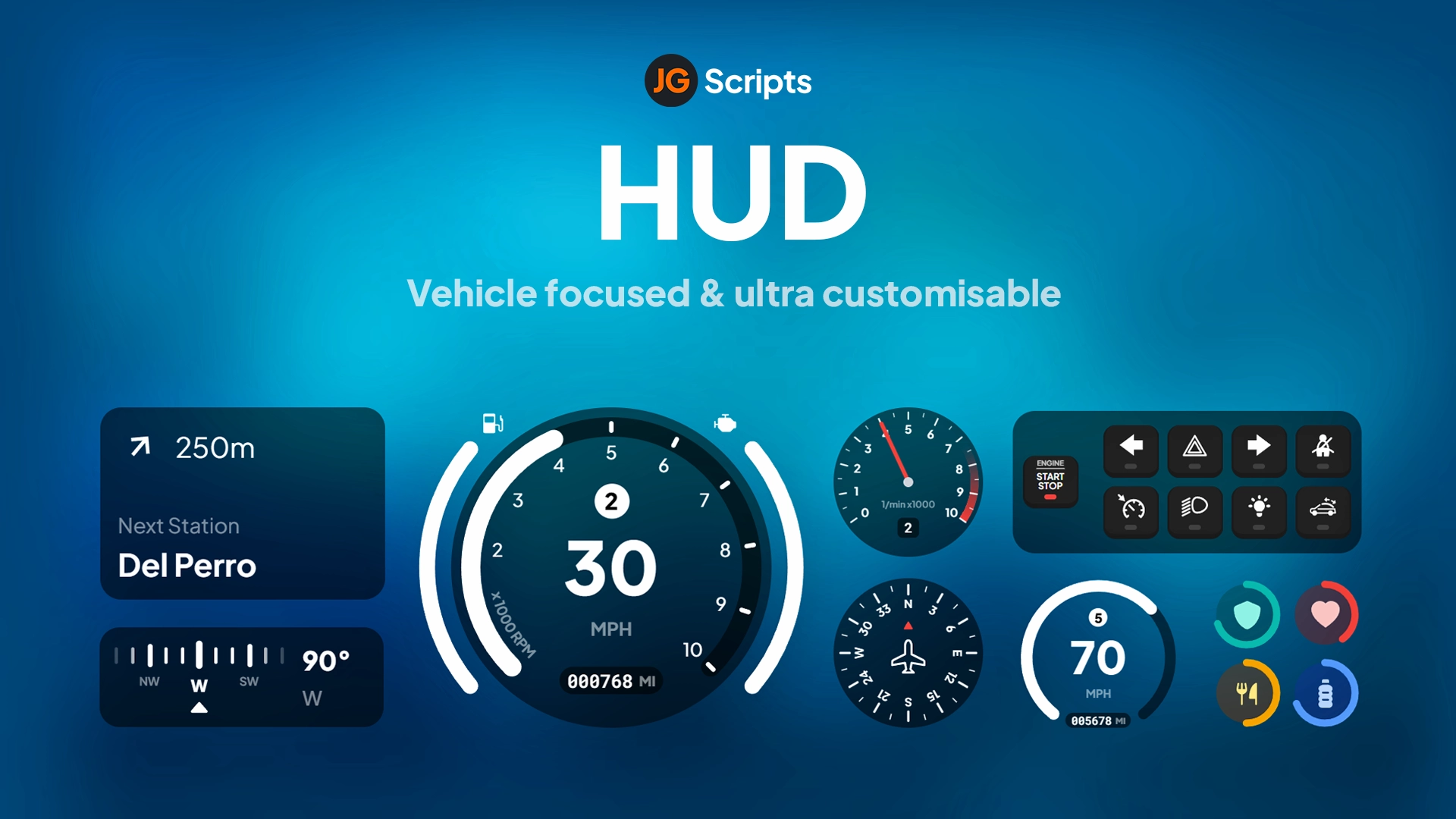
Venice HUD - modern customizable HUD interface for ESX servers. Compatible with ESX framework. Fully customizable and optimized.
Acesso Instantâneo
Política de reembolso de 14 dias
3 imagens do produto disponíveis.
Venice HUD - modern customizable HUD interface for ESX servers. Compatible with ESX framework. Fully customizable and optimized.
Use os dados publicados nesta página para confirmar se Venice HUD é compatível com seu servidor antes do checkout.
esx
Publicado nesta página
Disponível
Cartão, Klarna e carteiras compatíveis via Stripe. Outros métodos locais podem aparecer quando disponíveis na sua região.
Expectativa de suporte
O suporte cobre acesso ao download, arquivos entregues que estejam faltando e dúvidas com base nas notas de instalação publicadas.
Instalação personalizada, conversão de framework, configuração em servidor ao vivo e trabalho em recursos personalizados não estão incluídos, salvo quando indicado na página do produto.
Pergunte antes de comprar se seu servidor usa recursos de framework, inventário ou banco de dados muito modificados.
Use esta checklist para decidir rapidamente se o recurso combina com seu servidor, framework e expectativas de suporte.
Ganho para o administrador
Venice HUD foi posicionado para reduzir HUDs, em vez de você reconstruir o mesmo sistema do zero.
Compatibilidade
Funciona com esx. Verifique o bloco de requisitos antes de usar em um servidor ativo.
Confiança na compra
Download instantâneo, checkout Stripe, acesso ao suporte e contexto de reembolso são exibidos antes do pagamento.
Elementos de decisão
Requisitos, detalhes de instalação, Vídeo de pré-visualização, Perguntas do Produto
Venice HUD brings sleek, Italian-inspired design aesthetics to your FiveM server with a clean, unobtrusive interface that puts critical information at your fingertips without cluttering your screen. Drawing inspiration from luxury automotive instrumentation, this HUD system combines elegant typography with smooth animations to create a premium visual experience. Perfect for servers that want to elevate their presentation while maintaining excellent performance, Venice HUD has become a favorite among community owners who value both form and function.
This comprehensive HUD package includes everything needed for a complete player interface overhaul. The speedometer features analog-style needle movement with digital readouts, the status indicators use subtle gradient fills and icon sets, and the minimap integration provides a cohesive visual language across all UI elements. Every component is crafted with attention to detail, from the micro-animations when values change to the color-coded warning states that grab attention without being distracting.
Venice HUD includes extensive configuration options accessible through the config.lua file. Adjust element positions using X/Y coordinates and scale percentages. Toggle individual components on/off (don't need voice indicator? disable it). Set auto-hide timers for vehicle elements when on foot. The color system uses hex codes, making it easy to match your server's Discord, loading screen, and website branding. For developers, the clean code structure and detailed exports make it simple to add custom elements or integrate with proprietary systems.
Venice HUD distinguishes itself through exceptional attention to visual polish. Where many HUDs use static icons and instant value changes, Venice employs smooth interpolation and spring animations that feel responsive and alive. The speedometer needle doesn't jump - it sweeps naturally like a real gauge. Health bars don't snap - they flow with easing curves. This level of refinement creates a more immersive experience that players notice immediately. The HUD has been optimized through hundreds of hours of testing to find the perfect balance between information density and screen real estate, ensuring you see what you need without blocking gameplay.
Apenas os dados publicados nesta página devem ser considerados confirmados. Se você precisar de mais detalhes, revise a descrição, requisitos, histórico de alterações, avaliações e perguntas do produto antes do checkout.
Analog-digital hybrid speedometer with MPH/KPH toggle, fuel gauge, engine temperature, gear indicator, and damage warnings. The needle smoothly sweeps across the arc while digital readout provides exact speed for precision driving.
Circular progress rings display health and armor status with gradient color transitions. When health drops below 25%, the ring pulses red to indicate critical condition, giving players immediate visual feedback during combat.
Hunger, thirst, stress, and stamina bars arranged vertically along the screen edge. Each status uses distinct iconography and color coding, making it easy to monitor needs at a glance without reading labels.
Custom minimap border and compass design that complements the HUD's aesthetic. Shows player heading, street names, and can integrate with GPS systems for navigation waypoints.
Choose from 8 pre-built color themes (Classic, Ocean, Sunset, Forest, Violet, Rose Gold, Stealth, Electric) or create custom color palettes to match your server branding.
0 perguntas
Sem Perguntas
Seja o primeiro a fazer uma pergunta!
Learn more about setting up, configuring, and using this type of resource.

Complete reference of ESX admin commands for FiveM RP servers — player management, vehicle spawning, money & jobs, world manipulation, plus a self-hosting setup guide for setting your first admin.

When a HUD script breaks on your FiveM server, every player sees it within seconds. This guide walks through the 12 most common HUD failures — invisible HUDs, broken speedometers, framework mismatches, FPS drops — with diagnostic steps and copy-paste fixes for ESX, QBCore, and QBox.

Choosing a framework is the single most consequential decision when building a FiveM server. It determines which scripts you can use, how your developers write code, the…
Use este produto como parte de uma configuração maior. Explore categorias relacionadas, frameworks alternativos, pacotes premium e downloads gratuitos complementares.